
DESCO 718
Ìwé Ìtọ́sọ́nà Olùlò SCS 718 Sensọ Aláìdúró
Model: 718 | Brand: DESCO
1. Ifihan
Ìwé ìtọ́ni yìí fún wa ní ìwífún pàtàkì fún lílo, ìṣètò, ìṣiṣẹ́, àti ìtọ́jú SCS 718 Static Sensor. SCS 718 jẹ́ ẹ̀rọ amúṣẹ́ ọwọ́ tí a ṣe fún wíwọ̀n vol electrostatic charge vol.tage. Ó ní LED pupa lamp for accurate measurement distance guidance and can be used with the 718A Charger (Part No: 718CH) to perform ionizer function checks. This sensor is specifically designed for measuring charged potential.
2. Ọja Ipariview
The SCS 718 Static Sensor is a compact and portable instrument used to detect and measure static electricity. Its primary function is to identify and quantify electrostatic charges on surfaces, which is crucial in environments where static discharge can cause damage or interference.
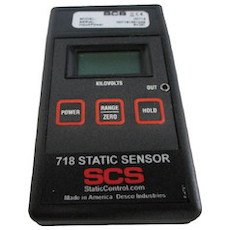
Figure 1: SCS 718 Static Sensor. This image displays the SCS 718 Static Sensor, a handheld device. The front panel features a digital display at the top, below which are three rectangular buttons: 'POWER' on the left, 'RANGE/ZERO' in the center, and 'HOLD' on the right. The device is labeled '718 STATIC SENSOR' with the 'SCS' logo and 'StaticControl.com Made in America Desco Industries' at the bottom.
3. Awọn ẹya ara ẹrọ
- Electrostatic measurement capability.
- LED pupa lamp for accurate measurement distance guidance.
- Compatibility with 718A Charger (Part No: 718CH) for ionizer function checks.
- Measures charged potential.
4. Alaye Aabo
Jọ̀wọ́ ka gbogbo ìlànà ààbò kí o sì lóye rẹ̀ kí o tó lo ẹ̀rọ náà. Àìṣe bẹ́ẹ̀ lè fa ìpalára tàbí ìbàjẹ́ sí ọjà náà.
- Ma ṣe fi ẹrọ naa han si awọn iwọn otutu to gaju, ọriniinitutu, tabi imọlẹ orun taara.
- Yago fun sisọ ẹrọ naa silẹ tabi fifisilẹ si awọn ipa to lagbara.
- Má ṣe gbìyànjú láti ṣí tàbí ṣe àtúnṣe sí ẹ̀rọ náà. Tọ́ka gbogbo iṣẹ́ ìtọ́jú náà sí àwọn òṣìṣẹ́ tó mọ̀ nípa rẹ̀.
- Keep the device away from liquids and corrosive materials.
- Ensure the measurement area is clear of obstructions and potential hazards.
5. Eto
The SCS 718 Static Sensor is designed for immediate use. No battery installation is required as the device does not use batteries.
- Ṣii silẹ: Carefully remove the sensor from its packaging and inspect for any signs of damage.
- Ṣayẹwo akọkọ: Tẹ awọn AGBARA button to turn on the device. The display should illuminate.
- Zeroing: Before each measurement, ensure the device is zeroed. Point the sensor away from any charged objects and press the RANGE/ZERO button to reset the reading to zero.
6. Awọn ilana Iṣiṣẹ
Follow these steps to accurately measure electrostatic charges:
- Agbara Tan: Tẹ awọn AGBARA button to activate the sensor.
- Zero the Sensor: Hold the sensor in free air, away from any charged surfaces. Press the RANGE/ZERO button until the display reads "0.00" or close to zero. This calibrates the sensor for accurate readings.
- Positioning for Measurement: Point the sensor towards the object or surface you wish to measure. The red LED lamp on the sensor acts as a distance guide. Position the sensor so that the red LED light is focused on the target surface, typically indicating the optimal measurement distance (e.g., 1 inch or 2.5 cm).
- Ka Ifihan naa: The display will show the electrostatic charge in kilovolts (kV).
- Di Kíkà Mú: Láti dì kíkà tó wà lórí ìbòjú náà, tẹ DIMU button. Press it again to release the hold and resume live readings.
- Ionizer Function Check (with 718A Charger):
- Connect the SCS 718 Static Sensor to the 718A Charger (Part No: 718CH).
- Follow the instructions provided with the 718A Charger to perform ionizer function checks. This typically involves measuring the decay time of a charge.
- Agbara Pa: Tẹ awọn AGBARA button again to turn off the device when not in use.
7. Itọju
Proper maintenance ensures the longevity and accuracy of your SCS 718 Static Sensor.
- Ninu: Use a soft, dry, lint-free cloth to clean the exterior of the sensor. Do not use abrasive cleaners, solvents, or liquids.
- Ibi ipamọ: Store the sensor in a cool, dry place, away from direct sunlight and extreme temperatures. Keep it in its original packaging or a protective case when not in use to prevent dust accumulation and physical damage.
- Iṣatunṣe: Regular calibration is recommended to maintain measurement accuracy. Refer to DESCO's official website or contact their support for calibration services.
8. Laasigbotitusita
| Isoro | Owun to le Fa | Ojutu |
|---|---|---|
| Ẹrọ naa ko ṣiṣẹ. | Internal power issue. | Ensure the power button is pressed firmly. If still unresponsive, contact customer support. |
| Awọn kika ti ko pe. | Sensor not zeroed; environmental interference; dirty sensor. | Zero the sensor before each use. Ensure no strong electromagnetic fields are nearby. Clean the sensor surface. Consider professional calibration. |
| Red LED not illuminating. | LED aiṣedeede. | Kan si atilẹyin alabara fun atunṣe tabi rirọpo. |
9. Awọn pato
| Iwa | Iye |
|---|---|
| Olupese | DESCO |
| Nọmba apakan | 718 |
| Iwọn Ọja | 130 g (0.13 kg) |
| Package Mefa | 26 x 19 x 8 cm |
| Lilo Batiri | Rara |
| ASIN | B01KMB21LM |
| Akọkọ Wa Ọjọ | Oṣu Kẹjọ Ọjọ 18, Ọdun 2016 |
10. Atilẹyin ọja ati Support
For information regarding product warranty, please refer to the warranty card included with your purchase or visit the official DESCO website. For technical support, troubleshooting assistance, or service inquiries, please contact DESCO customer service through their official channels.
Olupese: DESCO
Webojula: www.desco.com (Eksample ọna asopọ, ọna asopọ gangan le yatọ)