
1. Ifihan
O ṣeun fun riraasing the Sony Signature Series Audio Component Amplifier TA-ZH1ES. This high-resolution headphone amplifier is designed to deliver exceptional audio quality, featuring advanced technologies such as Sony's enhanced S-Master HX digital amplifier and DSD Remastering Engine. This manual provides essential information for the proper setup, operation, and maintenance of your device.
2. Alaye Aabo
Please read all safety instructions carefully before using the amplifier. Jeki iwe afọwọkọ yii fun itọkasi ọjọ iwaju.
- Orisun Agbara: Connect the unit only to the AC power outlet specified in the specifications.
- Afẹfẹ: Rii daju pe fentilesonu to peye ni ayika ẹyọ lati ṣe idiwọ igbona. Ma ṣe dina awọn ṣiṣi atẹgun.
- Ọrinrin: Maṣe fi ẹrọ naa si ojo tabi ọrinrin lati dinku eewu ti ina tabi ina mọnamọna.
- Awọn nkan ajeji: Má ṣe fi ohunkóhun sínú àwọn ihò ẹ̀rọ náà.
- Ṣiṣẹ: Dá gbogbo iṣẹ́ ìtọ́jú náà sí àwọn òṣìṣẹ́ iṣẹ́ tó péye. Má ṣe gbìyànjú láti ṣí tàbí tún ilé iṣẹ́ náà ṣe fúnra rẹ.
- Ibi: Place the unit on a stable, level surface away from direct sunlight, heat sources, and excessive dust or vibrations.
3. Ọja Ipariview
3.1 Igbimọ iwaju
The front panel provides various headphone output connections and essential controls for operation.

olusin 3.1: Ifilelẹ Panel iwaju
This image displays the front panel of the TA-ZH1ES amplifier, highlighting the various headphone output jacks and the volume control knob. From left to right, you can see the XLR4 balanced output, multiple 4.4mm and 3.5mm balanced outputs, and 6.3mm and 3.5mm unbalanced outputs. The large rotary knob on the right is for volume control, and a Walkman/Xperia USB input is also visible.
- Bọtini agbara: Yipada ẹyọ naa tan tabi pa.
- Aṣayan Input: Yiyipo nipasẹ awọn orisun igbewọle to wa.
- Output Selector: Selects the desired output mode.
- Ifihan: Ṣe afihan awọn eto lọwọlọwọ ati ipo.
- Akojọ aṣyn/Bọtini Pada: Navigates menu options or returns to the previous screen.
- Tẹ Bọtini: Jẹrisi awọn aṣayan.
- Gain Button: Adjusts the output gain for different headphone impedances.
- Bọtini Iwọn didun: Ṣakoso iwọn didun ti o wu jade.
- Awọn abajade agbekọri:
- Balanced Connections: 4.4mm, 3.5mm x 2, XLR4
- Unbalanced Connections: 6.3mm, 3.5mm
- Walkman/Xperia USB Input: For connecting compatible portable devices.
3.2 ru Panel
The rear panel houses various input and output terminals for connecting to other audio components and the power supply.
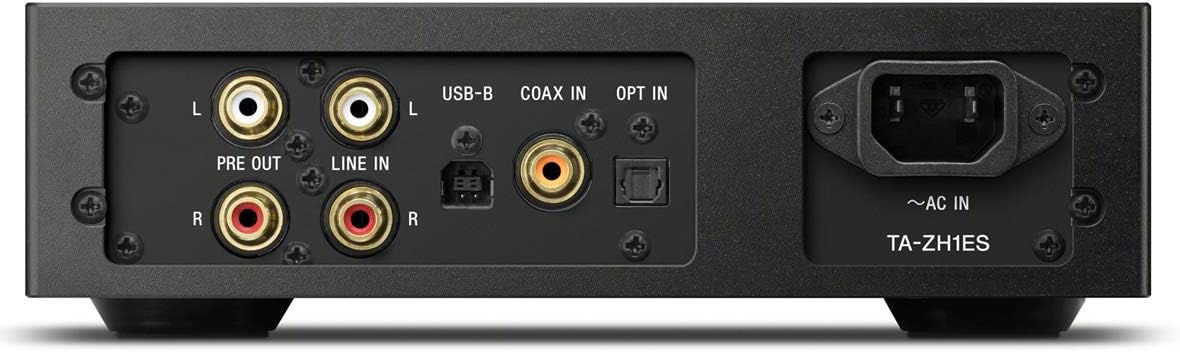
Nọmba 3.2: Ifilelẹ Igbimọ Ru
This image illustrates the rear panel of the TA-ZH1ES amplifier, detailing the various connectivity options. Visible ports include RCA Line In (L/R), RCA Pre Out (L/R), USB-B input, Coaxial input, Optical input, and the AC power inlet. Each port is clearly labeled for easy identification.
- LINE IN (RCA L/R): Analog audio input for connecting external devices.
- PRE OUT (RCA L/R): Analog audio output for connecting to a power amplifier tabi ti nṣiṣe lọwọ agbohunsoke.
- Ìbánisọ̀rọ̀ USB-B: For connecting to a computer or other digital audio sources.
- COAX IN: Coaxial digital audio input.
- Jade NI: Ìbáṣepọ̀ ohùn oní-nọ́ńbà optíkì.
- ~AC IN: Power input for the AC power cord.
4. Eto
Follow these steps to set up your TA-ZH1ES amplifier.
4.1 Ibi
Gbe awọn amplifier on a flat, stable surface with adequate space for ventilation. Avoid placing it near heat sources or in direct sunlight.

Nọmba 4.1: Amplifier Placement
This image shows the Sony TA-ZH1ES amplifier positioned on a flat surface, demonstrating a typical setup environment. Ensure the unit has sufficient space around it for proper airflow.
4.2 Nsopọ Awọn orisun ohun
Connect your audio sources to the appropriate input terminals on the rear panel.
- Digital Sources (Computer, CD Player, etc.):
- For a computer, connect a USB-B cable from your computer to the USB-B Input.
- For a CD player or other digital audio device, use a coaxial cable for the COAX IN or an optical cable for the OPT IN.
- Analog Sources (Turntable with pre-amp, etc.): Connect RCA cables from your analog source to the LINE IN (RCA L/R) ebute oko.
- Portable Devices (Walkman/Xperia): Connect compatible portable devices to the Walkman/Xperia USB Input on the front panel. This input also supports charging for Walkman devices.
4.3 Connecting Headphones or External Ampitanna
- Agbekọri: Connect your headphones to the appropriate balanced (4.4mm, 3.5mm x 2, XLR4) or unbalanced (6.3mm, 3.5mm) output jacks on the front panel.
- Agbara ita Amplifier/Active Speakers: If using the TA-ZH1ES as a DAC or pre-amplifier, connect RCA cables from the PRE OUT (RCA L/R) terminals on the rear panel to your power amplifier tabi ti nṣiṣe lọwọ agbohunsoke.
4.4 Asopọ agbara
So okùn agbara AC ti a pese pọ mọ ~ AC IN terminal on the rear panel, then plug the other end into a wall outlet.
5. Awọn ilana Iṣiṣẹ
5.1 Ipilẹ isẹ
- Agbara Tan: Press the Power button on the front panel.
- Yan Igbewọle: Use the Input Selector button to choose the desired audio source (e.g., USB-B, COAX, OPT, LINE IN).
- So Agbekọri pọ: Plug your headphones into the appropriate jack.
- Ṣatunṣe Iwọn didun: Slowly turn the Volume knob clockwise to increase the volume to a comfortable listening level.

olusin 5.1: Top Panel idari
Aworan yii pese oke-isalẹ view of the TA-ZH1ES amplifier, clearly showing the power button, input/output selectors, display screen, menu navigation buttons (Menu/Back, Enter), and the Gain button. These controls are used for basic operation and feature adjustments.
5.2 DSD Remastering Engine
The DSD Remastering Engine converts all PCM audio sources to DSD 11.2MHz, aiming to provide a more natural and analog-like sound experience. This feature can be enabled or disabled through the unit's menu settings.
5.3 DSEE HX
DSEE HX (Digital Sound Enhancement Engine HX) upscales compressed audio files to near high-resolution quality. This feature is particularly effective for improving the sound of lower-resolution files, such as those from streaming services or older recordings. Access DSEE HX settings via the unit's menu.
5.4 Gain Settings
Awọn amplifier features adjustable gain settings to optimize performance with various headphone impedances. Press the jèrè button on the front panel to cycle through available gain levels (e.g., Low, Mid, High). Select the setting that provides sufficient volume without distortion for your specific headphones.
6. Itọju
Proper care ensures the longevity and optimal performance of your amplifier.
- Ninu: Wipe the unit with a soft, dry cloth. Do not use abrasive pads, scouring powder, or solvents such as alcohol or benzene.
- Afẹfẹ: Periodically check that the ventilation openings are free from dust and obstructions.
- Ibi ipamọ: If storing the unit for an extended period, disconnect it from the power outlet and store it in a clean, dry place.
7. Laasigbotitusita
Ti o ba ni iriri awọn iṣoro pẹlu rẹ amplifier, tọka si awọn iṣoro ati awọn ojutu ti o wọpọ wọnyi.
| Isoro | Owun to le Fa / Solusan |
|---|---|
| Ko si agbara | Ensure the AC power cord is securely connected to both the unit and the wall outlet. Check if the power outlet is functional. |
| Ko si ohun |
|
| Ohun ti o daru |
|
| Unit becomes hot | Ensure adequate ventilation around the unit. Do not block the ventilation openings. If overheating persists, discontinue use and contact service. |
Ti iṣoro naa ba wa lẹhin igbiyanju awọn ojutu wọnyi, jọwọ kan si atilẹyin alabara Sony.
8. Awọn pato
| Ẹya ara ẹrọ | Ẹ̀kúnrẹ́rẹ́ |
|---|---|
| Nọmba awoṣe | TA-ZH1ES |
| Awọn Iwọn Ọja (W x H x D) | 2.56 x 12.36 x 8.27 inches (isunmọ 65 x 314 x 210 mm) |
| Iwọn Nkan | 1 poun (isunmọ 0.45 kg) |
| Agbekọri Impedance | 12-600 ohms |
| Awọn abajade agbekọri | Balanced: 4.4mm, 3.5mm x 2, XLR4 Unbalanced: 6.3mm, 3.5mm |
| Awọn igbewọle oni-nọmba | USB-B, Coaxial, Optical, Walkman/Xperia USB |
| Awọn igbewọle Analog | RCA Line In (L/R) |
| Awọn abajade Analog | RCA Pre Out (L/R) |
| Olupese | Sony |
| Ọjọ Akọkọ Wa | Oṣu Kẹsan Ọjọ 1, Ọdun 2016 |
Akiyesi: Awọn alaye ni o wa labẹ iyipada laisi akiyesi.
9. Atilẹyin ọja ati Support
Fun alaye atilẹyin ọja, jọwọ tọka si kaadi atilẹyin ọja ti o wa pẹlu ọja rẹ tabi ṣabẹwo si atilẹyin osise Sony website for your region. For technical assistance, product registration, or service inquiries, please contact Sony customer support.
Sony Atilẹyin Webojula: https://www.sony.com/electronics/support