
1. Ifihan
This manual provides instructions for the proper use and maintenance of your Casio GX-12B Value Series Desk Top/Compact Desk Type Calculator. Please read this manual thoroughly before using the calculator to ensure optimal performance and longevity.
Awọn ẹya pataki:
- Extra Large 12-Digit Display
- Two-Way Power (Solar and Battery)
- 2 Independent Memories
- Item Counter Function
- Mark-up Percentage Išẹ
- Durable Plastic Keys
- Compact Desk Type Design
2. Eto ati ipese agbara
Orisun Agbara:
The Casio GX-12B calculator operates on a two-way power system, utilizing both solar power and a single LR44 button-cell battery. For optimal performance, ensure the solar panel is exposed to sufficient light. In low-light conditions, the battery automatically takes over.
Fifi sori Batiri / Rirọpo:
- Rii daju pe ẹrọ iṣiro ti wa ni pipa.
- Wa ideri iyẹwu batiri ni ẹhin ẹṣiro naa.
- Using a small screwdriver, carefully remove the screw and open the battery compartment cover.
- Remove the old LR44 battery (if replacing) and insert a new LR44 battery with the positive (+) side facing up.
- Rọpo ideri kompaktimenti batiri ki o ni aabo pẹlu dabaru.
- Tẹ awọn AC (All Clear) button to reset the calculator.
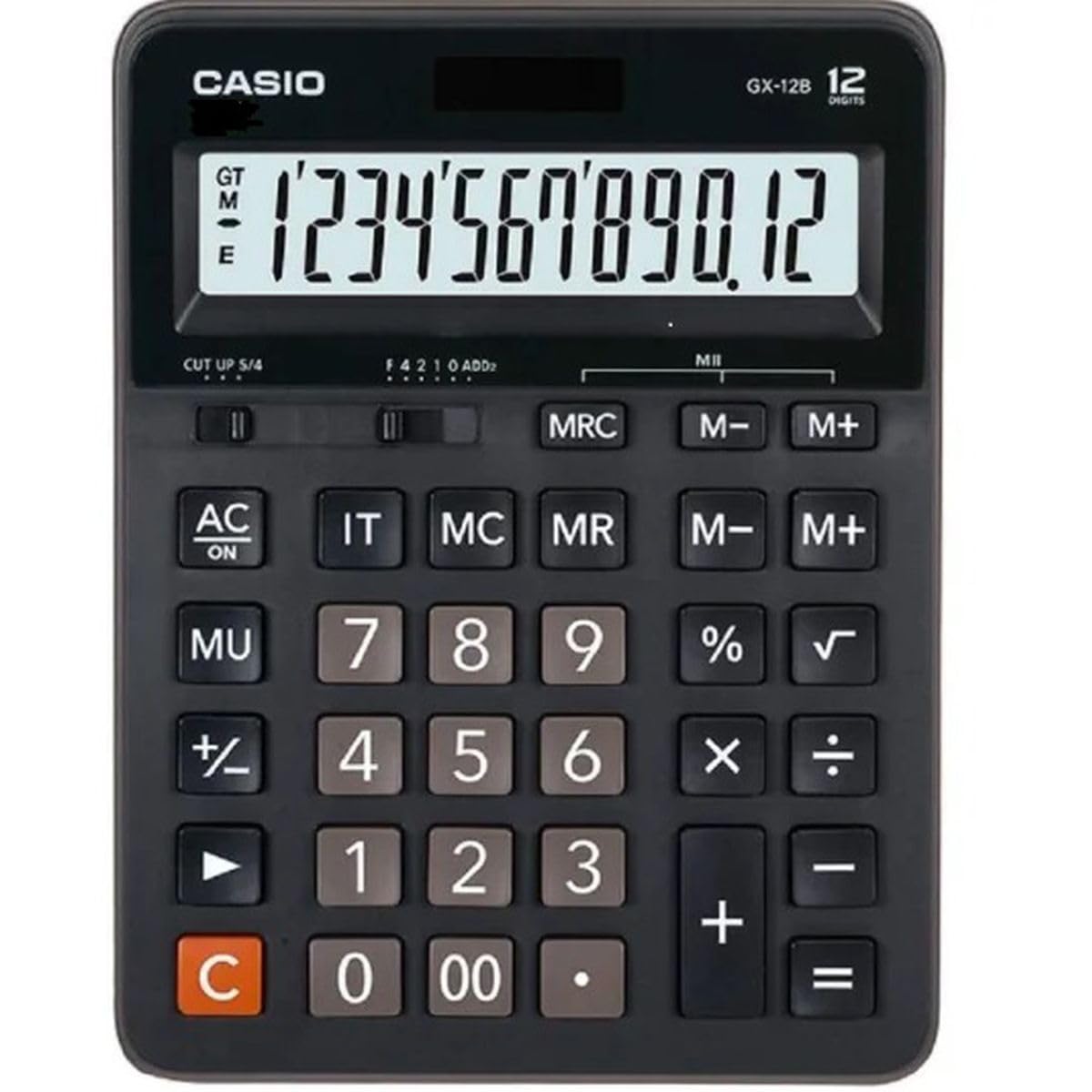
This image displays the Casio GX-12B calculator, highlighting its approximate length of 8.8 inches (22 cm) for scale. The calculator features a large display and clearly labeled keys.
3. Awọn iṣẹ ipilẹ
Familiarize yourself with the key functions to perform calculations efficiently.
Awọn iṣẹ bọtini Pariview:
- AC: All Clear. Clears all values and operations, resetting the calculator.
- C: Clear Entry. Clears the last entered number.
- + / - / × / ÷: Basic arithmetic operations.
- =: Executes the pending calculation.
- %: Ogoruntage key. Used for percentage calculations (e.g., 100 + 10% = 110).
- MU: Mark-up key. Used for profit margin calculations.
- M+: Ṣe afikun iye ti o han si iranti.
- M-: Yọkuro iye ti o han lati iranti.
- MRC: Memory Recall/Clear. Press once to recall the memory value. Press twice to clear the memory.
- IT: Item Counter. Counts the number of entries in a series of calculations.
Example Calculations:
- Afikun: To calculate 123 + 456:
- Tẹ AC
- Wọle 123
- Tẹ +
- Wọle 456
- Tẹ = ( Abajade: 579 )
- Ogoruntage: To add 10% to 200:
- Tẹ AC
- Wọle 200
- Tẹ +
- Wọle 10
- Tẹ % ( Abajade: 220 )
- Iṣẹ Iranti: To calculate (5 × 3) + (8 × 2):
- Tẹ AC
- Wọle 5 × 3 M+ (15 is added to memory)
- Wọle 8 × 2 M+ (16 is added to memory)
- Tẹ MRC ( Abajade: 31 )
- Tẹ MRC again to clear memory.
4. Itọju ati Itọju
- Ninu: Wipe the calculator with a soft, dry cloth. For stubborn dirt, use a cloth lightly dampened with water and a mild detergent, then wipe dry immediately. Avoid using strong solvents or abrasive cleaners.
- Ibi ipamọ: Tọju ẹrọ iṣiro naa ni itura, aye gbigbẹ kuro lati orun taara ati awọn iwọn otutu to gaju.
- Yago fun Ipa: Do not drop or subject the calculator to strong impacts, as this can damage internal components or the display.
- Igbesi aye batiri: If the display becomes dim or unresponsive, replace the LR44 battery.
5. Laasigbotitusita
| Isoro | Owun to le Fa | Ojutu |
|---|---|---|
| Ifihan ti ṣofo tabi baibai. | Ina ti ko to fun panẹli oorun, tabi batiri kekere. | Move the calculator to a brighter area. Replace the LR44 battery if the issue persists. |
| Awọn abajade iṣiro ti ko tọ. | Incorrect key input, or memory not cleared. | Tẹ AC to clear all operations and memory, then re-enter the calculation. Ensure correct order of operations. |
| Awọn bọtini ko ni idahun. | Low battery, or internal malfunction. | Replace the LR44 battery. If the problem continues, contact customer support. |
6. Awọn pato
- Awoṣe: GX-12B
- Ifihan: 12-Digit Extra Large LCD
- Orisun Agbara: Two-Way Power (Solar and 1 x LR44 Battery)
- Awọn iwọn (L x W): Isunmọ 20.8 cm x 15.9 cm (8.2 inches x 6.3 inches)
- Ìwúwo: Isunmọ 0.32 kg (0.7 lbs)
- Ohun elo: Ṣiṣu
- Awọn iṣẹ: Basic arithmetic, Percentage, Mark-up, Memory (M+, M-, MRC), Item Counter
7. atilẹyin ọja Information
This Casio product is covered by a Limited Warranty. For specific terms, conditions, and duration of the warranty, please refer to the warranty card included with your purchase or visit the official Casio webojula. Jeki ẹri rira rẹ fun awọn iṣeduro atilẹyin ọja.
8. Onibara Support
If you encounter any issues not covered in this manual or require further assistance, please contact Casio customer support. Contact details can typically be found on the official Casio webaaye tabi lori apoti ọja.