
HoldPeak 90EPD
HOLDPEAK 90EPD Digital Auto-ranging Mobile APP DMM Multimeter User Manual
Awoṣe: 90EPD | Brand: HoldPeak
1. Ifihan
The HOLDPEAK 90EPD is a versatile digital auto-ranging multimeter designed for a wide range of electrical testing applications, including commercial, home repair, and automotive use. It offers precise measurements of AC/DC current and voltage, resistance, capacitance, frequency, temperature, and duty cycles. Key features include non-contact voltage detection, a large backlit LCD display, Data Hold, Auto Back-Light, Relative Measurement, and Mobile APP connectivity for enhanced functionality.
Awọn ẹya pataki:
- Awọn iwọn AC/DC voltage and AC/DC current, resistance, capacitance, frequency, duty cycle, and temperature.
- Performs diode and continuity tests.
- Features Data Hold, Auto Back-Light, Relative Measurement, and Mobile APP DMM function.
- Auto-ranging scales simplify electronic measurements.
- Equipped with a super large Backlit LCD display for visibility in low light conditions.
- Automatically enters sleep mode after 15 minutes of inactivity to conserve power.

Figure 1.1: HoldPeak 90EPD Digital Multimeter shown with its mobile application interface on a smartphone.
2. Alaye Aabo
Always adhere to safety precautions when using the multimeter to prevent electric shock or personal injury. Read all safety information before operating the device.
- IEC61010 CAT.III 1000V, CAT.IV 600V: This meter is rated for CAT.III 1000V and CAT.IV 600V overvoltage protection. Always ensure the measurement category is appropriate for the circuit being tested.
- Idabobo Meji: The meter features double insulation for enhanced safety.
- Ṣayẹwo Ṣaaju Lilo: Kí o tó lo gbogbo ìgbà, ṣe àyẹ̀wò mita náà, dán àwọn ìtọ́sọ́nà wò, àti àwọn ohun èlò míìrán fún ìbàjẹ́ èyíkéyìí. Má ṣe lò ó bí ó bá bàjẹ́.
- Proper Terminal Connection: Always connect the test leads to the correct terminals for the desired measurement function.
- Voltage Iwọn: Maṣe lo voltage to the meter when it is set to a current, resistance, or continuity range.
- Wiwọn lọwọlọwọ: Ensure the circuit is de-energized before connecting the meter in series for current measurements.
- Ayika Ṣiṣẹ: Use the meter in a dry environment and avoid extreme temperatures.
- Rirọpo Batiri: Replace the battery promptly when the low battery indicator appears to ensure accurate readings.
3. Package Awọn akoonu
Daju pe gbogbo awọn nkan ti a ṣe akojọ rẹ si isalẹ wa ninu package rẹ:
- 1 x HOLDPEAK 90EPD Digital Mobile APP DMM Multimeter
- Àwọn Ìdánwò 1 x (Pupa àti Dúdú)
- 1 x Temperature Test Probe
- 1 x PC Link Software CD
- 1 x Okun USB
- 1 x Apo gbigbe
- 1 x Ilana Iṣiṣẹ
- 1 x 9V 6F22 battery

Figure 3.1: Contents included in the HoldPeak 90EPD Multimeter package.
4. Ọja irinše ati Awọn ẹya ara ẹrọ
Familiarize yourself with the various components and functions of the HOLDPEAK 90EPD Multimeter.

Figure 4.1: Labeled components of the HoldPeak 90EPD Multimeter.
Key Function Icons:

Figure 4.2: Visual representation of the multimeter's measurement capabilities and features.
5. Eto
5.1 Fifi sori batiri
The HOLDPEAK 90EPD Multimeter requires one 9V 6F22 battery for operation. To install or replace the battery:
- Rii daju pe multimeter ti wa ni pipa.
- Wa awọn yara batiri lori pada ti awọn kuro.
- Lo screwdriver lati ṣii ideri batiri naa.
- Insert the 9V battery, observing the correct polarity (+/-).
- Rọpo ideri batiri ki o ni aabo pẹlu dabaru.
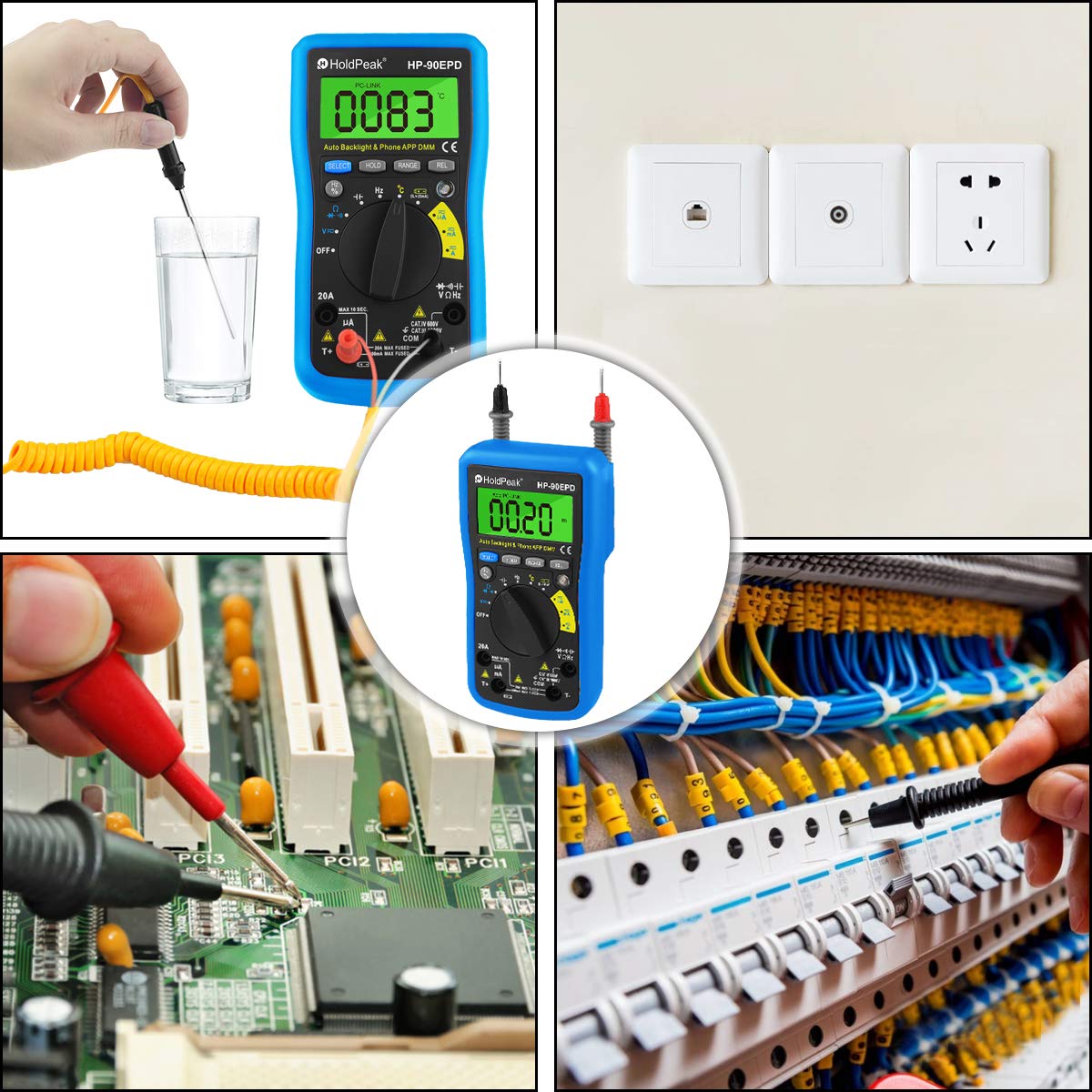
Figure 5.1: Location of the removable 9V battery compartment.
5.2 Mobile APP Connection
The HOLDPEAK 90EPD can connect to a mobile application for enhanced data logging and display features.
- Igbesẹ 1: Scan the QR code provided in the manual (or on the product packaging) or search for "intelligent multimeter" in your phone's app store to download the application.
- Igbesẹ 2: Open your phone's Bluetooth settings and ensure Bluetooth is enabled. Then, launch the downloaded application.
- Igbesẹ 3: Turn on the multimeter. Your phone should automatically detect and connect to the multimeter via Bluetooth.
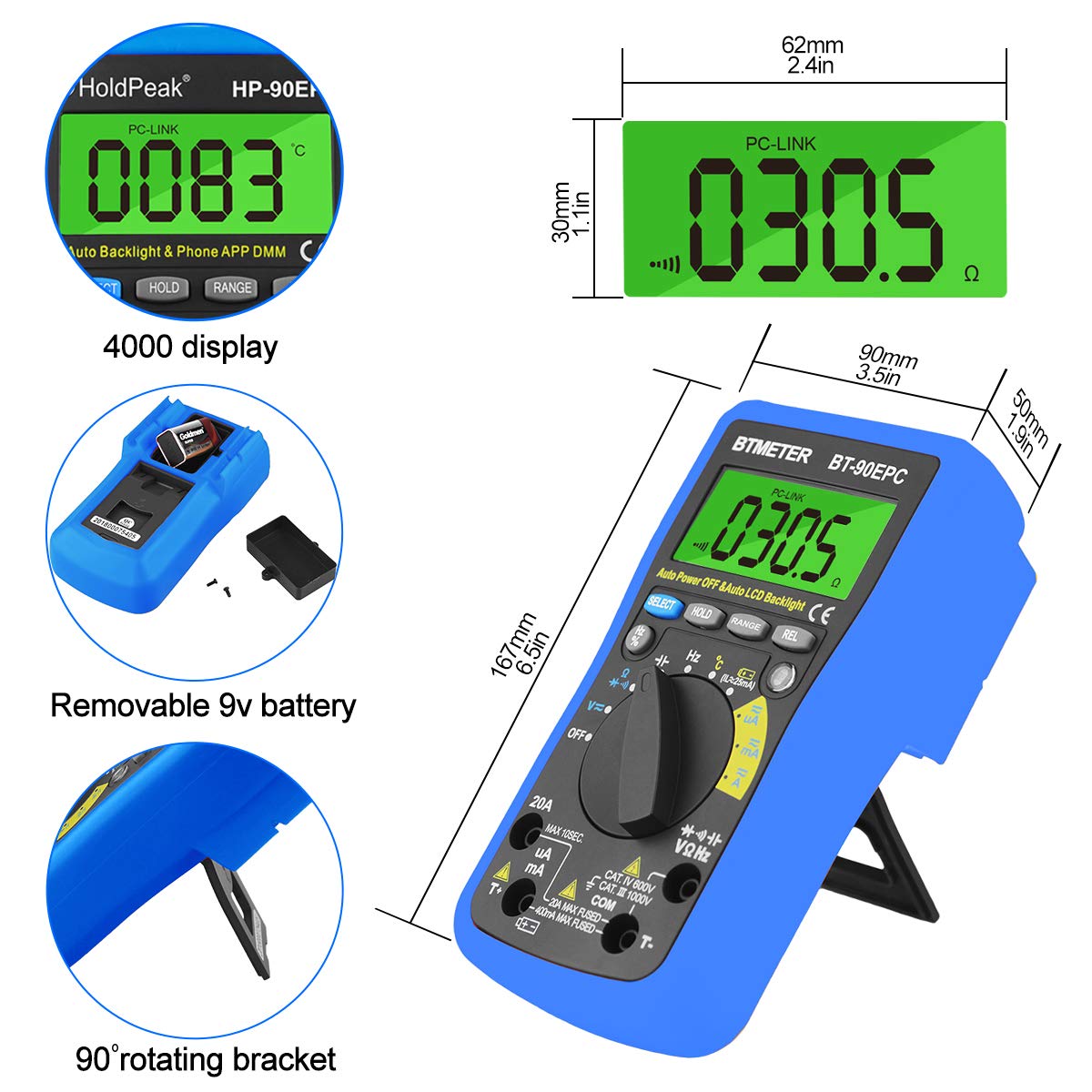
Figure 5.2: Steps for connecting the multimeter to a mobile phone application.
6. Awọn ilana Iṣiṣẹ
This section provides general guidance for using the HOLDPEAK 90EPD Multimeter for various measurements. Always refer to the specific function details in the full operating manual for precise instructions.
Isẹ gbogbogbo:
- Titan/Apapa: Rotate the central rotary switch to the desired measurement function to turn the meter on. Turn it to 'OFF' to power off.
- Gbigbe Aifọwọyi: The meter automatically selects the appropriate range for most measurements, simplifying operation.
- Idaduro data: Tẹ bọtini 'DÍDÁ' láti dì kíkà tó wà lórí ìbòjú náà. Tẹ̀ lẹ́ẹ̀kan síi láti tú u sílẹ̀.
- Auto Back-Light: The display features an auto backlight for improved visibility in low-light conditions.
- Ìwọ̀n Ìbátan (REL): Press the 'REL' button to store the current reading as a reference value. Subsequent readings will be displayed as a deviation from this reference.
- Function Selection (SELECT): For ranges with multiple functions (e.g., AC/DC voltage, diode/continuity), press the 'SELECT' button to toggle between them.
Awọn iṣẹ wiwọn:
- AC/DC Voltage (V~ / V-): Connect test leads in parallel to the circuit. Select the appropriate voltage ibiti.
- AC/DC Current (A~ / A-): Connect the meter in series with the circuit. Ensure the circuit is de-energized before connecting. Select the appropriate current range (µA, mA, A).
- Agbára ìdènà (Ω): Rí i dájú pé agbára ìṣiṣẹ́ náà kò pọ̀. So àwọn okùn ìdánwò pọ̀ mọ́ ara wọn.
- Agbara (F): Ensure the capacitor is discharged before testing. Connect test leads across the capacitor.
- Igbohunsafẹfẹ (Hz) / Iṣẹ́ iyipo (%): So awọn itọsọna idanwo pọ si orisun ifihan agbara.
- Idanwo Diode (→|): Use to check the forward voltage silẹ ti a ẹrọ ẹlẹnu meji.
- Continuity Test (•))): Use to check for open or closed circuits. An audible buzzer indicates continuity.
- Iwọn otutu (°C/°F): Connect the temperature test probe to the appropriate input jacks.
- Non-Olubasọrọ Voltage (NCV): Use the NCV sensor to detect the presence of AC voltage lai taara olubasọrọ.
Olusin 6.1: Examples of the HoldPeak 90EPD Multimeter in various measurement scenarios.
7. Itọju
7.1 Ninu
To clean the multimeter, use a soft cloth dampened with mild detergent. Do not use abrasives or solvents. Ensure the meter is powered off and disconnected from any circuits before cleaning.
7.2 Ibi ipamọ
When not in use for extended periods, remove the battery to prevent leakage. Store the multimeter in its carrying case in a cool, dry place, away from direct sunlight and extreme temperatures.
8. Laasigbotitusita
If you encounter issues with your HOLDPEAK 90EPD Multimeter, refer to the common problems and solutions below:
- Ko si Ifihan/Agbara:
- Check if the battery is installed correctly and has sufficient charge. Replace the 9V battery if necessary.
- Ensure the rotary switch is turned to an ON position.
- Awọn kika ti ko tọ:
- Verify that the test leads are properly connected to the correct input jacks for the selected function.
- Ensure the correct measurement function is selected on the rotary switch.
- Check the battery level; low battery can affect accuracy.
- Ensure the circuit being tested is within the meter's specified range.
- Mobile APP Connection Issues:
- Rii daju pe Bluetooth ti ṣiṣẹ lori foonuiyara rẹ.
- Make sure the multimeter is powered on and within Bluetooth range.
- Restart both the multimeter and the mobile application.
- Ṣayẹwo boya ohun elo naa ti ni imudojuiwọn si ẹya tuntun.
- "OL" Displayed (Overload):
- The measured value exceeds the selected range. The auto-ranging feature should typically handle this, but if manually ranged, switch to a higher range.
- Ensure the meter is not connected to a voltage or current exceeding its maximum input ratings.
9. Awọn pato
| Sipesifikesonu | Iye |
|---|---|
| Aabo / Awọn ibamu | IEC61010 CAT.III 1000V, CAT.IV 600V overvoltage ati ki o ė idabobo bošewa |
| Ifihan | Maximum reading 4000, analogue bar graph 41 segments |
| Aṣayan ibiti o wa | Aifọwọyi |
| Apọju àpapọ | Ṣe afihan OL |
| DC voltage | 400mV/4V/40V/400V (±0.5%), 1000V (±0.8%) |
| AC voltage | 400mV (±1.2%), 4/40/400V (±0.8%), 750V (±1.2%) |
| DC lọwọlọwọ | 400uA/4000uA/40mA/400mA (±1.2%), 4/20A (±2.0%) |
| AC lọwọlọwọ | 400uA/4000uA/40mA/400mA (±1.5%), 4/20A (±2.5%) |
| Agbara | 51.2nF (±3.0%), 512nF/5.12uF/51.2uF (±2.5%), 100uF (±5.0%) |
| Atako | 400ohm/4k/40k/400k/4Mohm (±1.0%), 40Mohm (±1.5%) |
| Iwọn igbohunsafẹfẹ | 5.12Hz ~ 5.12MHz (±0.1%) |
| Idanwo diode | Bẹẹni |
| Igbeyewo itesiwaju | Bẹẹni |
| Non-olubasọrọ voltage erin | Bẹẹni |
| Ojulumo Iye | Bẹẹni |
| Mobile APP | Bẹẹni |
| Awọn iwọn | 16.7 x 9 x 5 cm (6.6" x 3.48" x 2.36") |
| Agbara | 9V 6F22 batiri |
| Iwọn | 0.71 lb (isunmọ 322g) |
| Olupese | Zhuhai Jida Huapu Instrument Co.,Ltd |
| Nọmba awoṣe ohun kan | 90EPD |
| Ọjọ Akọkọ Wa | Oṣù Kẹsàn-án. Ọdún 2016 |
10. Atilẹyin ọja ati Support
For detailed warranty information, technical support, or service inquiries, please refer to the official HoldPeak webAaye ayelujara tabi kaadi atilẹyin ọja ti o wa pẹlu ọja rẹ. Pa iwe-ẹri rira rẹ mọ gẹgẹbi ẹri rira fun awọn ẹtọ atilẹyin ọja.
Ask a question about this manual
Ask about setup, troubleshooting, compatibility, parts, safety, or missing instructions. Manuals+ will review the question and use this page’s manual context to help answer it.