
Siglent Technologies SDG1032X Arbitrary Waveform - Ìwé Ìtọ́sọ́nà Olùlò Generator Iṣẹ́
Model: SDG1032X
1. Ifihan ati Loriview
The Siglent SDG1032X is an advanced arbitrary waveform and function generator designed for a wide range of electronic testing and measurement applications. This instrument offers dual-channel output, various modulation types, and a harmonics generation mode, making it a versatile tool for engineers and hobbyists.
Key features of the SDG1032X include:
- Ijade ikanni meji
- Sweep, Burst, Modulation, and Harmonics Generation capabilities
- CH1 - CH2 Waveform Combining
- Built-In Frequency Counter
- Square Wave generation up to 30 MHz

Iwaju view of the Siglent SDG1032X, showcasing its display, control panel, and dual output channels.
2. Eto
Follow these steps to set up your SDG1032X Function Generator:
- Ṣii silẹ: Carefully remove the instrument and all accessories from the packaging. Verify that all components listed in the packing list are present.
- Asopọ agbara: Connect the provided power cord to the instrument's power input on the rear panel, then plug it into a suitable AC power outlet.
- Agbara Ibẹrẹ Tan: Press the power button on the front panel. The instrument will perform a self-test and display the startup screen.
- Awọn isopọ Iṣjade: Connect BNC cables from the CH1 and CH2 output ports on the front panel to your desired test circuit or oscilloscope inputs.
- USB/LAN Connection (Optional): For remote control or data transfer, connect a USB cable to the USB Host/Device port or an Ethernet cable to the LAN port on the rear panel.
3. Awọn ilana Iṣiṣẹ
Yi apakan pese ohun loriview of the SDG1032X's operational features.
3.1 Ìṣẹ̀dá Ìgbì Wíwọ́-ẹ̀rọ Ìpìlẹ̀
The SDG1032X can generate standard waveforms such as sine, square, ramp, pulse, and noise. Use the dedicated waveform buttons on the front panel to select the desired waveform. Parameters like frequency, amplitude, and offset can be adjusted using the numeric keypad, rotary knob, and corresponding menu soft keys.

The SDG1032X display illustrating the settings for a sine wave output, including frequency, amplitude, offset, and phase.
3.2 High-Quality Square Wave Output
The SDG1032X is capable of producing high-performance square wave outputs, even at frequencies up to 30 MHz. It features dedicated circuitry to ensure excellent signal integrity with rise/fall times less than 4.2 ns and low jitter performance.

An oscilloscope screen displaying a precise square wave, demonstrating the SDG1032X's capability to produce high-quality square wave outputs.
3.3 Innovative EasyPulse Technology
EasyPulse technology addresses the jitter issues common in conventional Direct Digital Synthesis (DDS) methods when the sampling rate and output frequency are not integer multiples. This technology ensures low-jitter square wave and pulse outputs with finely adjustable pulse width and rise/fall times down to 1 ns, and a minimum duty cycle of 0.001%.
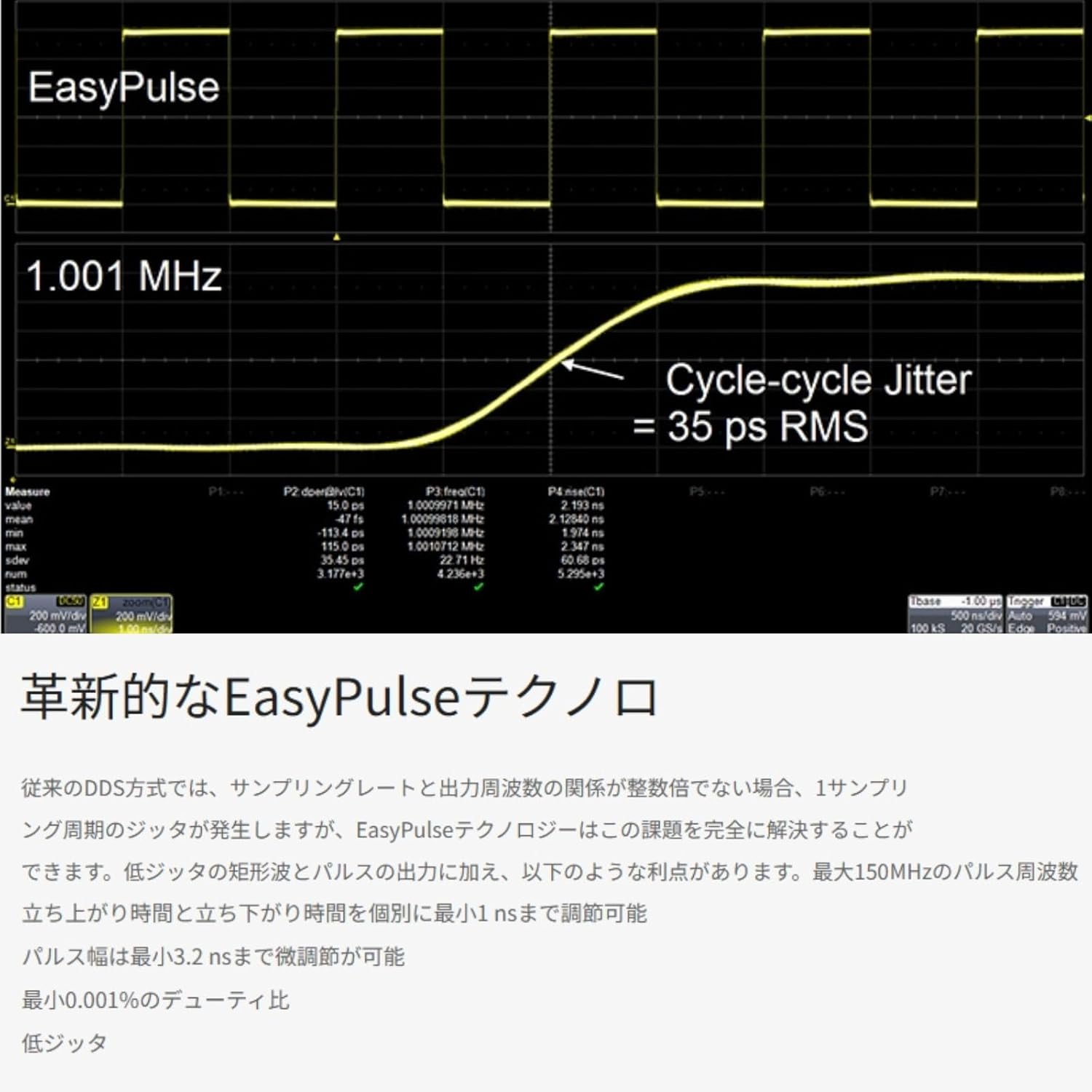
A waveform illustrating the EasyPulse technology, highlighting its ability to generate pulses with extremely low cycle-cycle jitter (35 ps RMS).
3.4 TrueArb Technology for Arbitrary Waveforms
TrueArb technology provides lower jitter and distortion output compared to traditional DDS methods. It allows for point-by-point output of arbitrary waveform data, ensuring high fidelity. The SDG1032X supports 16 kpts memory length for arbitrary waveforms and includes standard PC software, EasyWave, for generating and editing custom waveforms.

An oscilloscope display showing a complex waveform generated using TrueArb technology, emphasizing its high fidelity and detailed data retention capabilities.
3.5 Advanced Signal Generation Capabilities
The SDG1032X is equipped with comprehensive waveform generation functions supporting various modulation methods, sweep, burst output, and signal synthesis. Trigger sources can be set to internal, external, or manual. It supports AM, FM, PM, FSK, ASK, PSK, DSB-AM, and PWM modulation. Both linear and logarithmic sweeps are available, along with
Awọn iwe aṣẹ ti o jọmọ - SDG1032X
 |
SIGLENT SDG1000X Plus Series Arbitrary Waveform Generator User Manual Comprehensive user manual for the SIGLENT SDG1000X Plus Series Arbitrary Waveform Generator, covering safety information, operation, settings, and support for models SDG1062X Plus, SDG1032X Plus, and SDG1022X Plus. |
 |
SIGLENT SDG3000X Series Lainidii Waveform monomono Quick Bẹrẹ Itọsọna Itọsọna ibẹrẹ iyara yii n pese alaye pataki fun SIGLENT SDG3000X Series Arbitrary Waveform Generator, ibora awọn iṣọra ailewu, awọn apejuwe nronu, awọn iṣẹ ipilẹ, ati laasigbotitusita. |
 |
SIGLENT SDG3000X Series Lainidii Waveform monomono Afowoyi olumulo Itọsọna olumulo pipe fun SIGLENT SDG3000X Series Arbitrary Waveform Generator, ṣe alaye awọn ẹya rẹ, iṣẹ ṣiṣe, awọn itọnisọna ailewu, ati laasigbotitusita fun awọn awoṣe bii SDG3202X, SDG3162X, ati SDG3082X. |
 |
ArbExpress AXW100 Waveform Creation and Editing Tool User Manual - Tektronix User manual for Tektronix ArbExpress AXW100 software, a PC-based tool for creating, editing, and transferring arbitrary waveforms for AWG/AFG instruments. Covers installation, usage, waveform generation, and instrument communication. |
 |
UNI-T UTG9000T Series Išė / Lainidii waveform monomono Quick Itọsọna Itọsọna Iyara yii lati UNI-T ṣe alaye iṣẹ-ṣiṣe UTG9000T Series / monomono Waveform lainidii. O ni wiwa alaye ailewu pataki, ọja ti pariview, Awọn apejuwe nronu, awọn ilana ṣiṣe, ati awọn imọran laasigbotitusita fun lilo imunadoko ti ẹrọ idanwo itanna to ti ni ilọsiwaju. |
 |
MetroQ MTQ1515 DDS Signal Generator User's Manual Comprehensive user manual for the MetroQ MTQ1515 DDS Signal Generator, covering instrument introduction, panel layout, basic operation, modulation modes, measurement functions, technical specifications, and accessories. Provides detailed guidance on using the dual-channel function/arbitrary waveform generator. |
Ask a question about this manual
Ask about setup, troubleshooting, compatibility, parts, safety, or missing instructions. Manuals+ will review the question and use this page’s manual context to help answer it.