
Ọrọ Iṣaaju
O ṣeun fun riraasing the QUMOX L165U 2.4GHz Wireless Gamepad. This high-quality game controller is designed for use with PC and Android devices, offering a reliable 2.4GHz wireless connection for an enhanced gaming experience. Please read this manual carefully to ensure proper setup and operation of your new gamepad.

Figure 1: QUMOX L165U Gamepad with included USB adapter and OTG connection kit.
Package Awọn akoonu
Rii daju pe gbogbo awọn nkan wa ninu apo rẹ:
- 1x QUMOX L165U Gamepad
- 1x 2.4GHz USB Wireless Adapter
- 1x OTG Connection Kit (Micro USB to USB-A adapter)
Ṣeto
1. Fifi sori batiri
The QUMOX L165U Gamepad is powered by 2 AAA batteries (not included). To install the batteries:
- Locate the battery compartment on the back of the gamepad.
- Ifaworanhan ṣii ideri batiri.
- Fi awọn batiri AAA meji sii, ki o rii daju pe polarity ti o tọ (+/-).
- Pa ideri batiri naa ni aabo.

Figure 2: Open battery compartment for AAA battery installation.
2. Nsopọ si PC kan
- Plug the 2.4GHz USB Wireless Adapter into an available USB port on your PC.
- Turn on the gamepad by pressing the 'START' button. The gamepad will automatically attempt to connect.
- The PC should recognize the gamepad and install necessary drivers automatically.
- If the gamepad does not connect, press the 'MODE' button on the gamepad to cycle through connection modes until it is recognized by your PC.
3. Connecting to an Android Device (with OTG support)
- Connect the OTG Connection Kit to your Android device's Micro USB port.
- Plug the 2.4GHz USB Wireless Adapter into the USB-A end of the OTG Connection Kit.
- Turn on the gamepad by pressing the 'START' button. The gamepad will automatically attempt to connect.
- Your Android device should recognize the gamepad.
- If the gamepad does not connect, press the 'MODE' button on the gamepad to cycle through connection modes until it is recognized by your Android device.
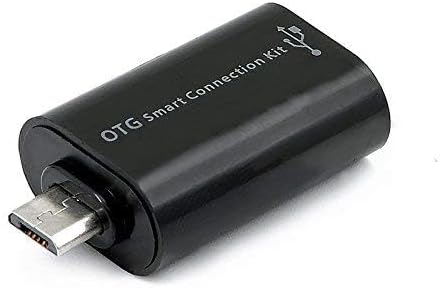
Figure 3: OTG Connection Kit for Android device connectivity.
Awọn ilana Iṣiṣẹ
Once connected, your QUMOX L165U Gamepad is ready for use. The layout is standard for most game controllers.
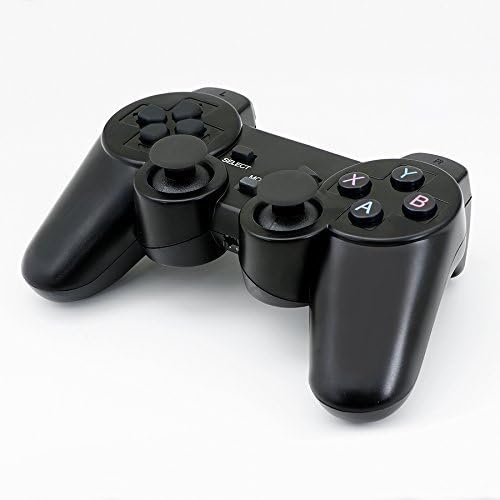
olusin 4: Top view of the QUMOX L165U Gamepad, highlighting button layout.
- Paadi itọsọna (D-paadi): Fún ìtẹ̀síwájú ìtọ́sọ́nà tó péye.
- Àwọn Joysticks Analog: Àwọn ọ̀pá analog méjì fún ìṣípo 360-degree àti ìṣàkóso kámẹ́rà.
- Àwọn bọ́tìnì ìgbésẹ̀ (A, B, X, Y): Awọn bọtini igbese boṣewa fun awọn aṣẹ inu ere.
- Awọn Bọtini ejika (L1, R1) & Awọn okunfa (L2, R2): Located on the top of the gamepad for additional actions.
- Bọ́tìnì YÀN/PÀDÁ: Typically used for menu navigation or specific in-game functions.
- Bọtini Ibẹrẹ: A lo lati da awọn ere duro tabi jẹrisi awọn yiyan.
- Bọtini MODE: Cycles through different operating modes (e.g., Android, PC) if automatic detection fails.
Ifihan fidio
Video 1: A seller-provided overview of a 2-pack wireless controller, demonstrating its features and compatibility. While showing a similar product, it illustrates general wireless controller usage and setup.
Itoju
- Ninu: Lo aṣọ rírọrùn tí ó gbẹ láti nu eré náà. Yẹra fún lílo àwọn kẹ́míkà líle tàbí àwọn ohun èlò ìpalára.
- Ibi ipamọ: Tọju paadi ere naa ni itura, aye gbigbẹ kuro lati orun taara ati awọn iwọn otutu to gaju.
- Itọju Batiri: Remove batteries if the gamepad will not be used for an extended period to prevent leakage.
Laasigbotitusita
| Isoro | Owun to le Fa | Ojutu |
|---|---|---|
| Gamepad does not connect. | Low batteries, incorrect mode, adapter not properly inserted. | Replace batteries. Press the 'MODE' button to cycle through modes. Ensure USB adapter is fully inserted into PC or OTG adapter. |
| Awọn bọtini tabi joysticks ko dahun. | Connection issue, game incompatibility, physical damage. | Reconnect the gamepad. Check game settings for controller support. If issue persists, contact support. |
| Android device does not recognize gamepad. | Android device lacks OTG support, OTG adapter issue. | Verify your Android device supports OTG. Ensure OTG adapter is functioning correctly. |
Awọn pato
| Ẹya ara ẹrọ | Ẹ̀kúnrẹ́rẹ́ |
|---|---|
| Nọmba awoṣe | L165U |
| Asopọmọra Technology | 2.4GHz Wireless (via USB Adapter) |
| Awọn ẹrọ ibaramu | PC, Android (with OTG support) |
| Orisun agbara | 2x AAA batiri |
| Iwọn Nkan | 5.3 iwon |
| Package Mefa | 8.07 x 5.63 x 2.95 inches |
| Àwọ̀ | Dudu |
Atilẹyin ọja ati Support
For warranty information or technical support, please refer to the contact details provided with your purchase or visit the official QUMOX webojula. Jeki ẹri rira rẹ fun eyikeyi awọn ibeere atilẹyin ọja.