
1. Ifihan
This manual provides essential instructions for the installation, operation, maintenance, and troubleshooting of your APC Smart-UPS SRT 3000VA RM 230V (SRT3000RMXLI). This Uninterruptible Power Supply (UPS) is designed to provide high-density, true double-conversion online power protection for critical electronic equipment, including servers, voice/data networks, medical labs, and light industrial applications. Please read this manual thoroughly before installing or operating the UPS to ensure proper and safe usage.
2. Alaye Aabo
Observe all warnings and operating instructions in this manual. Failure to do so may result in injury or equipment damage. This UPS contains hazardous voltages. Do not attempt to disassemble the unit. There are no user-serviceable parts inside.
Gbogbogbo Abo
- UPS yii jẹ ipinnu fun lilo inu ile nikan.
- Ma ṣe ṣiṣẹ UPS yii ni isunmọ taara taara, ni olubasọrọ pẹlu awọn ito, tabi nibiti eruku pupọ tabi ọriniinitutu ba wa.
- Ensure the ventilation openings on the UPS are not blocked. Maintain adequate clearance around the unit for proper airflow.
- Connect the UPS power cable directly to a grounded wall outlet. Do not use extension cords or surge suppressors.
Aabo batiri
- Batteries are heavy. Remove the battery module before installing the UPS in a rack or tower configuration.
- Battery service should be performed or supervised by personnel knowledgeable of batteries and the required precautions.
- Ma ṣe sọ awọn batiri sinu ina. Awọn batiri le gbamu.
- Ma ṣe ṣi tabi ge awọn batiri ge. Electrolyte ti a tu silẹ jẹ ipalara si awọ ara ati oju. O le jẹ majele.
- Replace batteries with the same type and number of batteries as originally installed.
3. Package Awọn akoonu
Carefully unpack the unit and inspect for shipping damage. If any damage is found, notify the carrier and dealer. The package should contain the following items:
- APC Smart-UPS SRT 3000VA RM 230V (SRT3000RMXLI) unit
- Battery module (may be pre-installed or separate)
- Rack-mounting hardware (rails, brackets)
- Tower stand (for tower configuration)
- Okun ibaraẹnisọrọ USB
- Serial ibaraẹnisọrọ USB
- CD iwe
- Safety information and warranty guide
4. Ọja Ipariview
The APC Smart-UPS SRT 3000VA RM 230V is a high-performance Uninterruptible Power Supply designed to protect your critical equipment from power disturbances. It features a rack/tower convertible form factor for flexible deployment.
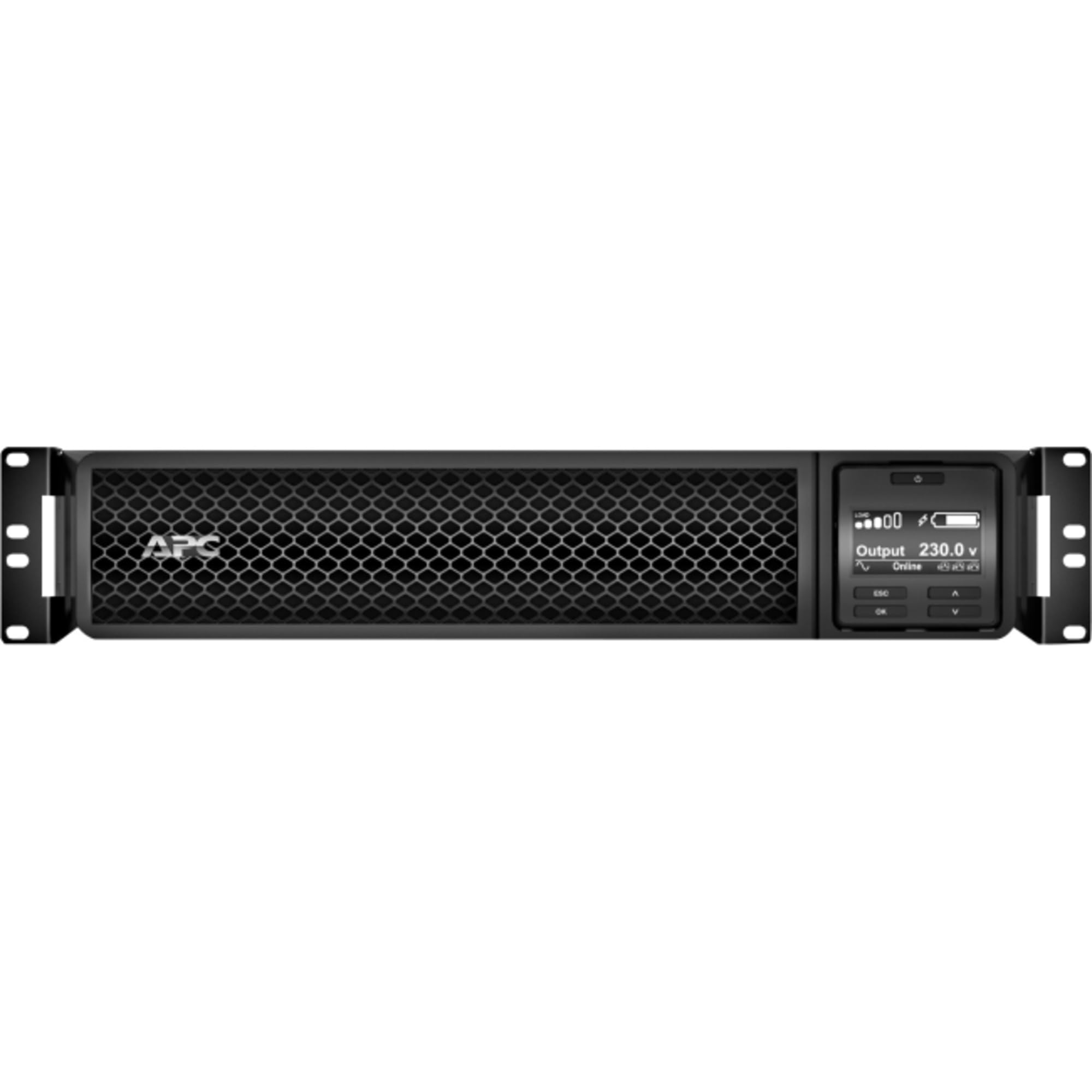
olusin 1: Iwaju view of the APC Smart-UPS SRT 3000VA RM 230V. This image displays the front panel with the LCD display, control buttons, and ventilation grilles.
Awọn paati bọtini
- Front Panel LCD Display: Provides real-time status information, configuration options, and alarm notifications.
- Awọn bọtini Iṣakoso: Used to navigate the LCD menu, power on/off the UPS, and perform self-tests.
- Modulu Batiri: Provides backup power during outages. Hot-swappable for easy replacement.
- Input Agbara Asopọ: Connects the UPS to the utility power source.
- Output Receptacles (IEC 320): Provide protected power to connected equipment.
- Communication Ports (USB, Serial): For connecting to a computer or network management card for monitoring and control.
- EPO (Agbara Pajawiri) Port: Allows for remote emergency shutdown of the UPS.
5. Eto
Follow these steps for initial setup of your UPS.
Igbesẹ 1: Yan Ibi kan
- Place the UPS on a sturdy, level surface or install it in a standard 19-inch rack.
- Ensure the ambient temperature is between 0°C and 40°C (32°F and 104°F).
- Maintain at least 10 cm (4 inches) of clearance at the front and rear of the unit for proper ventilation.
Step 2: Install the Battery Module
If the battery module is not pre-installed, slide it into the battery bay until it clicks into place. Connect the battery cables as indicated by the labels.
Step 3: Connect to Utility Power
- Connect the UPS input power cord to a grounded 230V AC outlet.
- The UPS will perform a self-test and the LCD display will illuminate.
Igbesẹ 4: Ohun elo Sopọ
- Connect your critical equipment (servers, network devices, etc.) to the output receptacles on the rear of the UPS.
- Ensure the total load does not exceed the UPS capacity (3000VA / 2700W).
Step 5: Connect Communication Cables (Optional)
- Connect the USB or serial cable from the UPS to your computer or server for monitoring and graceful shutdown capabilities.
- Install the PowerChute software (available from APC website) on your computer for advanced management.
6. Ṣiṣẹ awọn Soke
Agbara Lori UPS
Press and hold the power button on the front panel until you hear a beep. The UPS will start up and provide power to connected equipment.
Agbara Pa Soke
Press and hold the power button until the UPS shuts down. Ensure all connected equipment is safely shut down before powering off the UPS.
LCD Ifihan ati Lilọ kiri
The LCD display provides detailed information about the UPS status, battery charge, load level, and various settings. Use the navigation buttons (up, down, enter, escape) to browse through the menus and adjust settings.
Idanwo ara-ẹni
Regularly perform a self-test to ensure the UPS battery and internal components are functioning correctly. This can typically be initiated via the LCD menu or PowerChute software.
7. Itọju
Batiri Rirọpo
The UPS batteries have a typical lifespan of 3-5 years. The UPS will indicate when the batteries need replacement. Refer to the safety information before attempting battery replacement. Use only APC-approved replacement battery modules (APCRBC152).
Ninu
Clean the exterior of the UPS with a soft, damp cloth. Do not use solvents or abrasive cleaners. Ensure ventilation openings are free from dust and debris.
Awọn ero Ayika
Store the UPS in a cool, dry place when not in use. Avoid extreme temperatures and humidity, which can shorten battery life.
8. Laasigbotitusita
This section provides solutions to common issues you may encounter with your UPS.
| Isoro | Owun to le Fa | Ojutu |
|---|---|---|
| UPS ko ni tan | No utility power; Battery not connected; UPS fault | Check power outlet; Ensure battery cables are connected; Contact APC support if fault persists. |
| UPS beeps nigbagbogbo | On battery power; Overload; Low battery | Check utility power; Reduce connected load; Allow battery to recharge. |
| Batiri ko ngba agbara | Battery disconnected; Battery fault; Internal fault | Verify battery connection; Replace battery if faulty; Contact APC support. |
| Ẹrọ ti a sopọmọ padanu agbara | UPS overload; Battery depleted; UPS fault | Reduce load; Allow battery to recharge; Contact APC support. |
9. Awọn pato
Detailed technical specifications for the APC Smart-UPS SRT 3000VA RM 230V (SRT3000RMXLI).
| Ẹya ara ẹrọ | Ẹ̀kúnrẹ́rẹ́ |
|---|---|
| Nọmba awoṣe | SRT3000RMXLI |
| Brand | APC |
| Agbara | 3000 VA / 2700 Wattis |
| Iṣagbewọle Voltage | 230 Volts |
| O wujade Voltage | 230 Volts |
| Fọọmù ifosiwewe | Rack/Tower Convertible (2U) |
| Batiri Iru | Olori Acid |
| Àkókò Ìṣiṣẹ́ Àṣàrò (Ẹrù Kíkún) | O fẹrẹ to iṣẹju 4 |
| Nọmba ti iÿë | 8 x IEC 320 C13, 2 x IEC 320 C19 |
| Awọn ibudo Ibaraẹnisọrọ | USB, Serial (RJ45), SmartSlot |
| Awọn iwọn (H x W x D) | 8.5 cm x 43.2 cm x 63.5 cm (3.35 ni x 17.0 ni x 25.0 in) |
| Iwọn | 31.3 kg (69 lbs) |
| Àwọ̀ | Dudu |
10. Atilẹyin ọja ati Support
Alaye atilẹyin ọja
APC provides a standard warranty for this product. Please refer to the warranty card included in your package or visit the official APC webAaye fun awọn ofin atilẹyin ọja alaye ni pato si agbegbe rẹ. Jeki ẹri rira rẹ fun awọn iṣeduro atilẹyin ọja.
Oluranlowo lati tun nkan se
For technical assistance, troubleshooting beyond this manual, or to inquire about replacement parts, please contact APC customer support. Support contact information can typically be found on the APC website or in the documentation provided with your unit. When contacting support, please have your model number (SRT3000RMXLI) and serial number ready.