
1. Ifihan
The Imperial DABMAN i400 is a versatile audio adapter designed to enhance your existing stereo system with modern radio and streaming capabilities. It provides access to thousands of internet radio stations, digital radio (DAB+), and traditional FM radio. Additionally, it supports audio streaming via Bluetooth, UPnP/DLNA, and USB, offering a comprehensive listening experience.
2. Awọn ilana aabo
- Ibi ti ina elekitiriki ti nwa: Lo adapter agbara ti a pese nikan. Rii daju pe iwọn didun naa wa.tage ibaamu ti agbegbe rẹ ipese agbara.
- Omi ati Ọrinrin: Má ṣe fi ẹ̀rọ náà sí ojú òjò, ọrinrin, tàbí omi tó ń rọ̀ tàbí tó ń fọ́n jáde. Má ṣe gbé àwọn nǹkan tí omi kún, bíi àwọn ohun èlò ìgò, sí orí ẹ̀rọ náà.
- Afẹfẹ: Rí i dájú pé afẹ́fẹ́ ń tàn kálẹ̀ tó. Má ṣe dí àwọn ihò afẹ́fẹ́. Má ṣe gbé ẹ̀rọ náà sí orí àwọn ibi tí ó rọrùn tí ó lè dí afẹ́fẹ́ lọ́wọ́.
- Awọn orisun Ooru: Pa ẹrọ naa mọ kuro ni awọn orisun ooru gẹgẹbi awọn radiators, awọn iwe-ipamọ ooru, awọn adiro, tabi awọn ohun elo miiran ti n ṣe ooru.
- Ninu: Ge asopọ agbara ṣaaju ṣiṣe mimọ. Lo asọ asọ ti o gbẹ. Ma ṣe lo olomi tabi awọn olutọpa aerosol.
- Ṣiṣẹ: Maṣe gbiyanju lati ṣiṣẹ ọja yi funrararẹ. Tọkasi gbogbo iṣẹ si oṣiṣẹ oṣiṣẹ ti o peye.
3. Package Awọn akoonu
Jọwọ ṣayẹwo pe gbogbo awọn nkan wa ninu package:
- Imperial DABMAN i400 Internet Digital Radio
- Adapter agbara
- Telescopic Antenna with F-connector
- Wire Antenna with F-connector
- Okun RCA
- Audio Cable (3.5mm jack)
- Isakoṣo latọna jijin
- Afowoyi Olumulo (iwe-ipamọ yii)

Image: Imperial DABMAN i400 with its power adapter, telescopic antenna, wire antenna, RCA cable, 3.5mm audio cable, and remote control.
4. Ọja Ipariview
Iwaju View

Image: The front of the Imperial DABMAN i400, showing its display and control buttons on the top edge.
The front of the DABMAN i400 features a clear 3.2-inch LCD display for navigation and information. Control buttons are located on the top edge of the device for easy access to functions like power, mode selection, volume, and station presets.
Ẹyìn View ati Awọn isopọ
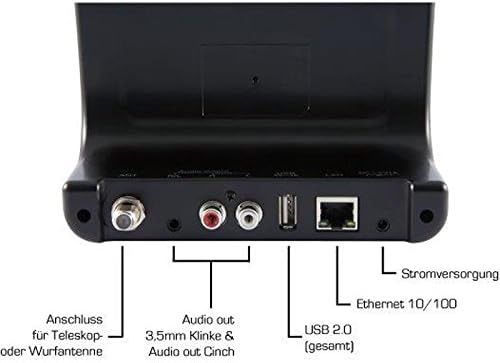
Image: The rear panel of the Imperial DABMAN i400, detailing its various connection ports. From left to right: Antenna connection (ANT), Audio output (RCA L/R and 3.5mm jack), USB 2.0 ports, Ethernet 10/100 (LAN), and Power supply (DC 5V/1A).
- ANT: F-connector for connecting the telescopic or wire antenna for DAB+/FM reception.
- Audio Output (R/L): RCA (Cinch) stereo audio output for connecting to an amplifier tabi sitẹrio eto.
- Ohùn tó ń jáde (Jack 3.5mm): 3.5mm stereo audio output for connecting to other audio devices.
- USB 2.0: USB port for playing media from a USB storage device.
- Lan: Ethernet port (RJ45) for wired network connection.
- DC 5V/1A: Ipese agbara fun ohun ti nmu badọgba agbara ti o wa ninu rẹ.
5. Eto
- Asopọmọra Antenna: Screw the telescopic antenna or connect the wire antenna to the ANT F-connector on the rear panel. Extend the telescopic antenna for optimal reception.
- Sopọ si Eto Olohun: Use the provided RCA cable to connect the Audio Output (R/L) on the DABMAN i400 to an available audio input (e.g., AUX, CD, LINE IN) on your amplifier or stereo system. Alternatively, use the 3.5mm audio cable if your system has a compatible input.
- Isopọ nẹtiwọki:
- Ẹ̀rọ onífóònù (LAN): Connect an Ethernet cable from your router to the LAN port on the rear of the DABMAN i400.
- Wireless (WLAN): The device will prompt you to set up Wi-Fi during the initial startup wizard. Select your network and enter the password.
- So agbara: Pulọọgi ohun ti nmu badọgba agbara sinu awọn DC 5V/1A input on the rear panel, then plug the adapter into a wall outlet. The device will power on automatically or enter standby mode.
- Oluṣeto Iṣeto akọkọ: Upon first power-on, the device will guide you through an initial setup process, including language selection, time/date settings, and network configuration. Follow the on-screen instructions.
6. Awọn ilana Iṣiṣẹ
Ipilẹ Lilọ kiri
Use the control buttons on the top of the device or the remote control to navigate menus, select options, adjust volume, and change modes.
Aṣayan Ipo
Press the 'Mode' button (or equivalent on remote) to switch between available modes:
- Redio Ayelujara: Access thousands of online radio stations worldwide. Browse by genre, location, or search for specific stations.
- DAB+ Redio oni nọmba: Enjoy high-quality digital radio broadcasts. The device will scan for available stations in your area.
- Redio FM: Tune into traditional analog FM radio stations.
- Bluetooth: Stream audio wirelessly from your Bluetooth-enabled smartphone, tablet, or computer.

Image: Bluetooth connectivity icon.
To pair: Select Bluetooth mode on the DABMAN i400. On your external device, search for available Bluetooth devices and select 'DABMAN i400'.
- UPnP/DLNA: Orin san files from compatible devices on your local network (e.g., a network-attached storage (NAS) drive or a computer running a media server).

Image: UPnP (Universal Plug & Play) icon.
- Sisisẹsẹhin USB: Mu ohun ṣiṣẹ files (e.g., MP3) from a USB flash drive connected to the USB port on the rear of the device.

Image: MP3 music file aami.
Awọn tito tẹlẹ
Save your favorite stations as presets for quick access. Refer to the on-screen menu for instructions on how to save and recall presets.
Air Music Control App
Control your DABMAN i400 using the Air Music Control App available for smartphones and tablets. This app allows for convenient remote control and browsing of stations.

Image: Air Music Control App icon.
7. Itọju
- Ninu: Wipe the device with a soft, dry, lint-free cloth. Do not use abrasive cleaners, waxes, or solvents.
- Awọn imudojuiwọn sọfitiwia: Periodically check for available software updates through the device's system settings menu to ensure optimal performance and access to new features.
- Ibi ipamọ: Ti o ba tọju ẹrọ naa fun akoko ti o gbooro sii, ge asopọ kuro ni agbara ki o tọju rẹ si ibi ti o tutu, ti o gbẹ.
8. Laasigbotitusita
- Ko si Agbara:
- Rí i dájú pé ohun tí a fi ń so agbára pọ̀ mọ́ ẹ̀rọ náà dáadáa àti ibi tí agbára ń gbé jáde tí ó ń ṣiṣẹ́.
- Gbiyanju iṣan agbara ti o yatọ.
- Ko si Ohun:
- Check the volume level on both the DABMAN i400 and your connected audio system.
- Ensure the audio cables are correctly connected to the appropriate input on your audio system.
- Verify that your audio system is set to the correct input source.
- Kò le Sopọ̀ mọ́ Wi-Fi/Íntánẹ́ẹ̀tì:
- Rii daju pe olulana Wi-Fi rẹ wa ni titan ati ṣiṣe ni deede.
- Ṣayẹwo ọrọ igbaniwọle Wi-Fi lẹẹmeji.
- Try moving the device closer to your Wi-Fi router or use a wired LAN connection.
- Restart your router and the DABMAN i400.
- Poor DAB+/FM Reception:
- Ensure the antenna is fully extended and positioned for optimal reception.
- Try repositioning the device or antenna.
- Check if you are in an area with good DAB+ or FM coverage.
- Awọn oran Isopọpọ Bluetooth:
- Ensure the DABMAN i400 is in Bluetooth pairing mode.
- Make sure your external device's Bluetooth is enabled and discoverable.
- Move your external device closer to the DABMAN i400.
- Gbiyanju yiyo ati tun so pọ awọn ẹrọ.
9. Awọn pato
| Ẹya ara ẹrọ | Sipesifikesonu |
|---|---|
| Brand | Imperial |
| Nọmba awoṣe | 22-241-00 |
| Àwọ̀ | Dudu |
| Iwon iboju | 3.2 inches |
| Asopọmọra Technology | Bluetooth, LAN (Ethernet), WLAN (Wi-Fi), RCA (Cinch) L/R, 3.5mm Audio Jack |
| Pataki Awọn ẹya ara ẹrọ | Portable (as an adapter), Internet Radio, DAB+, FM, UPnP/DLNA |
| Lapapọ Awọn ibudo USB | 1 |
| Awọn ẹrọ ibaramu | Bluetooth devices, UPnP/DLNA compatible devices |
| Orisun agbara | AC (nipasẹ adapter agbara) |
| Awọn ẹgbẹ Redio ti o ṣe atilẹyin | FM, DAB, DAB+, Internet Radio |
| Ọja Mefa | 15L x 8.1W x 14H sẹntimita |
| Awọn irinše to wa | Power Adapter, Telescopic Antenna, Wire Antenna, RCA Cable, Audio Cable, Remote Control, User Manual |
| Awọn ede Atilẹyin | German, English, French, Dutch |
10. Atilẹyin ọja ati Support
Atilẹyin ọja olupese
The Imperial DABMAN i400 comes with a manufacturer's warranty. Please refer to the warranty card included in your package or the manufacturer's official website for specific terms and conditions. Spare parts availability is guaranteed for 1 year.
Onibara Support
For technical assistance, troubleshooting beyond this manual, or warranty claims, please contact Imperial customer support. Contact information can typically be found on the manufacturer's webaaye tabi ni apoti ọja.