
Taylor Digital Timer
Taylor Digital Timer Instruction Manual
Model: Digital Timer
1. Ifihan
This manual provides instructions for the safe and efficient use of your Taylor Digital Timer. Please read this manual thoroughly before operating the device and retain it for future reference.
The Taylor Digital Timer is a compact and versatile timing device designed for various applications, including kitchen tasks, study sessions, and general time management. Its user-friendly design ensures ease of use for all ages.
2. Key Awọn ẹya ara ẹrọ
- Apẹrẹ Iwapọ: Small size for easy placement on desks or countertops, ideal for limited spaces and portability.
- Ifihan Rọrun-lati Ka: Large, clear digital screen for quick time checks from a distance.
- Fifẹyinti oofa: Allows secure attachment to metal surfaces like refrigerators or whiteboards.
- Isẹ ti o rọrun: Intuitive buttons for straightforward setup and use.
- Lilo Iwapọ: Suitable for kitchen, office, classroom, and various daily timing needs.
- Iṣẹ Batiri ọfẹ: No batteries required for immediate use.
3. Eto
The Taylor Digital Timer is designed for immediate use with minimal setup.
- Yọ Aago naa kuro: Fi ìṣọ́ra yọ aago náà kúrò nínú àpótí rẹ̀.
- Ibi: Place the timer on a flat, stable surface or attach it to a metal surface using its magnetic back. Ensure the display is clearly visible.
- Ko si awọn batiri ti a beere: This timer operates without batteries, eliminating the need for battery installation.
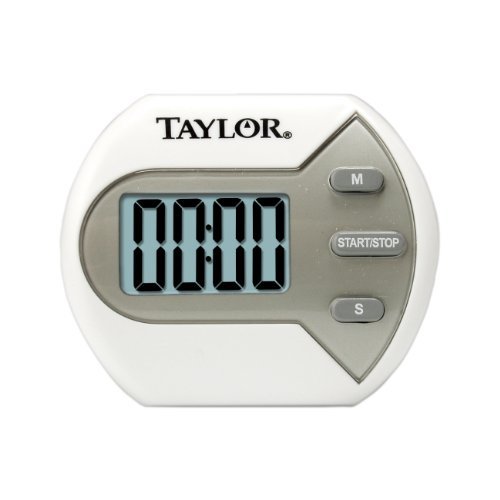
Aworan 1: Iwaju view of the Taylor Digital Timer, showing the display and control buttons.
4. Awọn ilana Iṣiṣẹ
The Taylor Digital Timer features intuitive controls for setting and managing time.
4.1. Ṣiṣeto Aago
- Agbara Tan: The timer is always ready for use. There is no separate power button.
- Ṣeto Akoko: Use the designated buttons (e.g., MIN, SEC) to set the desired countdown time. Pressing these buttons typically increases the time. Holding them down may accelerate the setting process.
- Clear Time: A "CLEAR" or "RESET" button is usually available to set the timer back to zero.
4.2. Bíbẹ̀rẹ̀ àti Dídá Aago náà dúró
- Bẹ̀rẹ̀ kíkà ìsàlẹ̀: After setting the desired time, press the "START/STOP" button to begin the countdown.
- Pause/Stop Countdown: Press the "START/STOP" button again to pause or stop the countdown. Pressing it again will resume the countdown from where it left off.
- Itaniji: When the countdown reaches zero, an audible alarm will sound. Press any button to silence the alarm.
4.3. Count-Up Function (if applicable)
Some digital timers also offer a count-up function. If your model includes this, typically, pressing the "START/STOP" button when the timer is at zero will initiate a count-up.
5. Itọju ati Itọju
Proper care will ensure the longevity and optimal performance of your digital timer.
- Ninu: Pa aago nu pẹlu asọ, damp cloth. Do not use abrasive cleaners or immerse the timer in water.
- Ibi ipamọ: Tọju aago naa ni itura, aye gbigbẹ nigbati ko si ni lilo.
- Yago fun awọn ipo to gaju: Do not expose the timer to extreme temperatures, direct sunlight for prolonged periods, or high humidity.
6. Laasigbotitusita
If you encounter issues with your Taylor Digital Timer, refer to the following common solutions:
| Isoro | Owun to le Fa | Ojutu |
|---|---|---|
| Timer does not respond. | Internal malfunction or temporary glitch. | Press and hold the "CLEAR" or "RESET" button for a few seconds to attempt a reset. If the issue persists, contact customer support. |
| Ifihan ti wa ni baibai tabi òfo. | Not applicable as this model does not require batteries. | Ensure the timer is not exposed to extreme cold, which can affect LCD performance. If the display remains blank, contact customer support. |
| Aago naa ko dun rara. | Volume setting too low or internal speaker issue. | Check if there is a volume control (if applicable to your model). Ensure the timer is not obstructed. If the alarm still does not sound, contact customer support. |
7. Awọn pato
| Ẹya ara ẹrọ | Ẹ̀kúnrẹ́rẹ́ |
|---|---|
| Awoṣe | Aago oni-nọmba |
| Ọja Mefa | 6.25 x 4.5 x 6 inches |
| Iwọn Nkan | 0.01 iwon |
| Orisun agbara | Ko si awọn batiri ti o beere |
| Ohun elo | Ṣiṣu |
8. Atilẹyin ọja ati Onibara Support
For warranty information and customer support, please refer to the official Taylor website or contact their customer service department directly. Specific warranty terms may vary by region and retailer.
O le rii alaye atilẹyin nigbagbogbo lori Taylor Brand Store or by searching for "Taylor customer support" online.
Ask a question about this manual
Ask about setup, troubleshooting, compatibility, parts, safety, or missing instructions. Manuals+ will review the question and use this page’s manual context to help answer it.