
Ọrọ Iṣaaju
This manual provides detailed instructions for the use and maintenance of your Strong SRT 7404 HD remote control. This remote is designed as an original replacement for the Strong SRT 7404 HD FRANSAT receiver, ensuring full compatibility and functionality.
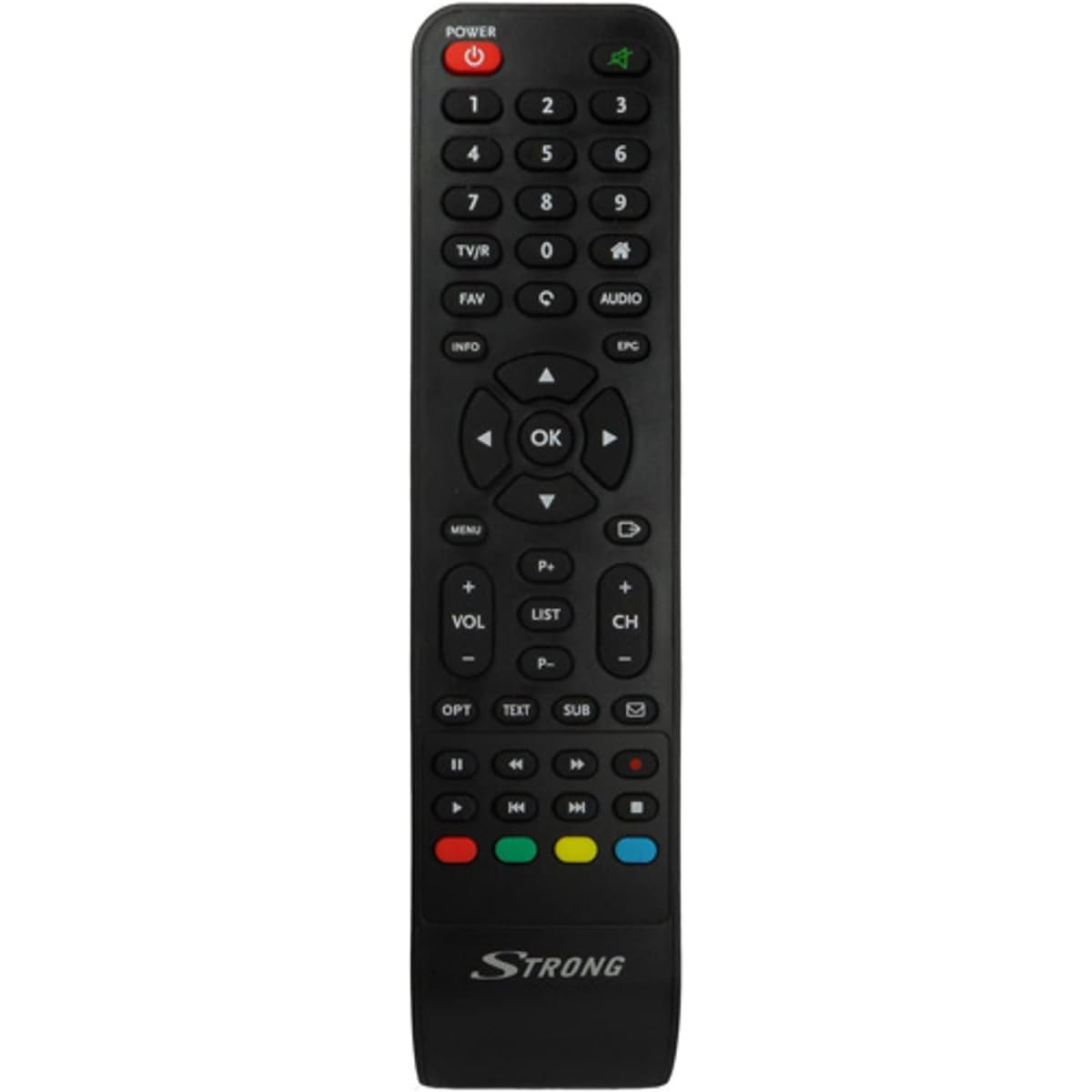
Image: The Strong SRT 7404 HD remote control, black in color, featuring various control buttons for television and receiver functions.
Ṣeto
1. Fifi sori batiri
- Wa yara batiri ni ẹhin isakoṣo latọna jijin.
- Gbe ideri batiri si isalẹ tabi ni itọsọna ti itọka si nipasẹ itọka lati ṣii.
- Insert two AAA alkaline batteries (not included), ensuring the positive (+) and negative (-) terminals align correctly with the markings inside the compartment.
- Rọpo ideri batiri nipa gbigbe pada si ipo titi yoo fi tẹ ni aabo.
Note: Always use new alkaline batteries for optimal performance. Do not mix old and new batteries, or different types of batteries.
2. Lilo akọkọ
The Strong SRT 7404 HD remote control is an original replacement and is pre-programmed for the Strong SRT 7404 HD FRANSAT receiver. No additional setup or pairing is typically required. Simply install the batteries and point the remote control towards your receiver to begin operation.
Awọn ilana Iṣiṣẹ
This section outlines the basic functions of the remote control buttons.
- Bọtini agbara: Tan olugba naa tan tabi pa.
- Ikanni Soke/Isalẹ: Navigates through television channels.
- Iwọn didun Soke/Isalẹ: Ṣe atunṣe iwọn didun ohun.
- Bọtini Mute: Silences or restores the audio.
- Awọn bọtini nọmba (0-9): Directly selects channels or enters numerical data.
- Bọtini Akojọ: Accesses the receiver's main menu.
- Awọn bọtini lilọ kiri (Soke, Isalẹ, Osi, Ọtun, O DARA): Ti a lo lati lilö kiri ni awọn akojọ aṣayan ati jẹrisi awọn aṣayan.
- Exit/Back Button: Pada si iboju iṣaaju tabi jade ni akojọ aṣayan kan.
- Bọtini Alaye: Ṣe afihan alaye eto naa.
- Awọn bọtini Awọ (Pupa, Alawọ ewe, Yellow, Blue): Functions vary depending on the on-screen menu or application.
Refer to your Strong SRT 7404 HD FRANSAT receiver's manual for specific functions related to its menu system and advanced features.
Itoju
Ninu
Lati nu isakoṣo latọna jijin, rọra nu dada rẹ pẹlu asọ ti o gbẹ. Fun idoti alagidi, die-die dampen the cloth with water. Avoid using abrasive cleaners, solvents, or alcohol, as these can damage the remote's finish or internal components.
Batiri Rirọpo
Replace batteries when the remote control becomes unresponsive or its range decreases significantly. Follow the battery installation steps outlined in the "Setup" section. Dispose of used batteries according to local regulations.
Ibi ipamọ
Tí o kò bá lò ó fún ìgbà pípẹ́, yọ àwọn bátìrì náà kúrò láti dènà jíjò, èyí tí ó lè ba ìṣàkóso latọna jijin jẹ́. Tọ́jú remote náà sí ibi tí ó tutù tí ó sì gbẹ, tí kò sí ìmọ́lẹ̀ tààrà tàbí ooru tó le koko.
Laasigbotitusita
- Iṣakoso Latọna jijin Ko Dahun:
- Check if the batteries are correctly inserted with the correct polarity (+/-).
- Rọpo awọn batiri atijọ pẹlu awọn batiri alkaline tuntun.
- Ensure there are no obstructions between the remote control and the receiver's infrared sensor.
- Rii daju pe o wa laarin iwọn iṣẹ ṣiṣe to munadoko (to awọn mita 10).
- Toka latọna jijin taara si olugba naa.
- Awọn bọtini kan pato Ko Ṣiṣẹ:
- Nu oju iṣakoso latọna jijin, paapaa ni ayika awọn bọtini ti ko dahun, lati yọ eyikeyi ẹgbin tabi idoti ti o le ṣe idiwọ fun ifọwọkan to dara kuro.
- If cleaning and battery replacement do not resolve the issue, the button or remote may be faulty.
Awọn pato
| Ẹya ara ẹrọ | Ẹ̀kúnrẹ́rẹ́ |
|---|---|
| Brand | Lagbara |
| Orukọ awoṣe | 7404 |
| Pataki Ẹya | Ìwúwo Fúyẹ́ |
| Àwọ̀ | Dudu |
| Awọn ẹrọ Atilẹyin ti o pọju | 1 |
| Awọn ẹrọ ibaramu | TV Decoder (Strong SRT 7404 HD FRANSAT Receiver) |
| Asopọmọra Technology | Igbohunsafẹfẹ Redio |
| Nọmba ti Awọn bọtini | 5 |
| Adarí Iru | Isakoṣo latọna jijin |
| Ibiti o pọju | 10 Mita |
| Batiri Iru | Alkaline (AAA, not included) |
| Ilu isenbale | China |
Atilẹyin ọja ati Support
Alaye atilẹyin ọja
This Strong SRT 7404 HD remote control comes with a 2-year warranty from the date of purchase. This warranty covers manufacturing defects under normal use. Please retain your proof of purchase for warranty claims.
Onibara Support
For further assistance, technical support, or warranty inquiries, please contact Strong customer service. Contact details can typically be found on the official Strong webaaye tabi nipasẹ alagbata ọja rẹ.
You can visit the official Strong brand store for more information: Strong Brand Store