
Ọrọ Iṣaaju
Thank you for choosing the ALLOYSEED Bluetooth FM Transmitter Car Charger. This device allows you to stream audio from your Bluetooth-enabled smartphone or tablet to your car's FM radio, make hands-free calls, and charge your mobile devices via its integrated USB port. Please read this manual carefully to ensure proper use and optimal performance.
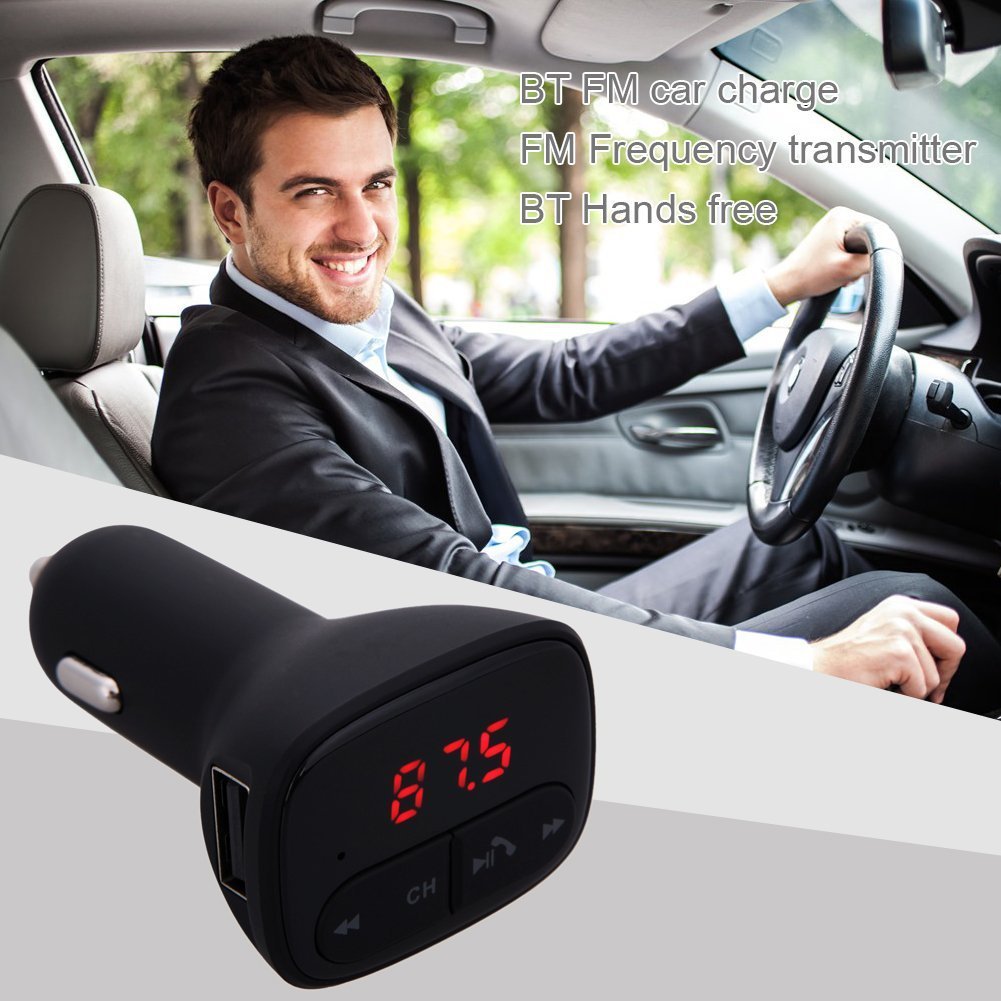
Image: The ALLOYSEED Bluetooth FM Transmitter Car Charger plugged into a car's cigarette lighter socket, with a driver in the background.
Alaye Aabo
- Ma ṣe tuka tabi yi ẹrọ naa pada.
- Jeki ẹrọ naa kuro ni omi, ọrinrin, ati awọn iwọn otutu to gaju.
- Yago fun ṣiṣafihan ẹrọ naa si imọlẹ oorun taara fun awọn akoko gigun.
- Ensure the car's cigarette lighter socket provides the specified DC 12V~24V input voltage.
- Do not operate the device while driving if it distracts you from the road. Prioritize road safety.
Ọja Pariview
Familiarize yourself with the components of your ALLOYSEED Bluetooth FM Transmitter Car Charger:
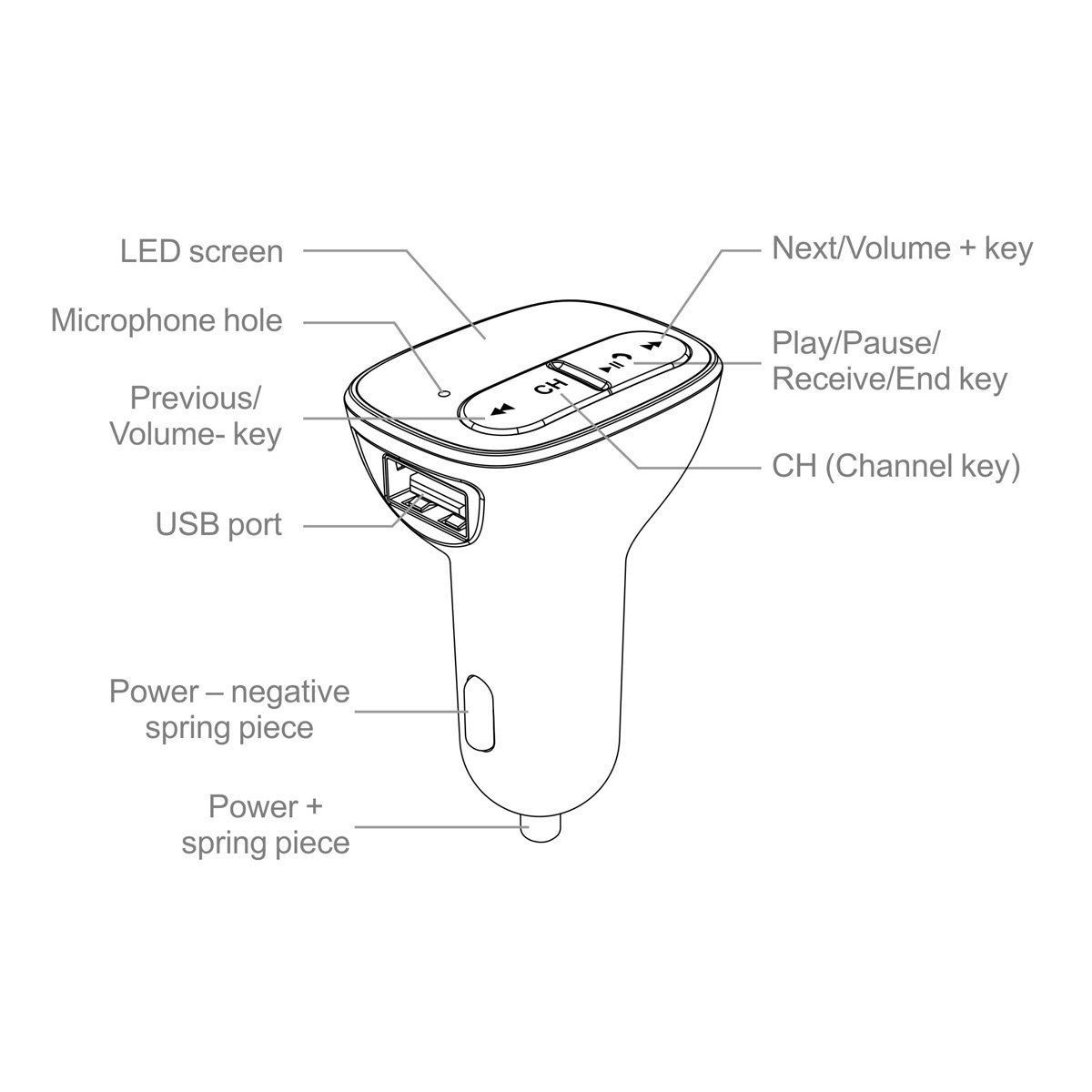
Image: A detailed diagram of the ALLOYSEED Bluetooth FM Transmitter Car Charger, highlighting its various components and controls.
- Iboju LED: Displays FM frequency.
- Microphone Hole: Fun ipe ti ko ni ọwọ.
- Ti tẹlẹ/Iwọn- bọtini: Tẹ kukuru fun orin iṣaaju, tẹ gun lati dinku iwọn didun.
- Next/Volume+ Key: Tẹ kukuru fun orin atẹle, tẹ gun lati mu iwọn didun pọ si.
- Play/Pause/Receive/End Key: Tẹ kukuru lati mu orin ṣiṣẹ/da duro, dahun/pari awọn ipe. Tẹ gun lati kọ awọn ipe.
- CH (Channel Key): Short press to enter FM frequency adjustment mode.
- Ibudo USB: 2.1A output for charging mobile devices.
- Power - Negative Spring Piece: Connects to the negative terminal of the car's power socket.
- Power + Spring Piece: Connects to the positive terminal of the car's power socket.
Awọn pato
| Iṣagbewọle Voltage | DC 12V~24V |
| Ṣiṣẹ Lọwọlọwọ | <100mA (when not charging) |
| Iwọn Igbohunsafẹfẹ FM | 87.5 - 108.0MHz (0.1MHz increments) |
| Ijinna Gbigbe FM | <3M |
| Ẹya Bluetooth | V2.1 + EDR |
| Bluetooth Protocols Supported | A2DP/AVRCP/HSP/HFP |
| A2DP Transmission Distance | >5M |
| O wu USB Lọwọlọwọ | 2.1A |
| Ijade USB Voltage | 5.2V |
| Iwọn Nkan | 80 g |
Ṣeto
- Fi sii sinu Socket Ọkọ ayọkẹlẹ: Plug the ALLOYSEED Bluetooth FM Transmitter into your car's 12V-24V cigarette lighter socket. The device will power on automatically, and the LED screen will display the current FM frequency.
- Agbara Tan: The device powers on automatically when connected to the car's power.
Awọn ilana Iṣiṣẹ
1. Setting the FM Frequency
- Tẹ awọn CH (Channel) key. The frequency display on the LED screen will start flashing.
- Lo awọn Previous/Volume- key or Next/Volume+ key to adjust the FM frequency. Select a frequency that is clear and not occupied by a local radio station.
- Once the desired frequency is set, wait a few seconds. The display will stop flashing, and the frequency will be saved.
- Tune your car's FM radio to the kanna igbohunsafẹfẹ as displayed on the transmitter.
2. Sisopọ Bluetooth
- After powering on, the device will automatically enter Bluetooth pairing mode. The LED screen may show a Bluetooth icon or similar indicator.
- Lori foonuiyara tabi tabulẹti, mu Bluetooth ṣiṣẹ ki o wa awọn ẹrọ to wa.
- Select the device named "ALOYSEED" (or similar) from the list to pair.
- Once paired, a confirmation sound or indicator may be heard/seen. You are now ready to stream audio.
3. Sisisẹsẹhin Orin
- After successful Bluetooth pairing, open your music player on your smartphone/tablet and start playing music.
- The audio will be transmitted to your car's FM radio.
- Lo awọn Bọtini / Sinmi on the transmitter to play or pause music.
- Lo awọn Previous/Volume- key ati Next/Volume+ key for track navigation (short press) and volume adjustment (long press).
- The device has an automatic memory function, resuming the last played song when restarted.
4. Ọwọ-Ọfẹ Npe
- When a call comes in, the music will automatically pause.
- Tẹ awọn Play/Pause/Receive/End key lẹ́ẹ̀kan láti dáhùn ìpè náà.
- Lati mu ipe dopin, tẹ awọn Play/Pause/Receive/End key lekan si.
- Lati kọ ipe ti nwọle, tẹ gun Play/Pause/Receive/End key.
- Gbohungbohun ti a ṣe sinu ngbanilaaye fun ibaraẹnisọrọ mimọ.
5. Awọn ẹrọ gbigba agbara
- Connect your mobile device (smartphone, tablet, etc.) to the USB ibudo on the transmitter using a compatible USB charging cable.
- The USB port provides a 2.1A output for efficient charging.
Itoju
- Nu ẹrọ naa pẹlu asọ ti o gbẹ. Maṣe lo awọn olutọpa olomi tabi awọn aerosols.
- Ensure the USB port and cigarette lighter connector are free from dust and debris.
- Tọju ẹrọ naa ni itura, aye gbigbẹ nigbati o ko ba wa ni lilo fun awọn akoko gigun.
Laasigbotitusita
- Ko si Agbara: Ensure the device is securely plugged into the car's cigarette lighter socket and that the car's ignition is on. Check the car's fuse for the cigarette lighter.
- Dídára Ohùn Tí Kò Dára/Tí Ó Dára Dídára:
- Adjust the FM frequency on the transmitter and your car radio to find a clear, unoccupied channel.
- Ensure the volume on your phone and car radio is set appropriately.
- Lọ kuro ni awọn agbegbe pẹlu kikọlu redio to lagbara.
- Bluetooth Ko Sopọ:
- Rii daju pe Bluetooth ti ṣiṣẹ lori ẹrọ alagbeka rẹ.
- Restart the transmitter by unplugging and re-plugging it.
- Gbagbe ẹrọ naa lati awọn eto Bluetooth ti foonu rẹ ki o gbiyanju lati so pọ lẹẹkansi.
- Ensure the transmitter is within range of your phone.
- Ngba agbara USB Ko Ṣiṣẹ:
- Check if the charging cable is properly connected to both the device and the USB port.
- Gbiyanju okun USB ti o yatọ.
- Ensure the car charger is receiving power.
Atilẹyin ọja ati Support
This product is covered by a warranty policy. For details regarding warranty coverage, terms, and conditions, please refer to the information provided at the point of purchase or contact ALLOYSEED customer support. Keep your purchase receipt as proof of purchase.
For technical assistance or further inquiries, please contact ALLOYSEED customer support through the official channels provided by the seller or manufacturer.