
1. Ifihan
The XTUGA EW240 UHF 4-Channel Wireless Microphone System is designed for professional audio applications, offering reliable performance and clear sound transmission. This system features a robust metal receiver and four bodypack transmitters, each capable of operating on independent channels without interference. It is suitable for various events requiring multiple wireless microphones.
2. Key Awọn ẹya ara ẹrọ
- Apẹrẹ Ọjọgbọn: Durable metal construction for the receiver.
- Iṣẹ́ ikanni 4: Four independent channels can operate simultaneously without interference.
- Iṣakoso iwọn didun ẹni kọọkan: Each channel on the receiver has its own volume control.
- Quiet Audio Circuitry: Designed for silent operation, reducing unwanted noise.
- Frequency Expansion Compression: Intrusive frequency expansion compression technique reduces noise and extends dynamic range.
- Idahun Igbohunsafẹfẹ Fifẹ: 50 Hz - 15 kHz with very low distortion.
- Awọn Ijade Ọpọ: One 1/4-inch mixed output and four individual 1/4-inch outputs.
- Ibi iṣẹ: Up to 65 meters (approximately 213 feet).
- Bodypack Transmitters: Innovative design compatible with lavalier, headset, or instrument connectors.
3. Package Awọn akoonu
The XTUGA EW240 system typically includes the following components:
- 1x XTUGA EW240 UHF 4-Channel Receiver
- 4x UHF Bodypack Transmitters
- Àwọn Gbohungbohun Agbekọri 4x
- 4x Àwọn Gbohungbohun Lavalier
- 4x Eriali olugba
- Adapta Agbara 1x fun Olugba
- 1x 1/4-inch Audio Cable
- Afowoyi Olumulo (iwe-ipamọ yii)
- Batteries for Transmitters (2x AA per transmitter, not always included)
4. Awọn ilana iṣeto
4.1 Receiver Placement and Connection

Aworan 1: Iwaju view of the XTUGA EW240 receiver. This image shows the front panel of the receiver unit, featuring four antennas, two digital display screens for channels 1-2 and 3-4, and individual volume controls for each channel.

Aworan 2: Ẹyìn view of the XTUGA EW240 receiver. This image displays the back panel of the receiver, highlighting the individual 1/4-inch audio outputs (OUT A, OUT B, OUT C, OUT D), a mixed 1/4-inch output, antenna connections (ANT A, ANT B, ANT C, ANT D), and the DC power input.
- Fi Olugba naa si ipo: Place the receiver unit in a central location, away from large metal objects or other electronic devices that may cause interference. Ensure the antennas are fully extended and positioned vertically for optimal signal reception.
- So agbara: Connect the provided AC power adapter to the DC 16V input on the rear of the receiver. Plug the adapter into a suitable power outlet.
- So Oju-iwe So pọ:
- For a mixed output of all four channels, connect a 1/4-inch audio cable from the "MIXED" output on the receiver to the input of your mixer or amplifier.
- For individual channel control, connect 1/4-inch audio cables from "OUT A", "OUT B", "OUT C", and "OUT D" to separate inputs on your mixer or amplifier.
4.2 Transmitter Preparation
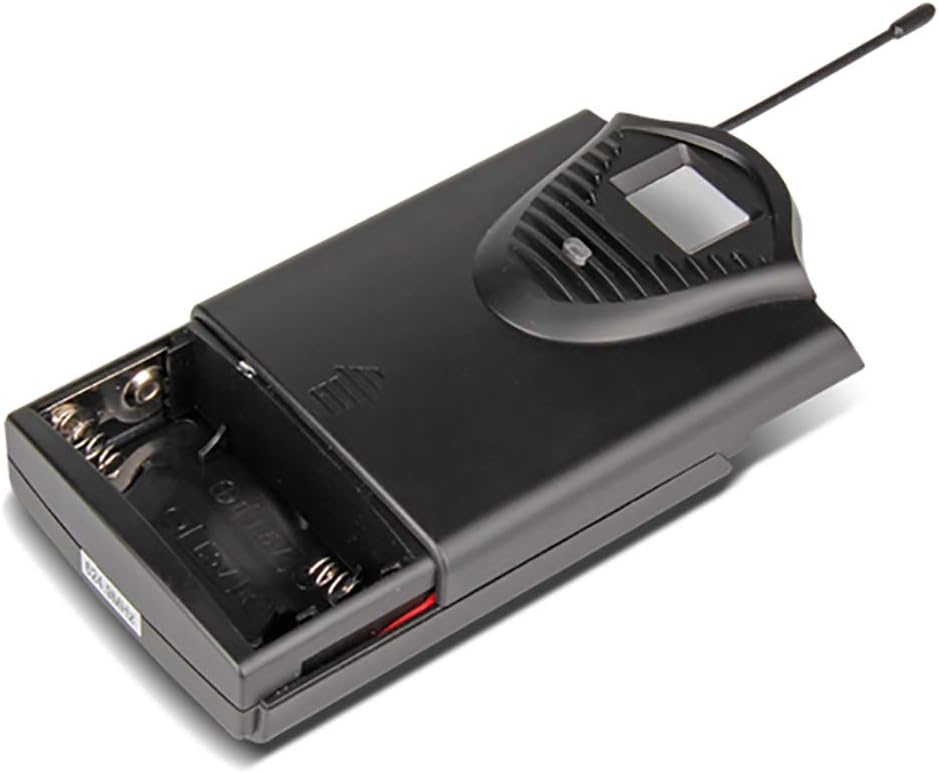
Aworan 3: Bodypack transmitter with battery compartment open. This image illustrates the battery compartment of the bodypack transmitter, designed to hold two 1.5V AA batteries.

Aworan 4: Two bodypack transmitters with connected microphones. This image shows two bodypack transmitters, one connected to a headset microphone and the other to a lavalier microphone, demonstrating the versatility of the system.
- Fi Awọn batiri sii: Open the battery compartment of each bodypack transmitter. Insert two 1.5V AA batteries, ensuring correct polarity. Close the compartment securely.
- Sopọ Gbohungbo: Plug the 3.5mm connector of either a headset microphone or a lavalier microphone into the input jack on the top of the bodypack transmitter. Ensure the connection is firm.
- Secure Transmitter: Attach the bodypack transmitter to clothing or a belt using the integrated clip. Position the microphone appropriately for the user (e.g., lavalier clipped to clothing, headset worn on head).
5. Awọn ilana Iṣiṣẹ
- Agbara Lori olugba: Press the power button on the front panel of the receiver. The display screens should illuminate, showing the channel frequencies.
- Awọn Gbigbe Agbara Lori: Slide the power switch on each bodypack transmitter to the "ON" position. The transmitter's display should light up, indicating its operating channel and battery status.
- Amuṣiṣẹpọ igbagbogbo: The EW240 system is designed for automatic frequency synchronization. Ensure the transmitter and receiver are on the same channel frequency. If channels are not synchronized, refer to the troubleshooting section or consult the full product manual for specific pairing instructions (not detailed in provided data).
- Ṣatunṣe Iwọn didun: Slowly increase the master volume on your mixer/amplifier and then adjust the individual channel volume controls on the receiver to achieve the desired audio level. Speak into the microphone to test the sound.
- Atẹle Iṣe: Observe the signal indicators on the receiver to ensure a strong and stable connection.
- Agbara Pa: After use, first turn off all bodypack transmitters, then power off the receiver.
6. Itọju
- Rirọpo Batiri: Replace transmitter batteries when the low battery indicator appears or when audio quality degrades. Always use fresh 1.5V AA batteries.
- Ninu: Clean the receiver and transmitters with a soft, dry cloth. Do not use liquid cleaners or solvents.
- Ibi ipamọ: When not in use for extended periods, remove batteries from transmitters and store the system in a cool, dry place, away from direct sunlight and extreme temperatures.
- Itọju Antenna: Handle receiver antennas carefully to prevent bending or damage.
7. Laasigbotitusita
| Isoro | Owun to le Fa | Ojutu |
|---|---|---|
| Ko si ohun lati gbohungbohun. |
|
|
| Static, interference, or intermittent audio. |
|
|
| Poor sound quality (e.g., muffled, distorted). |
|
|
8. Awọn pato
8.1 General System
- Nọmba awọn ikanni: 4
- Iduroṣinṣin: ± 0.006%
- Normal Deviation: 22 kHz
- Ipin S/N: <120dB
- THD: <0.6%
- Idahun Igbohunsafẹfẹ: 50 Hz - 15 kHz
- Ibi iṣẹ: Awọn mita 65 (isunmọ 213 ẹsẹ)
8.2 olugba
- Ifamọ: > 80dB
- Ijade ohun: Balanced and Unbalanced (1/4-inch mixed, 4x 1/4-inch individual)
- Awọn ibeere Agbara: AC 16 V, 400 mA
- Awọn iwọn: 440 x 210 x 40 mm (isunmọ 17.3 x 8.3 x 1.6 inches)
- Ìwúwo: Isunmọ. 1.3 kg (2.87 lbs)
8.3 Wireless Microphone (Bodypack Transmitter)
- Iru katiriji: Dynamic (for included microphones)
- Ijade RF: <10mW
- Normal Deviation: 22 kHz
- Iyapa ti o pọju: 80 kHz
- Batiri: 2x 1.5V AA batiri
- Igbesi aye batiri: > 8 wakati
9. Atilẹyin ọja ati Support
The XTUGA EW240 UHF Wireless Microphone System comes with a 2-odun didara atilẹyin ọja. For technical support, warranty claims, or further assistance, please contact XTUGA customer service through their official channels or the retailer from whom the product was purchased.
Fun alaye siwaju sii, o le ṣàbẹwò awọn XTUGA Brand Store.