
Ọrọ Iṣaaju
This manual provides essential information for the safe installation, operation, and maintenance of your Heathco HZ-5846-WH Motion Activated LED Security Light. This fixture is designed to provide reliable outdoor lighting with energy-efficient LED technology and motion detection capabilities. Please read these instructions thoroughly before installation and retain them for future reference.

Image: Heathco HZ-5846-WH Motion Activated LED Security Light, showing the two adjustable lamp heads and the motion sensor below.
Alaye Aabo
IKILO: Risk of electric shock. Disconnect power at the fuse or circuit breaker before installation or servicing. All electrical connections must be in accordance with local codes, ordinances, or the National Electrical Code (NEC).
- Ọja yii gbọdọ wa ni fifi sori ẹrọ nipasẹ oṣiṣẹ ina mọnamọna to peye.
- Rii daju pe ipese voltage is 120 VAC, 60 Hz.
- Má ṣe gbìyànjú láti tú tàbí ṣe àtúnṣe sí ohun èlò náà. Kò sí àwọn ẹ̀yà ara tí ó ṣeé lò nínú rẹ̀.
- Avoid looking directly into the LED light source when illuminated, as this may cause eye damage.
- Mount the fixture securely to a structural surface.
Eto ati fifi sori
The Heathco HZ-5846-WH security light is designed for either wall mount or eave mount installation. Ensure the mounting location provides adequate coverage for the desired detection area and is within reach of the electrical supply.
Awọn igbesẹ fifi sori ẹrọ:
- Ge asopọ agbara: Turn off power at the circuit breaker or fuse box before beginning installation.
- Ibi Igbesoke: Select a suitable wall or eave location. The fixture should be mounted at a height that allows for optimal motion detection and light coverage.
- Asopọmọra: Connect the fixture's wires to the household wiring according to local electrical codes. Typically, this involves connecting the black wire to live, white wire to neutral, and green/bare copper wire to ground.
- Imuduro to ni aabo: Mount the fixture securely to the junction box or mounting surface using the provided hardware.
- Ṣe atunṣe Lamp Heads and Sensor: Awọn lamp heads and motion sensor are tool-free adjustable. Position them to cover the desired area.
- Imupadabọ agbara: Nígbà tí a bá ti parí ìfìsílẹ̀ àti gbogbo ìsopọ̀mọ́ra, dá agbára padà sí ibi tí ẹ̀rọ ìfọ́mọ́ra náà ti ń ṣiṣẹ́.
Awọn ilana Iṣiṣẹ
Your Heathco HZ-5846-WH security light features a 180-degree motion detection zone and adjustable settings for optimal performance.
Atunse sensọ išipopada:
- Ibiti: The motion sensor can detect movement up to 40 feet. Adjust the sensor's angle to modify the detection range and area. Avoid pointing the sensor at heat sources or moving objects (e.g., trees, traffic) that could cause false triggers.
- Ni akoko: The light-on time can be adjusted up to 5 minutes. Use the control dial (if present, typically on the sensor unit) to set how long the light remains illuminated after motion is detected.
Yiyọ afọwọṣe:
This fixture includes a manual override function. To activate the manual override, quickly turn the light switch OFF then ON. The light will remain ON continuously. To return to motion-activated mode, quickly turn the light switch OFF then ON again. The light will then operate based on motion detection.
Itoju
The Heathco HZ-5846-WH security light utilizes energy-saving LED technology, meaning you will never need to change a bulb.
- Ninu: To maintain the appearance and performance of your fixture, periodically clean the lens and housing with a soft, damp asọ. Ma ṣe lo abrasive ose tabi epo.
- Ayewo: Máa ṣe àyẹ̀wò ẹ̀rọ náà lẹ́ẹ̀kọ̀ọ̀kan fún àwọn àmì ìbàjẹ́ tàbí àwọn ìsopọ̀ tí ó bàjẹ́. Tí a bá rí ìṣòro kankan, yọ agbára kúrò kí o sì bá onímọ̀ iná mànàmáná tó mọ̀ nípa rẹ̀ sọ̀rọ̀.
Laasigbotitusita
If your security light is not functioning as expected, refer to the following common issues and solutions:
| Isoro | Owun to le Fa | Ojutu |
|---|---|---|
| Imọlẹ ko tan. | No power; faulty wiring; sensor not detecting motion. | Check circuit breaker; verify wiring connections; adjust sensor angle and range. |
| Ina duro ON lemọlemọfún. | Manual override activated; constant motion in detection zone; faulty sensor. | Toggle power switch to reset manual override; reposition sensor; contact support if sensor is faulty. |
| Light turns ON/OFF frequently. | Sensor detecting unwanted motion (e.g., trees, traffic, animals). | Adjust sensor angle and sensitivity to exclude unwanted motion sources. |
| Detection range is poor. | Sensọ idiwo tabi ti ko tọ. | Clear obstructions; adjust sensor angle for optimal coverage. |
Ti awọn igbesẹ laasigbotitusita ko ba yanju ọran naa, jọwọ kan si atilẹyin alabara.
Awọn pato
| Ẹya ara ẹrọ | Ẹ̀kúnrẹ́rẹ́ |
|---|---|
| Nọmba awoṣe | HZ-5846-WH |
| Brand | Globe Electric |
| Orisun Imọlẹ | LED ti a ṣepọ |
| Imọlẹ | 1250 Lumens |
| Iwọn otutu awọ | 5296 Kelvin |
| Wattage | 13.73 Wattis |
| Išipopada erin Angle | 180 iwọn |
| Ibiti Iwari išipopada | Titi di 40 ẹsẹ |
| Adjustable On-Time | Titi di iṣẹju 5 |
| Orisun agbara | Corded Electric (120 VAC, 60 Hz) |
| Ohun elo | Polycarbonate (Shade), Metal (Fixture) |
| Iṣagbesori Iru | Wall Mount or Eave Mount |
| Omi Resistance Ipele | Mabomire |
| Awọn iwọn (L x W x H) | 7.54" x 6.79" x 6.22" |
| Iwọn Nkan | 1.9 iwon |
| UPC | 016963158467 |
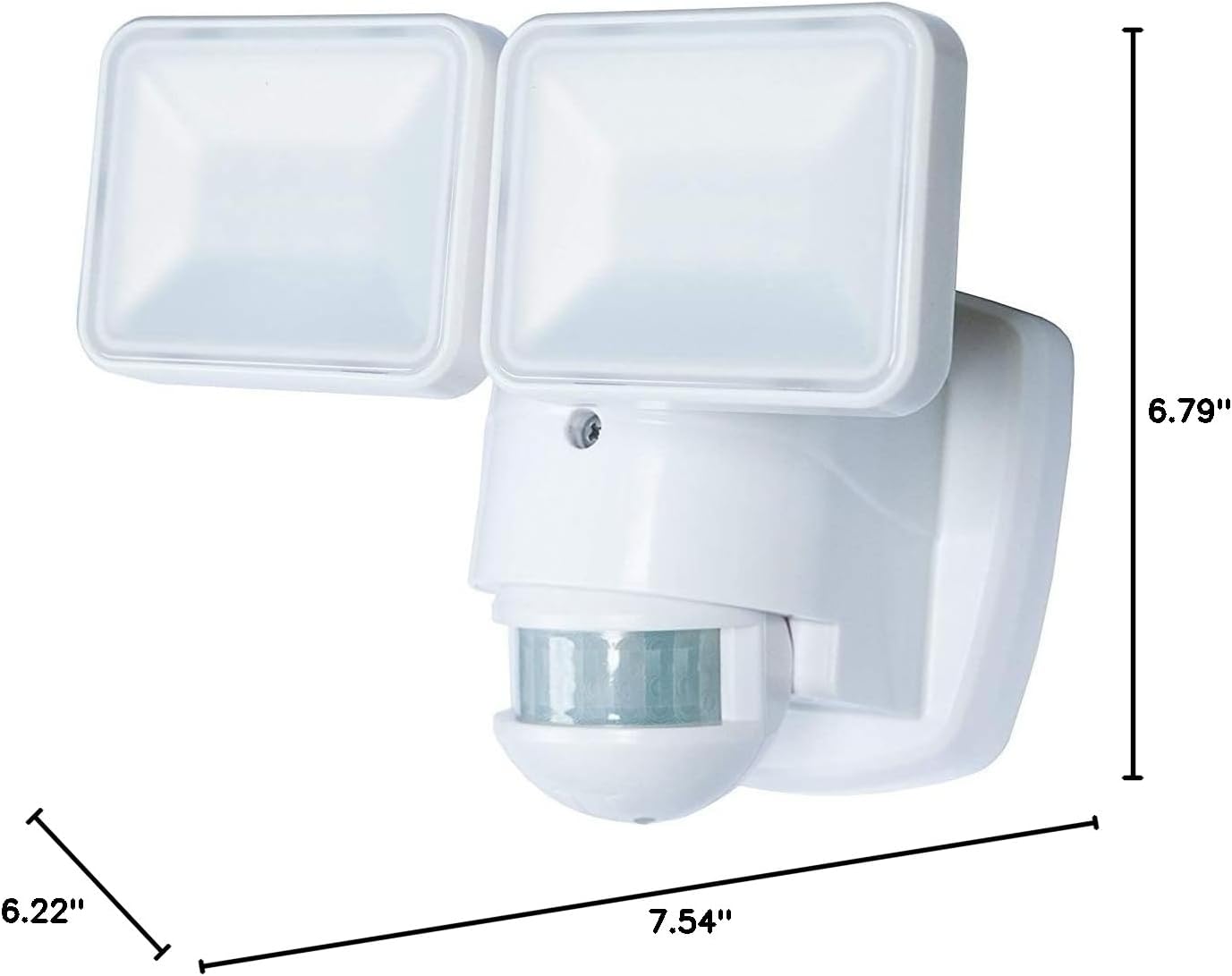
Image: Dimensions of the Heathco HZ-5846-WH security light, showing length (7.54"), width (6.79"), and height (6.22").
Atilẹyin ọja ati Support
Alaye Atilẹyin ọja:
The manufacturer warranty description for this product is Ko ṣiṣẹ fun. Please refer to your retailer's return policy for details regarding returns or exchanges.
Atilẹyin Onibara:
For further assistance, technical support, or inquiries regarding your Heathco HZ-5846-WH Motion Activated LED Security Light, please contact Globe Electric customer service. Refer to the product packaging or the Globe Electric webAaye fun lọwọlọwọ alaye olubasọrọ.