
Ọrọ Iṣaaju
O ṣeun fun riraasing the Ezonetronics 1DIN Car Stereo, Model RM-CW9601. This unit features a 7-inch retractable touchscreen, Bluetooth connectivity, FM radio, and multimedia playback capabilities. This manual provides essential information for installation, operation, and maintenance to ensure optimal performance and user satisfaction. Please read this manual thoroughly before using the product.
Alaye Aabo
- Ma ṣe ṣiṣẹ ẹyọ naa ni ọna ti o ṣe idiwọ fun ọ lati wakọ. Nigbagbogbo ni ayo aabo opopona.
- Rí i dájú pé ògbóǹtarìgì tó ní ìmọ̀ nípa iṣẹ́ fi sori ẹ̀rọ náà dáadáa láti dènà ìbàjẹ́ sí ẹ̀rọ tàbí ọkọ̀ náà.
- Avoid exposing the unit to extreme temperatures, direct sunlight for prolonged periods, or moisture.
- Má ṣe gbìyànjú láti tú tàbí ṣe àtúnṣe ẹ̀rọ náà. Èyí lè sọ àtìlẹ́yìn náà di òfo, ó sì lè fa ewu ààbò.
- Keep the volume at a level that allows you to hear external traffic sounds.
Package Awọn akoonu
Jẹrisi pe gbogbo awọn ohun kan wa ninu package:
- Ezonetronics 1DIN Car Stereo Unit (RM-CW9601)
- Agbara ati Agbọrọsọ Waya ijanu
- Isakoṣo latọna jijin
- Afowoyi Olumulo (iwe-ipamọ yii)
- Mounting Accessories (brackets, screws)
- Optional: Rearview Kámẹ́rà (tí ó bá wà nínú àpò pàtó rẹ)
Ọja Pariview
The Ezonetronics RM-CW9601 features a single DIN chassis with a motorized retractable 7-inch touchscreen display. The front panel includes essential controls and ports for easy access.

Nọmba 1: Iwaju view of the Ezonetronics RM-CW9601 car stereo, illustrating the 7-inch screen in both retracted and extended positions, along with front panel controls and ports.
Front Panel Controls and Ports:
- Bọtini Agbara / Ipo: Press to turn on/off, short press to change mode.
- Bọtini Iwọn didun: Yípo láti ṣàtúnṣe ìró ohùn. Tẹ̀ láti dákẹ́/dákẹ́.
- Ibudo USB: Fun ṣiṣiṣẹsẹhin media lati awọn awakọ USB.
- Iho kaadi SD: For media playback from SD cards.
- Iṣawọle AUX: Jack 3.5mm fun awọn ẹrọ ohun ita.
- Bọtini atunto: Small button to reset the unit (requires a pointed object).
- Screen Retract/Extend Button: Controls the motorized screen movement.
Ṣeto
1. fifi sori
The RM-CW9601 is designed for a standard 1DIN car stereo opening. Professional installation is highly recommended. Ensure the vehicle's battery is disconnected before starting installation.
- Yọ sitẹrio ọkọ ayọkẹlẹ ti o wa tẹlẹ kuro ninu dasibodu naa.
- Connect the wiring harness to the vehicle's wiring.
- Secure the unit into the dashboard using the provided mounting brackets and screws.
- Reconnect the vehicle's battery and test the unit.
2. Wiring Diagram (General)
Refer to the detailed wiring diagram included with your product packaging for specific connections. Below are common connections:
- Okun Yellow: Ibakan 12V (Batiri)
- Okun Pupa: Yipada 12V (Ẹya ẹrọ/Igina)
- Waya Dudu: Ilẹ
- Okun Osan: Illumination (Optional)
- Blue Waya: Eriali Agbara / Amplifier Remote Tan-On
- Awọn okun Agbọrọsọ: Connect to vehicle speakers (e.g., White/White-Black for Front Left, Grey/Grey-Black for Front Right, Green/Green-Black for Rear Left, Purple/Purple-Black for Rear Right).
- Ìtẹ̀síwájú Kámẹ́rà: Connect to the rearview camera video output and reverse trigger wire.
- Iṣawọle Iṣakoso Kẹkẹ Irin: Connect to vehicle's steering wheel control wires (if applicable).

Nọmba 2: Illustration of USB connection points, relevant for media input and smartphone integration.
Awọn ilana Iṣiṣẹ
1. Ipilẹ isẹ
- Titan/Apapa: Tẹ bọtini agbara lori iwaju nronu tabi iṣakoso latọna jijin.
- Atunse iwọn didun: Rotate the volume knob or use the remote control.
- Aṣayan Ipo: Short press the power/mode button to cycle through available modes (Radio, USB, SD, Bluetooth, AUX, CarPlay/Android Auto).
- Iṣakoso iboju: Use the dedicated button to retract or extend the 7-inch display.
2. Bluetooth Išė
Ẹ̀rọ náà ń ṣe àtìlẹ́yìn fún Bluetooth fún pípè láìsí ọwọ́ àti sísan ohùn aláìlóhun.
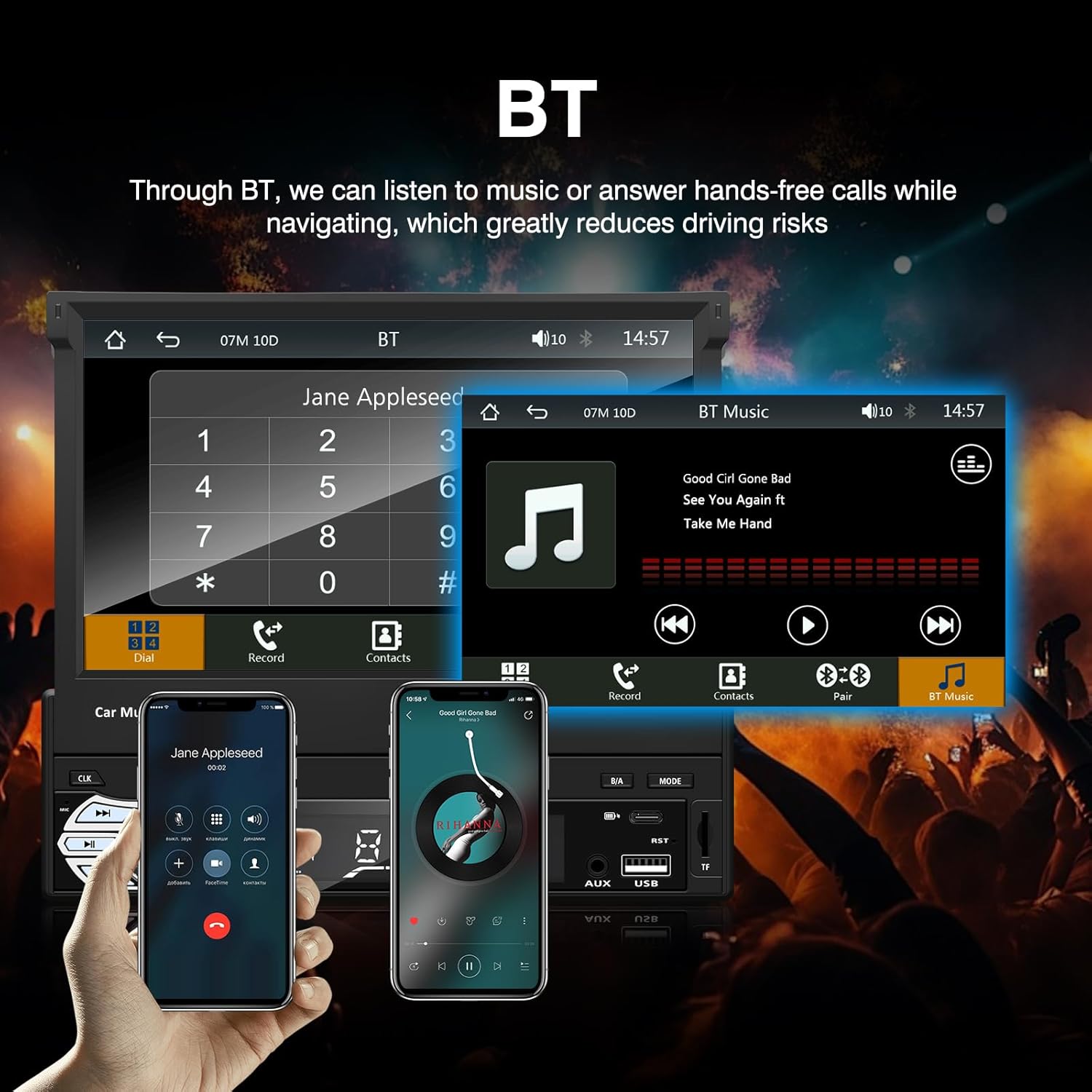
Nọmba 3: Bluetooth interface for hands-free calls and music streaming, showing a dial pad and music controls.
- Pipọpọ: Mu Bluetooth ṣiṣẹ lori ẹrọ alagbeka rẹ. Wa fun available devices and select "Ezonetronics" or similar. Enter PIN "0000" if prompted.
- Npe ni Ọwọ: Once paired, you can make and receive calls directly through the car stereo. Use the touchscreen or remote to dial, answer, or end calls.
- Sisanwọle ohun (A2DP): Play music from your paired device wirelessly. Control playback (play/pause, skip) from the car stereo or your device.
3. USB/SD Media Playback
Insert a USB drive or SD card into the respective slot. The unit will automatically switch to USB/SD mode and begin playing compatible media files.

Nọmba 4: Icons indicating support for Bluetooth, Auxiliary input, TF (SD) Card, and USB connections for media playback.
- Supported formats include RM, RMVB, ASF, MKV, DIVX, MPEG4, AVI, VOB for video, and MP3/MP4 for audio.
- Lilö kiri nipasẹ awọn folda ati files using the touchscreen interface.
4. Redio FM
Access the FM radio mode to listen to local broadcasts.

Nọmba 5: FM Radio interface with frequency display and equalizer settings for audio customization.
- Ṣiṣayẹwo Aifọwọyi: Automatically search and save strong stations.
- Itọsọna Afowoyi: Fine-tune frequencies using the touchscreen.
- Awọn tito tẹlẹ: Save your favorite stations for quick access (up to 18 preset stations).
5. Apple CarPlay / Android Auto
Connect your compatible smartphone via USB to access Apple CarPlay or Android Auto features directly on the stereo's display.

Nọmba 6: Wired Apple CarPlay interface, displaying phone applications like navigation, music, and messages on the car stereo screen.

Nọmba 7: Wired Android Auto interface, displaying Android applications like Google Maps, Spotify, and phone calls on the car stereo screen.
- Ensure your phone has CarPlay or Android Auto enabled.
- Use a high-quality USB cable for a stable connection.
- Access navigation, music, messages, and other compatible apps safely while driving.
6. Ìjápọ̀ Dígí
Mirror Link allows you to display your smartphone's screen content directly onto the car stereo's display via a USB data cable.

Nọmba 8: Mirror Link function demonstrating a smartphone screen being projected onto the car stereo display.
- Connect your smartphone to the USB port using a data cable.
- Tẹ̀lé àwọn ìtọ́ni tó wà lórí ìbòjú lórí sitírò àti fóònù rẹ láti fi ìdí ìsopọ̀ náà múlẹ̀.
- Note: Functionality may vary depending on your smartphone model and operating system.
7. Ẹyìnview Iṣagbewọle kamẹra
Nígbà tí ó bá padà sẹ́yìnview camera is connected and the vehicle is shifted into reverse, the stereo automatically displays the camera feed.

Nọmba 9: Reversing display showing the view from a rearview camera with parking assistance lines, providing an intuitive aid for parking.
- Rii daju ẹhinview camera is properly installed and connected to the dedicated input.
- Iboju naa yoo yipada laifọwọyi si kamẹra naa view when the reverse gear is engaged.
8. Iṣakoso kẹkẹ idari
The unit supports connection to your vehicle's existing steering wheel controls for convenient operation. Refer to your vehicle's manual and the stereo's wiring diagram for proper connection and configuration.
Itoju
- Ninu iboju: Lo asọ rirọ, ti ko ni lint lati mu rọra nu iboju ifọwọkan. Ma ṣe lo abrasive ose tabi epo.
- Isọsọ gbogboogbo: Wipe the unit's exterior with a dry, soft cloth.
- Yago fun Olomi: Má ṣe fọ́n omi sí ara rẹ̀ taara sí ara ẹ̀rọ náà.
- Iwọn otutu: Avoid prolonged exposure to extreme heat or cold, which can affect the unit's lifespan.
Laasigbotitusita
| Isoro | Owun to le Fa | Ojutu |
|---|---|---|
| Ẹka ko ni agbara lori. | Asopọmọra ti ko tọ; Fiusi ti a fẹ; Ọrọ batiri ọkọ. | Check power connections (Yellow, Red, Black wires). Inspect vehicle fuses. Ensure battery is charged. |
| Ko si ohun. | Ohùn tó lọ sílẹ̀ jù; A ti mu kí ó dákẹ́; A kò fi okùn agbọ́hùnsọ̀ sí i dáadáa. | Mu iwọn didun pọ si. Ṣayẹwo boya odi n ṣiṣẹ. Ṣayẹwo awọn asopọ agbọrọsọ. |
| Bluetooth ko sopọ. | Bluetooth not enabled on phone; Incorrect pairing process. | Ensure phone's Bluetooth is on and discoverable. Re-attempt pairing. |
| USB/SD media not playing. | Ti ko ni atilẹyin file format; Corrupted media; Drive/card not inserted correctly. | Ṣayẹwo file formats. Try a different USB drive/SD card. Ensure proper insertion. |
| Ẹyìnview kamẹra ko han. | Kámẹ́rà kò sopọ̀ mọ́ra; Wáyà ìfàsẹ́yìn kò sopọ̀ mọ́ra. | Verify camera video input and reverse trigger wire connection. |
Ti awọn iṣoro ba tẹsiwaju, kan si alamọja ti o pe tabi kan si atilẹyin alabara.
Awọn pato
- Brand: EZoneTronics
- Nọmba awoṣe: RM-CW9601
- Àwọ̀: Dudu
- Iboju: 7-inch Capacitive Touchscreen, Retractable
- Imọ-ẹrọ Asopọmọra: Bluetooth, USB, SD, AUX, RCA
- Bluetooth: Integrated Bluetooth 2.0 with A2DP/Hands-free
- Awọn ẹrọ ibaramu: Foonuiyara
- Ipo Ijade Ohun: Sitẹrio
- Video Encoding Support: RM, RMVB, ASF, MKV, DIVX, MPEG4, AVI, VOB
- USB/SD atilẹyin: Up to 32GB max.
- Awọn ẹya pataki: Touchscreen, Steering Wheel Control Support, Rear Camera Input, Apple CarPlay, Android Auto, Mirror Link
- Olupese: Rhythm Electronics Limited
Atilẹyin ọja ati Support
This product comes with a limited manufacturer's warranty.
- Main Unit Warranty: 12 months for defective items (excluding damaged or misused items after receipt).
- Atilẹyin ọja Awọn ẹya ẹrọ: 3 months for accessories.
For warranty claims or technical support, please contact your retailer or the manufacturer directly. Keep your purchase receipt as proof of purchase.