
1. Ọja Ipariview
The Godox AD200 Pocket Flash is a compact and powerful 200Ws strobe flash monolight designed for professional photography. It features a built-in 2.4G Wireless X System, offering stable output and compatibility with various Godox X System products. The flash supports TTL, 1/8000s HSS, first/second curtain sync, and manual flash modes. Its interchangeable flash heads provide versatility for different lighting effects, and the high-capacity lithium battery ensures extended use.

Figure 1.1: Godox AD200 Pocket Flash with interchangeable speedlite and bare bulb flash heads.
2. Ohun ti o wa ninu Apoti
Daju pe gbogbo awọn paati wa lori ṣiṣi silẹ:
- 1x AD200 Flash Body
- 1x Battery (WB29A)
- 1x Ṣaja Batiri
- Okun Ṣaja 1x
- 1x Bare Bulb Flash Head
- 1x Speedlite Flash Head

Figure 2.1: Included components of the Godox AD200 Pocket Flash kit.
3. Eto
3.1 Attaching Flash Heads
The AD200 features interchangeable flash heads. To attach a flash head, align the head with the flash body's mounting slot and slide it in until it clicks securely into place. To remove, press the release button and slide the head out.

olusin 3.1: exploded view of the AD200 showing the bare bulb and speedlite flash heads, battery, and control panel.
3.2 Batiri sori ati gbigba agbara
Insert the WB29A lithium battery into the battery compartment until it locks. To charge, remove the battery and place it into the provided charger. Connect the charger to a power source using the charger cable. The battery level indicators on the charger will illuminate during charging.

Figure 3.2: Battery installation and charging process for the AD200.
3.3 Fifi Flash sori ẹrọ
The AD200 can be mounted on a light stand using its 1/4" screw hole. Ensure the flash is securely fastened to prevent accidental drops.
4. Awọn ilana Iṣiṣẹ
4.1 Iṣakoso Pariview
The AD200 features an intuitive control panel with a VA display for easy operation. Key controls include:
- Agbara Yi pada: Tan/pa a kuro.
- Group/Channel Button (GR/CH): Long press to adjust group or channel settings for wireless control.
- Test/C.Fn Button: Triggers a test flash; long press to access custom functions.
- Mode/Wireless Selection Button: Switches between flash modes (TTL, Manual, Multi) and wireless modes.
- Awoṣe Lamp/HSS Button: Activates the modeling lamp or High-Speed Sync mode.
- Yan Póòlù: Ti a lo lati lọ kiri awọn akojọ aṣayan ati ṣatunṣe awọn eto.
- Ṣeto Bọtini: Jẹrisi awọn aṣayan.
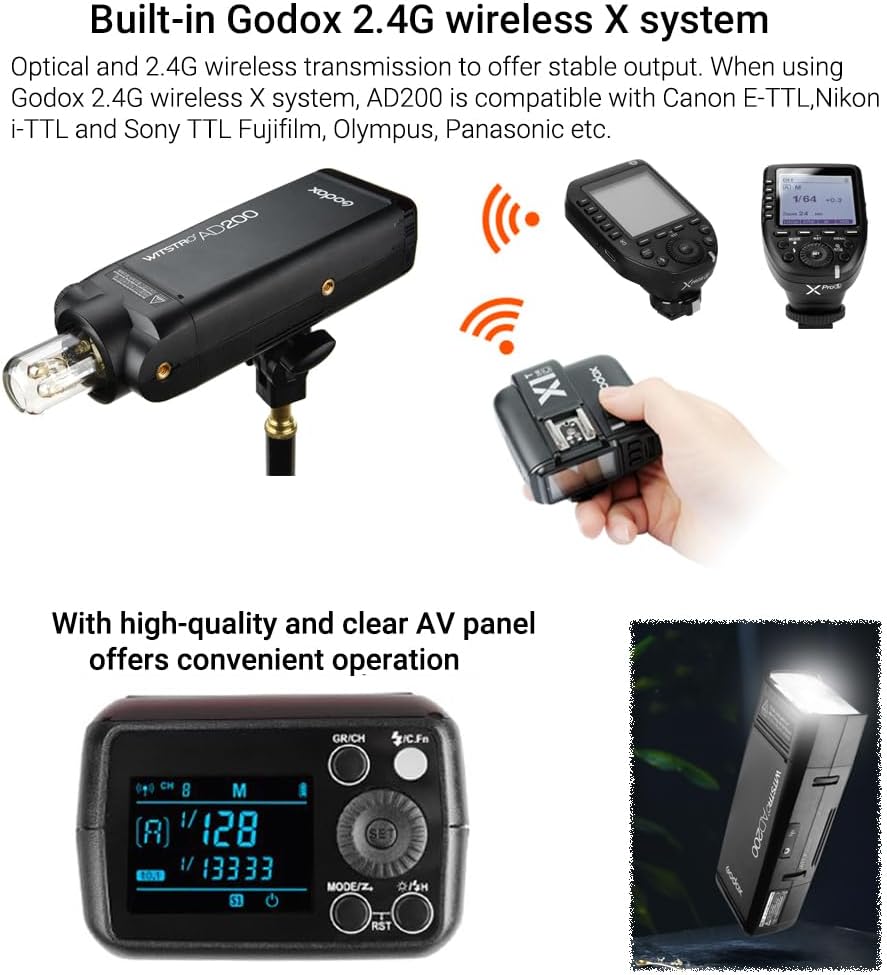
Figure 4.1: The AD200 control panel and display.
4.2 Flash Modes and Power Adjustment
The AD200 offers 8 stops of power adjustment, from 1/1 to 1/256, providing precise control over light output. Use the Select Dial to adjust power levels. Supported flash modes include:
- TTL (Lẹ́ńsì-Lẹ́ńsì): Automatic exposure control.
- Afọwọṣe (M): Manual power adjustment.
- Ọ̀pọ̀lọpọ̀ (Stroboscopic): Fires a series of rapid flashes.
- HSS (High-Speed Sync): Ó gba ààyè láti mú ìṣiṣẹ́pọ̀ fílíṣì pọ̀ ní iyàrá ìbora tó 1/8000s.
- First/Second Curtain Sync: Controls when the flash fires relative to the shutter curtains.

Figure 4.2: TTL Auto Metering and Exposure Compensation in action.
Ètò X Alailowaya 4.3 2.4G
The built-in 2.4G Wireless X System enables wireless control of the AD200. It is compatible with Godox X1, X2, XPro, XProII, and X3 triggers for Canon, Nikon, Sony, Olympus, Panasonic, and Fujifilm cameras. This system allows for remote adjustment of flash power levels and TTL functions.

Figure 4.3: Wireless control of the AD200 using a Godox X-system trigger.
4.4 Lilo Awọn ẹya ẹrọ
The AD200 supports a wide range of light effect accessories. The bare bulb flash head is compatible with AD360 accessories, while the speedlite flash head can be adapted to Bowens mount accessories using an S-type bracket (sold separately).
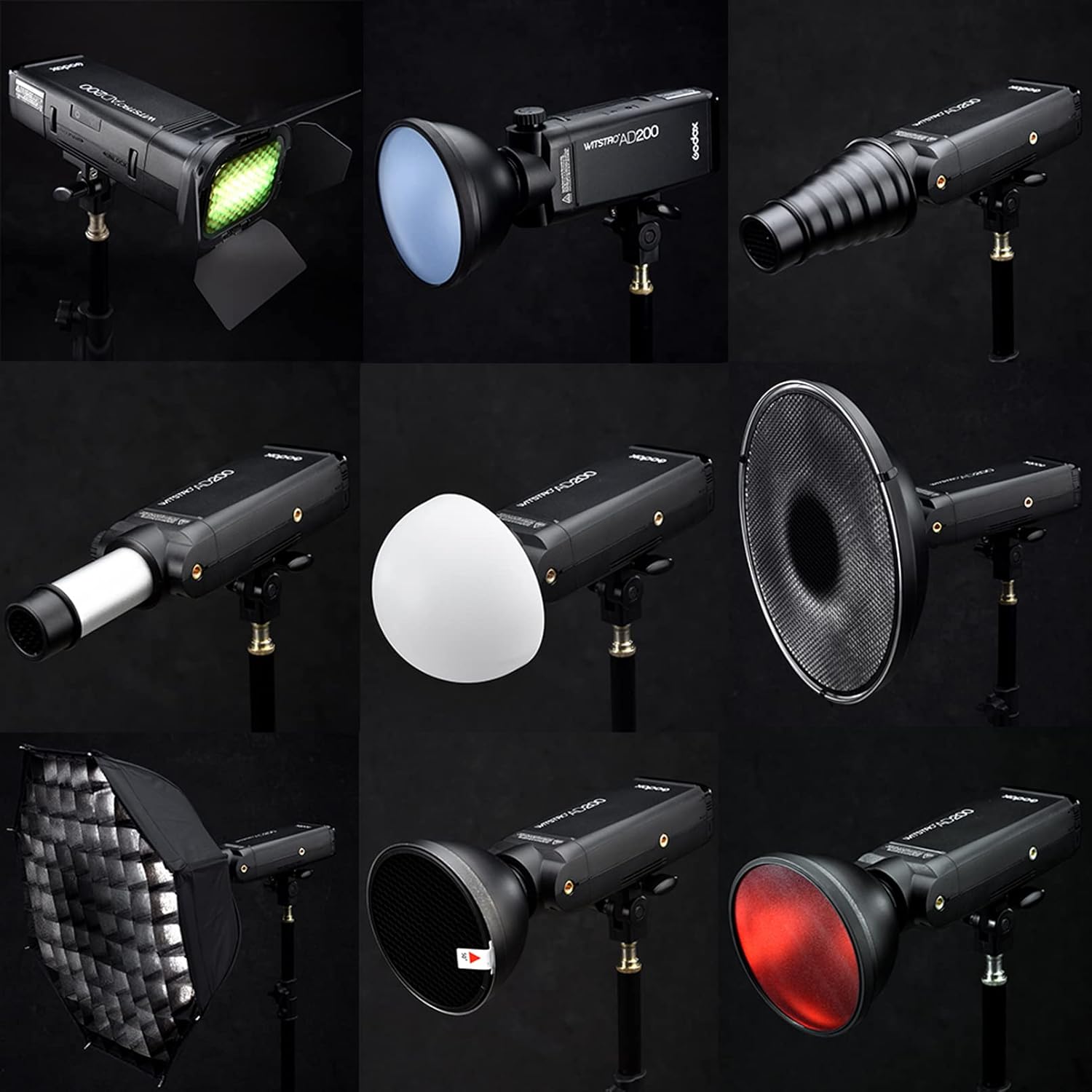
Olusin 4.4: Examples of light modifiers and accessories for the AD200.
5. Itọju
5.1 batiri Itọju
- Gba agbara si batiri ni kikun ṣaaju lilo akọkọ.
- Avoid completely draining the battery to prolong its lifespan.
- Tọju batiri naa ni itura, aye gbigbẹ nigbati ko si ni lilo.
- Ma ṣe fi batiri han si awọn iwọn otutu to gaju tabi imọlẹ orun taara.
5.2 Ninu ati Ibi ipamọ
- Clean the flash body with a soft, dry cloth. Do not use solvents or abrasive cleaners.
- Handle the bare bulb flash head with care as it is fragile.
- Store the AD200 in its carry bag to protect it from dust and impact.
6. Laasigbotitusita
If you encounter issues with your Godox AD200, consider the following:
- Filaṣi ko ta: Check battery level, ensure flash head is securely attached, and verify wireless trigger settings (group, channel, mode).
- Inconsistent power output: Ensure battery is fully charged. Check for proper connection between flash head and body.
- Awọn iṣoro asopọ alailowaya: Confirm that the flash and trigger are on the same group and channel. Check for interference from other 2.4G devices.
For further assistance, please refer to the official Godox support resources or contact customer service.
7. Awọn pato
| Brand | GODOX |
| Orukọ awoṣe | AD200 |
| Ijade agbara | 200Ws |
| Iyara amuṣiṣẹpọ Flash | 1/8000s (HSS) |
| Tunlo Aago | 0.01-2.1-orundun |
| Awọn filasi Agbara ni kikun | Isunmọ. 500 |
| Agbara Batiri | 14.4V/2900mAh Lithium-ion (WB29A) |
| Iwọn otutu awọ | 5600K ± 200K |
| Alailowaya Technology | 2.4G RF (Godox X System) |
| Awọn iṣagbesori ibaramu | Canon, Nikon, Sony, Fujifilm, Panasonic, Olympus |
| Awọn iwọn Nkan (D x W x H) | 6.61"D x 2.95"W x 19.69"H (approximate, with bare bulb head) |
| Iwọn Nkan | 1.97 kilo |

Figure 7.1: Dimensions of the Godox AD200 with different flash heads.
8. Awọn fidio ọja osise
Godox AD200 TTL Studio Flash
Fidio 8.1: Ipariview of the Godox AD200 TTL Studio Flash features and capabilities.
Godox AD200 Real Shot Scene
Video 8.2: Demonstrates the Godox AD200 in various real-world shooting scenarios, highlighting its versatility.
Godox AD200 Studio Flash Strobe Light
Video 8.3: Showcases the Godox AD200 as a studio flash strobe light, emphasizing its performance.
9. Atilẹyin ọja ati Support
The Godox AD200 Pocket Flash comes with a 1 Odun atilẹyin ọja. For warranty claims, technical support, or service inquiries, please contact your authorized Godox dealer or visit the official Godox webojula fun onibara iṣẹ alaye olubasọrọ.