
ILIFE V5s Pro
ILIFE V5s Pro Robot Vacuum and Mop Combo User Manual
Awoṣe: V5s Pro
Ọrọ Iṣaaju
This manual provides essential information for the safe and efficient operation, maintenance, and troubleshooting of your ILIFE V5s Pro Robot Vacuum and Mop Combo. Please read it thoroughly before using the appliance and retain it for future reference.

The ILIFE V5s Pro Robot Vacuum and Mop Combo.
Ṣeto
1. Unboxing ati Ayẹwo paati
Ni ifarabalẹ yọ gbogbo awọn paati kuro ninu apoti. Rii daju pe gbogbo awọn nkan ti o wa ni isalẹ wa:
- 1 ILIFE V5s Pro Robot Vacuum (Vacuum & Mop)
- 1 Omi omi
- 1 Mop Cloth
- 1 Dustbin
- 1 Iṣakoso latọna jijin
- Awọn batiri AAA 2 (fun isakoṣo latọna jijin)
- 2 Ajọ
- 1 AC Adapter (approx. 1.5m length)
- 1 Ipilẹ Gbigba agbara
- 1 Fifọ Fẹlẹ
- 2 Awọn gbọnnu ẹgbẹ
- 1 User's Quick Guide
- 1 Afowoyi olumulo
2. Gbigba agbara Mimọ Placement
Place the charging base against a wall in an open area, ensuring there are no obstacles within 1 meter (3 feet) to the sides and 2 meters (6 feet) in front. Connect the AC adapter to the charging base and plug it into a power outlet. Ensure the power indicator on the charging base is illuminated.
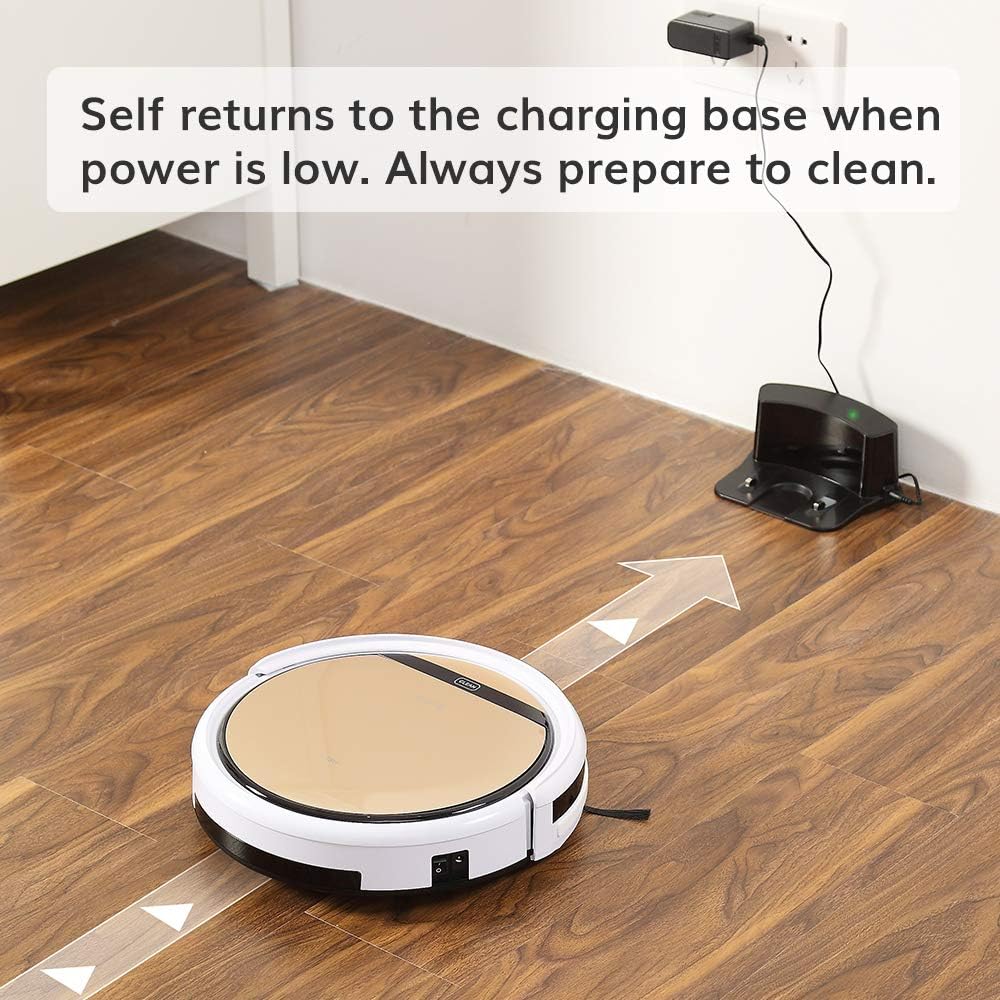
The robot vacuum returning to its charging base.
3. Gbigba agbara akọkọ
Before first use, fully charge the robot. You can either place the robot manually onto the charging base, ensuring the charging contacts align, or connect the AC adapter directly to the robot's charging port. The 'CLEAN' button will flash during charging and turn solid when fully charged. A full charge takes approximately 4-5 hours.
4. Fifi ẹgbẹ gbọnnu
Attach the two side brushes to the posts on the underside of the robot. Press firmly until they click into place.

Underside of the robot showing side brush attachment points.
5. Fifi sori ẹrọ apoti idọti tabi ojò omi
The ILIFE V5s Pro supports both vacuuming and mopping. For vacuuming, ensure the dustbin is installed. For mopping, replace the dustbin with the water tank and attach the mop cloth.

Removing the dustbin.

Inserting the water tank.
Isẹ
1. Agbara Tan / Paa
To power on, press the 'CLEAN' button on the robot or the power button on the remote control. To power off, press and hold the 'CLEAN' button for a few seconds or use the remote.
2. Ninu awọn ipo
The ILIFE V5s Pro offers multiple cleaning modes:
- Ipo Aifọwọyi: The robot automatically cleans the area, maximizing coverage.
- Ipo Aami: The robot focuses on a specific small area for intensive cleaning.
- Ipo ti o pọju: Provides intensive cleaning with increased suction power.
- Ipo eti: The robot cleans along walls and corners.
Select your desired mode using the remote control.

The robot vacuum cleaning a low-pile carpet.
3. Iṣeto
You can set a daily cleaning schedule using the remote control. Refer to the remote control section in the User's Quick Guide for detailed instructions on setting the time and schedule.
4. Vacuuming and Mopping Functions
The robot automatically detects whether the dustbin (for vacuuming) or water tank (for mopping) is installed and operates accordingly. Ensure the correct tank is in place for the desired cleaning function.

The robot vacuum operating quietly near a sleeping dog, demonstrating its quiet operation.
5. Automatic Docking
When the battery is low, the robot will automatically return to its charging base to recharge. Ensure the charging base is accessible and plugged in.

The robot vacuum intelligently navigating around furniture, showcasing its anti-collision sensors.
Itoju
Itọju deede ṣe idaniloju iṣẹ ṣiṣe ti o dara julọ ati fa gigun igbesi aye ti igbale robot rẹ.
1. Ofo Dustbin
Empty the dustbin after each use. Press the 'PUSH' button on the top cover to open, remove the dustbin, and discard collected debris. Clean the dustbin with the provided cleaning brush or rinse with water (ensure it is completely dry before re-inserting).
2. Cleaning Ajọ
The robot uses two filters. Clean the primary filter and the high-performance filter regularly. Tap them to remove dust or use the cleaning brush. Replace filters every 3-6 months, depending on usage.
3. Cleaning Side gbọnnu
Periodically remove and clean the side brushes. If they are worn or damaged, replace them with new ones.
4. Cleaning the Suction Inlet
The V5s Pro features a unique suction inlet designed to prevent hair tangles. Regularly check and clean the inlet to ensure efficient debris collection, especially for pet owners.
5. Water Tank and Mop Cloth Maintenance
After mopping, empty any remaining water from the tank and allow it to air dry. Remove and wash the mop cloth. Ensure the water tank is completely dry before storage.
6. Awọn sensọ mimọ ati Awọn olubasọrọ gbigba agbara
Wipe the anti-drop sensors, anti-collision sensors, and charging contacts on both the robot and the charging base with a soft, dry cloth to ensure proper function.
Laasigbotitusita
If your ILIFE V5s Pro encounters an issue, refer to the following common solutions:
- Robot ko bẹrẹ: Ensure the robot is fully charged and the main power switch (usually on the side) is turned on.
- Robot ko gba agbara: Verify the charging base is plugged in and the power indicator is on. Clean the charging contacts on both the robot and the base.
- Robot di nigbagbogbo: Clear obstacles like loose cables, small rugs, or furniture that are too low for the robot to pass under.
- Iṣe mimọ ti ko dara: Empty the dustbin, clean or replace filters, and clean the side brushes and suction inlet.
- Iṣẹ mopping ko ṣiṣẹ: Ensure the water tank is filled and correctly installed, and the mop cloth is attached.
Fun awọn ọran ti o tẹsiwaju, kan si iwe afọwọkọ olumulo ni kikun tabi kan si atilẹyin alabara.
Awọn pato
| Ẹya ara ẹrọ | Sipesifikesonu |
|---|---|
| Brand | IGBE AYE |
| Orukọ awoṣe | ILFV5SPRO2RB |
| Dada iṣeduro | Ilẹ lile, capeti |
| Pataki Ẹya | Robot Vacuum ati Mop Konbo |
| Àwọ̀ | V5s Pro |
| Adarí Iru | Isakoṣo latọna jijin |
| Àlẹmọ Iru | Katiriji |
| Igbesi aye batiri | 110 iṣẹju |
| Batiri Iru | Litiumu Iwon |
| Voltage | 14.4 Volts |
| Agbara (Dustbin) | 300 milimita |
| Orisun agbara | Agbara Batiri |
| Awọn iwọn Nkan L x W x H | 11.8"L x 11.8"W x 3"H |
| Iwọn Nkan | 4.9 iwon |
| Ariwo Ipele | 58 Decibels |
| Lilo ita ita gbangba | Ninu ile |
| Nọmba awoṣe | ILIFEV5SP01 |
| UPC | 768571855510 |
Atilẹyin ọja ati Support
Alaye atilẹyin ọja
A new ILIFE V5s Pro Robot Vacuum is provided with a 12-osu atilẹyin ọja. Refurbished or used robots are provided with a 3-osu atilẹyin ọja. Jọwọ ṣe idaduro ẹri rira rẹ fun awọn iṣeduro atilẹyin ọja.
Onibara Support
For technical assistance, warranty inquiries, or replacement parts, please contact ILIFE customer support through their official webaaye tabi alaye olubasọrọ ti a pese ninu apoti ọja rẹ.
Ask a question about this manual
Ask about setup, troubleshooting, compatibility, parts, safety, or missing instructions. Manuals+ will review the question and use this page’s manual context to help answer it.