
Fanvil X3S
Fanvil X3S SIP Phone User Manual
Awoṣe: X3S
Ọja Pariview
The Fanvil X3S is a 2-line color screen SIP phone designed for efficient communication in office environments. It features an extra-large 320 x 240 2.4-inch color LCD for enhanced visual information and user experience. This model supports HD Voice and offers dual 10/100 Mbps network ports. It is suitable for various network setups and supports secure communication protocols.
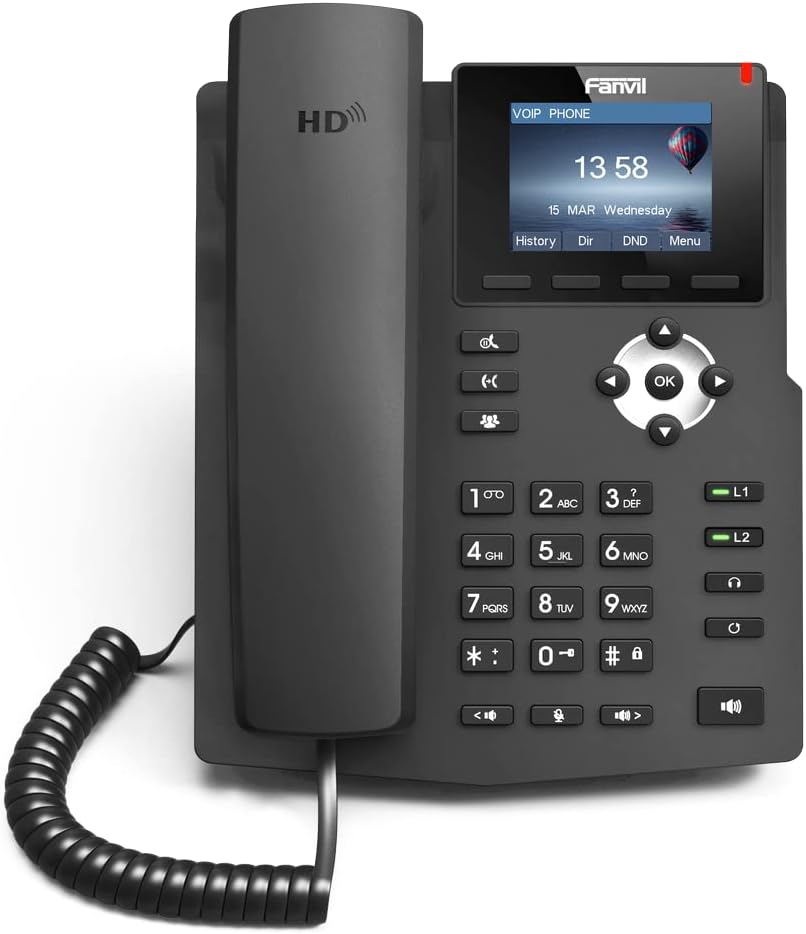
Aworan: Iwaju view of the Fanvil X3S SIP Phone, showing the handset, keypad, navigation buttons, and color display screen. The screen displays time and date, with menu options below.
Package Awọn akoonu
Ṣaaju ki o to tẹsiwaju pẹlu fifi sori ẹrọ, rii daju pe gbogbo awọn ohun kan wa ninu package naa:
- Fanvil X3S SIP Phone Unit
- Aimudani
- Okun amudani
- àjọlò Cable
- Power Adapter (for non-PoE models)
- Iduro Iduro
- Awọn ọna fifi sori Itọsọna
Eto ati fifi sori
1. Nto foonu naa
- Attach the desk stand to the main unit by aligning the tabs and sliding it into place until it clicks.
- Connect the coiled handset cord to the handset and the designated handset port on the phone base.
2. Nsopọ si Nẹtiwọọki ati Agbara
- Isopọ nẹtiwọki: So opin okun Ethernet pọ si ibudo LAN lori foonu ati opin miiran si iyipada nẹtiwọki tabi olulana.
- Asopọ agbara:
- If using the included power adapter: Connect the power adapter to the power port on the phone and then plug it into an electrical outlet.
- Note: This model (X3S) does not support Power over Ethernet (PoE). A power adapter is required.
3. Iṣeto ni ibẹrẹ
Upon first boot, the phone will attempt to obtain an IP address via DHCP. You may need to access the phone's web interface or use the phone's menu for SIP account registration and further network settings. Refer to your VoIP service provider's instructions for specific SIP account details.
Awọn ilana Iṣiṣẹ
Awọn iṣẹ Ipilẹ Ipe
- Npe Ipe: Lift the handset, dial the number, and press the Kiakia asọ bọtini tabi awọn # key. Alternatively, dial the number and then lift the handset.
- Ndahun ipe kan: Gbe foonu soke tabi tẹ awọn Agbọrọsọ bọtini.
- Pari ipe kan: Rọpo foonu tabi tẹ awọn Ipe Ipari bọtini rirọ.
- Titun: Tẹ awọn Redial Bọtini asọ lati pe nọmba ti a tẹ kẹhin.
To ti ni ilọsiwaju Awọn ẹya ara ẹrọ
- Duro: Lakoko ipe, tẹ awọn Dimu bọtini asọ. Tẹ lẹẹkansi lati tun bẹrẹ ipe naa.
- Gbe: Lakoko ipe, tẹ awọn Gbigbe bọtini asọ, tẹ nọmba titun, lẹhinna tẹ Gbigbe again (blind transfer) or wait for the party to answer before pressing Gbigbe (lọ gbigbe).
- Pa ẹnu mọ́: Tẹ awọn Pa ẹnu mọ́ bọtini lati mu gbohungbohun rẹ dakẹ nigba ipe kan. Tẹ lẹẹkansi lati mu dakẹ.
- Foonu agbọrọsọ: Tẹ awọn Agbọrọsọ bọ́tìnì láti yí ipò ohùn agbọ́hùnsọ padà.
- Atunse iwọn didun: Lo awọn Iwọn didun buttons during a call to adjust handset, headset, or speaker volume.
- BLF (Busy Lamp Field) Buttons: The X3S features 2 BLF buttons. These can be configured to monitor the status of other extensions (busy, ringing, available) and allow for quick dialing or call pickup. Configuration is typically done via the phone's web ni wiwo.
Itoju
Proper maintenance ensures the longevity and optimal performance of your Fanvil X3S SIP Phone.
- Ninu: Lo asọ asọ ti o gbẹ lati nu dada foonu naa. Fun awọn ami alagidi, die-die damp cloth with mild, non-abrasive cleaner can be used. Avoid using harsh chemicals, solvents, or abrasive materials.
- Ayika: Keep the phone in a dry environment, away from direct sunlight, excessive heat, and moisture. Ensure proper ventilation around the device.
- Awọn kebulu: Periodically check all connected cables (handset cord, Ethernet, power) for any signs of damage or loose connections.
- Awọn imudojuiwọn sọfitiwia: Regularly check the Fanvil official website for firmware updates. Keeping the firmware updated can improve performance, add new features, and address security vulnerabilities. Firmware updates are typically performed via the phone's web ni wiwo.
Laasigbotitusita
| Isoro | Owun to le Fa | Ojutu |
|---|---|---|
| Foonu ko ṣiṣẹ. | No power connection; faulty power adapter. | Ensure power adapter is securely connected to the phone and a working electrical outlet. Test outlet with another device. |
| Ko si ohun orin ipe. | Network connection issue; SIP account not registered. | Check Ethernet cable connection. Verify network connectivity. Ensure SIP account is correctly configured and registered (check phone display for registration status). Restart the phone. |
| Ko le ṣe tabi gba awọn ipe wọle. | SIP account not registered; network firewall issues; incorrect dial plan. | Confirm SIP account registration. Check network firewall settings (ports 5060 UDP/TCP, RTP ports). Consult your VoIP service provider for dial plan or network specific issues. |
| Didara ohun ti ko dara (iwoyi, aimi). | Network congestion; faulty handset/headset; environmental interference. | Check network bandwidth. Try a different handset or headset. Ensure phone is not near strong electromagnetic interference sources. |
| Ifihan ti ṣofo tabi tio tutunini. | Software error; power issue. | Unplug the power adapter, wait 10 seconds, then plug it back in to restart the phone. If issue persists, contact support. |
Awọn pato
| Ẹya ara ẹrọ | Ẹ̀kúnrẹ́rẹ́ |
|---|---|
| Awoṣe | Fanvil X3S |
| SIP Lines | 2 |
| Ifihan | 2.4-inch (320x240) LCD awọ |
| HD Ohun | Atilẹyin |
| BLF Buttons | 2 |
| Awọn ibudo nẹtiwọki | Meji 10/100 Mbps àjọlò |
| Poe Support | No (External Power Adapter Required) |
| Awọn aṣayan fifi sori ẹrọ | Desktop / Wall-mount |
| Awọn iwọn (L x W x H) | 2.52 x 8.82 x 10.98 inches (6.4 x 22.4 x 27.9 cm) |
| Iwọn Nkan | 1.65 poun (0.75 kg) |
| Olupese | Fanvil |
Atilẹyin ọja ati Support
For warranty information, please refer to the warranty card included with your product or visit the official Fanvil webojula. Awọn ofin atilẹyin ọja le yatọ nipasẹ agbegbe.
For technical support, firmware updates, and additional resources, please visit the Fanvil support portal:
Fanvil Official Support Webojula
When contacting support, please have your product model (X3S) and serial number ready.
Ask a question about this manual
Ask about setup, troubleshooting, compatibility, parts, safety, or missing instructions. Manuals+ will review the question and use this page’s manual context to help answer it.