
Ọrọ Iṣaaju
The HyperGear Marathon Sport Wireless Bluetooth Earphones are engineered to provide a high-fidelity audio experience for active individuals. Designed for comfort and durability, these earphones offer wireless connectivity, clear sound, and convenient hands-free calling, making them suitable for various activities from intense workouts to casual listening.
Package Awọn akoonu
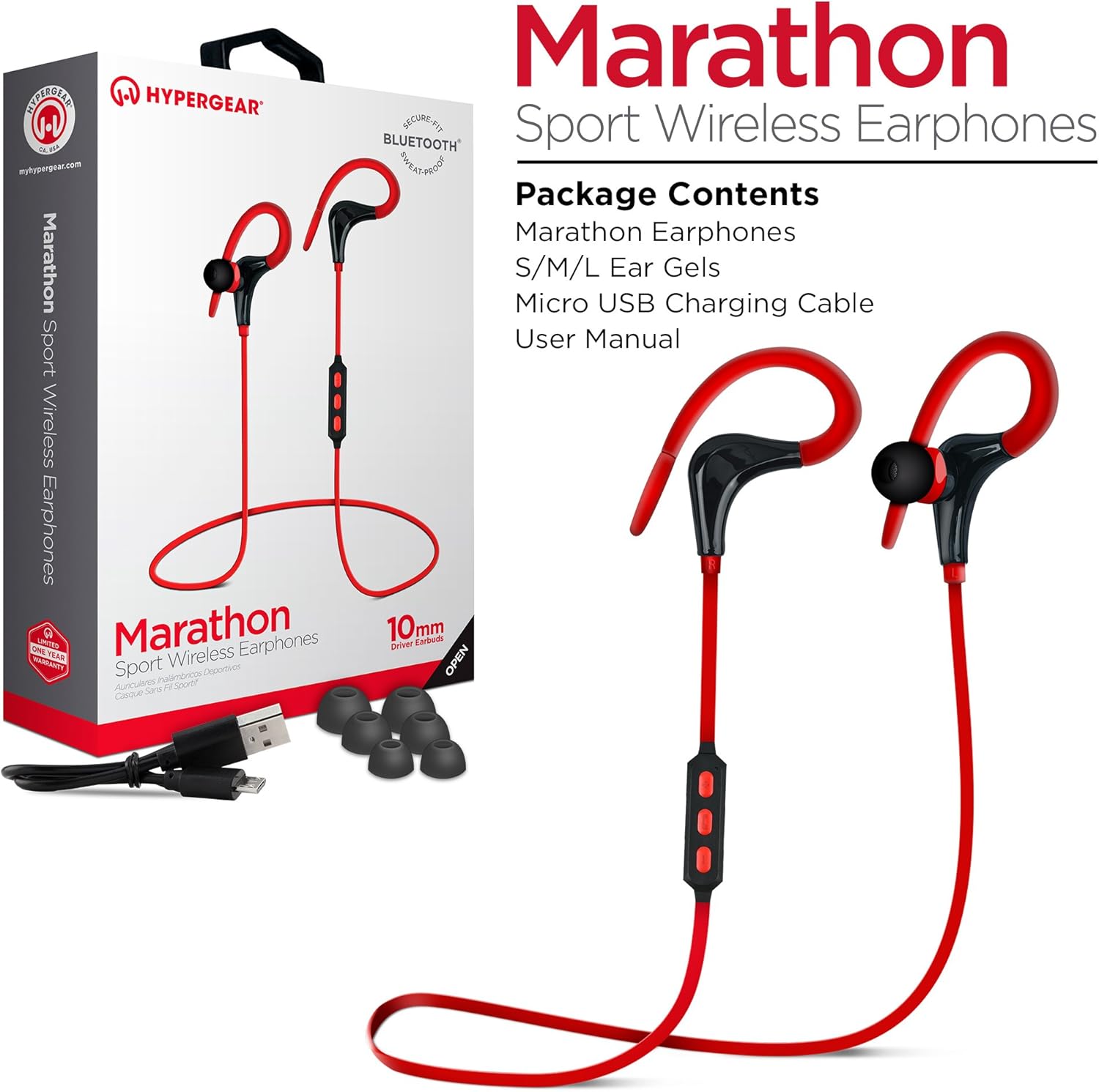
This image displays the retail packaging for the HyperGear Marathon Sport Wireless Earphones, showing the earphones themselves, a Micro USB charging cable, and various sizes of ear gels. The box highlights features such as 'Secure Fit' and 'Bluetooth'.
Jọwọ ṣayẹwo apoti fun awọn nkan wọnyi:
- HyperGear Marathon Sport Wireless Earphones
- S/M/L Ear Gels (various sizes for optimal fit)
- Micro USB Ngba agbara USB
- Afowoyi Olumulo (iwe-ipamọ yii)
Ṣeto
1. Ngba agbara si awọn Earphone
Before first use, fully charge your earphones. The battery provides up to 5 hours of average life on a single charge.
- Locate the Micro USB charging port on the earphones' in-line control module.
- So okun USB Micro ti a pese pọ mọ ibudo gbigba agbara.
- So opin keji okun USB pọ mọ orisun agbara USB ti o baamu (fun apẹẹrẹ, ibudo USB kọmputa, adapter odi USB).
- The LED indicator will show charging status (refer to the LED indicator section for details). Once fully charged, the LED will change color or turn off.
2. Sisopọ pọ pẹlu Ẹrọ Bluetooth kan

This image illustrates the wireless freedom of the HyperGear Marathon Sport Earphones, depicting them wirelessly connected via Bluetooth to a smartphone, tablet, and desktop computer, emphasizing their universal compatibility.
The earphones use Bluetooth 4.1 technology for reliable wireless transmission up to 33 feet (10 meters).
- Ensure the earphones are charged and turned off.
- Press and hold the Multi-function button (usually the center button on the in-line control) for approximately 5-7 seconds until the LED indicator flashes red and blue alternately, indicating pairing mode.
- Lori ẹrọ Bluetooth ti o ṣiṣẹ (foonuiyara, tabulẹti, ati bẹbẹ lọ), lọ si awọn eto Bluetooth ki o tan-an Bluetooth.
- Wa fun available devices. You should see "HyperGear Marathon" or a similar name appear in the list.
- Select "HyperGear Marathon" to connect. Once successfully paired, the LED indicator on the earphones will typically flash blue slowly or turn solid blue.
- Ti o ba beere fun koodu iwọle, tẹ "0000".
Àwọn agbekọri naa yoo gbiyanju lati so pọ mọ ẹrọ ti a so pọ mọ nikẹhin nigbati a ba tan ina.
Awọn ilana Iṣiṣẹ
Awọn Iṣakoso Loriview

This image highlights the in-line control module of the HyperGear Marathon Sport Earphones, positioned next to a smartphone displaying a music player. It emphasizes the convenience of hands-free music and call management.
The in-line control module allows you to manage music playback and calls.
| Bọtini / Action | Išẹ |
|---|---|
| Olona-iṣẹ Button (Aarin) |
|
| Iwọn didun soke (+) |
|
| Iwọn didun isalẹ (-) |
|
Wọ awọn Earphones

This image shows a person cycling outdoors while wearing the HyperGear Marathon Sport Earphones, demonstrating the secure behind-the-ear hook design that keeps the earphones in place during active movement.

This image depicts a person running, wearing the HyperGear Marathon Sport Earphones. It highlights the ergonomic ear gels and sweatproof design, emphasizing their suitability for active lifestyles and secure fit during exercise.
The Marathon earphones feature a behind-the-ear hook design and ergonomic ear gels for a secure and comfortable fit, even during strenuous activities.
- Select the ear gel size that provides the best seal and comfort for your ears. Three sizes (S/M/L) are included.
- Place the earbud into your ear canal.
- Gently loop the ear hook over the top and behind your ear, adjusting it until it feels secure and comfortable.
Didara ohun

This image showcases the High-Fidelity Stereo Sound feature of the HyperGear Marathon Sport Earphones, highlighting the 10mm Neodymium Drivers that deliver powerful bass and clear highs for an authentic listening experience.
Equipped with powerful 10mm Neodymium Drivers, these earphones deliver high-fidelity stereo sound with robust bass and clear high frequencies for an immersive audio experience.
Itoju
Proper care will extend the life of your HyperGear Marathon earphones.
- Ninu: Use a soft, dry cloth to wipe the earphones. For ear gels, remove them and clean with a mild soap solution if necessary, then rinse and dry thoroughly before reattaching. Do not use harsh chemicals or abrasive materials.
- Ibi ipamọ: Tí o kò bá lò ó, kó àwọn ètígbọ́ náà sí ibi tí ó tutù tí ó sì gbẹ, kúrò níbi tí oòrùn kò ti lè tàn án tàbí ibi tí ó gbóná janjan.
- Omi Resistance: The earphones are sweatproof and water-resistant, but they are not waterproof. Do not submerge them in water or expose them to heavy rain. Dry them thoroughly if they get wet from sweat or light splashes.
- Gbigba agbara: Avoid overcharging. Disconnect the charging cable once the earphones are fully charged.
Laasigbotitusita
| Isoro | Owun to le Fa | Ojutu |
|---|---|---|
| Awọn agbekọri ko ni tan-an | Batiri kekere | Gba agbara si awọn agbekọri naa patapata. |
| Ko le so pọ pẹlu ẹrọ | Earphones not in pairing mode; Bluetooth off on device; Device too far | Ensure earphones are in pairing mode (flashing red/blue). Turn on Bluetooth on your device. Move device closer to earphones (within 33 ft/10m). Forget previous pairings on your device and try again. |
| Ko si ohun tabi iwọn didun kekere | Volume too low; Earphones not connected; Incorrect audio output selected on device | Increase volume on both earphones and connected device. Reconnect earphones. Check audio output settings on your device. |
| Sound cutting in/out | Interference; Device too far; Obstructions | Move closer to the connected device. Avoid strong electromagnetic interference. Ensure no physical obstructions between earphones and device. |
| Gbohungbohun ko ṣiṣẹ | Incorrect settings on device; Earphones not properly connected | Check microphone input settings on your device. Ensure earphones are fully connected and selected as the audio input device. |
Awọn pato

This is a clear, full-view image of the HyperGear Marathon Sport Wireless Bluetooth Earphones in red, showcasing their design with ear hooks and the in-line control module.
| Ẹya ara ẹrọ | Ẹ̀kúnrẹ́rẹ́ |
|---|---|
| Awoṣe | HYG-14077 |
| Asopọmọra | Bluetooth 4.1 |
| Alailowaya Ibiti | Titi de 33ft (mita 10) |
| Awakọ Iwon | 10mm Neodymium Awakọ |
| Igbesi aye batiri | Up to 5 hours (average use) |
| Gbohungbohun | Built-In, Noise Cancelling |
| Omi Resistance | Sweatproof / Water Resistant |
| Iwọn | 9 g |
| Ohun elo | Ṣiṣu |
| Awọn iwọn | 32 x 3.3 x 2.49 cm |
| Ibamu | Universal (Apple, Android, tablets, wearables, gaming devices) |
Atilẹyin ọja ati Support
HyperGear products are designed with quality and reliability in mind. For warranty information and customer support, please refer to the official HyperGear webojula tabi kan si wọn onibara iṣẹ taara.
- Osise Webojula: www.hypergear.com (Jọwọ ṣakiyesi: Eyi jẹ aaye ibi URL. Refer to your product packaging or HyperGear's official documentation for the correct support webAaye.)
- Iṣẹ onibara: Alaye olubasọrọ le ṣee ri ni igbagbogbo lori olupese webaaye tabi apoti ọja.
Jọwọ ṣe idaduro ẹri rira rẹ fun awọn iṣeduro atilẹyin ọja.