
1. Ifihan
Thank you for choosing the ERAYAK M1500 Modified Sine Wave Power Inverter. This device converts 12V DC battery power to 230V AC household power, enabling you to operate various electronic devices and appliances from your vehicle or off-grid power source. This manual provides essential information for the safe and efficient use of your inverter.

Figure 1: ERAYAK M1500 Power Inverter with various protection indicators.
2. Awọn ilana aabo
Jọwọ ka ati loye gbogbo awọn ilana aabo ṣaaju ṣiṣe ẹrọ oluyipada. Ikuna lati tẹle awọn ilana wọnyi le ja si mọnamọna, ina, tabi ipalara nla.
- Afẹfẹ: Ensure the inverter is placed in a well-ventilated area. Do not block the ventilation openings.
- Ayika Gbẹgbẹ: Do not expose the inverter to water, rain, or spray. Operate only in dry conditions.
- Iwọn otutu: Avoid operating the inverter in direct sunlight or near heat sources.
- Awọn ohun elo ina: Maṣe ṣiṣẹ inverter nitosi awọn olomi tabi awọn gaasi ti o le fa ina.
- Isopọ to dara: Connect the inverter only to a 12V DC power source. Ensure correct polarity (+ to + and - to -). Reverse polarity will damage the inverter.
- Ilẹ: Always connect the inverter's ground terminal to a proper earth ground.
- Agbara fifuye: Do not exceed the inverter's rated continuous power output (1500W). Overloading can cause damage and trigger protection features.
- Modified Sine Wave: This inverter produces a modified sine wave output. Some sensitive electronic devices, medical equipment, or appliances with AC motors may not operate correctly or may be damaged. Consult your appliance manual or contact the manufacturer if unsure.
- Awọn eroja inu: Do not attempt to open or modify the inverter. There are no user-serviceable parts inside.
- Awọn ọmọde: Pa inverter kuro ni arọwọto awọn ọmọde.
The ERAYAK M1500 inverter is equipped with multiple protection features:
- Lori-voltage aabo
- Labẹ-voltage aabo
- Aabo apọju
- Idaabobo kukuru-kukuru
- Idaabobo iwọn otutu ju
- Yiyipada polarity Idaabobo
3. Awọn ẹya Ọja
The ERAYAK M1500 inverter offers robust performance and intelligent design:
- Ijade Agbara giga: Provides 1500W continuous power, up to 1800W maximum continuous power, and 3000W peak power for demanding applications.
- Eto itutu agbaiye to munadoko: Features two intelligent temperature-controlled fans and expanded cooling modules for effective heat dissipation, ensuring stable operation and longevity.
- Ifipamọ Agbara: Designed for low standby power consumption, typically less than 3W.
- Ikole Didara: Manufactured with high-quality electronic materials under strict ISO9001 quality control standards, ensuring a conversion efficiency of over 90%.
- Asopọmọra Wapọ: Equipped with two 230V AC outlets and one 5V/2.1A USB port for charging various devices.
- Ohun elo jakejado: Suitable for powering a range of 230V appliances from 12V battery systems in cars, RVs, boats, and solar installations. Examples include small power tools, heaters, coffee makers, fans, and refrigerators.
- Aabo ti o ni kikun: Includes built-in safeguards against over-voltage, labẹ-voltage, overload, short-circuit, over-temperature, and reverse polarity.
- Apẹrẹ ti o tọ: A fi sinu alloy aluminiomu to lagbara casing with solid fixing holes for secure installation.
- Awọn iwe-ẹri: CE, EMC, and CE-LVD certified for safety and electromagnetic compatibility.

Figure 2: The inverter's efficient cooling system with two temperature-controlled fans.
4. Eto
Follow these steps to set up your ERAYAK M1500 power inverter:
- Yan Ibi kan: Select a dry, cool, and well-ventilated area for the inverter. Ensure there is sufficient space around the unit for airflow, especially around the fan vents. Avoid areas exposed to direct sunlight, heat, moisture, or flammable materials.
- Gbigbe (Aṣayan): The inverter features solid fixing holes on its casing. If desired, securely mount the inverter to a stable surface using appropriate hardware.
- Sopọ si Batiri:
- Rí i dájú pé ẹ̀rọ ìyípadà agbára ẹ̀rọ ìyípadà náà wà ní ipò PÁ.
- Connect the red battery cable (positive) to the inverter's red (+) terminal and then to the positive (+) terminal of your 12V battery.
- Connect the black battery cable (negative) to the inverter's black (-) terminal and then to the negative (-) terminal of your 12V battery.
- Ensure all connections are tight and secure to prevent loose connections, which can cause overheating and damage. The included battery cables are approximately 60 cm long and 8 mm² in cross-section.
- Ilẹ: Connect the inverter's ground terminal (usually a screw terminal marked with a ground symbol) to a reliable earth ground. In a vehicle, this can be the chassis.

olusin 3: Ru ati iwaju view of the inverter, highlighting DC input, ground, AC outlets, and USB port.
5. Awọn ilana Iṣiṣẹ
Once the inverter is properly installed and connected:
- Agbara Tan: Flip the inverter's power switch to the ON position. The power indicator light should illuminate, indicating the inverter is operational.
- So awọn ẹrọ AC pọ: Plug your 230V AC appliances into the inverter's AC outlets. Ensure the total power consumption of all connected devices does not exceed the inverter's continuous power rating (1500W). For devices with high startup surges (e.g., motors, compressors), ensure their surge power is within the inverter's peak power rating (3000W).
- So awọn ẹrọ USB pọ: Plug your USB-powered devices into the 5V/2.1A USB port for charging.
- Agbara Pa: When you are finished using the inverter, first turn off all connected appliances, then switch the inverter's power switch to the OFF position.
Awọn ero pataki:
- Agbara Batiri: Ensure your 12V battery system has sufficient capacity (Ah) to power your devices for the desired duration. Refer to the battery compatibility chart in the specifications section for guidance.
- Modified Sine Wave: This inverter produces a modified sine wave. While suitable for most resistive loads (e.g., lights, heaters, simple chargers), it may not be ideal for sensitive electronics, medical devices, or appliances with induction motors (e.g., some refrigerators, power tools, laser printers). These devices may operate inefficiently, generate heat, or be damaged.

Figure 4: The inverter powering various devices in a portable setup.
Fidio 1: Ọja ti pariview and demonstration of the ERAYAK M1500 Power Inverter.
6. Itọju
Regular maintenance ensures optimal performance and extends the lifespan of your inverter:
- Ninu: Periodically clean the exterior of the inverter with a dry, soft cloth. Do not use liquid cleaners or solvents. Ensure the ventilation openings are free from dust and debris.
- Ṣayẹwo Asopọmọra: Regularly inspect battery cable connections to ensure they are tight and free from corrosion. Loose connections can lead to voltage silė ati overheating.
- Isẹ Fan: Ensure the cooling fans are operating correctly and are not obstructed. If the fans are excessively noisy or not spinning, check for obstructions or contact support.
- Ibi ipamọ: Ti o ba tọju ẹrọ oluyipada fun akoko ti o gbooro sii, ge asopọ kuro ninu batiri ki o tọju rẹ si ibi ti o tutu, ti o gbẹ.
7. Laasigbotitusita
If you encounter issues with your ERAYAK M1500 inverter, refer to the following common problems and solutions:
| Isoro | Owun to le Fa | Ojutu |
|---|---|---|
| Inverter does not turn on / No power indicator | Àwọn ìsopọ̀ bátírì tí ó dínkù; iwọ̀n bátírì kékerétage; Blown fuse (internal); Faulty power switch. | Check battery connections and ensure they are tight. Charge or replace the battery. Contact support if the issue persists after checking connections and battery voltage. |
| No AC output / Fault indicator on | Overload; Short circuit in connected appliance; Over-temperature; Low/High input voltage. | Reduce the load by disconnecting some appliances. Check appliances for short circuits. Allow the inverter to cool down. Check battery voltage. Restart the inverter after resolving the issue. |
| Connected appliance not working correctly | Appliance incompatible with modified sine wave; Appliance requires more power than available. | Verify if your appliance is compatible with modified sine wave inverters. Check the appliance's power requirements against the inverter's output. |
| Àwọn olùfẹ́ máa ń sáré nígbà gbogbo tàbí kí wọ́n máa pariwo gidigidi | High internal temperature; Obstructed vents. | Ensure the inverter is in a well-ventilated area. Clear any obstructions from the fan vents. Reduce the load if the inverter is running hot. |
If troubleshooting steps do not resolve the issue, please contact ERAYAK customer support for assistance.
8. Awọn pato
Detailed technical specifications for the ERAYAK M1500 Power Inverter:
| Ẹya ara ẹrọ | Sipesifikesonu |
|---|---|
| Awoṣe | M1500 (8102U1) |
| Iṣagbewọle Voltage | 12 Volts DC |
| O wujade Voltage | 230 folti AC |
| Agbara Tesiwaju | 1500 Wattis |
| O pọju Tesiwaju Power | 1800 Wattis |
| Agbara ti o ga julọ | 3000 Wattis |
| Iwajade Waveform | Títúnṣe Sine igbi |
| Ijade USB | 5V / 2.1A |
| AC iletslets | 2 |
| Imudara Iyipada | > 90% |
| Iduro Agbara Agbara | <3 Wattis |
| Awọn iwọn (L x W x H) | 15 x 16.5 x 6.8 cm |
| Iwọn | 2.7 kilo |
| Awọn iwe-ẹri | CE, EMC, CE-LVD |
| Iṣeduro Lilo | Car, RV, Boat, Solar Systems |
Battery Compatibility Chart (Minimum 12V Battery Capacity for Inverter Power)
| Inverter Power | 50 Ah Batiri | 100 Ah Batiri | 150 Ah Batiri |
|---|---|---|---|
| 1500W | 2 batiri | 1 batiri | 1 batiri |
| 2000W | 4 batiri | 2 batiri | 1 batiri |
| 3000W | 6 batiri | 3 batiri | 2 batiri |
Note: This table indicates the minimum number of 12V batteries required for optimal inverter performance. Actual requirements may vary based on discharge rate and battery type (e.g., Lithium, AGM, FLD, SLD, Gel, LiFePO4).
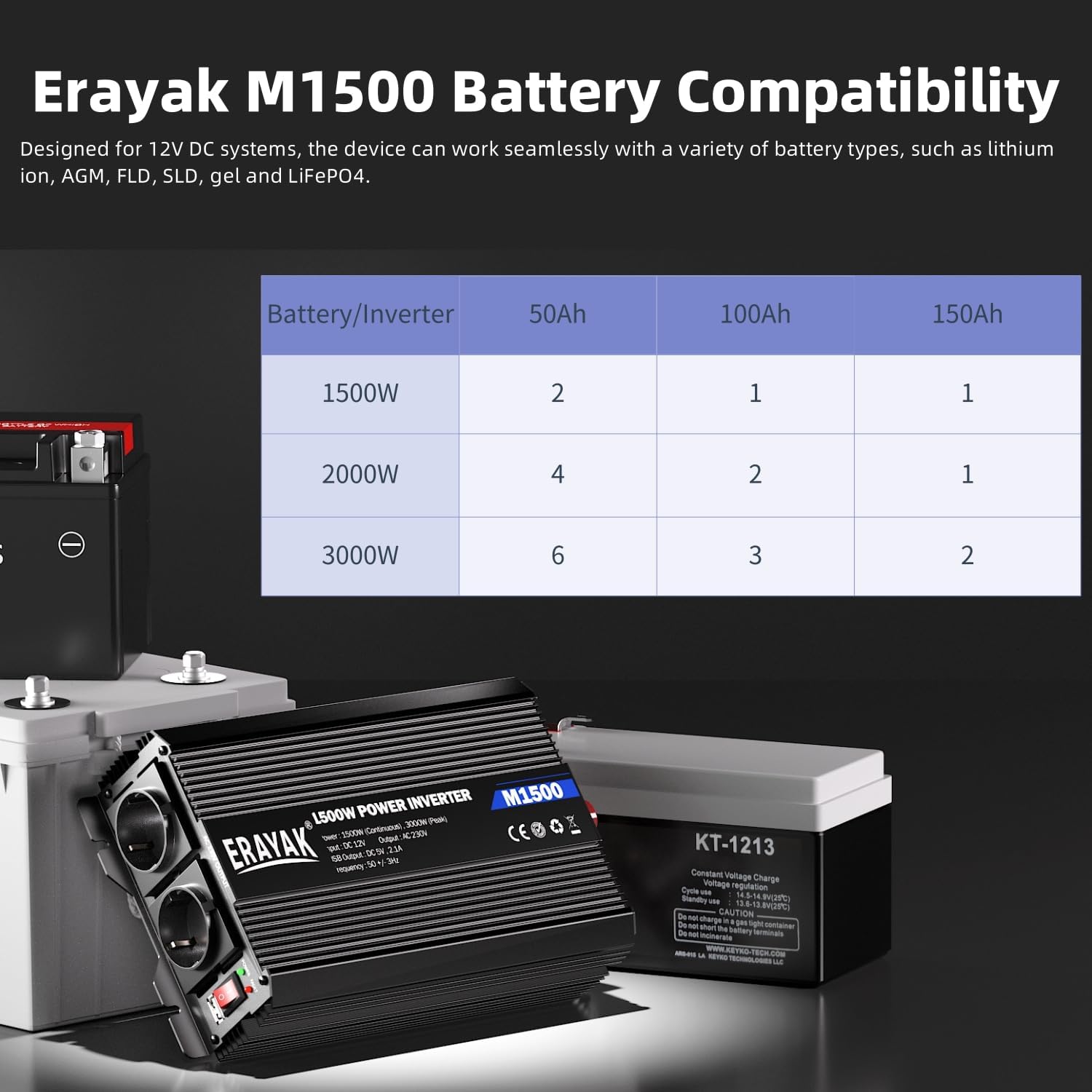
Figure 5: Battery compatibility information for the ERAYAK M1500 inverter.
9. Atilẹyin ọja ati Support
ERAYAK products are manufactured under strict quality standards. While specific warranty details may vary by region, ERAYAK is committed to providing reliable products and customer support.
If you experience any issues with your ERAYAK M1500 Power Inverter or require technical assistance, please contact ERAYAK customer support through your purchase platform or the official ERAYAK website. Please have your model number (M1500) and purchase details ready when contacting support.


