
1. Ifihan
The Focal Shape 50 is a versatile monitoring loudspeaker designed for professional audio environments. It offers extended low-frequency response and precise control, making it suitable for rooms up to 130 sq ft (12 sq m). This manual provides essential information for the proper setup, operation, and maintenance of your Shape 50 studio monitor.

olusin 1.1: Iwaju-ẹgbẹ view of the Focal Shape 50 Studio Monitor, showcasing its dark walnut finish and speaker components.
2. Package Awọn akoonu
Before proceeding with installation, please verify that all components are present in the packaging:
- Focal Shape 50 Studio Monitor (1 unit)
- Okun agbara
- Afowoyi Olumulo (iwe-ipamọ yii)
3. Eto
3.1 Ibi
The Shape 50 monitor is designed to be placed near a wall due to its port-less design. For optimal listening, position the monitor at a distance of approximately 30 inches (80 cm) from your listening position. Ensure the monitors are placed symmetrically in your room to achieve a balanced stereo image.
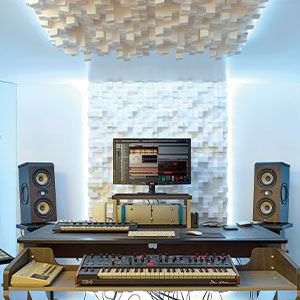
Olusin 3.1: Example of a studio setup with two Focal Shape 50 monitors positioned for optimal sound monitoring.
3.2 Awọn isopọ
Connect your audio source to the Shape 50 monitor using an RCA cable. Ensure all connections are secure before powering on the unit.
- Iṣawọle Olohun: Use the RCA input for connecting your audio interface or mixer.
- Agbara: Connect the provided power cord to the monitor's power inlet and then to a suitable electrical outlet.

Figure 3.2: Rear panel of the Focal Shape 50, showing the RCA input, power connection, and various adjustment controls.
3.3 Iṣagbesori
The Shape 50 includes threads for ceiling and wall mount fastening. Mounting accessories are not supplied and must be purchased separately. Consult a professional for proper installation of wall or ceiling mounts.
4. Awọn ilana Iṣiṣẹ
4.1 Titan / Pa a
To power on the monitor, ensure all audio connections are made, then connect the power cord and flip the power switch located on the rear panel. To power off, reverse this process.
4.2 Siṣàtúnṣe Eto
The Shape 50 features numerous settings on its rear panel for optimal integration into various acoustic environments and for accurate control of sound reproduction. These include adjustments for high-frequency, mid-frequency, and low-frequency response, allowing you to tailor the sound to your specific room and preferences.
4.3 Flexible Listening Position
The monitor's low directivity tweeter design allows for a flexible listening position, providing consistent sound quality even when slightly off-axis from the monitor.
5. Itọju
To ensure the longevity and optimal performance of your Focal Shape 50 monitors, follow these maintenance guidelines:
- Ninu: Use a soft, dry cloth to clean the exterior surfaces of the monitor. Avoid abrasive cleaners or solvents.
- Afẹfẹ: Ensure adequate airflow around the monitor to prevent overheating. Do not block the ventilation openings.
- Ayika: Operate the monitor in a stable environment, away from extreme temperatures, humidity, and direct sunlight.
6. Laasigbotitusita
If you encounter issues with your Focal Shape 50 monitor, refer to the following common troubleshooting steps:
- Ko si Ohun:
- Check if the monitor is powered on and the power cord is securely connected.
- Verify that the audio source is active and connected correctly to the monitor's input.
- Ensure the volume levels on both the monitor and the audio source are appropriately set.
- Ohun Yiyi:
- Reduce the input level from your audio source to prevent clipping.
- Check all cables for damage or loose connections.
- Ensure the monitor's rear panel settings are not causing excessive boosting of certain frequencies.
- Ariwo ìró tàbí ìró tí ń dún kíkankíkan:
- Rí i dájú pé gbogbo àwọn okùn ohùn ni a dáàbò bò dáadáa.
- Try connecting the monitor to a different power outlet, preferably on a different circuit.
- Ṣàyẹ̀wò àwọn ẹ̀rọ itanna tó wà nítòsí tó lè fa ìdènà.
If the issue persists after attempting these steps, please contact Focal customer support.
7. Awọn pato
| Ẹya ara ẹrọ | Sipesifikesonu |
|---|---|
| Brand | Idojukọ |
| Orukọ awoṣe | Apẹrẹ 50 |
| Nọmba awoṣe | 3544059801524DW001 |
| Agbọrọsọ Iru | Atẹle |
| Agbọrọsọ Agbara Ijade ti o pọju | 1000 Wattis |
| Idahun Igbohunsafẹfẹ | 35000 Hz |
| Asopọmọra Technology | RCA |
| Ipo Ijade Ohun | Sitẹrio, Agbegbe |
| Iṣagbesori Iru | Wall Mount (accessories not supplied) |
| Ohun elo apade | Wolinoti |
| Subwoofer Opin | 5 inches |
| Iwọn Iwọn Woofer | 5 inches |
| Àwọ̀ | Dudu Wolinoti |
| Awọn iwọn Nkan (D x W x H) | 9.5"D x 12.3"W x 7.5"H |
| Iwọn Nkan | 14.33 iwon |
| Orisun agbara | Okun Itanna |
| Nọmba ti Audio awọn ikanni | 2.0 |
| Awọn ẹrọ ibaramu | Foonuiyara, Tabulẹti, MP3 Player, Ojú-iṣẹ, Telifisonu, Pirojekito, Kọǹpútà alágbèéká |
8. atilẹyin ọja Information
The Focal Shape 50 Studio Monitor is covered by a 2-odun olupese ká atilẹyin ọja Láti ọjọ́ tí a rà á. Àtìlẹ́yìn yìí bo àwọn àbùkù nínú àwọn ohun èlò àti iṣẹ́ ọwọ́ lábẹ́ lílò déédéé. Kò bo ìbàjẹ́ tí ó wáyé nípasẹ̀ àìlòkulò, jàǹbá, àtúnṣe tí a kò fún ní àṣẹ, tàbí fífi sori ẹrọ tí kò tọ́.
Please retain your proof of purchase for warranty claims. For detailed warranty terms and conditions, refer to the official Focal webojula tabi kan si atilẹyin alabara.
9. Atilẹyin
For technical assistance, troubleshooting beyond this manual, or warranty inquiries, please contact Focal customer support through their official webojú-òpó wẹ́ẹ̀bù tàbí ìwífún ìbánisọ̀rọ̀ tí a pèsè pẹ̀lú ìwé ọjà rẹ.
Awọn orisun Ayelujara: Ṣabẹwo si Focal osise webaaye fun iforukọsilẹ ọja, FAQs, ati awọn ohun elo atilẹyin afikun.