
Ọrọ Iṣaaju
This manual provides comprehensive instructions for the safe and effective use of your Winplus AC55925-80 3-in-1 Emergency Socket Power Bank. This device combines a compact power bank, a USB car charger, and an emergency glass-breaking tool. Please read this manual thoroughly before operation and retain it for future reference.
Ọja Pariview
The Winplus 3-in-1 Emergency Socket Power Bank is designed for convenience and safety, offering multiple functionalities in a compact form factor.

Figure 1: Winplus 3-in-1 Emergency Socket Power Bank with key features highlighted.
Awọn eroja:
- Compact Power Bank: Provides portable power for charging devices.
- Ṣaja ọkọ ayọkẹlẹ USB: Plugs into a 12V car socket to charge devices and the power bank.
- Emergency Glass-Breaking Tool: Ti a ṣe pọ fun awọn ipo pajawiri.
- Ibudo Ijade USB: For connecting charging cables to devices.
- Ibudowọle USB Micro: For charging the internal power bank.
- Atọka LED: Ṣe afihan ipo gbigba agbara.

Nọmba 2: Alaye view of the device's ports.
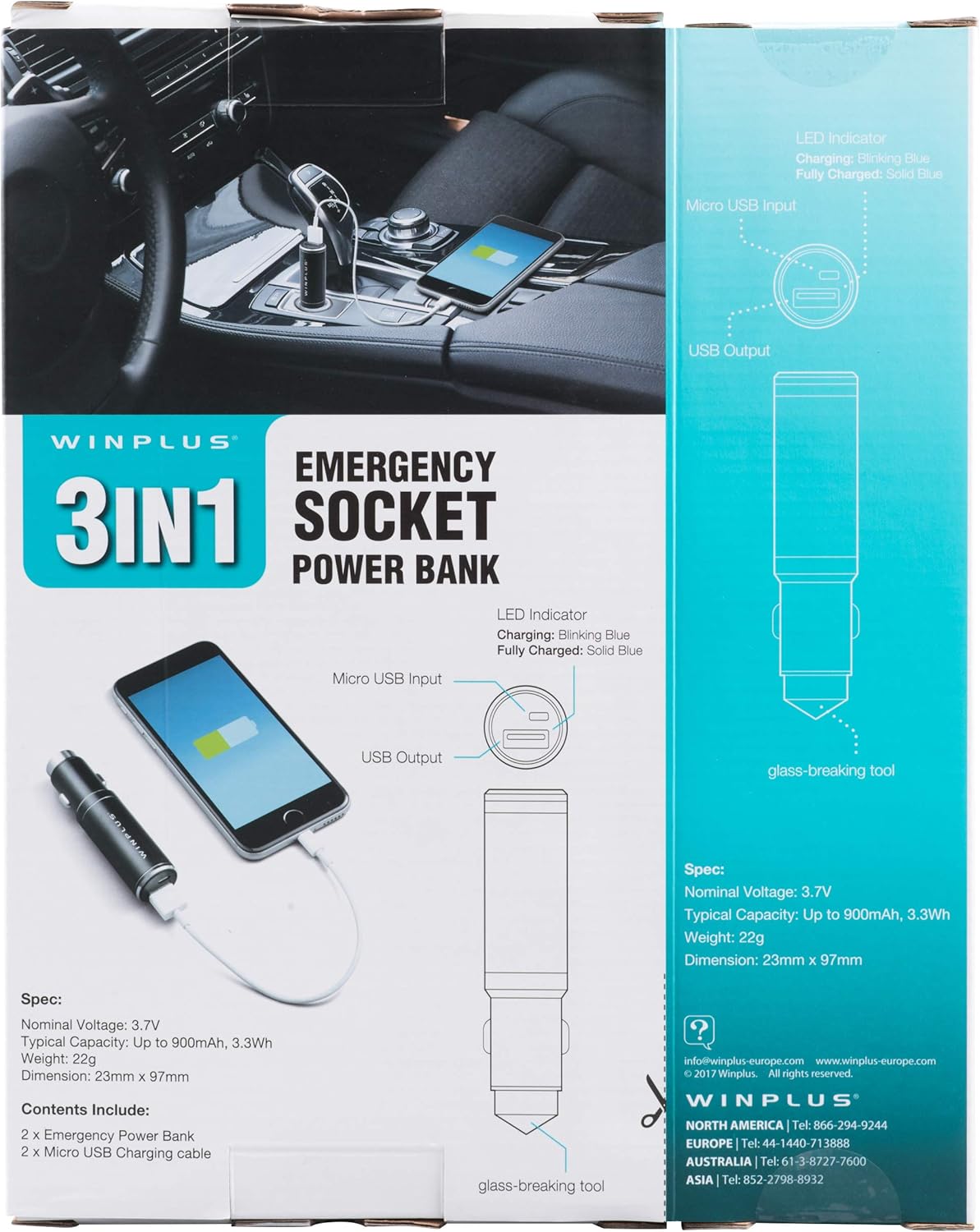
Figure 3: LED indicator status and glass-breaking tool location.
Ṣeto
Gbigba agbara akọkọ ti Bank Power:
- Locate the Micro USB Input port on the device.
- Connect the provided Micro USB charging cable to the Micro USB Input port.
- Connect the other end of the USB cable to a standard USB power source (e.g., a computer USB port, a wall adapter, or the car's 12V socket when used as a car charger).
- The LED indicator will blink blue during charging.
- Once fully charged, the LED indicator will turn solid blue.
Note: It is recommended to fully charge the power bank before its first use.
Awọn ilana Iṣiṣẹ
Lilo bi Banki Agbara to šee gbe:
- Ensure the power bank is charged (solid blue LED indicator).
- Connect your device's charging cable to the USB Output port on the power bank.
- Connect the other end of the cable to your mobile device (smartphone, tablet, etc.).
- Ile-ifowopamọ agbara yoo bẹrẹ gbigba agbara ẹrọ rẹ laifọwọyi.
Using as a USB Car Charger:
- Insert the Winplus 3-in-1 device into your vehicle's 12V accessory socket (cigarette lighter socket).
- Connect your device's charging cable to the USB Output port on the Winplus device.
- So opin miiran ti okun pọ si ẹrọ alagbeka rẹ.
- Your device will begin charging. The internal power bank will also charge simultaneously if it is not full.
Using the Emergency Glass-Breaking Tool:
The emergency glass-breaking tool is located at the tip of the device, opposite the USB ports. This tool is intended for emergency use only to break vehicle side windows in situations where occupants are trapped.
- In an emergency, firmly press the tip of the tool against a corner of a side window.
- Apply steady pressure until the spring-loaded mechanism activates and shatters the glass.
- Once the glass is broken, carefully clear any remaining shards before exiting the vehicle.
IKILO: Use this tool only in genuine emergencies. Misuse can cause serious injury. Keep out of reach of children.
Itoju
- Jẹ́ kí ẹ̀rọ náà gbẹ. Ọrinrin lè ba àwọn ẹ̀rọ inú jẹ́.
- Ma ṣe fi han si awọn iwọn otutu to gaju (gbona tabi otutu).
- Nu ẹrọ naa pẹlu asọ ti o tutu, ti o gbẹ. Maṣe lo awọn kẹmika ti o lewu tabi awọn afọmọ abrasive.
- Tọju ni itura, ibi gbigbẹ nigbati ko si ni lilo.
- Yago fun sisọ silẹ tabi tẹriba ẹrọ si awọn ipa to lagbara.
Laasigbotitusita
| Isoro | Owun to le Fa | Ojutu |
|---|---|---|
| Ẹrọ ko gba agbara. | Power bank is depleted. Cable jẹ aṣiṣe. USB port is dirty or damaged. | Gba agbara banki agbara. Gbiyanju okun gbigba agbara ti o yatọ. Clean the USB ports carefully or try another port. |
| Atọka LED ko tan ina. | Device is not connected to a power source. Device is fully charged (if solid blue). Ẹrọ naa jẹ aṣiṣe. | Ensure proper connection to a power source. Check if it's already solid blue. Kan si atilẹyin alabara ti awọn ọran ba tẹsiwaju. |
| Gbigba agbara lọra. | Cable is not suitable. Power source is low current. Device being charged has high power requirements. | Use a high-quality charging cable. Connect to a higher current USB adapter. This device provides 2.1A output, which is standard for fast charging most phones. |
Awọn pato
- Awoṣe: AC55925-80
- Oruko Voltage: 3.6V
- Agbara Aṣoju: Up to 2500 mAh, 9 Wh
- Iṣapọ Ẹẹkẹẹkẹ batiri: Litiumu polima
- Ijade USB: 5V / 2.1A
- Micro USB Input: 5V / 0.5A
- Awọn iwọn: 23mm x 127mm (approximate)
- Ìwọ̀n Nkan: 510 g (for the 2-pack)
- Orisi Asopọmọra: Micro USB (Input), USB Type-A (Output)
Alaye Aabo
- Ma ṣe tuka, ṣi, tabi ge idii batiri naa.
- Ma ṣe ṣi idii batiri si igbona tabi ina. Yago fun ibi ipamọ ni orun taara.
- Ma ṣe kukuru-yipo idii batiri kan. Ma ṣe fi awọn akopọ batiri pamọ lairotẹlẹ sinu apoti kan tabi duroa nibiti wọn le ṣe kukuru-yikasi ara wọn tabi ni kukuru nipasẹ awọn ohun elo irin miiran.
- Ma ṣe fi awọn akopọ batiri si mọnamọna.
- Ni iṣẹlẹ ti batiri jijo, maṣe gba laaye omi lati kan si awọ ara tabi oju. Ti o ba ti kan si, wẹ agbegbe ti o kan pẹlu ọpọlọpọ iye omi ki o wa imọran iṣoogun.
- Ma ṣe lo ṣaja eyikeyi yatọ si eyiti a pese fun lilo pẹlu ẹrọ naa.
- Jeki awọn akopọ batiri kuro ni arọwọto awọn ọmọde.
- Wa imọran iṣoogun lẹsẹkẹsẹ ti idii batiri ba ti gbe.
- Nigbagbogbo ra idii batiri ti o pe fun ohun elo naa.
- Jeki awọn akopọ batiri mọ ki o si gbẹ.
- Ma ṣe fi batiri silẹ lori idiyele gigun nigbati ko si ni lilo.
- Dispose of battery packs properly according to local regulations.
Atilẹyin ọja ati Support
For warranty information or technical support, please contact Winplus North America Inc. directly.
- Olupese: Winplus North America Inc
- Ibi iwifunni: Refer to product packaging or the official Winplus webAaye fun awọn alaye atilẹyin lọwọlọwọ julọ.
You can also visit the Winplus webOju opo wẹẹbu fun Awọn ibeere Nigbagbogbo ati alaye ọja afikun: www.winplus-europe.com