
1. Alaye Aabo
Please read and understand all safety instructions before using the Winplus LM55812-6/1 LED Folding Work Light. Failure to follow these instructions may result in electric shock, fire, or serious personal injury.
- Aabo Itanna: Ensure the power cord and plug are in good condition. Do not operate the light with a damaged cord or plug. Do not immerse the light in water or expose it to excessive moisture.
- LED Light Safety: Do not stare directly into the LED light source, as this may cause eye damage. Allow the light to cool before handling after extended use.
- Ibi: Place the work light on a stable, level surface. Do not block ventilation openings. Keep away from flammable materials.
- Lilo inu ile: This product is designed for indoor use. Avoid using in wet environments.
- Awọn ọmọde: Jeki kuro ni arọwọto awọn ọmọde.
2. Awọn ẹya Ọja
The Winplus LM55812-6/1 LED Folding Work Light offers versatile illumination and power solutions for various tasks.
- Multi-directional LED Panels: Adjustable panels allow for precise light direction to illuminate specific work areas.
- Awọn LED Imọlẹ Ultra: Provides a combined 2100 lumens of LED light with a 5000K cool white color temperature for clear visibility.
- Ibudo Agbara Apapo: Features dedicated power sockets and USB ports with built-in overload protection to power and charge devices.
- Iwapọ ati Apẹrẹ to gbe: Folds for easy carrying and storage, making it convenient for various job sites.
- Imọlẹ Adijositabulu: Offers options to adjust high/low brightness levels to suit different lighting needs.
3. Package Awọn akoonu
Jẹrisi pe gbogbo awọn ohun kan wa ninu package:
- Winplus LM55812-6/1 LED Folding Work Light
- Integrated Power Cord
- Afowoyi Olumulo (iwe-ipamọ yii)
4. Eto
Follow these steps to set up your Winplus LED Folding Work Light:
- Unfold the Light: Gently unfold the LED panels and the base stand to the desired position. The stand can be adjusted for floor mounting or used as a handle for portability.
- Ipo: Place the work light on a stable, flat surface. The adjustable stand allows for various angles to direct light where needed. The light can also be wall-mounted (mounting hardware not included).
- So agbara: So okùn agbara ti a ti sopọ mọ inu iṣan ina AC 120V boṣewa kan.
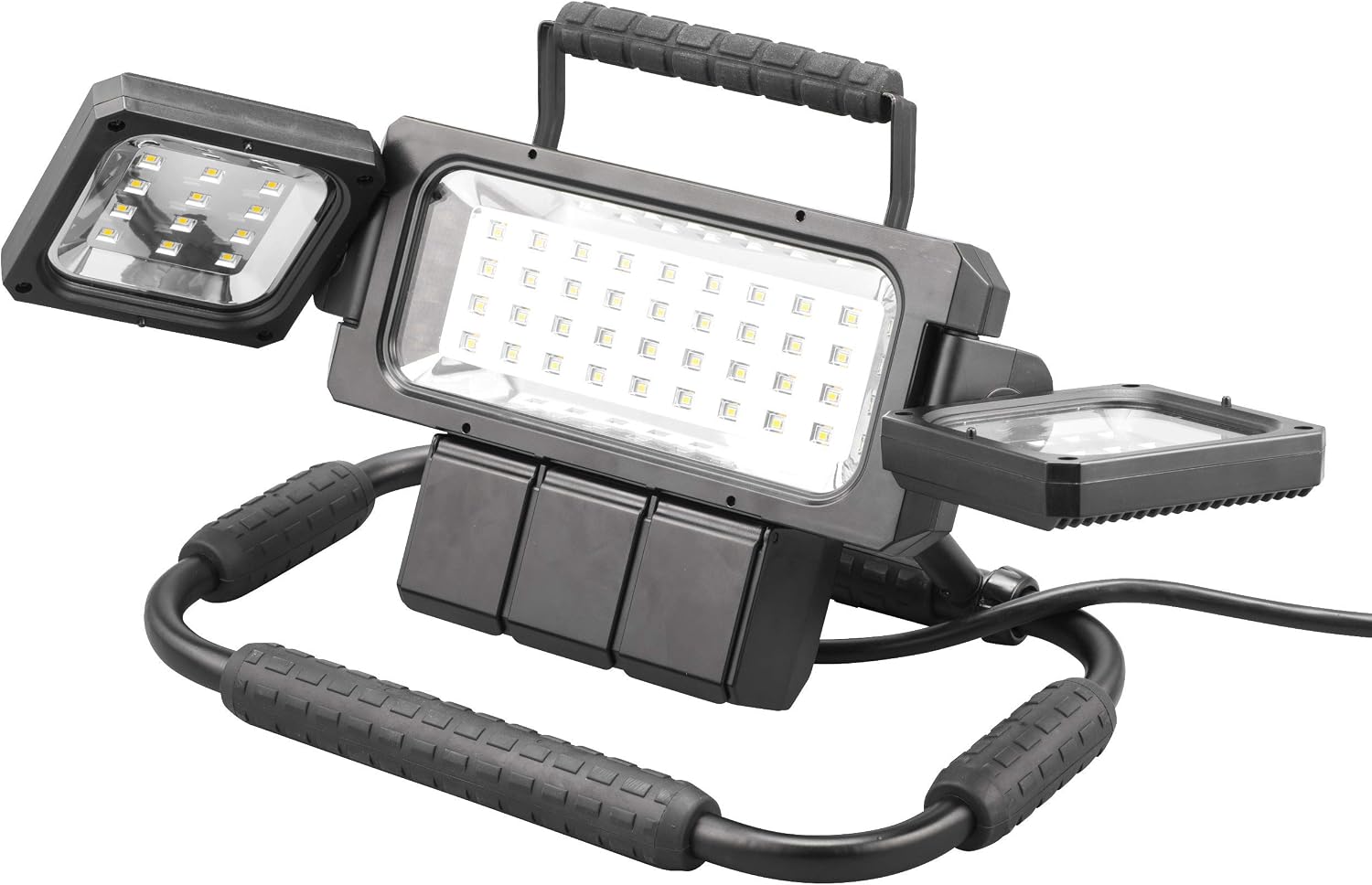
Image 1: The Winplus LED Folding Work Light fully unfolded, showcasing its main light panel and two adjustable side panels.
Video 1: Official product video demonstrating the features and usage of the Winplus LED Folding Work Light, including its adjustable panels and portability.
5. Awọn ilana Iṣiṣẹ
Operating your work light is straightforward:
- Titan/Apapa: Locate the master switch on the back of the main light unit. Flip the switch to the "ON" position to turn on the light, and to "OFF" to turn it off.
- Adjusting Light Panels: The two side LED panels can be rotated independently to direct light to specific areas. The main center panel provides broad illumination.
- Lilo Ibusọ Agbara:
- Awọn iṣan AC: The work light features two standard AC power outlets. Lift the protective covers and plug in your tools or other electrical devices.
- Awọn ibudo gbigba agbara USB: Two USB ports are available for charging mobile devices. Lift the protective cover and connect your USB charging cable.
Note: The power station includes built-in overload protection. If an overload occurs, disconnect devices and reset the light by cycling the master switch.

Aworan 2: Ẹyin view of the work light, highlighting the master power switch and the covered power outlets.

Image 3: A user demonstrating the power station feature, with tools plugged into the AC outlets and a phone charging via USB.
6. Itọju
Proper care ensures longevity of your work light:
- Ninu: Ge okun ina kuro ki o to nu. Lo okun ina ti o rọ, damp asọ lati mu ese si isalẹ awọn ode. Ma ṣe lo abrasive ose tabi epo.
- Ibi ipamọ: When not in use, fold the light into its compact form and store it in a dry, cool place away from direct sunlight and moisture.
- Itọju okun: Regularly inspect the power cord for any signs of damage. Do not wrap the cord tightly around the unit.

Image 4: The work light shown in its folded configuration, ready for compact storage or transport.
7. Laasigbotitusita
Ti o ba pade awọn ọran, tọka si awọn iṣoro ti o wọpọ ati awọn ojutu wọnyi:
| Isoro | Owun to le Fa | Ojutu |
|---|---|---|
| Imọlẹ ko tan. | Ko si agbara si ẹrọ naa. Master switch is OFF. Okun agbara ti bajẹ. | Rii daju pe okun agbara ti wa ni edidi ni aabo sinu iṣan-iṣẹ iṣẹ. Flip the master switch to the "ON" position. Inspect the power cord for damage; discontinue use if damaged. |
| Awọn ọna agbara tabi awọn ebute oko USB ko ṣiṣẹ. | Idaabobo apọju ti mu ṣiṣẹ. Light is not powered on. | Unplug all devices from the power station. Turn the master switch OFF, then ON again to reset. Ensure the master switch is in the "ON" position. |
| Ina flickers tabi dims. | Ipese agbara ti ko ni iduroṣinṣin. Ti abẹnu paati oro. | Try plugging the light into a different electrical outlet. Ti iṣoro naa ba wa, kan si atilẹyin alabara. |
8. Awọn pato
| Ẹya ara ẹrọ | Ẹ̀kúnrẹ́rẹ́ |
|---|---|
| Nọmba awoṣe | LM55812-6/1 |
| Brand | Winplus |
| Imọlẹ Orisun Orisun | LED |
| Ìmújáde ìmọ́lẹ̀ tó pọ̀ jùlọ | 2100 lumen |
| Iwọn otutu awọ | 5000K (Cool White) |
| Orisun agbara | Okun Itanna |
| Voltage | 120 folti |
| Wattage | 25 watt |
| Ohun elo | Irin |
| Iwọn Nkan | 5.2 iwon |
| Iṣagbesori Iru | Floor Mount (also portable/wall mountable) |
| Awọn irinše to wa | LED Folding work light |
9. Atilẹyin ọja & Atilẹyin
Atilẹyin ọja: This Winplus LM55812-6/1 LED Folding Work Light is covered by a 1-odun olupese ká atilẹyin ọja lati ọjọ ti o ra. Atilẹyin ọja yi ni wiwa awọn abawọn ninu awọn ohun elo ati iṣẹ ṣiṣe labẹ lilo deede.
Ohun ti a ko bo: The warranty does not cover damage resulting from misuse, abuse, accident, unauthorized repairs or modifications, or normal wear and tear.
Atilẹyin: For warranty claims, technical assistance, or any questions regarding your product, please contact Winplus customer support. Refer to the product packaging or the official Winplus webojula fun awọn julọ lọwọlọwọ alaye olubasọrọ.