
Ọrọ Iṣaaju
This manual provides detailed instructions for the setup, operation, and maintenance of your SUNBA 4K 8MP PTZ Camera, model 405-D20X 4K-P. Please read this manual thoroughly before using the product to ensure proper functionality and safety.
1. Eto ati fifi sori
1.1 Package Awọn akoonu
Daju pe gbogbo awọn nkan wa ninu apo rẹ:
- SUNBA 4K 8MP PTZ Camera (Model 405-D20X 4K-P)
- Wall Bracket (plastic)
- 12V2A Power Adapter (PoE adapter is not included)
- Itọsọna olumulo
- CD-Rom (for software/drivers)
1.2 Iṣagbesori Kamẹra
The camera is designed for outdoor use and comes with a wall bracket. Ensure the mounting surface is sturdy enough to support the camera's weight (approximately 5.81 pounds).

Image: The SUNBA 405-D20X 4K-P PTZ camera mounted on a wall bracket, showing its dome shape and lens array.
The camera features a compact 4-inch design. For optimal performance, mount the camera in a location that provides a clear field of view and is within range of your network connection.
1.3 Power and Network Connection (PoE+)
This camera supports Power over Ethernet Plus (PoE+), specifically 802.3at, which requires at least a 25W single-port adapter. PoE+ allows a single Ethernet cable to deliver both network connectivity and power to the camera, simplifying installation.
- Connect an Ethernet cable from your PoE+ switch or injector to the camera's RJ45 Network Port.
- Alternatively, use the included 12V DC Power Adapter for power and a separate Ethernet cable for network connection if PoE+ is not available.
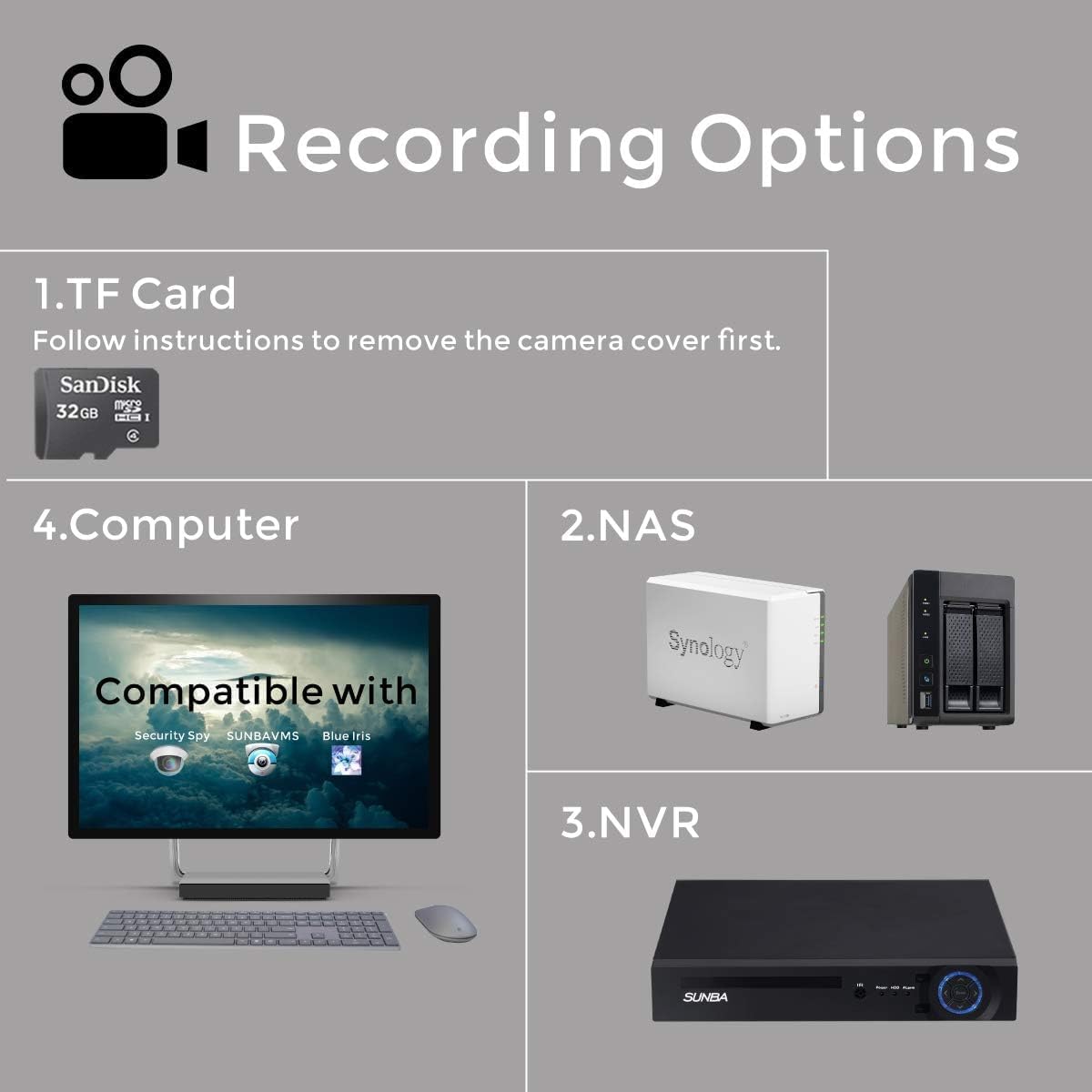
Image: A diagram illustrating the PoE+ connection setup, showing the camera connected to a router via an Ethernet cable and a PoE+ switch/injector.
The camera also includes an audio interface for two-way audio functionality.
1.4 Initial Configuration and Remote Access
After connecting the camera, you can access it remotely for live viewing and motion alerts. The camera supports P2P remote viewing via smartphone apps (iOS/Android), web access (Chrome, Internet Explorer), and desktop access (complimentary VMS client for PC & Mac users).
- Refer to the included CD-Rom or the manufacturer's website for the VMS client software and detailed setup instructions for remote access.
- The camera is compatible with Blue Iris, QNAP, and Security Spy. For Blue Iris, use SUNBA: H.264/H.265 34567.

Image: A graphic displaying various recording options including TF Card, NAS, NVR, and Computer, highlighting compatibility with Security Spy, SUNBA VMS, and Blue Iris.
2. Awọn ilana Iṣiṣẹ
2.1 Pan, Tilt, and Zoom (PTZ) Functions
The 405-D20X 4K-P is a fast-speed PTZ dome camera, offering extensive coverage:
- Akara: 360-ìyí yiyi.
- Tẹ: 90 degrees downward and an additional 5 degrees upward.
- Sun-un: 20x optical zoom (2.8~55.4 degrees viewing angle) for detailed observation of distant objects.
Control these functions via the smartphone app, web interface, or VMS client. The PTZ speed can reach up to 90 degrees per second.

Image: A comparison showing a wide view ati ki o kan sun-ni view (20x optical zoom) of a distant building, demonstrating the camera's zoom capabilities.
Video: An official product video from SUNBA demonstrating the 20x optical zoom and pan-tilt capabilities of the camera, focusing on its performance for home and small business surveillance.
Ìpinnu 2.2 4K Ultra HD
The camera features a 1/2.8" sensor, delivering 4K Ultra HD resolution (8MP effective still resolution) for clear and detailed images. This high resolution allows for capturing more details in your surveillance footage.

Image: A visual comparison demonstrating the increased detail captured by 4K Ultra HD resolution compared to lower resolutions like 5MP, 3MP, and 1080P, showing a house and sidewalk.
2.3 Night Vision
Equipped with IR-Cut infrared night vision, the camera provides clear visibility up to 328 feet (100 meters) in low-light conditions. The automatic day/night switch ensures continuous monitoring. The laser infrared LED is IEC 60825-1 certified for safety.

Image: A split image showing the same outdoor scene during the day (color) and at night (black and white infrared), demonstrating the camera's night vision capabilities.
2.4 Two-Way Audio and Storage
The camera supports two-way audio, allowing for communication through the camera. It also features a built-in TF card slot for local storage. For network storage, the camera is compatible with Network Attached Storage (NAS) and Network Video Recorders (NVRs).
The camera utilizes H.265 HEVC video compression, which reduces bandwidth and storage requirements by up to 50% when used with Blue Iris, VMS Client, or Sunba H.265 NVRs. It is backwardly compatible with H.264 supported software/NVRs.
3. Itọju
3.1 Ninu kamẹra
To ensure optimal image quality, regularly clean the camera lens and dome. Use a soft, lint-free cloth and a mild cleaning solution. Avoid abrasive materials or harsh chemicals that could damage the lens coating or housing.
3.2 Ayika riro
The camera has an IP66 international protection rating, indicating it is dust-tight and protected against powerful water jets. While designed for outdoor use, extreme weather conditions can affect performance. Ensure proper installation to prevent water accumulation around connections.
3.3 famuwia imudojuiwọn
Periodically check the SUNBA official website for firmware updates. Keeping your camera's firmware up-to-date ensures access to the latest features, security enhancements, and bug fixes. Follow the instructions provided with the firmware update carefully.
4. Laasigbotitusita
This section addresses common issues you might encounter with your SUNBA PTZ camera.
4.1 Ko si Aworan / Fidio kikọ sii
- Ṣayẹwo Agbara: Ensure the camera is receiving power, either via PoE+ or the 12V DC adapter. Verify the PoE+ injector/switch is functioning correctly.
- Isopọ nẹtiwọki: Confirm the Ethernet cable is securely connected to both the camera and your network device (router/switch). Check network status indicators.
- Adirẹsi IP: Verify the camera's IP address is correctly configured and accessible on your network. Use the VMS client or a network scanner to find the camera's IP.
- Sọfitiwia/Ohun elo: Rii daju rẹ viewing software (VMS client, browser, mobile app) is correctly configured and up-to-date.
4.2 PTZ Functions Not Responding
- Yiyipo Agbara: Disconnect and reconnect power to the camera.
- Iṣakoso sọfitiwia: Ensure you are using the correct PTZ controls within your viewsọfitiwia.
- Idaduro Nẹtiwọọki: High network latency can cause delays in PTZ commands. Check your network speed.
4.3 Aworan Didara
- Lẹnsi mimọ: Clean the camera lens and dome as described in the Maintenance section.
- Awọn Eto ipinnu: Verify the video resolution settings in your camera's configuration. Ensure it is set to 4K (8MP) if desired.
- Imọlẹ: Ensure adequate lighting for optimal image quality, especially during the day. For night vision, confirm IR LEDs are active.
4.4 Tun Ọrọigbaniwọle pada
If you forget your camera's password, contact SUNBA customer support for assistance. A factory reset may be required, which typically involves specific procedures provided by the manufacturer.
5. Awọn pato
| Ẹya ara ẹrọ | Ẹ̀kúnrẹ́rẹ́ |
|---|---|
| Orukọ awoṣe | 405-D20X 4K-P |
| inu ile / ita gbangba Lilo | Ita gbangba |
| Ipinnu Yaworan fidio | 4K (Ìpinnu Iduro Iduro 8MP to munadoko) |
| Sun-un Optical | 20x |
| Pan / Tẹ Range | 360 Degrees (Pan), 90 Degrees Downward + 5 Degrees Upward (Tilt) |
| Ibiti Iran Night | Titi di awọn ẹsẹ 328 |
| Asopọmọra Technology | Ethernet (Wired/PoE+) |
| Orisun agbara | Corded Electric (12V DC) or PoE+ (802.3at) |
| Ohun elo | Aluminiomu |
| International Idaabobo Rating | IP66 |
| Awọn iwọn (L x W x H) | 8 x 12.2 x 7.5 inches |
| Iwọn Nkan | 5.81 iwon |
| Fidio funmorawon | H.265 HEVC (backward compatible with H.264) |
| Awọn ẹrọ ibaramu | ONVIF, Blue Iris, QNAP, Security Spy |
6. Atilẹyin ọja ati Support
6.1 Atilẹyin ọja
Your SUNBA 4K 8MP PTZ Camera comes with a 2-year US manufacturer's warranty. This warranty covers defects in materials and workmanship under normal use. Please retain your proof of purchase for warranty claims.
For detailed warranty terms and conditions, refer to the documentation included with your product or visit the official SUNBA webojula.
6.2 Onibara Support
If you require technical assistance, have questions about your product, or need to initiate a warranty claim, please contact SUNBA customer support. You can often find contact information on the manufacturer's webaaye tabi nipasẹ alagbata ti o ti ra ọja naa.
O tun le ṣàbẹwò awọn SUNBA Store fun afikun oro ati ọja alaye.