
1. Ifihan ati Loriview
Thank you for choosing the KLH Bassbite-II Powered Subwoofer. This unit is designed to enhance the low-frequency response of your existing audio system, providing deep, rich bass for an immersive listening experience. This manual provides essential information for the safe and effective operation of your subwoofer.
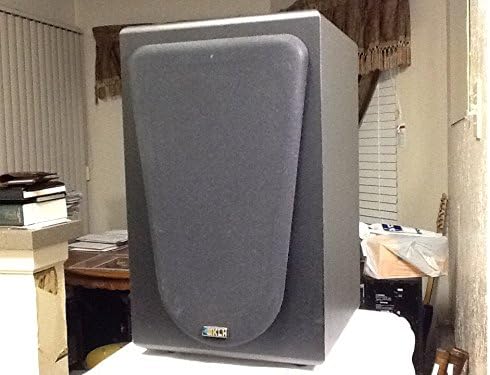
olusin 1.1: Iwaju view of the KLH Bassbite-II Powered Subwoofer with grille.
This image shows the front of the KLH Bassbite-II subwoofer, featuring its dark gray cabinet and a removable front grille that covers the speaker driver. The KLH logo is visible at the bottom of the grille.
2. Awọn Ilana Aabo pataki
Please read and follow all safety instructions before operating the subwoofer to prevent electric shock, fire, or injury.
- Ka Awọn ilana: Ka gbogbo ailewu ati awọn ilana iṣiṣẹ ṣaaju ṣiṣe ohun elo naa.
- Daduro Awọn ilana: Tọju aabo ati awọn ilana iṣiṣẹ fun itọkasi ọjọ iwaju.
- Awọn ikilọ Tẹtisi: Fojusi si gbogbo awọn ikilo lori ohun elo ati ninu awọn ilana ṣiṣe.
- Tẹle Awọn ilana: Tẹle gbogbo iṣẹ ṣiṣe ati lo awọn ilana.
- Omi ati Ọrinrin: Maṣe lo ohun elo yii nitosi omi.
- Ninu: Mọ pẹlu asọ gbigbẹ nikan.
- Afẹfẹ: Ma ṣe dina eyikeyi awọn ṣiṣi atẹgun. Fi sori ẹrọ ni ibamu pẹlu awọn ilana ti olupese.
- Ooru: Maṣe fi sori ẹrọ nitosi awọn orisun ooru gẹgẹbi awọn imooru, awọn iforukọsilẹ ooru, awọn adiro, tabi awọn ohun elo miiran (pẹlu ampliifiers) ti o gbe ooru jade.
- Idaabobo okun agbara: Dabobo okun agbara lati ma rin lori tabi pin, ni pataki ni awọn pilogi, awọn ohun elo irọrun, ati aaye nibiti wọn ti jade kuro ninu ohun elo naa.
- Mànàmáná: Yọọ ohun elo yi nigba iji manamana tabi nigba lilo fun igba pipẹ.
- Ṣiṣẹ: Tọkasi gbogbo iṣẹ si awọn oṣiṣẹ iṣẹ ti o peye. Iṣẹ nilo nigbati ohun elo ba ti bajẹ ni ọna eyikeyi, gẹgẹbi okun ipese agbara tabi plug ti bajẹ, omi ti ta silẹ tabi awọn nkan ti ṣubu sinu ẹrọ, ohun elo naa ti farahan si ojo tabi ọrinrin, ko ṣiṣẹ deede. , tabi ti lọ silẹ.
3. Package Awọn akoonu
Jọwọ ṣayẹwo package fun awọn nkan wọnyi:
- KLH Bassbite-II Powered Subwoofer
- Power Cable (attached)
Ti awọn ohun kan ba nsọnu tabi bajẹ, jọwọ kan si alagbata rẹ.
4. Eto
4.1. Ifiweranṣẹ
The placement of your subwoofer can significantly affect its sound performance. Experiment with different locations to find the best bass response for your room.
- Ibi Igun: Placing the subwoofer in a corner of the room can often maximize its output and provide the most impactful bass.
- Nitosi Awọn Agbọrọsọ Iwaju: Placing the subwoofer near your main front speakers can help create a more seamless soundstage.
- Yago fun Awọn Idilọwọ: Ensure the subwoofer is not placed in an enclosed cabinet or directly against a wall that might block its port (if applicable) or restrict airflow.
4.2. Awọn isopọ
The KLH Bassbite-II subwoofer offers multiple connection options to integrate with your audio system. Ensure all components are turned off before making any connections.

Figure 4.1: Rear panel of the KLH Bassbite-II Subwoofer.
This image displays the rear panel of the subwoofer, featuring the speaker level inputs/outputs ("FROM AMPLIFIER", "TO SPEAKERS"), RCA low-level inputs, a power switch, and a volume control knob. The attached power cord is also visible.

Figure 4.2: Close-up of the connection panel.
A alaye view of the connection panel, highlighting the speaker wire terminals (red and black clips) for "FROM AMPLIFIER" and "TO SPEAKERS", and the RCA jacks for "LOW LEVEL" input. The "POWER" switch and "VOLUME" knob are also clearly visible.
Option 1: Low-Level (RCA) Connection (Recommended for Receivers with Subwoofer Output)
- Connect an RCA cable from the "SUBWOOFER OUT" or "LFE OUT" jack on your receiver/amplifier to the "LOW LEVEL" (L or R) input on the Bassbite-II subwoofer. If your receiver has a single LFE output, connect it to either the L or R input on the subwoofer.
- Ensure the subwoofer's power switch is in the OFF position.
- Plug the subwoofer's power cord into a standard 120 VAC, 60 Hz electrical outlet.
Option 2: Speaker Level Connection (For Amplifiers without Subwoofer Output)
- Connect speaker wires from the "SPEAKER OUT" terminals of your amplifier/receiver to the "FROM AMPLIFIER" speaker level inputs on the Bassbite-II subwoofer. Ensure correct polarity (+ to + and - to -).
- Connect speaker wires from the "TO SPEAKERS" outputs on the Bassbite-II subwoofer to your main left and right speakers. Again, ensure correct polarity.
- Ensure the subwoofer's power switch is in the OFF position.
- Plug the subwoofer's power cord into a standard 120 VAC, 60 Hz electrical outlet.
5. Awọn ilana Iṣiṣẹ
5.1. Agbara lori / Paa
- To turn on the subwoofer, flip the "POWER" switch located on the rear panel to the ON position.
- To turn off the subwoofer, flip the "POWER" switch to the OFF position.
5.2. Siṣàtúnṣe iwọn didun
The "VOLUME" knob on the rear panel controls the output level of the subwoofer.
- Yi bọtini naa pada si apa aago lati mu iwọn didun pọ si.
- Yi bọtini naa pada ni ọna idakeji-ago lati dinku iwọn didun naa.
- Start with the volume at a low setting and gradually increase it until the bass blends seamlessly with your main speakers without overpowering them.
6. Itọju
Proper care will ensure the longevity and performance of your KLH Bassbite-II Subwoofer.
- Ninu: Use a soft, dry cloth to clean the cabinet. Do not use abrasive cleaners, waxes, or solvents, as they may damage the finish.
- Eruku: Regularly dust the subwoofer to prevent accumulation, especially around the rear panel connections and ventilation areas.
- Ayika: Yẹra fún fífi subwoofer sí àwọn iwọn otutu tó le koko, ọriniinitutu, tàbí oòrùn tààrà.

Figure 6.1: Subwoofer with grille removed.
This image shows the KLH Bassbite-II subwoofer with its front grille detached, revealing the bass reflex port located at the bottom of the front baffle. This port helps enhance the low-frequency output.
7. Laasigbotitusita
Ti o ba ni iriri awọn ọran pẹlu subwoofer rẹ, tọka si awọn iṣoro ti o wọpọ ati awọn ojutu wọnyi:
| Isoro | Owun to le Fa | Ojutu |
|---|---|---|
| Ko si Agbara | Kò sí okùn agbára tí a so pọ̀; Agbára tí a ti pa; Ibùdó ìtajà kò ṣiṣẹ́. | Ensure power cord is securely plugged into the subwoofer and a working electrical outlet. Flip the power switch to ON. Test the outlet with another device. |
| Ko si Ohun | Incorrect connections; Volume too low; Source device not sending signal. | Check all audio connections (RCA or speaker wires) for proper seating and polarity. Increase the subwoofer's volume knob. Ensure your receiver/amplifier is powered on and sending an audio signal. |
| Distorted or Boomy Sound | Volume too high; Improper placement; Source signal distortion. | Decrease the subwoofer's volume. Experiment with different placement locations (refer to Section 4.1). Check if the audio source itself is distorted. |
| Ariwo Humming | Ground loop; Nearby electrical interference. | Try plugging the subwoofer into a different electrical outlet (preferably on a different circuit). Ensure all audio cables are high quality and properly shielded. Avoid running audio cables parallel to power cables. |
8. Awọn pato
| Orukọ awoṣe | Bassbite-II |
| Nọmba awoṣe | E206825 (KLH Bassbite-II) |
| Brand | KLH |
| Agbọrọsọ Iru | Agbara Subwoofer |
| O pọju Agbọrọsọ o wu Power | 40 Wattis |
| Orisun agbara | Corded Electric (120 VAC, 60 Hz) |
| Awọn iwọn (H x W x D) | 38.1 cm x 22.9 cm x 26.7 cm (15 inches x 9 inches x 10.5 inches) |
| Iwọn | 6.35 kg (14 lbs) |
| Awọn ẹrọ ibaramu | Video Game Consoles, Home Theater Systems, Televisions |
9. Atilẹyin ọja ati Support
For specific warranty information, please refer to the documentation provided by your retailer at the time of purchase. Manufacturer warranty details are typically included with new products.
If you require technical support or have questions regarding your KLH Bassbite-II Subwoofer, please contact your original retailer or visit the official KLH Audio Systems webojula fun support oro.
Note: The product description mentions a "Two weeks Return/Refund Guarantee" which refers to a seller's return policy and not a manufacturer's warranty.