
1. Ifihan
This manual provides comprehensive instructions for the safe and effective use of the PCE Instruments PCE-170 A Light Meter. This device is designed for measuring illuminance (lux or foot-candles) in various environments, such as offices, factories, and outdoor settings. It features a wide measurement range, fast response time, and a compact design for ease of use.
Jọwọ ka iwe afọwọkọ yii daradara ṣaaju ṣiṣiṣẹ ẹrọ naa ki o da duro fun itọkasi ọjọ iwaju.
2. Alaye Aabo
Observe the following safety precautions to prevent injury and avoid damage to the device:
- Ma ṣe fi ẹrọ naa han si awọn iwọn otutu to gaju, ọriniinitutu, tabi imọlẹ orun taara.
- Yago fun awọn gbigbọn to lagbara tabi awọn ipa.
- Má ṣe gbìyànjú láti ṣí tàbí ṣe àtúnṣe sí ẹ̀rọ náà. Tọ́ka gbogbo iṣẹ́ ìtọ́jú náà sí àwọn òṣìṣẹ́ tó mọ̀ nípa rẹ̀.
- Keep the light sensor clean and free from obstructions to ensure accurate readings.
- Yọ batiri kuro ti ẹrọ naa ko ba ni lo fun igba pipẹ lati ṣe idiwọ jijo.
- Sọ awọn batiri ati ẹrọ naa sọnu ni ibamu si awọn ilana agbegbe.
3. Ọja Ipariview
The PCE-170 A Light Meter consists of a main unit with a display and control buttons, and an integrated light sensor.

Nọmba 1: Iwaju view of the PCE-170 A Light Meter, showing the display, control buttons, and light sensor at the top.
3.1 irinše
- Sensọ Imọlẹ: Located at the top of the device, protected by a white dome. This silicon photodiode measures incident light.
- Ifihan LCD: A 5-digit display showing measurement values, units (lux/fc), and function indicators (e.g., AUTO RANGE, HOLD, MIN, MAX).
- Bọtini Agbara (Titan/Pa): Tan ẹrọ naa si tan tabi pa.
- Bọtini CAL: Used for zero adjustment.
- Bọtini Dimu: Didi kika lọwọlọwọ lori ifihan.
- fc/lx Button: Toggles between foot-candle (fc) and lux (lx) measurement units.
- Bọtini RANGE: Manually selects measurement ranges or activates auto-ranging.
- Abala Batiri: Located at the rear, houses the 9V battery.

Nọmba 2: Sun mo tipetipe view of the LCD display, showing a reading of "534 lx" and "AUTO RANGE 4 000".
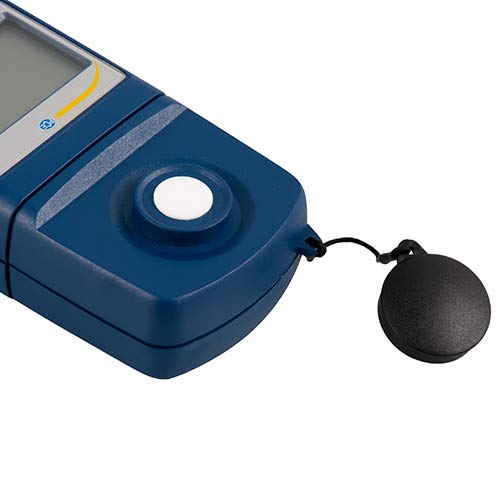
Nọmba 3: Alaye view of the light sensor at the top of the device, with its protective cap removed.
4. Eto
4.1 Fifi sori batiri
- Wa ideri iyẹwu batiri ni ẹhin ẹrọ naa.
- Slide the cover open or unscrew it, depending on the model.
- Insert one 9V battery, observing the correct polarity (+/-).
- Rọpo ideri iyẹwu batiri ni aabo.
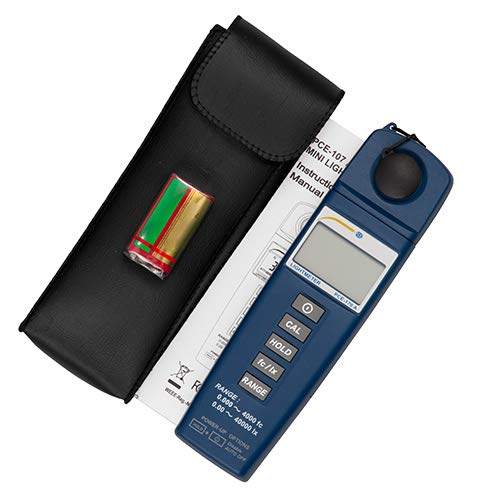
Nọmba 4: The PCE-170 A Light Meter shown with its carrying case and the included 9V battery, ready for installation.
4.2 Ibẹrẹ Agbara-On
Tẹ awọn Agbara button to turn on the device. The display will illuminate and show a reading. If the battery symbol appears, replace the battery.
5. Awọn ilana Iṣiṣẹ
5.1 Gbigba Idiwon
- Tan-an ẹrọ nipa lilo awọn Agbara bọtini.
- Ensure the light sensor is clean and unobstructed.
- Position the light sensor at the location where illuminance is to be measured. Ensure the sensor is facing the light source directly for accurate readings.
- The current illuminance value will be displayed on the LCD.

Nọmba 5: A user measuring light levels in an office environment with the PCE-170 A Light Meter.
5.2 Changing Measurement Units (fc/lx)
Tẹ awọn fc/lx button to toggle between foot-candles (fc) and lux (lx) units. The selected unit will be indicated on the display.
5.3 Dimu Išė
Tẹ awọn DIMU bọ́tìnì láti dì kíkà tó wà lórí ìbòjú náà. Tẹ̀ ẹ́ lẹ́ẹ̀kan síi láti tú ìdúró náà sílẹ̀ kí o sì tún bẹ̀rẹ̀ àwọn ìwọ̀n tó wà láàyè.
5.4 Zero Adjustment (CAL)
Lati ṣe atunṣe odo:
- Place the light sensor in a completely dark environment (e.g., cover it with the protective cap or place it in a dark box).
- Tẹ awọn CAL button. The display should show "0.00" or a value very close to zero.
- If the display does not show zero, repeat the process.
5.5 Range Yiyan
The device typically operates in auto-ranging mode. To manually select a range or cycle through available ranges, press the RANGE button. The display will indicate the active range. Press and hold the RANGE button to return to auto-ranging mode.
5.6 Min/Max Function (Power-Up Option)
The PCE-170 A supports Min/Max recording. To activate this feature, refer to the power-up options indicated on the device label (e.g., press and hold a specific button during power-on). This function records the minimum and maximum illuminance values detected during a measurement session.
6. Itọju
6.1 Ninu
Wipe the device with a soft, dry cloth. Do not use abrasive cleaners or solvents. Keep the light sensor clean and free of dust or smudges, as this can affect measurement accuracy.
6.2 Ibi ipamọ
When not in use, store the PCE-170 A Light Meter in its carrying case in a cool, dry place, away from direct sunlight and extreme temperatures. Remove the battery if storing for extended periods.
7. Laasigbotitusita
| Isoro | Owun to le Fa | Ojutu |
|---|---|---|
| Ẹrọ ko tan. | Batiri ti ku tabi ti ko tọ. | Ṣayẹwo polarity batiri tabi ropo rẹ pẹlu batiri 9V tuntun. |
| Àfihàn fi "OL" (Overload) hàn. | Light intensity exceeds the current measurement range. | Switch to a higher measurement range using the RANGE button, or move to a less intensely lit area. |
| Awọn kika ti ko pe. | Dirty sensor, incorrect zero adjustment, or sensor not facing light source correctly. | Clean the sensor, perform zero adjustment in darkness, and ensure the sensor is properly oriented. |
| Ifihan ti ṣofo tabi yiyi. | Batiri kekere. | Rọpo batiri 9V naa. |
8. Awọn pato
| Paramita | Iye |
|---|---|
| Awọn sakani wiwọn | 0.00 ... 40,000 lux / 0.000 ... 4000 fc |
| Ipinnu | 0.01 lux / 0.001 fc |
| Yiye | ±3% of measurement value + 5 digits |
| Atọka apọju | "OL" |
| Oṣuwọn Iwọnwọn | Gbogbo 2 aaya |
| Awọn iwọn otutu ti nṣiṣẹ | 0 ... 40°C / 32 ... 104°F |
| Sensọ ina | Silicon photodiode, corrected cosine angle |
| Ifihan | 5-nọmba LCD |
| Orisun agbara | Batiri 9V (pẹlu) |
| Awọn iwọn | 33 x 54 x 196 mm / 1.3 x 2.1 x 7.7 ninu |
| Iwọn | 180 g / <1 lb (approx. 9.17 ounces) |
8.1 Ifijiṣẹ Dopin
The standard delivery package includes:
- 1 x PCE-170 A Lux Meter
- 1 x 9V batiri
- 1 x Apo gbigbe
- 1 x Ìwé ìtọ́nisọ́nà olùlò (ìwé yìí)
9. Atilẹyin ọja ati Support
PCE Instruments provides a warranty for this product against defects in materials and workmanship. For specific warranty terms and conditions, please refer to the warranty card included with your purchase or visit the official PCE Instruments website. For technical support, service, or calibration inquiries, please contact PCE Instruments customer service.
PCE Instruments US: Ṣabẹwo Ile-itaja