
Uncaged Ergonomics RUwbk
Uncaged Ergonomics Rise Up Electric Standing Desk Instruction Manual
Model: RUwbk
Ọja Pariview
The Uncaged Ergonomics Rise Up Electric Standing Desk is designed to provide a seamless transition between sitting and standing positions, promoting a healthier and more dynamic work environment. This desk features a robust dual-motor system, anti-collision technology, and programmable memory settings for personalized height adjustments. It is built with a durable, one-piece bamboo desktop and a sturdy alloy steel frame, engineered for long-lasting performance.

Image: The Rise Up Electric Standing Desk, showcasing its spacious black bamboo desktop and white frame, equipped with dual monitors for a complete workstation setup.
- Eto Mọto Meji: Ensures smooth, quiet, and efficient height adjustments.
- Ibiti Giga Atunṣe: From 23.6 inches to 49.2 inches, accommodating various user heights and preferences.
- Imọ-ẹrọ Anti-ijamba: Automatically stops and reverses if an obstruction is detected during movement, enhancing safety.
- Eto Iranti: Four programmable height presets for quick and convenient adjustments.
- Ikole ti o tọ: Features a solid 60x30 inch bamboo desktop and a robust alloy steel frame, supporting up to 250 lbs.
Eto ati Apejọ
Your Uncaged Ergonomics Rise Up Electric Standing Desk requires assembly. All necessary tools are included in the package to facilitate a straightforward setup process. Please follow the detailed instructions provided in the separate assembly guide for step-by-step installation.
Key Assembly Components:
- Electric Standing Desk Frame (Alloy Steel)
- 60x30 inch Bamboo Desktop
- Control Panel/Keypad
- Power Adapter ati Cables
- Apejọ Hardware ati Irinṣẹ
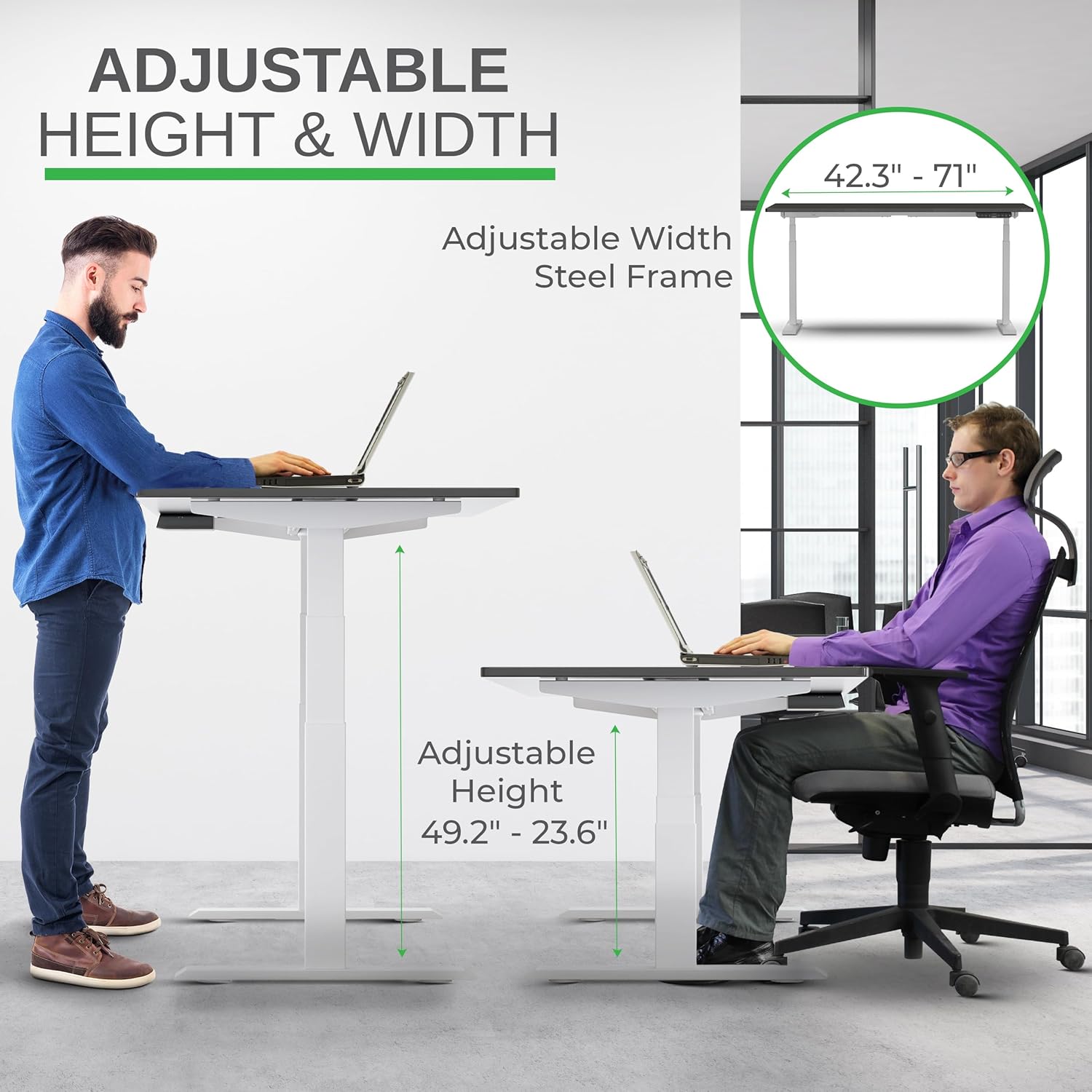
Image: A visual representation of the desk's adjustable height and width capabilities, highlighting the steel frame's adaptability.
Ensure all components are present and undamaged before beginning assembly. It is recommended to assemble the desk on a soft, clean surface to prevent scratches to the desktop or frame.
Awọn ilana Iṣiṣẹ
The Rise Up Electric Standing Desk features an intuitive control panel for easy height adjustments and memory programming.
Awọn iṣẹ igbimọ Iṣakoso:

Image: A detailed diagram of the desk's multifunctional keypad, illustrating the setting button, memory presets (1-4), digital display, and auto up/down controls.
- Up/Down Buttons (^ / _): Tẹ ki o si dimu mọ lati ṣe atunṣe giga tabili pẹlu ọwọ. Tu silẹ lati duro ni giga ti o fẹ.
- Awọn tito iranti (1, 2, 3, 4):
- Ṣatunṣe tabili si giga ti o fẹ nipa lilo awọn bọtini Soke / Isalẹ.
- Press the "M" button. The display will show "S-".
- Within 3 seconds, press the desired number button (1, 2, 3, or 4) to save the current height. The display will show "S-1", "S-2", etc., indicating successful storage.
- To recall a saved height, simply press the corresponding number button. The desk will automatically move to the programmed position.
- Eto Ikolu-ija: The desk is equipped with an anti-collision feature. If the desk encounters an obstacle while moving up or down, it will automatically stop and reverse slightly to prevent damage.

Image: Demonstrating the seamless transition from sitting to standing, highlighting the desk's ability to adjust to various ergonomic needs.
Itoju
Proper maintenance will ensure the longevity and optimal performance of your Uncaged Ergonomics Rise Up Electric Standing Desk.
- Ninu:
- For the bamboo desktop, wipe with a soft, damp asọ. Yago fun abrasive ose tabi simi kemikali ti o le ba awọn ipari.
- For the steel frame, use a mild cleaner and a soft cloth. Ensure no liquids enter the motor or control components.
- Iṣakoso USB: Regularly check and organize cables to prevent tangling or damage, which could interfere with desk movement.
- Agbara iwuwo: Do not exceed the maximum weight capacity of 250 lbs. Overloading can strain the motors and affect performance.
- Ayẹwo igbagbogbo: Máa ṣàyẹ̀wò gbogbo àwọn skru àti àwọn ìsopọ̀ láti rí i dájú pé wọ́n wà ní ààbò. Mú wọn le tí ó bá pọndandan.

Aworan: A sunmọ-soke view of the desk's durable bamboo desktop and integrated control panel, highlighting its scratch-resistant and smooth finish with anti-collision design.
Laasigbotitusita
If you encounter any issues with your Rise Up Electric Standing Desk, please refer to the following common solutions. For more complex problems, contact customer support.
| Isoro | Owun to le Fa | Ojutu |
|---|---|---|
| Iduro ko gbe. | Power cable disconnected; Overload; Control panel error. | Check power connections. Reduce weight on desk. Unplug and replug power after 10 seconds. |
| Desk stops unexpectedly. | Anti-collision activated; Overload. | Check for obstructions. Reduce weight. Reset by moving desk slightly in opposite direction. |
| Uneven movement. | Unbalanced load; Loose connections. | Distribute weight evenly. Check and tighten all assembly screws. |
Akiyesi pataki: The anti-collision system is a safety feature. If the desk repeatedly stops, ensure there are no obstacles in its path and that the weight on the desk does not exceed 250 lbs.
Awọn pato ọja
| Ẹya ara ẹrọ | Ẹ̀kúnrẹ́rẹ́ |
|---|---|
| Brand | Ergonomics ti ko ni idalẹnu |
| Nọmba awoṣe | RUwbk |
| Awọn iwọn Ọja (D x W x H) | 30"D x 60"W x 49.2"H |
| Ohun elo Ojú-iṣẹ | Solid Bamboo (Black Bamboo finish) |
| Ohun elo mimọ | Alloy Steel (White finish) |
| Igi to kere julọ | 23.6 inches |
| O pọju Giga | 49.2 inches |
| Igbega Mechanism | Electric Dual Motor |
| O pọju iwuwo Agbara | 250 iwon |
| Pataki Awọn ẹya ara ẹrọ | Adjustable, Electric, Ergonomic, Anti-Collision, Memory Presets |
| Apejọ ti a beere | Bẹ́ẹ̀ni (Gbogbo irinṣẹ́ ló wà nínú rẹ̀) |
| Iwọn Nkan | 110 iwon |
Alaye atilẹyin ọja
The Uncaged Ergonomics Rise Up Electric Standing Desk comes with a 5-odun lopin atilẹyin ọja. This warranty covers defects in materials and workmanship under normal use and service. For specific terms and conditions, please refer to the warranty documentation included with your product or contact customer support.
This product has been field-tested since 2010, reflecting our commitment to durability and quality.
Onibara Support
Uncaged Ergonomics is dedicated to providing outstanding customer support. If you have any questions regarding assembly, operation, maintenance, or warranty claims, please do not hesitate to contact us.
Fun iranlọwọ, jọwọ ṣabẹwo si Uncaged Ergonomics Store on Amazon tabi tọka si alaye olubasọrọ ti a pese ninu apoti ọja rẹ.
Our team is committed to treating every customer like family and ensuring your satisfaction with our products.
Ask a question about this manual
Ask about setup, troubleshooting, compatibility, parts, safety, or missing instructions. Manuals+ will review the question and use this page’s manual context to help answer it.