
Rigol DL3031
Rigol DL3031 Programmable DC Electronic Load
Ilana itọnisọna
1. Ifihan ati Loriview
The Rigol DL3031 is a high-performance, single-channel programmable DC electronic load. It is an essential instrument for engineers and technicians involved in power supply testing, battery discharge testing, LED driver testing, and other applications requiring precise load simulation. This manual provides detailed instructions for setting up, operating, and maintaining your DL3031 electronic load.
Awọn ẹya pataki pẹlu:
- Single channel, DC150 V/60 A, total power up to 350 W.
- Dynamic mode: up to 15 kHz.
- Adjustable current rising speed: 0.001 A/µs to 5 A/µs.
- Min. readback resolution: 1 mV, 1 mA.
- 4.3-inch TFT LCD, capable of displaying multiple parameters and states simultaneously.
- Apọjutage/overcurrent/overpower/overtemperature/reverse voltage Idaabobo.
- 4 static modes: CC, CV, CR, CP.
- 3 dynamic modes: continuous, pulsed, toggled.
- Built-in RS232/USB/LAN communication interface.
- Battery test function, OCP test, OPP test, factory test function, etc.

olusin 1.1: Iwaju view of the Rigol DL3031 Programmable DC Electronic Load.
2. Eto
2.1 Unpacking ati ayewo
Carefully unpack the DL3031 electronic load and all accessories from its packaging. Verify that all components listed below are present and undamaged. If any items are missing or damaged, please contact your Rigol distributor immediately.
- Rigol DL3031 Electronic Load Unit
- Okun agbara
- Okun USB
- Awọn ọna Itọsọna
- Ijẹrisi odiwọn

Figure 2.1: Typical package contents for the Rigol DL3031.
2.2 Ti ara Awọn isopọ
Before powering on the device, ensure all necessary connections are made securely.
- Asopọ agbara: Connect the supplied power cord to the AC power input on the rear panel and to a suitable AC power outlet. Ensure the voltage selector (if present) matches your local power supply.
- Load Input Terminals: Connect the device under test (DUT) to the red (+) and black (-) input terminals on the front panel. For high current applications, use appropriate gauge wires to minimize voltage ju.
- Sense Terminals (Optional): Fun iwọn didun ti o peyetage regulation at the DUT, connect the sense terminals (S+ and S-) to the DUT's output. This compensates for voltage drop across the load wires.
- Awọn oju Ibaraẹnisọrọ: The DL3031 supports various communication interfaces for remote control and data logging.
- Gbalejo USB: Located on the front panel, used for connecting USB storage devices.
- Ẹrọ USB: Located on the rear panel, used for connecting to a PC for remote control.
- Lan: Located on the rear panel, for network connectivity and remote control.
- RS-232: Located on the rear panel, for serial communication.
- I/O oni-nọmba: Located on the rear panel, for external triggering and control signals.
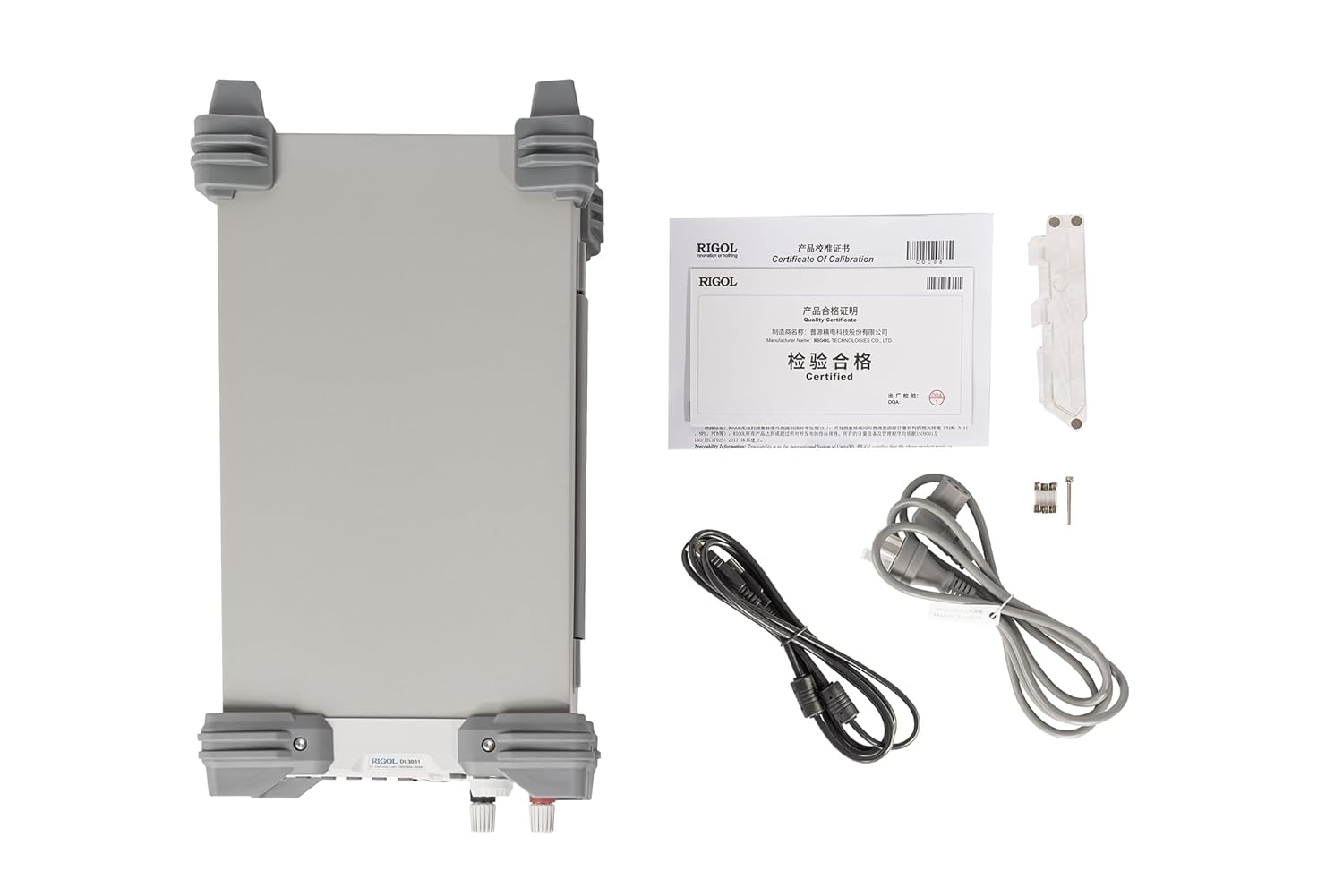
Figure 2.2: Rear panel connections of the Rigol DL3031.
2.3 Ibẹrẹ Agbara Lori
After making all physical connections, press the power key on the front panel to turn on the electronic load. The 4.3-inch TFT LCD will display the startup screen, followed by the main measurement interface.
3. Operating the DL3031
3.1 Iwaju Panel idari
The front panel of the DL3031 is designed for intuitive operation. Familiarize yourself with the various controls and their functions.

Figure 3.1: Labeled front panel of the Rigol DL3031.
- LCD: 4.3-inch TFT display for showing measurement data, settings, and waveforms.
- Function Keys (CC, CV, CR, CP, List): Yan ipo iṣẹ ti o fẹ.
- Control Keys (Up, Down, Left, Right, OK): Navigate menus and adjust parameters.
- Input Control Keys (Numeric Keypad): Directly input numerical values.
- Ikun: Fine-tune parameter values.
- System Function Keys (Local, Utility, Option, Store, Help): Access system settings, save/recall configurations, and view iranlọwọ alaye.
- Waveform Display Key: Toggles the waveform display for real-time graphing of parameters.
- Application Key (APP): Accesses specialized application modes like Battery Test, OCP, and OPP.
- Gbalejo USB: Fun sisopọ awọn ẹrọ ipamọ USB.
- Bọtini agbara: Tan/pa a kuro.
- Channel Terminals (S+, S-, Input +, Input -): Connect the DUT and sense lines.
3.2 Awọn ọna ṣiṣe
The DL3031 offers a variety of operating modes to suit different testing requirements.
3.2.1 Static Modes
These modes maintain a constant load condition.
- CC (Constant Current): Maintains a constant current draw from the DUT.
- CV (Ibakan Voltage): N ṣetọju vol ti o duro nigbagbogbotage across the DUT.
- CR (Constant Resistance): Maintains a constant resistance load on the DUT.
- CP (Constant Power): Maintains a constant power dissipation from the DUT.
3.2.2 Awọn ipo Yiyi
These modes allow for varying load conditions over time.
- Tesiwaju: Provides a continuous dynamic load.
- Ti fa: Generates pulsed load changes.
- Toggled: Switches between two defined load levels.
- Akojọ: Allows programming a sequence of up to 512 steps with different load conditions and durations.
3.2.3 Awọn ọna ohun elo
Access these specialized tests via the APP bọtini.
- Idanwo Batiri: Designed for testing battery discharge characteristics.
- OCP Test (Over Current Protection): Tests the overcurrent protection of a power supply.
- OPP Test (Over Power Protection): Tests the overpower protection of a power supply.
3.3 Waveform Graphing
The DL3031 can display real-time waveforms of current, voltage, resistance, and power over time, similar to an oscilloscope. This feature is useful for analyzing dynamic load responses and identifying transient behaviors.
Fidio 3.1: Pariview of the Rigol DL3000 Series Electronic Load, demonstrating various modes and features including waveform graphing.
4. Itọju
Proper maintenance ensures the longevity and accuracy of your DL3031 electronic load.
- Ninu: Regularly clean the exterior of the instrument with a soft, damp asọ. Ma ṣe lo abrasive ose tabi epo.
- Afẹfẹ: Ensure the rear exhaust fan and ventilation slots are clear of obstructions to prevent overheating. The fan is crucial for dissipating heat generated during operation.
- Rirọpo Fuse: If the unit does not power on, check the fuse located near the AC power input on the rear panel. Replace with a fuse of the same type and rating as indicated on the unit (e.g., T 15A/250V for 230V AC, T 30A/250V for 115V AC).

Figure 4.1: Rear panel showing the exhaust fan and fuse location.
5. Laasigbotitusita
This section provides solutions to common issues you might encounter with the DL3031.
| Isoro | Owun to le Fa | Ojutu |
|---|---|---|
| Ẹka ko ni agbara lori. | No AC power; Blown fuse; Power cord not connected. | Check power outlet; Replace fuse (refer to Section 4); Ensure power cord is securely connected. |
| No load current/voltage. | Input terminals not connected; Load mode not active; Over-protection triggered. | Verify DUT connection; Activate load mode (ON/OFF button); Check for OVP/OCP/OPP warnings on display. |
| Readings are unstable or inaccurate. | Poor connections; External noise; Sense lines not used (for precise voltagati). | Ensure all connections are tight; Minimize external interference; Use sense lines for improved accuracy. |
| Communication error with PC. | Incorrect cable; Driver not installed; Wrong communication settings. | Use correct USB/LAN/RS-232 cable; Install Rigol drivers; Verify communication settings (baud rate, IP address). |
If the problem persists after attempting these solutions, please contact Rigol customer support.
6. Awọn pato
The following table outlines the key technical specifications for the Rigol DL3031 Electronic Load.
| Paramita | Value (DL3031) |
|---|---|
| Agbara | 350 W |
| Voltage/lọwọlọwọ | 150V/60A |
| CC Slew Rate | <2.5 A/µs |
| Igbohunsafẹfẹ Yiyi | Titi di 15 kHz |
| Voltage Readback Resolution | 1 mV |
| Current Readback Resolution | 1 mA |
| Awọn iwọn Ọja (L x W x H) | 9.41 x 17.4 x 6.18 inches |
| Iwọn Nkan | 16.71 iwon (7.58 kilo) |
| Orisun agbara | Ipese Agbara DC |
| Awọn ibaraẹnisọrọ ibaraẹnisọrọ | RS232/USB/LAN |
| Awọn iṣẹ Idaabobo | Apọjutage/overcurrent/overpower/overtemperature/reverse voltage |
7. Atilẹyin ọja ati Support
7.1 atilẹyin ọja Alaye
The Rigol DL3031 Programmable DC Electronic Load is manufactured by RIGOL TECHNOLOGIES USA INC. For specific warranty terms and conditions, please refer to the warranty card included with your product or visit the official Rigol webojula. Jeki ẹri rira rẹ fun awọn iṣeduro atilẹyin ọja.
Awọn eto aabo ti o gbooro le wa fun rira:
- 3-odun Idaabobo Eto
- 4-odun Idaabobo Eto
- Ààbò pípé (àṣàyàn ìtúnṣe oṣooṣù)
7.2 Imọ Support
For technical assistance, troubleshooting beyond this manual, or service inquiries, please contact Rigol customer support. You can find contact information on the official Rigol website or through your local distributor. When contacting support, please have your product model number (DL3031) and serial number ready.
Ask a question about this manual
Ask about setup, troubleshooting, compatibility, parts, safety, or missing instructions. Manuals+ will review the question and use this page’s manual context to help answer it.