
DIGOO DG-TH8868 Afọwọṣe Olumulo Ibusọ Oju-ọjọ Alailowaya
Awoṣe: DG-TH8868
Ọrọ Iṣaaju
The DIGOO DG-TH8868 is a versatile wireless weather station designed to provide accurate indoor and outdoor temperature and humidity readings, along with a comprehensive weather forecast, moon phase, and time display. This manual provides detailed instructions for setting up, operating, maintaining, and troubleshooting your device to ensure optimal performance.
Package Awọn akoonu
Ṣaaju ki o to bẹrẹ, jọwọ rii daju pe gbogbo awọn nkan wa ninu package:
- 1 x DIGOO DG-TH8868 Digital Weather Station (Main Unit)
- 1 x DIGOO DG-TH8868 Alailowaya ita gbangba sensọ
- 1 x DIGOO DG-TH8868 English User Manual
- 1 x DIGOO DG-TH8868 Special USB Power Cable (5V 1A required)
- 1 x Original Color Gift Packaging

Aworan: The main DIGOO DG-TH8868 Weather Station unit and its accompanying wireless outdoor sensor.
Ṣeto
1. Ṣiṣe agbara Ẹka akọkọ
The main weather station unit can be powered by either batteries or the included USB power cable.
- Agbara Batiri: Insert 3 x AAA batteries (not included) into the battery compartment on the back of the main unit.
- Agbara agbara USB: Connect the special USB power cable to the DC 5V 1A port on the back of the main unit and plug the other end into a compatible USB power adapter (not included). Using the USB power cable ensures the colorful display remains continuously bright.
2. Lilo sensọ ita gbangba
Insert 2 x AA batteries (not included) into the battery compartment of the wireless outdoor sensor.
3. Ibi sensọ
Place the wireless outdoor sensor in a shaded, dry location outdoors, protected from direct sunlight and rain, to ensure accurate temperature and humidity readings. Ensure it is within range of the main unit for optimal wireless data transmission.

Aworan: Diagram illustrating the wireless data transmission between the outdoor sensor and the main weather station unit, allowing for continuous monitoring of indoor and outdoor environmental conditions.
4. Amuṣiṣẹpọ akọkọ
Once both units are powered, they should automatically synchronize. The main unit will display outdoor temperature and humidity readings. If synchronization does not occur, refer to the troubleshooting section.

Aworan: Sun mo tipetipe view of the weather station's back, showing the USB power input and the battery compartment for AAA batteries, highlighting flexible power options.
Awọn ilana Iṣiṣẹ
Ifihan Loriview
The DIGOO DG-TH8868 features a colorful HD LCD display that presents a wealth of information at a glance.

Aworan: The vibrant, high-definition display of the weather station, showcasing its colorful interface against a home backdrop, designed for enhanced readability and visual appeal.
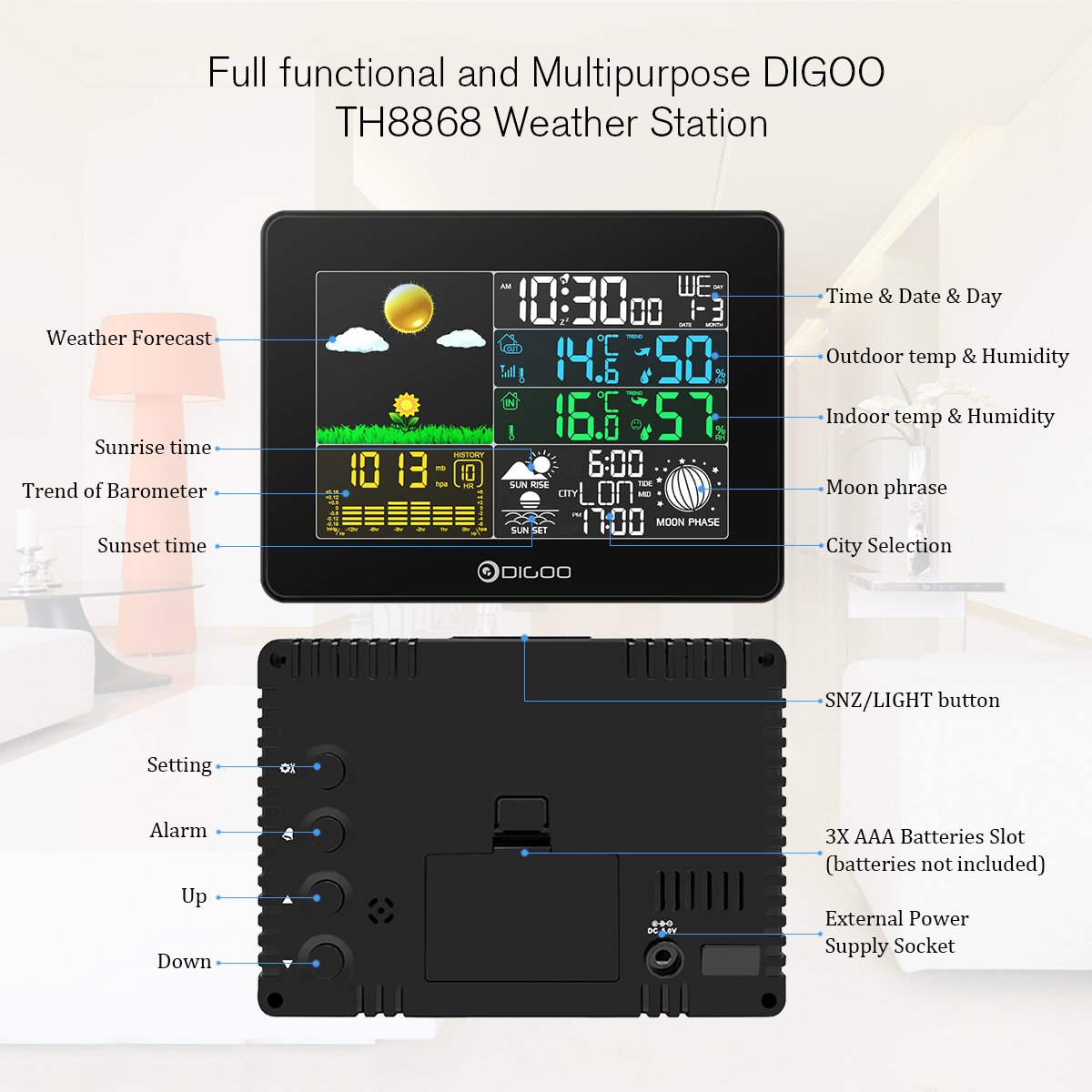
Aworan: A comprehensive diagram labeling all key features and buttons on the front and back of the DIGOO TH8868 Weather Station, including display sections, settings, and power options.
- Aago ati Ọjọ: Ṣe afihan akoko lọwọlọwọ, ọjọ, ati ọjọ ti ọsẹ.
- Iwọn otutu ati ọriniinitutu inu ile/ita gbangba: Shows current readings, along with maximum/minimum records.
- Ifihan itunu: Indicates indoor comfort levels (Dry, Comfort, Wet) based on temperature and humidity.
- Barometer Trends: Displays air pressure trends, updated automatically every 12 minutes.
- Àfojúsùn ojú ọjọ: Predicts weather for the next 12-24 hours with 6 vivid patterns: Sunny, Partly Sunny, Cloudy, Rainy, Stormy, Snowy.
- Sunrise & Sunset Time: Displays local sunrise and sunset times based on selected city.
- Alakoso Oṣupa: Shows the current moon phase.

Aworan: Visual representation of the weather station's ability to predict weather, showing various forecast icons like sunny, cloudy, rainy, and snowy conditions.

Aworan: The weather station display showing sunrise time, sunset time, and the current moon phase, providing comprehensive astronomical information.
Eto Aago ati Ọjọ
Refer to the detailed instructions in the included English User Manual for setting the precise time and date.
Iṣẹ aago itaniji
The weather station includes an alarm clock with a snooze function.
- To set the alarm, follow the instructions in the manual.
- When the alarm sounds for 2 minutes, press the SNZ/Imọlẹ button to activate the snooze function for 10 minutes.
- To stop the alarm for the day, press any button except HI / Low / Off.
Language and City Selection
The device supports eight languages: German, French, Spanish, Italian, Dutch, Danish, Russian, and English. You can also select your city to get accurate sunrise, sunset, and moon phase information.
Itoju
Batiri Rirọpo
Replace batteries in both the main unit and the outdoor sensor when the low battery indicator appears on the display or when readings become inconsistent.
Ninu
Wipe the weather station and sensor with a soft, dry cloth. Do not use abrasive cleaners or immerse the units in water.
Laasigbotitusita
- Ko si Ifihan: Ensure batteries are correctly inserted and charged, or that the USB power cable is securely connected and receiving power.
- Outdoor Sensor Not Connecting:
- Check if the outdoor sensor batteries are installed correctly and charged.
- Ensure the sensor is within the effective wireless range of the main unit.
- Try re-synchronizing by removing and reinserting batteries in both units.
- Awọn kika ti ko pe:
- Ensure the outdoor sensor is placed in a shaded area, away from direct heat sources or extreme cold.
- Verify that the main unit is not near heat-emitting appliances or direct sunlight indoors.
Awọn pato
| Ẹya ara ẹrọ | Sipesifikesonu |
|---|---|
| Ibiti Igba otutu Ile | 0°C si 50°C (32°F si 122°F) |
| Abe ile ọriniinitutu Range | 1% RH - 99% RH |
| Ibiti Igba otutu Ita gbangba | -30°C si 60°C (-22°F si 140°F) |
| Ita gbangba ọriniinitutu Range | 1% RH - 99% RH |
| Yiye iwọn otutu | ±1°C |
| Barometer Range | 800 MB si 1100 MB |
| Main Unit Power | 3 x AAA batteries (not included) or 5V 1A USB power cable |
| Ita gbangba Sensọ Power | 2 x AA batiri (ko si) |
| Pataki Awọn ẹya ara ẹrọ | Alarm, Wireless, Clock, Moon Phase, Weather Forecast, Sunrise/Sunset |
| Ọja Mefa | 21.01 x 13 x 5 cm; 272.16g |
| Àwọ̀ | Dudu |
Onibara Support
For any issues or inquiries regarding your DIGOO DG-TH8868 Weather Station, the manufacturer guarantees a response within 24 hours. Solutions may include a full refund without product return if problems cannot be resolved, or a partial refund as a gesture of appreciation for your patience and support.