
1. Ifihan
This manual provides essential information for the safe and effective operation of your CEM LDM-100 Digital Laser Distance Meter. Please read this manual thoroughly before using the device and keep it for future reference. The LDM-100 is designed for precise distance, area, and volume measurements using laser technology.
2. Alaye Aabo
IKILO: Lesa Radiation
The LDM-100 emits Class 2 laser radiation. Do not stare into the laser beam or direct it at other people or animals. Avoid direct eye exposure. Use of controls or adjustments or performance of procedures other than those specified herein may result in hazardous radiation exposure.
- Ma ṣe gbiyanju lati yi ẹrọ naa pada.
- Jeki ẹrọ naa kuro ni arọwọto awọn ọmọde.
- Ma ṣe lo ẹrọ naa ni awọn agbegbe bugbamu.
- Daabobo ẹrọ naa lati ọrinrin ati oorun taara.
- Rii daju pe awọn batiri ti wa ni fi sii pẹlu polarity to pe.
3. Ọja Ipariview
The CEM LDM-100 is a compact and robust laser distance meter. Familiarize yourself with its components:

Nọmba 1: Iwaju view of the CEM LDM-100 Digital Laser Distance Meter, showing the display, measurement buttons, and function keys.

Nọmba 2: Close-up of the LDM-100 display, showing measurement readings and icons for various functions like area, volume, and Pythagorean calculations.
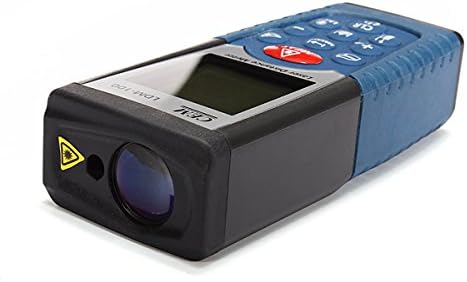
Nọmba 3: Apa view of the LDM-100, highlighting the laser emission aperture and the receiving lens.
Awọn eroja pataki:
- Iho itujade lesa: Where the laser beam exits.
- Receiving Lens: Ó ń ṣàwárí ìtànṣán lésà tí a fi hàn.
- Iboju ifihan: Shows measurements, battery status, and function indicators.
- Bọtini MEAS: Activates laser and initiates measurements.
- Awọn bọtini iṣẹ: For area, volume, Pythagorean calculations, and continuous measurement.
- Bọtini Ẹyọ: Changes measurement units (m, ft, in).
- CLR/OFF Button: Ó pa ìwọ̀n ìṣiṣẹ́ lọ́wọ́ tàbí ó pa ẹ̀rọ náà.
- +/- Awọn bọtini: For adding/subtracting measurements or navigating menus.
4. Eto
4.1 Fifi sori batiri
The LDM-100 requires batteries for operation. Batteries are not included with the device.
- Wa ideri iyẹwu batiri ni ẹhin ẹrọ naa.
- Gbe tabi yọ ideri naa kuro lati ṣii yara naa.
- Insert the required batteries (e.g., AAA batteries, refer to the compartment for specific type) ensuring correct polarity (+/-).
- Pa ideri batiri naa ni aabo.
Akiyesi: Yọ awọn batiri kuro ti ẹrọ naa ko ba ni lo fun igba pipẹ lati ṣe idiwọ jijo.
5. Awọn ilana Iṣiṣẹ
5.1 Agbara Tan / Pa
- Lati fi agbara si: Tẹ bọtini naa MEAS bọtini. Lesa yoo mu ṣiṣẹ.
- Lati fi agbara si pipa: Tẹ mọlẹ CLR/OFF button for a few seconds. The device will also automatically power off after a period of inactivity.
5.2 Ipilẹ Distance Wiwọn
- Turn on the device by pressing MEAS.
- Tọka lesa ni aaye ibi-afẹde.
- Tẹ MEAS again to take a measurement. The distance will be displayed on the screen.
5.3 Yiyipada Iwọn Iwọn
Tẹ awọn Ẹyọ button repeatedly to cycle through available units: meters (m), feet (ft), inches (in).
5.4 Agbegbe wiwọn
- Tẹ awọn Išẹ button (often indicated by a square icon) until the area icon appears on the display.
- Ṣe iwọn ẹgbẹ akọkọ (fun apẹẹrẹ, ipari) nipa titẹ MEAS.
- Ṣe iwọn ẹgbẹ keji (fun apẹẹrẹ, iwọn) nipa titẹ MEAS lẹẹkansi.
- Agbegbe iṣiro yoo han.
5.5 Iwọn Iwọn didun
- Tẹ awọn Išẹ button until the volume icon (cube) appears.
- Ṣe iwọn gigun nipa titẹ MEAS.
- Ṣe iwọn iwọn nipa titẹ MEAS.
- Ṣe iwọn giga nipasẹ titẹ MEAS.
- Iwọn iṣiro yoo han.
5.6 Iwọn Pythagorean (Iwọn aiṣe-taara)
This function allows indirect measurement of heights or distances using the Pythagorean theorem.
- Tẹ awọn Išẹ button until the Pythagorean icon appears (e.g., a triangle).
- Follow the on-screen prompts or diagram to measure the required sides (e.g., hypotenuse, base).
- Ẹ̀rọ náà yóò ṣírò, yóò sì fi ẹ̀gbẹ́ tí a kò mọ̀ hàn.
5.7 Wiwọn Tesiwaju (Titọpa)
- Tẹ mọlẹ MEAS button or activate the continuous measurement function (often indicated by a MAX/MIN icon).
- Move the device slowly towards or away from the target. The display will update measurements in real-time, often showing current, maximum, and minimum distances.
- Tẹ MEAS lẹẹkansi lati da lemọlemọfún wiwọn.
6. Itọju
- Ninu: Lo asọ, damp cloth to clean the device. Do not use abrasive cleaners or solvents. Clean the laser lens with a soft cloth, similar to cleaning eyeglasses.
- Ibi ipamọ: Store the device in a dry, cool place, away from direct sunlight and extreme temperatures. If storing for extended periods, remove the batteries.
- Iṣatunṣe: The device is factory calibrated. If you suspect inaccuracies, contact customer support.
7. Laasigbotitusita
| Isoro | Owun to le Fa | Ojutu |
|---|---|---|
| Ẹrọ ko tan. | Awọn batiri ti o ku tabi ti ko tọ fi sii. | Rọpo awọn batiri tabi ṣayẹwo polarity. |
| Awọn wiwọn ti ko pe. | Dirty laser lens; unstable measuring surface; extreme temperatures. | Clean lens; ensure stable position; operate within specified temperature range. |
| Lésà kò hàn. | Imọlẹ ibaramu imọlẹ; lesa ko mu ṣiṣẹ. | Use in lower light conditions; press MEAS to activate laser. |
| Ifiranṣẹ aṣiṣe lori ifihan. | Wíwọ̀n tí kò sí ní ìwọ̀n; àṣìṣe inú. | Ensure target is within measuring range; restart device. If error persists, contact support. |
8. Awọn pato
| Ẹya ara ẹrọ | Ẹ̀kúnrẹ́rẹ́ |
|---|---|
| Awoṣe | LDM-100 |
| Brand | CEM |
| Iwọn Iwọn | Up to 50m (as per product title) |
| International Idaabobo Rating | IP54 |
| Iwọn Nkan | 0.31 Pounds (tó fẹ́rẹ̀ẹ́ tó 140.61 g) |
| Awọn batiri | Not included (type typically AAA, refer to device) |
| Lesa Kilasi | Kilasi 2 |
9. Atilẹyin ọja ati Support
Fun alaye atilẹyin ọja tabi atilẹyin imọ-ẹrọ, jọwọ tọka si iwe ti a pese ni akoko rira tabi kan si alagbata rẹ. Tọju iwe-ẹri rira rẹ bi ẹri rira.