
Ọja Pariview
This manual provides instructions for the EASYGUARD ES002-P2 smart push engine start-stop module. This module is designed for automatic transmission vehicles and can be integrated with existing car alarm or keyless entry systems.
Key Awọn ẹya ara ẹrọ
- Titari bọtini ibere/da
- Switch among ACC-ON-OFF modes
- Engine start by pressing and holding the button
- Remote engine start/stop (optional)
Awọn akọsilẹ pataki ati awọn ikilọ
- This system is for automatic transmission cars only.
- Installation requires releasing the steering wheel lock if present.
- The remote engine start function requires 3 lock signals from your existing remote (key fob) when pressing the lock button 3 times. If your remote does not provide this, the remote engine start function will not work.
- This kit does not include key fobs; use your existing car keys/remote.
- This item must work in conjunction with power locking or central door locking systems.
- The engine start button illuminates blue when disarmed, in ACC, or ON mode. It changes to red once the car is started.
- Professional installation by a car alarm installer is highly recommended. Technical support is available.
- If your original car remote control (key) has a chip immobilizer, an extra bypass module (e.g., ASIN: B00MEHBVIC or B07NSLPBG7) is required.
Package Awọn akoonu
Jẹrisi pe gbogbo awọn ohun kan wa ninu package:
- Brain (Control Module) x 1
- Titari Bọtini x 1
- 6P Ignition Harness x 1
- Ijanu Waya x 1
- English User Manual & Installation Guide x 1
Component Visuals


Eto ati fifi sori
Due to the complexity of automotive electrical systems, professional installation is strongly recommended. Incorrect installation can lead to vehicle damage or system malfunction.
Pre-Fifi Igbesẹ
- Rii daju pe batiri ọkọ ti ge asopọ ṣaaju ki o to bẹrẹ fifi sori ẹrọ.
- If your vehicle has a steering wheel lock, it must be released or bypassed for proper operation.
- If your vehicle uses a chip immobilizer in its original key, an external bypass module is required (not included).
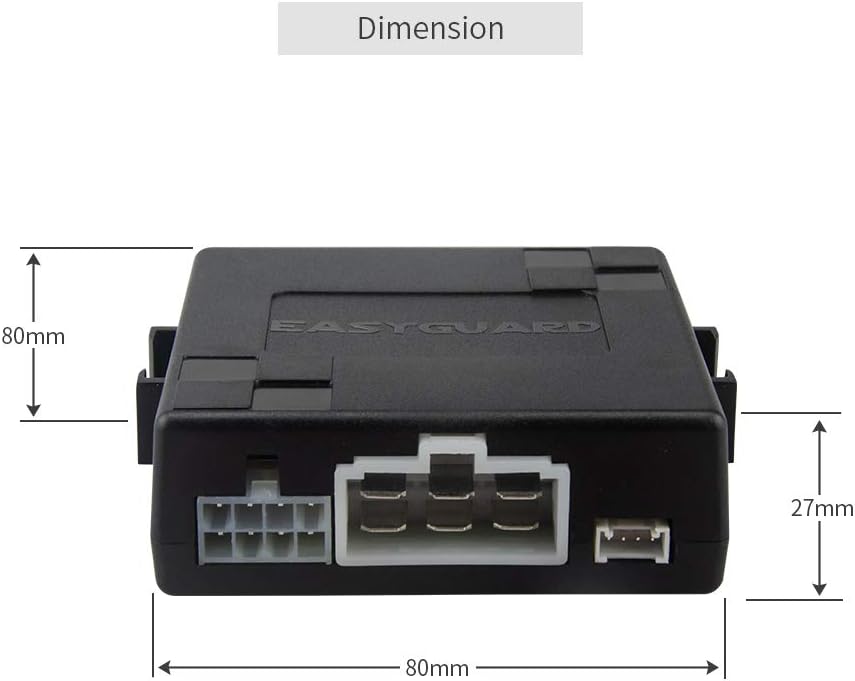
Module Mefa
Push Button Dimensions and Illumination

Awọn isopọ onirin
Refer to the included English installation guide for detailed wiring diagrams and connection points. Ensure all connections are secure and properly insulated.
Awọn ilana Iṣiṣẹ
Bibẹrẹ Ọkọ
There are two methods to start the vehicle:
- Ọna 1: While the system is disarmed, step on the foot brake pedal and briefly press the push start button once. The engine will start.
- Ọna 2: While the system is disarmed, keep the foot brake pedal pressed and hold the push start button for 3 seconds. The engine will start.
Shutting Off the Vehicle
Once the car is started, step on the foot brake pedal and briefly press the push start button once. The engine will shut off.

Remote Engine Start (Optional)
If configured, the remote engine start function can be activated on automatic transmission cars by pressing the lock button on your existing remote (key fob) three times. Ensure your existing remote provides this triple-lock signal.
Laasigbotitusita
Wọpọ Oran ati Solusan
- Enjini ko bẹrẹ:
- Ensure the foot brake pedal is fully depressed.
- Check all wiring connections for security.
- Verify the vehicle's battery has sufficient charge.
- If using a chip immobilizer, confirm the bypass module is correctly installed and functioning.
- Remote start not working:
- Confirm your existing remote sends three consecutive lock signals.
- Verify the remote start feature is enabled and correctly wired.
- Button illumination incorrect:
- Check power connections to the button and control module.
- Ensure the system is in the correct armed/disarmed state.
For further assistance, refer to the detailed installation guide or contact customer support.
Awọn pato
| Ẹya ara ẹrọ | Ẹ̀kúnrẹ́rẹ́ |
|---|---|
| Nọmba awoṣe | ES002-P2 |
| Iwọn Nkan | 12.3 iwon |
| Ọja Mefa | 7.09 x 5.91 x 1.97 inches |
| Awọn ẹrọ ibaramu | Most DC12V Cars |
| Latọna Alailowaya | Yes (requires existing car remote) |
| UPC | 716294407721 |
Alaye atilẹyin ọja
This product comes with a 1-Year Manufacturer Warranty. For warranty claims or details, please contact EASYGUARD customer support.
Onibara Support
For technical assistance, installation queries, or troubleshooting not covered in this manual, please contact EASYGUARD customer support.
You may also visit the official EASYGUARD store on Amazon for additional resources: EASYGUARD Amazon Store


