
MIFA A1-BK
MIFA A1 Portable Bluetooth Speaker User Manual
Model: A1-BK
Ọrọ Iṣaaju
Welcome to the MIFA A1 Portable Bluetooth Speaker user manual. This guide provides detailed instructions for setting up, operating, maintaining, and troubleshooting your new speaker. The MIFA A1 is designed for portability and durability, featuring IP56 dustproof and water-resistant capabilities, a 12-hour playtime, and enhanced sound.

The MIFA A1 Portable Bluetooth Speaker.
Package Awọn akoonu
Jọwọ ṣayẹwo package fun awọn nkan wọnyi:
- 1 × A1 Bluetooth Speaker
- 1 × Micro USB Cable
- 1 × 3.5 mm Audio Cable
- 1 × Òkùn tí ó lè tètè máa ràn
- 1 × Afowoyi olumulo

The MIFA A1 package contents.
Ọja Pariview
Àwọn Ẹ̀yà àti Àwọn Ìdarí Agbọrọsọ
Familiarize yourself with the speaker's layout and functions:
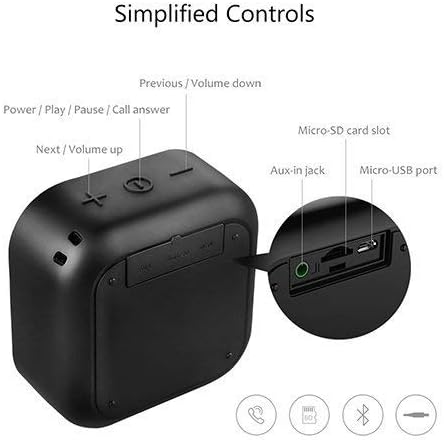
Pariview of MIFA A1 controls and ports.
- Power / Play / Pause / Call Answer Button: Controls power, music playback, and call management.
- Next / Volume Up Button (+): Ó mú kí ohùn pọ̀ sí i, ó sì fò sí orin tó tẹ̀lé e.
- Previous / Volume Down Button (-): Ó dín ìró ohùn kù, ó sì lọ sí orin tó ti kọjá.
- Iho kaadi Micro-SD: For playing music directly from a Micro-SD card.
- Aux-in Jack: Fun asopọ ohun afetigbọ nipa lilo okun ohun afetigbọ 3.5mm kan.
- Ibudo USB Micro-USB: Fun gbigba agbara si agbọrọsọ.
Key Awọn ẹya ara ẹrọ
- Superior Loud Sound: 5W driver & Class-G double charge pump audio power amplifier delivers high-quality DSP 3D stereo sound & enhanced bass; supports TWS, allowing you to enjoy true wireless stereo (right + left channels) by connecting two A1 speakers.
- IP56 Dust-Proof & Water-Resistant: Features woven fabric housing; great looking while shock-resistant; allows outlasting all of your adventures.
- Igbesi aye batiri gigun: Built-in 1200 mAh rechargeable lithium polymer battery plays up to 12 hours at 70% volume on a full charge; recharge in just 3 hours with the included Micro USB cable.
- Bluetooth 4.2 Imọ-ẹrọ: Easy to pair with any Bluetooth-enabled device; auto-reconnects to the last-used device within up to 33 feet; 3.5mm AUX and Micro-SD capability offers more audio options; built-in microphone for hands-free calls.
- Super Portable: Mini size for take-anywhere convenience; slips into a bag or a coat pocket easily; offers a strap to hang from a backpack; 3.3 × 1.8 × 3.4 in; 6.2 oz.
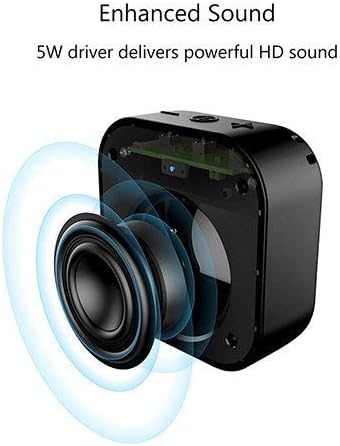
The 5W driver delivers powerful HD sound.
Ṣeto
Gbigba agbara si Agbọrọsọ
The MIFA A1 speaker comes with a built-in 1200 mAh rechargeable lithium polymer battery.
- Connect the Micro USB cable to the speaker's Micro-USB port and the other end to a USB power adapter (not included) or a computer's USB port.
- Ina Atọka gbigba agbara yoo tan imọlẹ.
- Gbigba agbara ni kikun gba to wakati mẹta.
- Once fully charged, the speaker provides up to 12 hours of playtime at 70% volume.

Enjoy up to 12 hours of playtime.
Titan / Pipa agbara
- Lati tan-an, tẹ mọlẹ Bọtini Agbara titi ti o fi gbọ ohun ti o gbọ.
- Lati pa agbara, tẹ mọlẹ Bọtini Agbara lẹẹkansii titi ti agbọrọsọ yoo ti ku.
Isẹ
Asopọ Bluetooth
- Rii daju pe agbọrọsọ ti wa ni titan ati ni ipo sisọpọ Bluetooth (itọkasi nipasẹ LED didan).
- Lori ẹrọ rẹ (foonuiyara, tabulẹti, kọǹpútà alágbèéká), mu Bluetooth ṣiṣẹ ki o wa awọn ẹrọ to wa.
- Select "MIFA A1" from the list of devices.
- Ni kete ti a ba so pọ, agbọrọsọ yoo pese ijẹrisi ti o gbọ, ati pe Atọka LED yoo di mimọ.
- The speaker will automatically reconnect to the last-used device within a range of up to 33 feet (10 meters).
Ti ndun Audio
Ipo Bluetooth
Lẹ́yìn tí a bá ti ṣe àṣeyọrí sí ìsopọ̀pọ̀, ohùn láti inú ẹ̀rọ tí a so pọ̀ yóò máa dún nípasẹ̀ agbọ́hùnsọ̀kan náà.
- Press the Power button to Play/Pause music.
- Press the '+' button to increase volume. Press and hold '+' to skip to the next track.
- Press the '-' button to decrease volume. Press and hold '-' to go to the previous track.
AX-ni Ipo
Use the included 3.5mm audio cable to connect the speaker to any device with a 3.5mm audio output. The speaker will automatically switch to AUX mode.
Micro-SD Card Playback
Insert a Micro-SD card (up to 32GB, not included) loaded with audio files into the Micro-SD card slot. The speaker will automatically begin playing music from the card.
Ọwọ-Free Ipe
When connected via Bluetooth, the built-in microphone allows for hands-free calls.
- Press the Power button to answer an incoming call.
- Press the Power button again to end a call.
- Tẹ mọlẹ bọtini Agbara lati kọ ipe ti nwọle.
True Wireless Stereo (TWS) Pairing (for two A1 speakers)
If you have two MIFA A1 speakers, you can pair them together for a true wireless stereo experience (left and right channels).
- Rí i dájú pé àwọn agbohunsoke méjèèjì ti pa.
- Agbara lori awọn agbohunsoke mejeeji.
- On one speaker (this will be the master), double-press the Power button. It will search for the other speaker.
- Once connected, both speakers will provide an audible confirmation, and the master speaker's LED will flash slowly, while the slave speaker's LED will be solid.
- Connect your device via Bluetooth to the master speaker.
- Audio yoo mu ṣiṣẹ ni sitẹrio nipasẹ awọn agbohunsoke mejeeji.
Itoju
Ninu
Lati nu agbọrọsọ, lo asọ, damp asọ. Maṣe lo awọn kẹmika ti o lewu tabi awọn afọmọ abrasive.
Atako omi ati eruku (IP56)
The MIFA A1 is IP56 rated, meaning it is protected against dust ingress and powerful water jets.
While it can withstand splashes and rain, it is kii ṣe designed to be submerged in water. Ensure all port covers are securely closed before exposing the speaker to water or dust.
This video demonstrates the MIFA A1's robust IP56 rating, showcasing its ability to withstand exposure to wet mud and water jets without affecting performance. It highlights the speaker's durability for outdoor and adventurous use.

The MIFA A1 speaker is built with an IP56 dust-proof and water-resistant fabric and TPU housing.
Laasigbotitusita
Wọpọ Oran ati Solusan
| Isoro | Ojutu |
|---|---|
| Agbọrọsọ ko ni agbara lori | Rí i dájú pé batiri náà ti gba agbára. So mọ́ orísun agbára nípa lílo okùn Micro USB. |
| Ko le so pọ nipasẹ Bluetooth | Ensure the speaker is in pairing mode. Check if Bluetooth is enabled on your device. Move the speaker closer to your device. Disconnect from other Bluetooth devices. |
| Ko si ohun | Check volume levels on both the speaker and your connected device. Ensure the correct input mode (Bluetooth, AUX, Micro-SD) is selected. |
| Ko dara ohun didara / Iparun | Move the speaker closer to your device to improve Bluetooth signal. Reduce volume if distortion occurs at maximum levels. Ensure the speaker is on a stable surface. |
| Sisopọ TWS kuna | Ensure both speakers are MIFA A1 models. Power off both speakers and try the TWS pairing process again. |
Awọn pato
Awọn alaye imọ-ẹrọ
| Ẹya ara ẹrọ | Ẹ̀kúnrẹ́rẹ́ |
|---|---|
| Orukọ awoṣe | A1 |
| Agbọrọsọ Agbara Ijade ti o pọju | 5 Wattis |
| Asopọmọra Technology | Bluetooth 4.2 |
| Imọ-ẹrọ Ibaraẹnisọrọ Alailowaya | Bluetooth |
| Bluetooth Ibiti | 10 Mita (33 Ẹsẹ) |
| Igbesi aye batiri | Awọn wakati 12 (ni iwọn 70%) |
| Agbara Batiri | 1200 mAh |
| Akoko gbigba agbara | Awọn wakati 3 |
| Omi Resistance Ipele | IP56 (Dustproof & Water-Resistant) |
| Ọja Mefa | 3.4"D x 3.3"W x 1.8"H |
| Iwọn Nkan | 6.2 iwon (175 Giramu) |
| Ohun elo | Plastic, Metal, Fabric |
| Awọn irinše to wa | 1 × A1 Bluetooth Speaker, 1 × Micro USB Cable, 1 × 3.5 mm Audio Cable, 1 × Detachable Strap, 1 × User Manual |
Atilẹyin ọja ati Support
Alaye atilẹyin ọja
Please refer to the warranty card included with your purchase for detailed warranty terms and conditions.
Onibara Support
For further assistance or support, please visit the official MIFA website or contact MIFA customer service.
You can also refer to the official user manual PDF for more details: Ṣe igbasilẹ Itọsọna olumulo (PDF)
Ask a question about this manual
Ask about setup, troubleshooting, compatibility, parts, safety, or missing instructions. Manuals+ will review the question and use this page’s manual context to help answer it.