
Ọrọ Iṣaaju
This manual provides instructions for the safe and effective operation of the Benetech GM8905 Digital Laser Tachometer. This device is designed for non-contact measurement of rotational speed (RPM) using a laser, offering precise readings for various industrial and mechanical applications.
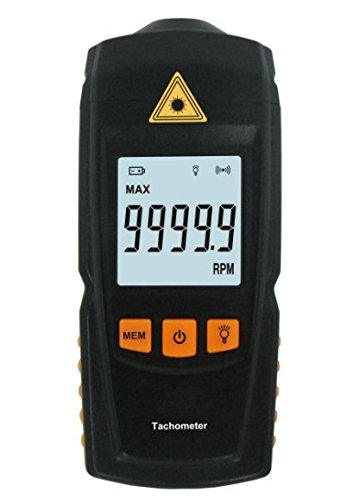
Image description: A front view of the Benetech GM8905 Digital Laser Tachometer, showing its black casing, LCD display with "9999.9 RPM" shown, and orange control buttons for MEM, Power, and Light. A yellow laser warning symbol is visible at the top.
Alaye Aabo
Please read all safety warnings and instructions carefully before using this product. Failure to follow these instructions may result in injury or damage to the device.
- Aabo lesa: Do not look directly into the laser beam. Laser radiation can cause eye damage. Do not point the laser at people or animals.
- Lilo daradara: Use the device only as described in this manual. Any unauthorized modifications or repairs will void the warranty and may pose safety risks.
- Awọn ipo Ayika: Keep the device away from water, high humidity, and extreme temperatures. Do not operate in explosive atmospheres.
- Mimu Batiri: Dispose of batteries properly according to local regulations. Do not mix old and new batteries or different types of batteries.
Ọja Pariview
The Benetech GM8905 is a portable, non-contact digital tachometer designed for accurate RPM measurements. It features a large LCD display, memory function, and a precise laser pointer for easy targeting.

Image description: The Benetech GM8905 Tachometer laid out with its instruction manual, two AAA batteries, reflective tape, and product packaging.
Awọn eroja
- Olùtújáde Lésà: Projects the laser beam onto the target surface.
- Photoelectric Receiver: Detects the reflected laser light to calculate RPM.
- Ifihan LCD: Shows measurement readings, units, and status indicators.
- Bọtini MEM: Cycles through Maximum, Minimum, Average, and Last measurement values.
- Bọtini agbara: Tan ẹrọ naa si tan tabi pa.
- Bọtini Imọlẹ: Ó ń mú kí ìmọ́lẹ̀ ìbòjú ìfihàn ṣiṣẹ́ tàbí ó ń mú kí ó má ṣiṣẹ́.
- Abala Batiri: Located at the rear, holds two 1.5V AAA batteries.
Ṣeto
1. Fifi sori batiri
- Wa ideri iyẹwu batiri ni ẹhin ẹrọ naa.
- Gbe ideri naa ṣii.
- Insert two 1.5V AAA batteries, ensuring correct polarity (+/-) as indicated inside the compartment.
- Pa ideri batiri naa ni aabo.

Image description: The Benetech GM8905 Tachometer inside its packaging, alongside its instruction manual and two AAA batteries, indicating the items included for setup.
2. Applying Reflective Tape
For accurate non-contact measurements, a piece of reflective tape must be applied to the rotating object.
- Cut a small piece of the provided reflective tape (approximately 10-30mm long).
- Attach it to the rotating shaft, disk, or wheel where you intend to measure RPM. Ensure the tape is flat, smooth, and securely adhered to prevent detachment during rotation.
- The reflective tape provides a distinct target for the laser beam, allowing the tachometer to count rotations.
Awọn ilana Iṣiṣẹ
1. Agbara lori / Paa
Tẹ awọn Agbara bọtini () to turn the tachometer on. The LCD display will illuminate. To turn it off, press and hold the Agbara button for approximately 2 seconds. The device also features an automatic shutdown function, turning off after 60 seconds of inactivity to conserve battery life.
2. Gbigbe Iwọn kan
- Ensure the reflective tape is properly applied to the rotating object.
- Hold the tachometer firmly and point the laser beam towards the reflective tape on the rotating object. The laser emitter is located at the top front of the device.
- Maintain a measuring distance between 50mm and 500mm (approximately 2 to 20 inches) for optimal accuracy.
- The current RPM reading will be displayed on the LCD screen. Ensure the laser spot consistently hits the reflective tape for stable readings.

Image description: A side view of the Benetech GM8905 Tachometer, highlighting the laser emitter at the front, which projects the beam for RPM measurement.
3. Using Memory Functions (MAX/MIN/AVG/LAST)
During or after a measurement session, press the MEM bọtini () repeatedly to cycle through the stored measurement values:
- O pọju: Displays the maximum RPM recorded during the current measurement session.
- MIN: Displays the minimum RPM recorded during the current measurement session.
- AVG: Displays the average RPM calculated from the measurements taken.
- ÌKẸYÌN: Displays the last measured RPM value before entering memory mode.
4. Imọlẹ ẹhin
Tẹ awọn Imọlẹ bọtini () to turn the LCD backlight on or off. This feature improves visibility of the display in low-light conditions.
Itoju
Ninu
Wipe the device with a soft, dry cloth. Do not use abrasive cleaners, solvents, or corrosive chemicals, as these can damage the casing or display. Keep the laser emitter and photoelectric receiver lenses clean and free of dust or debris to ensure accurate readings.
Batiri Rirọpo
When the low battery indicator appears on the display, replace the batteries promptly to ensure continued accurate readings. Refer to the "Battery Installation" section for detailed instructions.
Ibi ipamọ
If the device will not be used for an extended period, remove the batteries to prevent leakage and potential damage. Store the tachometer in a cool, dry place, away from direct sunlight, extreme temperatures, and high humidity.
Laasigbotitusita
| Isoro | Owun to le Fa | Ojutu |
|---|---|---|
| Ko si ifihan/Ẹrọ ko ni tan-an | Awọn batiri ti o ku tabi ti ko tọ | Ropo awọn batiri, aridaju ti o tọ polarity. |
| Àwọn ìwé kíkà tí kò péye tàbí tí kò dúró ṣinṣin |
|
|
| "Aṣiṣe" ifiranṣẹ lori ifihan | Measurement out of range or no signal detected | Ensure target RPM is within range (2.5-99999 RPM) and laser is properly aimed at the reflective tape. |
| Ẹrọ naa wa ni pipa lairotẹlẹ | Automatic shutdown activated (60 seconds inactivity) or low battery | Turn device back on. Replace batteries if the low battery indicator is present. |
Awọn pato
The following table outlines the technical specifications of the Benetech GM8905 Digital Laser Tachometer.
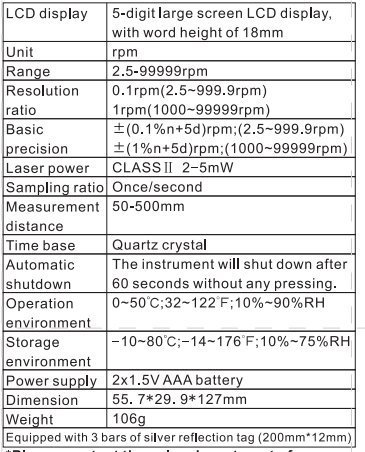
Image description: A detailed table listing the technical specifications of the Benetech GM8905 Tachometer, including LCD display type, unit, range, resolution, precision, laser power, sampling ratio, measurement distance, time base, automatic shutdown, operation environment, storage environment, power supply, dimension, and weight.
| Ẹya ara ẹrọ | Sipesifikesonu |
|---|---|
| Iwọn Iwọn | 2.5 ~ 99999RPM |
| Ipinnu | 0.1 RPM (2.5 ~ 999.9 RPM), 1 RPM (1000 ~ 99999 RPM) |
| Basic Precision | ±(0.1%n + 5d) RPM (2.5 ~ 999.9 RPM) ±(1%n + 5d) RPM (1000 ~ 99999 RPM) |
| Agbara lesa | Class II, 2 ~ 5 mW |
| Sampling ratio | Once/second |
| Wiwọn Iwọn | 50 ~ 500 mm (2 ~ 20 inches) |
| Ipilẹ akoko | Kuotisi Crystal |
| Tiipa aifọwọyi | Lẹhin awọn aaya 60 ti aiṣiṣẹ |
| Ayika isẹ | 0 ~ 50°C (32 ~ 122°F), 10% ~ 90% RH |
| Ibi ipamọ Ayika | -10 ~ 80°C (14 ~ 176°F), 10% ~ 75% RH |
| Ibi ti ina elekitiriki ti nwa | 2 x 1.5V AAA Batiri |
| Awọn iwọn | 55.7 x 29.9 x 127 mm |
| Iwọn | 106 giramu (3.74 iwon) |
| UPC | 732140088524 |
Atilẹyin ọja ati Support
For warranty information or technical support regarding your Benetech GM8905 Digital Laser Tachometer, please refer to the documentation provided with your purchase or contact the retailer directly. Keep your purchase receipt as proof of purchase for any warranty claims.