
Ọja Pariview
The MOTOROLA Talkabout T280 is a rechargeable two-way radio designed for instant communication. It features 22 channels, a maximum talking range of 25 miles under optimal conditions, and weather alert capabilities. The T280 is suitable for various communication needs, including outdoor activities and emergency preparedness.
Awọn ẹya pataki pẹlu:
- 22 FRS channels for communication.
- Rechargeable NiMH battery packs with micro-USB charging.
- Weatherproof design for durability.
- Emergency preparedness features, including weather alerts.

Aworan: Isalẹ view of the Motorola T280 radio, featuring the 'Talkabout' branding.
Package Awọn akoonu
The MOTOROLA Talkabout T280 bundle includes the following items:
- Two (2) T280 Radios
- One (1) Y Cable with Dual Micro-USB Chargers
- Two (2) NiMH Rechargeable Battery Packs
- Two (2) Belt Clips
- One (1) Red Carry Case
- Emergency Preparedness Checklist
Ṣeto
1. Fifi sori batiri
- Rí i dájú pé redio náà ti pa.
- Wa ideri iyẹwu batiri ni ẹhin redio naa.
- Ṣii ideri iyẹwu batiri naa.
- Insert the NiMH rechargeable battery pack, ensuring correct polarity. The radio also supports 4 AAA alkaline batteries (not included) as an alternative.
- Pa ideri batiri naa ni aabo.

Aworan: Apa view of the Motorola T280 radio, illustrating the general area for battery access and the belt clip attachment point.
2. Ngba agbara si awọn batiri
- Connect the Y cable with dual micro-USB chargers to a compatible USB power source.
- Plug the micro-USB connectors into the charging ports located at the bottom of each radio.
- The battery indicator on the radio display will show charging status.
- Allow sufficient time for a full charge before first use (typically 8-10 hours).
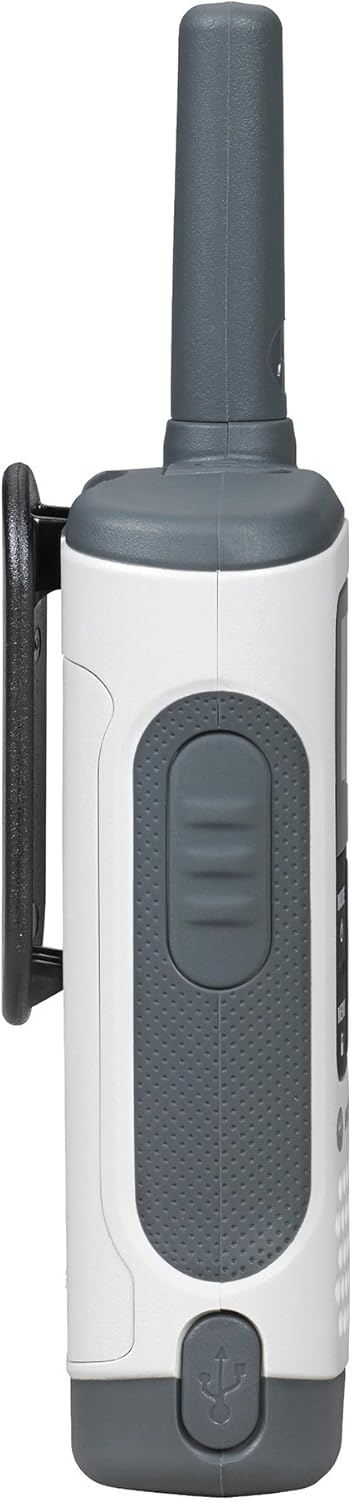
Aworan: Isalẹ view of the Motorola T280 radio, highlighting the micro-USB charging port.
3. Sisopọ Agekuru Beliti
- Ṣe àtúnṣe sí bẹ́líìtì náà pẹ̀lú àwọn ihò tó wà ní ẹ̀yìn rédíò náà.
- Gbe agekuru igbanu si isalẹ titi ti o fi tẹ sinu aaye.
- To remove, push the release tab and slide the clip upwards.
Awọn ilana Iṣiṣẹ
1. Agbara Tan / Paa
- Lati fi agbara tan: Tẹ mọlẹ MODE/AKỌSỌ button until the radio turns on.
- Lati fi agbara si pipa: Tẹ mọlẹ MODE/AKỌSỌ button until the radio turns off.

Aworan: Iwaju view of two Motorola T280 radios, showing the display, MODE/MENU, plus/minus, and monitor buttons.
2. Siṣàtúnṣe iwọn didun
- Lo awọn + (Plus) and - (Minus) buttons to increase or decrease the listening volume.
3. Yiyan ikanni kan
- Pẹlu redio ti wa ni titan, tẹ awọn MODE/AKỌSỌ bọ́tìnì kan náà. Nọ́mbà ikanni náà yóò tàn yanranyanran.
- Lo awọn + or - awọn bọtini lati yan ikanni ti o fẹ (1-22).
- Tẹ awọn MODE/AKỌSỌ bọtini lẹẹkansi lati jẹrisi yiyan ikanni naa.
- For optimal communication, ensure all radios in your group are set to the same channel and privacy code.
4. Setting a Privacy Code
Privacy codes help reduce interference from other users. The T280 supports 121 privacy codes (38 CTCSS codes and 83 DCS codes).
- After selecting a channel, press the MODE/AKỌSỌ bọ́tìnì náà lẹ́ẹ̀mejì. Nọ́mbà kódù ìpamọ́ náà yóò tàn yanranyanran.
- Lo awọn + or - awọn bọtini lati yan koodu ikọkọ ti o fẹ.
- Tẹ awọn MODE/AKỌSỌ bọtini lẹẹkansi lati jẹrisi koodu aṣiri naa.
5. Gbigbe ati Gbigba
- To transmit: Press and hold the Titari-si-Sọrọ (PTT) button located on the side of the radio. Speak clearly into the microphone. Release the PTT button to listen.
- To receive: Ensure the PTT button is not pressed. The radio will automatically receive transmissions on the selected channel and privacy code.
Aworan: Apa view of the Motorola T280 radio, highlighting the Push-to-Talk (PTT) button.
6. Monitor Išė
- Tẹ awọn MON button (often labeled with a 'Z' or 'MON' icon) to temporarily disable the privacy code and listen for activity on the current channel. This is useful for checking for weak signals or if you suspect interference.
7. Weather Alerts
The T280 can receive NOAA weather alerts. Refer to the radio's display for weather channel indicators. In areas with NOAA broadcasts, the radio can alert you to severe weather conditions.
- To activate/deactivate weather alerts, consult the full user manual for specific menu navigation steps.
Itoju
1. Itọju batiri
- Always use the provided NiMH rechargeable battery packs or approved AAA alkaline batteries.
- Maṣe dapọ atijọ ati awọn batiri titun, tabi awọn oriṣiriṣi awọn batiri.
- Remove batteries if the radio will not be used for extended periods.
- Tọju awọn batiri ni itura, ibi gbigbẹ.
2. Ninu
- Nu redio nu pẹlu asọ, damp asọ.
- Ma ṣe lo abrasive ose tabi epo.
- Ensure the micro-USB charging port is free of debris.
3. Omi Resistance
The T280 radio is designed to be waterproof. However, ensure all port covers (e.g., micro-USB charging port, accessory port) are securely closed to maintain its water resistance. Avoid submerging the radio for extended periods or exposing it to high-pressure water jets.

Aworan: Oke view of the Motorola T280 radio, showing the antenna and the covered accessory port.
Laasigbotitusita
| Isoro | Owun to le Solusan |
|---|---|
| Redio ko ṣiṣẹ. |
|
| Ko le ṣe ibasọrọ pẹlu awọn redio miiran. |
|
| Dídára ohùn tí kò dára tàbí tí kò dúró ṣinṣin. |
|
| Iwọn to lopin. |
|
Awọn pato
| Ẹya ara ẹrọ | Ẹ̀kúnrẹ́rẹ́ |
|---|---|
| Nọmba awoṣe | T280 |
| Ọja Mefa | 6.42 x 2.13 x 1.24 inches |
| Iwọn Nkan | 6.4 iwon |
| Nọmba ti awọn ikanni | 22 |
| Iwọn Igbohunsafẹfẹ | 300 MHz - 3 GHz |
| Ti o pọju Ọrọ sisọ | Maili 25 (labẹ awọn ipo to dara julọ) |
| Orisun agbara | NiMH Rechargeable Battery Packs (included) or 4 AAA batteries (not included) |
| Voltage | 9.6 Volts (DC) |
| Omi Resistance Ipele | Mabomire |
| Pataki Awọn ẹya ara ẹrọ | Rechargeable, Waterproof, Weather Alerts |
Atilẹyin ọja ati Support
For warranty information, technical support, and additional resources, please visit the official Motorola Solutions webojula tabi kan si wọn onibara iṣẹ Eka.
You can find more information and products from Motorola Solutions at their official store: Motorola Solutions Store.