
Ọrọ Iṣaaju
O ṣeun fun yiyan Lepro LED Desk Lamp. Eleyi lamp is designed to provide versatile and comfortable lighting for various tasks, featuring adjustable brightness, multiple color temperatures, a flexible design, and convenient additional functions.

Iduro LED Lepro Lamp provides versatile illumination for your workspace.
- Imọlẹ adijositabulu: Choose from 3 color temperatures (3000K Warm White, 4700K Natural White, 6000K Cool White) and stepless dimming from 5% to 100% brightness.
- Apẹrẹ Rọ: Awọn lamp features a multi-angle adjustable arm and head, allowing for precise light positioning. The base rotates 90 degrees, and the lamp head adjusts 180 degrees.
- Ibudo USB ti a dapọ: A 5V/1A USB output port is located on the back of the base for convenient charging of your electronic devices.
- Awọn iṣẹ Smart: Includes a memory function to recall your last lighting setting and a 30-second timer for automatic shut-off.
- Ikole ti o tọ: Made with a brushed aluminum alloy stand and shade, ensuring excellent heat dissipation and longevity, with ABS plastic articulations for flexibility.
Awọn ilana iṣeto
- Yọ Awọn akoonu: Fara yọ lamp, power adapter, and cleaning cloth from the packaging.
- Gbe ipo Lamp: Gbe lamp on a stable, flat surface such as a desk or table.
- So agbara: Insert the power adapter's DC plug into the power input port on the back of the lamp base. Then, plug the power adapter into a standard electrical outlet.
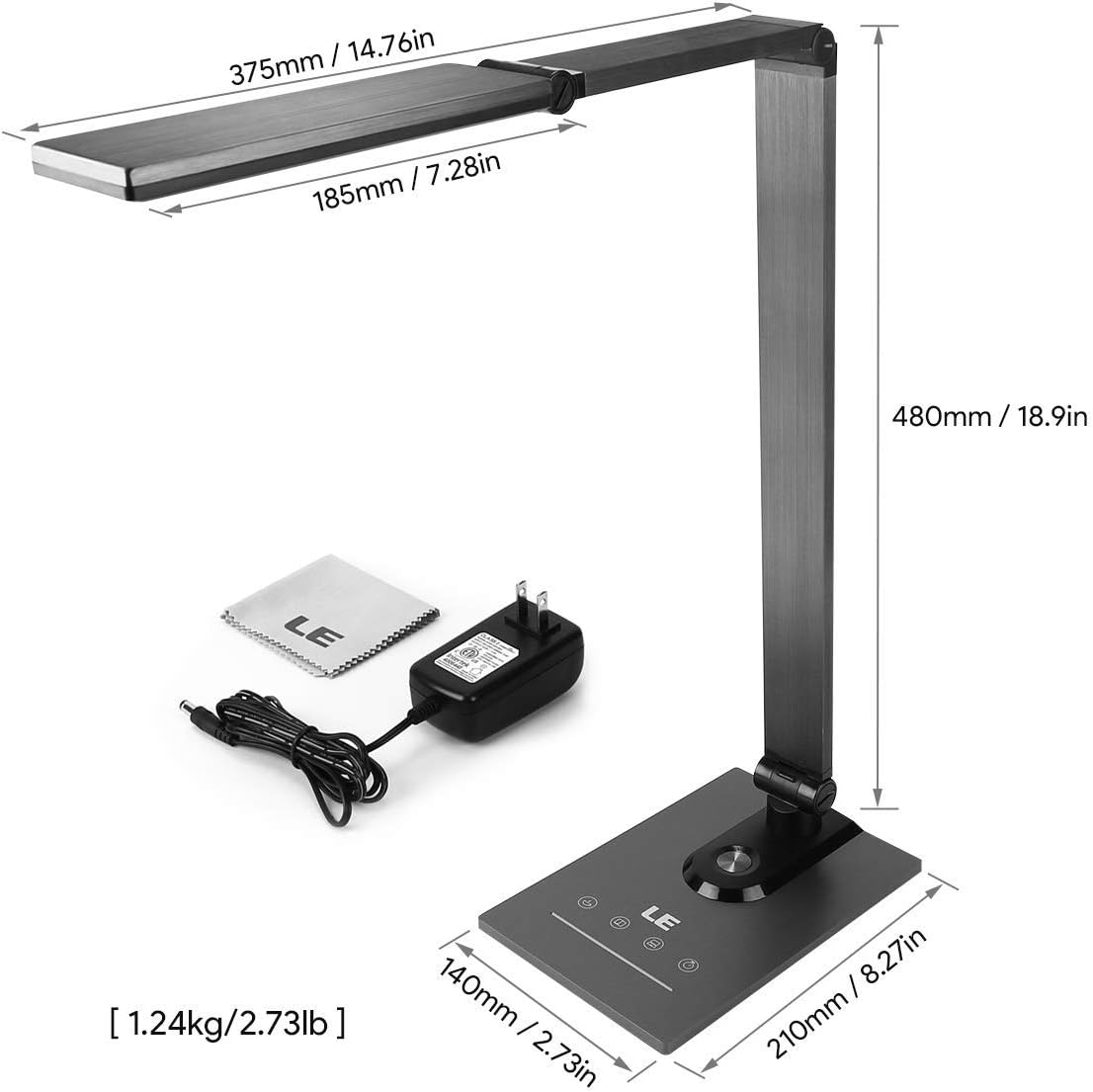
Ensure all components, including the power adapter and cleaning cloth, are present.
Awọn ilana Iṣiṣẹ
1. Agbara Tan / Paa
Gently touch the power symbol (O) on the lamp ipilẹ lati tan lamp tan tabi pa.
2. Siṣàtúnṣe Imọlẹ
Slide your finger along the touch panel (indicated by a horizontal line with sun icons) on the lamp base to adjust the brightness level from 5% to 100%. The lamp offers stepless dimming for precise control.
3. Changing Color Temperature
Touch the mode symbol (icons resembling a coffee cup, book, and computer) on the lamp base to cycle through the three available color temperature modes:
- 3000K (Funfun Gbona): Ideal for relaxation or a cozy atmosphere.
- 4700K (Natural White): Suitable for general reading and daily tasks.
- 6000K (Cool White): Best for focused work and concentration.

Easily switch between three color temperatures and adjust brightness with the touch controls.
4. USB Ngba agbara Port
Connect your smartphone, tablet, or other USB-powered devices to the 5V/1A USB output port located on the rear of the lamp mimọ fun rọrun gbigba agbara.

Charge your devices efficiently using the integrated 5V/1A USB port.
5. Iṣẹ Iranti
Awọn lamp automatically remembers your last used brightness and color temperature settings. When you turn the lamp on again, it will resume with these previous settings.
6. 30-Second Timer
Touch the clock symbol (Aago) on the lamp base to activate the 30-second timer. The lamp will dim to a low light level and automatically turn off after 30 seconds, providing a convenient delay for leaving a room or falling asleep.

Utilize the timer and memory functions for enhanced convenience.
7. Adjusting Lamp Ipo
Awọn lamp's design allows for extensive adjustment to direct light precisely where needed:
- Yiyi ipilẹ: Awọn lamp base can be rotated up to 90 degrees horizontally.
- Àtúnṣe apá: The main arm of the lamp can be adjusted to various angles.
- Atunse Ori: Awọn lamp head can be tilted and rotated up to 180 degrees vertically.

Ṣe atunṣe lamp's arm and head to achieve optimal lighting angles.

The flexible design allows for precise light direction, suitable for various scenarios.
Itoju
- Ninu: Use the provided cleaning cloth or a soft, dry cloth to wipe the lampMá ṣe lo àwọn ohun ìfọṣọ, àwọn ohun èlò ìfọṣọ, tàbí àwọn kẹ́míkà líle, nítorí pé wọ́n lè ba àwọn ohun èlò ìfọṣọ tàbí ẹ̀rọ itanna jẹ́.
- Ibi ipamọ: Ti o ba tọju lamp Fún ìgbà pípẹ́, rí i dájú pé ó mọ́ tónítóní àti gbígbẹ. Tọ́jú rẹ̀ sí ibi tí ó tutù, tí ó sì gbẹ, tí kò sí ìmọ́lẹ̀ oòrùn tààrà àti ooru tó le koko.
- Awọn LED: A ti so orisun ina LED naa pọ mọ ara wọn, kii ṣe lati rọpo olumulo. Maṣe gbiyanju lati tú ina naa ka.amp ori.
Laasigbotitusita
| Isoro | Owun to le Fa | Ojutu |
|---|---|---|
| Lamp ko tan. | Ko si ipese agbara tabi asopọ alaimuṣinṣin. | Rii daju pe ohun ti nmu badọgba agbara ti wa ni edidi ni aabo sinu awọn mejeeji lamp àti ìsopọ̀ iná mànàmáná tó ń ṣiṣẹ́. |
| Light flickers or brightness is inconsistent. | Unstable power supply or dirty touch panel. | Check the power source. Clean the touch control panel with a dry cloth. |
| Ibudo gbigba agbara USB ko ṣiṣẹ. | Device incompatibility or faulty cable. | Ensure your device is compatible with 5V/1A USB charging. Try a different USB cable. |
| Lamp does not hold its adjusted position. | Joints may be loose or over-extended. | Gently readjust the lamp to a stable position. Avoid forcing joints beyond their intended range of motion. |
Awọn pato
| Ẹya ara ẹrọ | Ẹ̀kúnrẹ́rẹ́ |
|---|---|
| Nọmba awoṣe | 3100030-EU |
| Awọn iwọn (L x W x H) | 14P x 21l x 48H cm (5.5 x 8.3 x 18.9 inches) |
| Iwọn | 1450 Giramu (3.2 lbs) |
| LED Agbara | 9 Wattis |
| Ijade USB | 5V/1A (10 Wattis) |
| Iṣagbewọle Voltage | 240 Volts |
| Awọn iwọn otutu awọ | 3000K, 4700K, 6000K |
| Atunṣe Imọlẹ | Stepless Dimming (5%-100%) |
| Ọna Iṣakoso | Iṣakoso ifọwọkan |
| Awọn ohun elo | Brushed Metal (Base, Shade), ABS Plastic (Articulations) |
| Awọn irinše to wa | Iduro Lamp, Power Adapter, Cleaning Cloth |
Atilẹyin ọja ati Support
This product comes with a 1-year availability of spare parts, indicating a commitment to product support.
For any questions, technical assistance, or warranty claims, please contact the retailer where you purchased the product or visit the official Lepro webojú-òpó wẹ́ẹ̀bù fún ìwífún nípa ìrànlọ́wọ́ àwọn oníbàárà.
Jọwọ ṣe idaduro ẹri rira rẹ fun awọn idi atilẹyin ọja.