
1. Ifihan
This manual provides essential information for the safe and efficient operation of your Lenco L-30BK Belt Drive Turntable. Please read these instructions thoroughly before using the device and retain them for future reference. The Lenco L-30BK is designed for playing vinyl records at 33 and 45 RPM, featuring a built-in preamplifier and USB connectivity for digitizing your vinyl collection.
2. Alaye Aabo
- Orisun Agbara: Rii daju pe ipese agbara voltage matches the requirements specified on the unit. Use only the provided power adapter.
- Omi ati Ọrinrin: Má ṣe fi ẹ̀rọ náà sí òjò, ọrinrin, tàbí omi tó ń rọ̀/tó ń tú jáde. Má ṣe gbé àwọn ohun tí ó kún fún omi, bíi àwọn ìgò, sí orí ẹ̀rọ náà.
- Afẹfẹ: Rii daju pe fentilesonu to peye. Ma ṣe dina awọn ṣiṣi atẹgun.
- Ooru: Jeki ẹyọ kuro lati awọn orisun ooru gẹgẹbi awọn imooru, awọn iforukọsilẹ ooru, awọn adiro, tabi awọn ohun elo miiran (pẹlu ampliifiers) ti o gbe ooru jade.
- Ninu: Yọọ kuro lati inu iṣan ogiri ṣaaju ṣiṣe mimọ. Lo asọ asọ ti o gbẹ. Maṣe lo awọn olutọpa olomi tabi awọn ẹrọ aerosol.
- Ṣiṣẹ: Maṣe gbiyanju lati ṣiṣẹ ọja yi funrararẹ. Tọkasi gbogbo iṣẹ si oṣiṣẹ oṣiṣẹ ti o peye.
- Ibi: Place the turntable on a stable, level surface to prevent vibrations and ensure proper playback.
3. Package Awọn akoonu
Please check that all items listed below are included in the package:
- Lenco L-30BK Turntable Unit
- Ideri Eruku
- Pẹpẹ
- Belii wakọ
- Slipmat
- Adaparọ Agbara AC
- Okun USB
- RCA Audio USB
- Ilana itọnisọna
- Pick-up Needle (pre-installed on cartridge)
4. Ọja Ipariview
Familiarize yourself with the components of your Lenco L-30BK turntable.

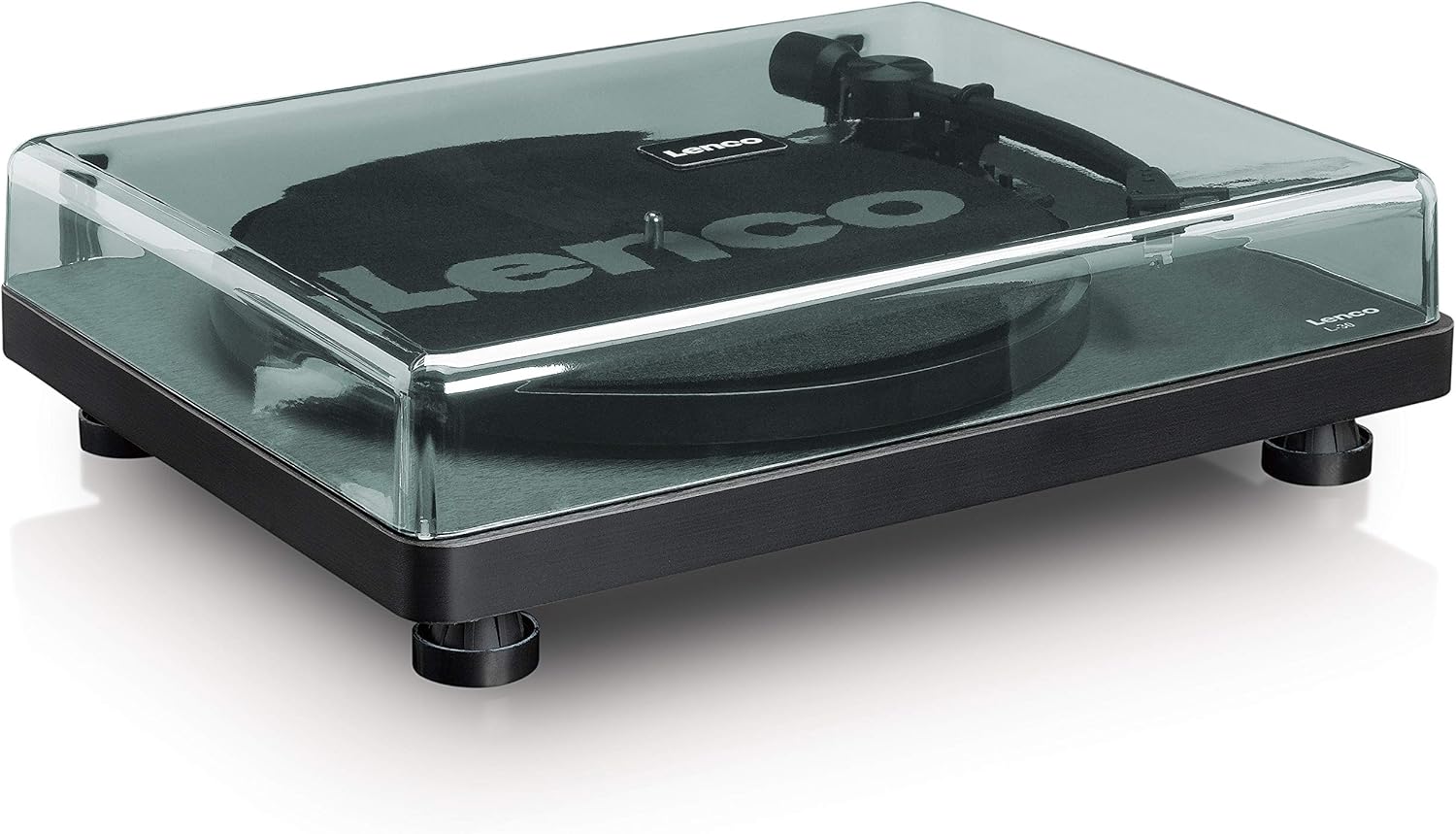
Nọmba 4.1: Iwaju view of the Lenco L-30BK Turntable with the dust cover open, revealing the main components including the platter, tonearm, and control buttons.

Nọmba 4.2: Rear panel connections of the Lenco L-30BK, including RCA audio outputs (L/R), USB port, DC12V power input, and the main power switch.
Awọn eroja pataki:
- Platter: The circular platform where records are placed.
- Ohun orin: Holds the cartridge and stylus, which reads the grooves of the record.
- Cartridge and Stylus: Converts physical vibrations into electrical signals. The L-30BK features a Movable Magnet Sensor (MMC) with an individually replaceable stylus.
- Yiyan Iyara: Switch to select between 33 and 45 RPM playback speeds.
- Tiipa Aifọwọyi: Automatically stops the platter rotation at the end of a record.
- Ideri Ekuru: Protects the turntable from dust when not in use.
- Àwọn ìjáde ohùn RCA (L/R): Fun asopọ si ita amplifier tabi ti nṣiṣe lọwọ agbohunsoke.
- Ibudo USB: For connecting to a computer to digitize vinyl records.
- Ìtẹ̀wọlé Agbára DC12V: Fun sisopọ ohun ti nmu badọgba agbara.
5. Eto
5.1 Ṣiṣii ati Gbe
- Carefully remove the turntable from its packaging.
- Place the unit on a stable, level surface, away from direct sunlight, heat sources, and excessive dust or vibrations.
- Install the dust cover by aligning its hinges with the slots on the back of the turntable.

Nọmba 5.1: The Lenco L-30BK Turntable with its protective dust cover closed, ready for placement.
5.2 Platter ati igbanu fifi sori
- Gbé àwo náà sí orí ọ̀pá ìyípo tí a fi ń yípo.
- Locate the drive belt, typically found underneath the platter or separately packaged.
- Carefully stretch the drive belt around the motor pulley and the inner rim of the platter. Ensure the belt is not twisted.
- Place the slipmat on top of the platter.
5.3 Audio Asopọ
The L-30BK has a built-in preamplifier, allowing direct connection to most audio systems.
- Connect the RCA audio cable (red for right channel, white for left channel) from the AUDIO OUT jacks on the rear of the turntable to the LINE IN or AUX IN jacks on your amplifier tabi ti nṣiṣe lọwọ agbohunsoke.
5.4 Asopọ agbara
- Connect the DC12V power adapter to the DC12V POWER input on the rear of the turntable.
- Pulọọgi ohun ti nmu badọgba agbara sinu iṣan ogiri ti o dara.
5.5 USB Connection (for Digitization)
- To digitize your vinyl records, connect the USB cable from the USB port on the rear of the turntable to an available USB port on your computer (PC or Mac).
6. Awọn ilana Iṣiṣẹ
6.1 Titan / Pa a
- Flip the ON/OFF switch on the rear panel to the 'ON' position to power on the turntable.
- Flip the switch to 'OFF' when not in use.
6.2 Ti ndun igbasilẹ kan
- Place a record on the platter, ensuring it is centered.
- Select the appropriate speed (33 or 45 RPM) using the speed selector switch. For 45 RPM singles, place the included adapter on the spindle if needed.
- Gbe apa ohun orin soke nipa lilo lefa ika.
- Pẹlu ọwọ gbe ohun orin ipe si ori ibi ibẹrẹ ti o fẹ ti igbasilẹ naa.
- Gently lower the tonearm using the cueing lever. The stylus will descend onto the record, and playback will begin.
- At the end of the record, the auto shut-off function will stop the platter rotation. Lift the tonearm and return it to its rest.

Nọmba 6.1: Proper technique for lowering the tonearm onto a record for playback.
Nọmba 6.2: Alaye view of the Movable Magnet Sensor (MMC) cartridge and stylus assembly.
6.3 Digitizing Records via USB
The L-30BK allows you to convert your vinyl records into digital audio files lilo kọmputa kan.
- Connect the turntable to your computer using the supplied USB cable.
- Download and install audio recording software such as Audacity (available online for free) on your computer.
- Open the recording software and select the USB Audio Device as the input source.
- Start recording in the software, then begin playing your record on the turntable as described in section 6.2.
- Once the record finishes, stop the recording in the software and save your digitized audio file.
7. Itọju
7.1 Cleaning the Turntable
- Always unplug the turntable from the power outlet before cleaning.
- Use a soft, dry, lint-free cloth to wipe the cabinet and dust cover.
- Ma ṣe lo abrasive Cleaners, waxes, tabi epo bi wọn ṣe le ba ipari jẹ.
7.2 Ìtọ́jú àti Rírọ́pò Stylus
- The stylus is a delicate component. Avoid touching it with your fingers.
- Clean the stylus regularly using a soft brush, gently brushing from back to front.
- The stylus should be replaced after approximately 300-500 hours of playback, or if you notice a degradation in sound quality.
- To replace the stylus, carefully pull the old stylus assembly forward and down from the cartridge. Insert the new stylus assembly by pushing it upwards and backwards into the cartridge until it clicks into place.
8. Laasigbotitusita
If you encounter problems with your turntable, refer to the following common issues and solutions:
| Isoro | Owun to le Fa | Ojutu |
|---|---|---|
| Ko si agbara | Power adapter not connected; Power switch off; Wall outlet faulty. | Ensure power adapter is securely connected; Turn power switch to 'ON'; Test wall outlet with another device. |
| Ko si ohun tabi iwọn didun kekere | Awọn kebulu RCA ko ni asopọ daradara; Amplifier/speakers off or volume low; Input selected incorrectly on amplifier. | Check RCA cable connections; Turn on amplifier/speakers and adjust volume; Select correct input source on your audio system. |
| Ohun ti o daru | Dirty stylus; Damaged stylus; Dirty record; Turntable not on a stable surface. | Clean the stylus; Replace the stylus if damaged; Clean the record; Ensure turntable is on a stable, level surface. |
| Fífò ìgbàsílẹ̀ | Dirty or scratched record; Stylus worn or damaged; Turntable not level; External vibrations. | Clean the record; Replace the stylus; Ensure turntable is level; Place turntable away from sources of vibration. |
| Awọn iṣoro pẹlu gbigbasilẹ USB | USB cable not connected; Incorrect input selected in software; Software not installed. | Check USB cable connection; Select 'USB Audio Device' as input in recording software; Install Audacity or similar software. |
9. Awọn pato
| Orukọ awoṣe | L-30BK |
| Brand | Lenco |
| Wakọ Iru | Belii wakọ |
| Awọn iyara | 33 1/3, 45 RPM |
| Ṣaajuampitanna | Ti a ṣe sinu |
| Iru katiriji | Movable Magnet Sensor (MMC) |
| Asopọmọra | USB, RCA Audio Out |
| Pa laifọwọyi | Bẹẹni |
| Platter Diamita | 300 mm |
| Ohun elo | Wood (Enclosure) |
| Àwọ̀ | Dudu |
| Iwọn Nkan | 3.28 kilo |
| Awọn iwọn (L x W x H) | 41L x 32W x 12H sẹntimita |
| Ifihan Ibuwọlu-si-Noise | 60 dB |
| Voltage | 240 Volts |
| Orisun agbara | Okun Itanna |
10. Atilẹyin ọja ati Support
Lenco products are manufactured to high quality standards. In the event of a defect, your product is covered by the terms of the warranty in your country of purchase. For detailed warranty information, please refer to the warranty card included with your product or visit the official Lenco website. For technical support or service inquiries, please contact Lenco customer service through their official channels.