
1. Ifihan
This manual provides essential information for the safe and efficient operation of your Rigol DS1104Z-S Plus 100 MHz Digital Oscilloscope. Please read this manual thoroughly before using the instrument to ensure proper functionality and to prevent damage. The Rigol DS1104Z-S Plus is a 4-channel digital storage oscilloscope designed for precise signal analysis with a 100 MHz bandwidth and a 1 GSa/s real-time sample oṣuwọn.
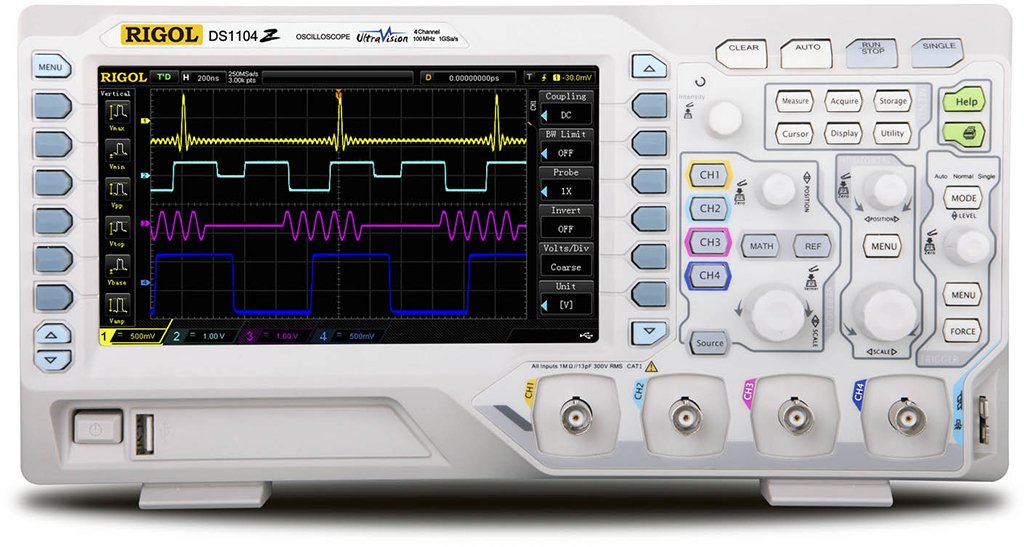
Figure 1: Rigol DS1104Z-S Plus Digital Oscilloscope. This image shows the front panel of the oscilloscope with its display, control knobs, and input channels.
2. Alaye Aabo
Maa tẹle awọn iṣeduro aabo wọnyi nigbagbogbo lati yago fun ipalara ati ibajẹ si ohun elo naa:
- Orisun Agbara: Connect the instrument only to a power source with the specified voltage ati igbohunsafẹfẹ.
- Ilẹ: Rí i dájú pé ohun èlò náà dúró dáadáa láti dènà ìkọlù iná mànàmáná.
- Afẹfẹ: Má ṣe dí àwọn ihò afẹ́fẹ́. Rí i dájú pé afẹ́fẹ́ tó wà ní àyíká ohun èlò náà tó.
- Ayika: Operate the oscilloscope in a dry, well-ventilated area, away from direct sunlight, high temperatures, and excessive dust.
- Awọn iwadii: Use only probes designed for the specified voltage ati igbohunsafẹfẹ-wonsi.
- Ṣiṣẹ: Dá gbogbo iṣẹ́ ìtọ́jú náà sí àwọn òṣìṣẹ́ iṣẹ́ tó péye. Má ṣe gbìyànjú láti tún ohun èlò náà ṣe fúnra rẹ.
- Ninu: Ge asopọ agbara ṣaaju ṣiṣe mimọ. Lo asọ, damp asọ. Ma ṣe lo abrasive ose tabi epo.
3. Package Awọn akoonu
Jẹrisi pe package rẹ ni awọn nkan wọnyi ninu:
- Rigol DS1104Z-S Plus Digital Oscilloscope
- Okun agbara
- Passive Probes (4 units)
- Okun USB
- Awọn ọna Itọsọna
- Resource CD (User Manual, Programming Manual, Software)
4. Ọja Ipariview
The Rigol DS1104Z-S Plus features a user-friendly interface and robust design for various measurement applications.
4.1 Igbimọ iwaju
The front panel includes the display, control knobs, function buttons, and input connectors for channels 1-4.
- Iboju ifihan: Shows waveforms, measurement results, and menu options.
- Àwọn Ìṣàkóso Inaro: Satunṣe voltage per division and position for each channel.
- Àwọn Ìṣàkóso Pẹtẹlẹ̀: Adjust time per division and horizontal position.
- Trigger Controls: Set trigger level, mode, and type.
- Awọn bọtini iṣẹ: Access various menus such as Acquire, Measure, Storage, Utility, etc.
- Channel Inputs (CH1-CH4): BNC connectors for probe connection.
4.2 ru Panel
The rear panel provides power input, USB host/device ports, and LAN port for connectivity.
- Input Agbara AC: Fun asopọ okun agbara.
- Ibudo Gbalejo USB: Fun sisopọ awọn ẹrọ ipamọ USB.
- USB Device Port: For connecting to a PC.
- Ibudo LAN: Fun asopọ nẹtiwọọki ati iṣakoso latọna jijin.
5. Eto
5.1 Asopọ agbara
- Rii daju pe iyipada agbara lori nronu ẹhin wa ni ipo PA.
- Connect the provided power cord to the AC power input on the rear panel of the oscilloscope.
- Pulọọgi opin miiran ti okun agbara sinu iṣan agbara AC ti o wa lori ilẹ.
5.2 Iwadi Asopọ
- Connect the BNC connector of a passive probe to one of the input channels (CH1, CH2, CH3, or CH4) on the front panel.
- Connect the probe's ground clip to the circuit's ground reference.
- Set the attenuation ratio on the probe to match the setting on the oscilloscope (e.g., 1X or 10X).
5.3 Ibẹrẹ Agbara Lori
- Press the power switch on the rear panel to the ON position.
- The oscilloscope will perform a self-test and display the Rigol logo.
- After startup, the default waveform display will appear.
6. Awọn ilana Iṣiṣẹ
This section covers basic operations for acquiring and analyzing waveforms.
6.1 Ìfihàn Ìgbì Wíwọ́-ẹ̀rọ Ìpìlẹ̀
- Vertical Scale (VOLTS/DIV): Use the vertical scale knob for the active channel to adjust the voltage ifamọ.
- Ipo inaro: Use the vertical position knob to move the waveform up or down on the screen.
- Horizontal Scale (SEC/DIV): Use the horizontal scale knob to adjust the time base.
- Ipò Pẹtẹpẹ́: Use the horizontal position knob to shift the waveform left or right.
6.2 Nfa
Ìfàsẹ́yìn ń mú kí àwọn ìgbì omi tó ń yípadà dúró ṣinṣin, ó sì ń kó àwọn ìṣẹ̀lẹ̀ ìbọn kan ṣoṣo.
- Ipele okunfa: Adjust the trigger level knob to set the voltage point at which the trigger occurs.
- Àkójọ Àkójọ Ìfàsẹ́yìn: Tẹ awọn Àtòjọ Ìfàsẹ́yìn button to configure trigger type (Edge, Pulse, Video, etc.), source, and slope.
- Ipo Nfa: Select between Auto, Normal, and Single modes.
6.3 Awọn iṣẹ wiwọn
The oscilloscope offers various automatic measurement functions.
- Tẹ awọn Iwọn button to display the measurement menu.
- Select desired measurements such as Vpp, Vmax, Vmin, Freq, Period, Rise Time, etc.
- The results will be displayed on the screen.
6.4 Saving Data
Waveforms and settings can be saved to internal memory or a USB storage device.
- Tẹ awọn Ibi ipamọ bọtini.
- Select the storage type (Waveform, Setup, Image) and destination (Internal, USB).
- Follow the on-screen prompts to save the data.
7. Itọju
7.1 Ninu
To maintain the instrument's appearance and performance:
- Ge asopọ okun agbara ṣaaju ṣiṣe mimọ.
- Lo asọ asọ dampened with mild detergent and water to clean the exterior.
- Ma ṣe lo awọn afọmọ abrasive, nkanmimu, tabi awọn kẹmika lile.
- Rii daju pe omi ko wọ inu ẹrọ naa.
7.2 Idiwọn
The oscilloscope is factory calibrated. For optimal performance, periodic calibration by qualified service personnel is recommended, typically every 1-2 years, depending on usage.
7.3 Ibi ipamọ
When not in use for extended periods, store the oscilloscope in a dry, dust-free environment within the specified operating temperature range.
8. Laasigbotitusita
This section lists common problems and their solutions. If the problem persists, contact Rigol customer support.
| Isoro | Owun to le Fa | Ojutu |
|---|---|---|
| Ko si ifihan lẹhin agbara lori | Power cord not connected; Power switch off; Faulty power outlet | Ṣàyẹ̀wò ìsopọ̀ okùn agbára; Rí i dájú pé switch agbára wà ní ON; dán ibi ìjáde agbára wò pẹ̀lú ẹ̀rọ mìíràn |
| Kò sí ìgbì ìgbì tí a fi hàn | Probe not connected; Incorrect channel settings; Trigger level incorrect; Input signal too small/large | Connect probe to active channel; Adjust vertical scale and position; Adjust trigger level; Check input signal source |
| Ìgbì ìgbì tí kò dúró ṣinṣin | Incorrect trigger settings; Noisy signal | Adjust trigger level and mode; Check signal source for noise; Use averaging acquisition mode |
| Cannot save data to USB | USB drive not formatted correctly; USB drive full; USB drive faulty | Format USB drive to FAT32; Delete unnecessary files; Gbiyanju awakọ USB miiran |
9. Awọn pato
Key technical specifications for the Rigol DS1104Z-S Plus Digital Oscilloscope:
- Bandiwidi: 100 MHz
- Awọn ikanni: 4 Awọn ikanni afọwọṣe
- Akoko gidi SampOṣuwọn: Títí dé 1 GSa/s
- Ijinle Iranti: 12 Mpts (Standard), 24 Mpts (Optional)
- Waveform Capture Rate: Up to 30,000 wfms/s
- Ifihan: 7-inch TFT LCD (800x480 resolution)
- Ifamọ inaro: 1 mV/ìpín sí 10 V/ìpín
- Àkókò Ìpìlẹ̀: 2 ns/div to 50 s/div
- Àwọn Irú Èérú: Edge, Pulse, Video, Slope, Alternate, Runt, Window, Delay, Setup/Hold, Nth Edge
- Ni wiwo: USB Host, USB Device, LAN, Pass/Fail, Trigger Out
- Orisun Agbara: Okun Itanna
- Ìwọ̀n Nkan: 1 kilo
- Ibamu: CE
10. Atilẹyin ọja ati Support
Rigol Technologies provides a standard warranty for its products. For detailed warranty terms and conditions, please refer to the warranty card included with your product or visit the official Rigol website. For technical support, service, or inquiries, please contact your local Rigol distributor or Rigol customer service. Contact information can typically be found on the Rigol website or in the documentation provided with your oscilloscope.
Osise Webojula: www.rigol.com