
Ọrọ Iṣaaju
Thank you for choosing the Brookstone Big Blue True Wireless Earbuds. These earbuds are designed to provide a seamless audio experience, allowing you to enjoy music and manage calls wirelessly. This manual provides essential information on setting up, operating, maintaining, and troubleshooting your new earbuds.
Awọn ẹya pataki:
- True wireless design for freedom of movement.
- Rich, full-range audio with deep bass.
- Integrated microphone with Qualcomm cVc noise-cancelling technology for clear calls.
- Bluetooth connectivity for easy pairing with your smartphone or device.

Image: Brookstone Big Blue True Wireless Earbuds in their black charging case.
Ṣeto
Ohun ti o wa ninu Apoti
- Brookstone Big Blue True Wireless Earbuds (Left and Right)
- Alailowaya Ngba agbara Case
Ngba agbara si Earbuds ati Ọran
- Place both earbuds into the charging case. Ensure they are seated correctly.
- So àpótí ìgbara náà mọ́ orísun agbára USB nípa lílo okùn gbigba agbara tí a pèsè.
- The indicator lights on the case and earbuds will show charging status. Refer to the specific light patterns in your product packaging for details.
- Gba akoko to fun idiyele ni kikun ṣaaju lilo akọkọ.
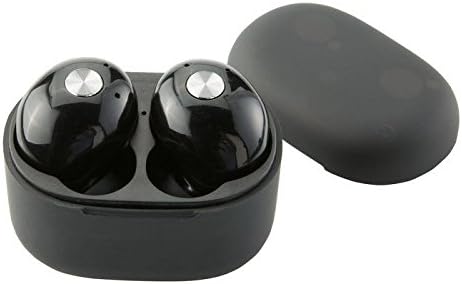
Aworan: Isunmọ view of the earbuds within the charging case, illustrating proper placement for charging.
Asopọ Bluetooth
- Rii daju pe awọn agbekọri ti gba agbara.
- Remove both earbuds from the charging case. They will automatically enter pairing mode, indicated by flashing LED lights (refer to your product packaging for specific light patterns).
- Lori foonuiyara tabi ẹrọ Bluetooth ti o ṣiṣẹ, lọ si awọn eto Bluetooth.
- Wa fun new devices and select "BIG BLUE" (or similar name) from the list.
- Once connected, the earbud indicator lights will change, typically turning solid or off.
- Ti sisopọ ba kuna, gbe awọn afikọti pada sinu ọran, tii, ki o tun awọn igbesẹ naa tun.
Awọn ilana Iṣiṣẹ
Titan / Paa
- Agbara Tan: Remove the earbuds from the charging case. They will automatically power on and attempt to connect to the last paired device.
- Agbara Pa: Gbe awọn agbekọri naa pada sinu apoti gbigba agbara ki o pa ideri naa. Wọn yoo pa ina laifọwọyi ati bẹrẹ gbigba agbara.
Sisisẹsẹhin Orin ati Isakoso Ipe
The earbuds feature integrated controls for media playback and call handling. Specific functions may vary slightly; refer to your product's quick start guide for exact button presses.
- Ṣiṣẹ/Daduro: Ni deede titẹ ẹyọkan lori boya agbekọri.
- Orin t’okan: Often a double press on the right earbud.
- Tẹlẹ Orin: Often a double press on the left earbud.
- Idahun/Ipe Ipari: A single press on either earbud during an incoming call or active call.
- Kọ Ipe: A long press on either earbud during an incoming call.
- Mu Oluranlọwọ Ohun ṣiṣẹ: A triple press or long press on an earbud (check specific model instructions).

Image: A man wearing a Brookstone Big Blue True Wireless Earbud, demonstrating typical use.
Itoju
Ninu
- Lo asọ ti o gbẹ, asọ ti ko ni lint lati nu afikọti ati apoti gbigba agbara.
- Ma ṣe lo awọn olutọpa abrasive, awọn nkanmimu, tabi awọn ohun elo aerosol.
- Gently clean ear tips and speaker grilles with a dry cotton swab to remove earwax or debris.
Ibi ipamọ
- Tọju awọn agbekọri nigbagbogbo sinu apoti gbigba agbara wọn nigbati ko si ni lilo lati daabobo wọn ati jẹ ki wọn gba agbara.
- Tọju ni itura, aye gbigbẹ, kuro lati awọn iwọn otutu ti o ga julọ ati oorun taara.
Itọju Batiri
- Láti mú kí batiri pẹ́ sí i, má ṣe jẹ́ kí àwọn ètí àti àpótí náà máa tú jáde dáadáa nígbà gbogbo.
- Gba agbara si ẹrọ nigbagbogbo, paapaa ti kii ṣe ni lilo loorekoore.
Laasigbotitusita
| Isoro | Owun to le Solusan |
|---|---|
| Earbuds ko so pọ pẹlu ẹrọ. |
|
| Sound skipping or cutting out. |
|
| Agbohungbohun kan ko ni ohun. |
|
| Earbuds ko gba agbara. |
|
Awọn pato
| Ẹya ara ẹrọ | Ẹ̀kúnrẹ́rẹ́ |
|---|---|
| Nọmba awoṣe | BIG BLUE |
| Imọ-ẹrọ Ibaraẹnisọrọ Alailowaya | Bluetooth |
| Awọn irinše to wa | Alailowaya Ngba agbara Case |
| Ohun elo | Ṣiṣu |
| Iṣakoso Iru | Iṣakoso Media |
| Cable Ẹya | Laisi Cable |
| Iwọn Nkan | 2.4 iwon (0.15 iwon) |
| Ọja Mefa | 3.35 x 1.57 x 5.71 inches |
| Pataki Awọn ẹya ara ẹrọ | Microphone Included, Noise Cancellation, Wireless |
| Àwọ̀ | Dudu |
| Fọọmù ifosiwewe | Ninu Eti |
| UPC / GTIN | 883594061516 |
Alaye atilẹyin ọja
Brookstone products are designed with quality and reliability in mind. For specific warranty details regarding your Big Blue True Wireless Earbuds, please refer to the warranty card included in your product packaging or visit the official Brookstone webojula. Jeki ẹri rira rẹ fun eyikeyi awọn ibeere atilẹyin ọja.
Onibara Support
If you encounter any issues not covered in this manual or require further assistance, please contact Brookstone customer support. Contact information can typically be found on the product packaging or the official Brookstone webojula.