
1. Ọja Ipariview
The TTEC 2KM102S Tone Bluetooth Headset is designed for wireless communication, offering convenience and clear audio. This manual provides instructions for setting up, operating, and maintaining your headset.
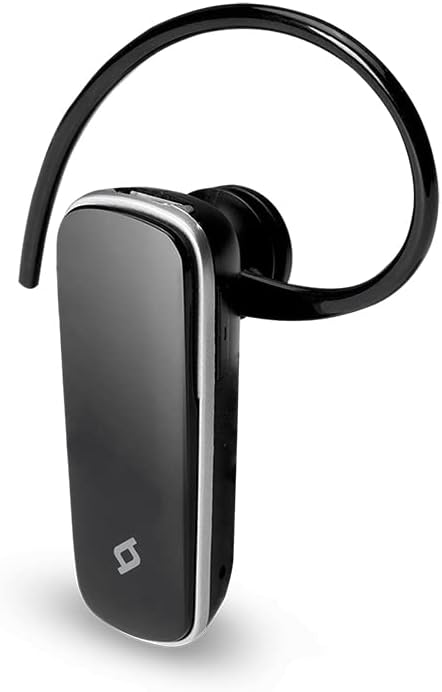
olusin 1: Iwaju view of the TTEC 2KM102S Tone Bluetooth Headset.
2. Package Awọn akoonu
Rii daju pe gbogbo awọn nkan wa ninu package:
- TTEC 2KM102S Tone Bluetooth Headset
- Eti Hook
- Okun Ngba agbara USB
3. Eto Itọsọna
3.1 Ngba agbara si Agbekọri
Before first use, fully charge the headset. Use the provided USB charging cable.
- Connect the small end of the USB charging cable to the charging port on the headset.
- Connect the larger end of the USB cable to a USB power source (e.g., computer USB port, USB wall adapter).
- The LED indicator on the headset will show the charging status. Refer to the "LED Indicator" section for details.
- Ni kete ti o ti gba agbara ni kikun, ge asopọ okun gbigba agbara.
Akiyesi: The headset features an integrated rechargeable battery. Charging time may vary.
3.2 Sisopọ pẹlu ẹrọ kan
To use the headset wirelessly, it must be paired with a Bluetooth-enabled device.
- Rii daju pe agbekari ti wa ni pipa.
- Press and hold the multi-function button on the headset until the LED indicator flashes red and blue alternately. This indicates pairing mode.
- Lori ẹrọ rẹ (foonuiyara, tabulẹti, ati bẹbẹ lọ), mu Bluetooth ṣiṣẹ ki o wa awọn ẹrọ to wa.
- Select "TTEC Tone" or "2KM102S" from the list of found devices.
- Once paired, the LED indicator will flash blue periodically, and you may hear a confirmation tone.
Imọran: For iPhone and iPad users, the battery status of the headset can be monitored on your device's screen.
3.3 Multi-Device Sisopọ
The TTEC Tone headset supports simultaneous connection with two different Bluetooth devices.
- Pa agbekari pọ pẹlu ẹrọ akọkọ bi a ti ṣalaye ni apakan 3.2.
- Mu Bluetooth ṣiṣẹ lori ẹrọ akọkọ.
- Put the headset back into pairing mode (LED flashes red and blue).
- Pa agbekari pọ pẹlu ẹrọ keji.
- Re-enable Bluetooth on the first device. The headset should automatically connect to both devices.
The headset will manage audio from both connected devices, prioritizing incoming calls.
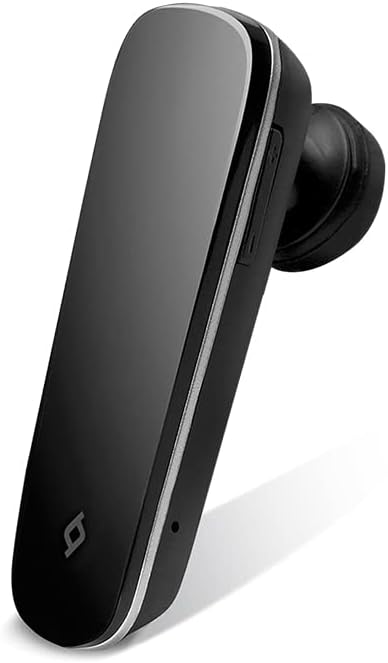
olusin 2: Apa view of the TTEC 2KM102S Tone Bluetooth Headset, showing control buttons.
4. Awọn ilana Iṣiṣẹ
4.1 Agbara Tan / Pa
- Agbara Tan: Tẹ bọtini iṣẹ-pupọ naa ki o si dimu fun bii iṣẹju-aaya mẹta titi ti LED yoo fi tan ina buluu.
- Agbara Pa: Tẹ bọtini iṣẹ-pupọ naa ki o si di mu fun bii iṣẹju-aaya marun titi ti LED yoo fi tan imọlẹ pupa lẹhinna yoo pa.
4.2 ipe Management
The multi-function button controls call functions:
- Idahun Ipe: Tẹ bọtini iṣẹ-pupọ lẹẹkan nigbati ipe ba wọle.
- Ipe Ipari: Tẹ bọtini iṣẹ-pupọ lẹẹkan nigba ipe kan.
- Kọ Ipe: Tẹ mọlẹ bọtini iṣẹ-ọpọlọpọ fun isunmọ iṣẹju 2 nigbati ipe ba wọle.
- Nọmba Ikẹhin Tun Tun: Tẹ bọtini iṣẹ-ọpọlọpọ lẹẹmeji nigbati kii ṣe lori ipe kan.
4.3 Iṣakoso iwọn didun
Use the dedicated volume buttons on the headset:
- Mu iwọn didun pọ si: Press the Volume Up button (+).
- Din iwọn didun silẹ: Press the Volume Down button (-).
4.4 LED Atọka Ipo
The LED indicator provides visual cues for the headset's status:
- Flashing Red & Blue: Ipo sisopọ.
- Flashing Blue (slowly): Connected/Standby.
- Pupa ti o lagbara: Gbigba agbara.
- LED Off (after solid red): Ti gba agbara ni kikun.
- Pupa didan (yara): Batiri kekere.
5. Itọju
Proper care ensures the longevity of your headset.
- Ninu: Use a soft, dry cloth to clean the headset. Do not use abrasive cleaners or immerse in water.
- Ibi ipamọ: Tọju agbekari naa ni itura, aye gbigbẹ kuro lati orun taara ati awọn iwọn otutu to gaju.
- Itọju Batiri: Lati tọju igbesi aye batiri, yago fun gbigba agbara agbekari ni kikun nigbagbogbo. Gba agbara rẹ nigbagbogbo, paapaa ti kii ba lo fun awọn akoko gigun.
6. Laasigbotitusita
| Isoro | Owun to le Solusan |
|---|---|
| Agbekọri ko ni titan. | Rii daju pe agbekari ti gba agbara. So pọ mọ orisun agbara nipa lilo okun USB. |
| Ko le so pọ pẹlu ẹrọ kan. |
|
| Ko si ohun afetigbọ tabi didara ohun ti ko dara. |
|
| Agbekọri ma n ge asopọ nigbagbogbo. |
|
7. Awọn alaye ọja
| Orukọ awoṣe: | Ohun orin |
| Nọmba awoṣe: | 2KM102S |
| Brand: | TTEC |
| Asopọmọra: | Bluetooth |
| Iru ẹrọ: | Agbekọri Bluetooth |
| Akoko Ọrọ: | Titi di wakati 4 |
| Akoko Iduro: | Titi di wakati 100 |
| Asopọ-ojuami pupọ: | Yes, connect to 2 devices simultaneously |
| Awọn iwọn (L x W x H): | 4.5 x 1.7 x 2 cm |
| Àwọ̀: | Dudu |
| Ibudo gbigba agbara: | USB |
8. Atilẹyin ọja ati Support
For warranty information and customer support, please refer to the warranty card included with your product or visit the official TTEC webojula. Tọju iwe-ẹri rira rẹ bi ẹri rira.
Olupese: ttec