
1. Ifihan ati Loriview
The Digoo DG-ROSA is a compact, wireless 433 MHz standalone alarm siren designed for home security. It is compatible with any 433 MHz detectors or accessories. After a simple code learning process, any triggered detector or remote control action will activate the DG-ROSA. It features rapid red and blue flashing lights combined with a super loud siren sound to effectively deter intruders. Designed for ease of use, it provides a convenient and secure DIY security solution.
This manual provides detailed instructions for the setup, operation, and maintenance of your Digoo DG-ROSA alarm siren.
2. Package Awọn akoonu
Jọwọ ṣayẹwo package ni pẹkipẹki lati rii daju pe gbogbo awọn nkan wa:
- 1 x Digoo DG-ROSA 433 MHz Wireless Alarm Siren Host
- 1 x Digoo DG-ROSA English User Manual
- 1 x Digoo DG-ROSA USB Power Cable (requires 5V 1A adapter, not included)
- 1 x Original Gift Packaging
3. Awọn ẹya Ọja
- Standalone Alarm Host: Functions independently, supporting up to 20 wireless detectors and 5 wireless remote controls.
- Effective Deterrence: Combines loud voice prompts, a super loud siren, and rapid red and blue strobe flashes.
- Wireless 433 MHz Learning Code: Allows for convenient and efficient addition of new compatible accessories.
- Fifi sori Rọrun: Apẹrẹ fun awọn ọna ati ki o taara setup.
- Ibi Iwapọ: Dara fun awọn mejeeji inu ati ita lilo.
4. Eto
4.1 Agbara ẹrọ naa
- Connect the provided USB power cable to the DC 5V port on the back of the DG-ROSA siren.
- So opin keji okun USB sinu adapter agbara USB 5V 1A (ko si ninu rẹ) lẹhinna sinu ibudo agbara.
- Locate the ON/OFF switch on the back of the siren and slide it to the 'ON' position. The siren will power on.

Nọmba 4.1: Rear panel of the DG-ROSA siren, indicating the power input and control switch.
4.2 Pairing Wireless Detectors and Remote Controls
The DG-ROSA uses a 433 MHz learning code system to pair with wireless accessories.
- Ensure the DG-ROSA siren is powered on.
- Press the 'SET' button on the back of the siren. The siren will enter learning mode, indicated by a specific light or sound cue (refer to the siren's audible prompts).
- Within a few seconds, trigger the wireless detector (e.g., open a door/window sensor, press a button on a remote control).
- The siren will emit a confirmation sound or flash, indicating successful pairing.
- Repeat this process for all additional detectors and remote controls you wish to pair. The system supports up to 20 wireless detectors and 5 remote controls.
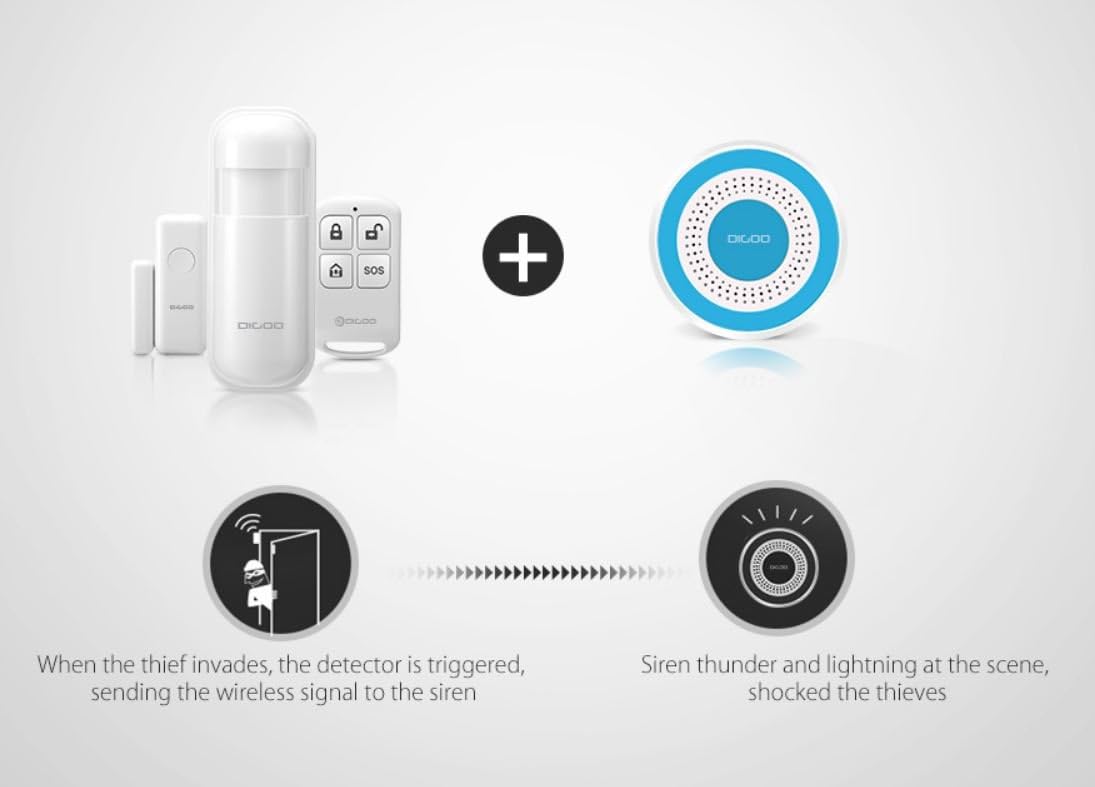
Nọmba 4.2: The DG-ROSA siren can be paired with various wireless sensors and remote controls.
4.3 Mounting the Siren
The DG-ROSA siren can be mounted on a wall or placed on a flat surface. Use the included mounting ring for wall installation.
- Choose a suitable location, ensuring it is within range of your wireless detectors and remote controls.
- Secure the mounting ring to the wall using appropriate screws (not included).
- Attach the DG-ROSA siren to the mounting ring by twisting it clockwise until it locks into place.

Nọmba 4.3: The DG-ROSA siren with its detachable mounting ring for installation.
5. Awọn ilana Iṣiṣẹ
5.1 Arming ati disarming
Use your paired wireless remote control to arm or disarm the DG-ROSA alarm system.
- Apa: Press the 'Arm' button on your remote control. The siren will emit a confirmation sound, and the system will be armed.
- Tu silẹ: Press the 'Disarm' button on your remote control. The siren will emit a confirmation sound, and the system will be disarmed.
5.2 Itaniji Muu
When the system is armed and a paired detector is triggered (e.g., a door/window opens, motion is detected), the DG-ROSA siren will activate.
- The siren will emit a loud alarm sound.
- The red and blue strobe lights will flash rapidly.
- The alarm will continue for a preset duration or until disarmed via the remote control.

Nọmba 5.1: The DG-ROSA siren with its red and blue flashing lights during an alarm event.

Nọmba 5.2: The DG-ROSA siren can integrate into a larger security system, providing an audible and visual alarm.
6. Itọju
To ensure optimal performance and longevity of your Digoo DG-ROSA siren, follow these maintenance guidelines:
- Ninu: Regularly wipe the siren with a soft, dry cloth to remove dust and dirt. Do not use abrasive cleaners or solvents.
- Ibi ti ina elekitiriki ti nwa: Ensure the siren is continuously connected to a stable 5V 1A power source. Although it has a battery, it is primarily USB powered.
- Ṣayẹwo Batiri: The siren includes a backup battery. If the siren frequently loses power or fails to operate during power outages, the internal battery may need inspection or replacement by a qualified technician.
- Awọn ipo Ayika: While suitable for outdoor use, avoid exposing the siren to extreme weather conditions or direct water immersion.
7. Laasigbotitusita
If you encounter issues with your Digoo DG-ROSA siren, refer to the following troubleshooting steps:
- Siren Not Powering On:
- Check if the USB power cable is securely connected to both the siren and the power adapter.
- Ensure the power adapter is plugged into a working electrical outlet.
- Verify the ON/OFF switch on the back of the siren is in the 'ON' position.
- Siren Ko Ṣiṣẹ:
- Confirm the system is armed.
- Check if the paired detector is functioning correctly and within range of the siren.
- Re-pair the detector with the siren if necessary (refer to Section 4.2).
- Iṣakoso latọna jijin Ko Ṣiṣẹ:
- Rii daju pe isakoṣo latọna jijin ni batiri ti n ṣiṣẹ.
- Verify the remote control is paired with the siren (refer to Section 4.2).
- Check for any obstructions or excessive distance between the remote and the siren.
- Awọn itaniji eke:
- Inspect detectors for proper installation and sensitivity settings.
- Ensure detectors are not placed in areas prone to environmental triggers (e.g., direct sunlight, drafts for motion sensors).
8. Awọn pato
| Iwa | Sipesifikesonu |
|---|---|
| Olupese | Digoo |
| Itọkasi awoṣe | DG-ROSA |
| Brand | DIGOO |
| Orisun agbara | Battery (1 A required, included) / USB 5V 1A |
| Voltage | 5 Volts |
| Alailowaya Igbohunsafẹfẹ | 433 MHz |
| Awọn iwọn | 14.8 x 12.6 x 5.2 cm |
| Iwọn | 239 g |
| UPC | 688975206025 |
9. Atilẹyin
For further assistance or inquiries not covered in this manual, please refer to the official Digoo support channels or contact your retailer.