
1. Ifihan
This manual provides instructions for the safe and efficient use of your Woods 50012WD 2-Outlet Outdoor 24-Hour Heavy Duty Mechanical Timer. This device is designed to automate the on/off cycles of outdoor electrical devices, such as seasonal lighting or pond pumps, for convenience and energy saving.
The timer features two grounded outlets and a durable, weather-resistant housing suitable for outdoor use. Please read this manual thoroughly before installation and operation.
2. Alaye Aabo pataki
IKILO: Láti dín ewu iná, ìkọlù iná mànàmáná, tàbí ìpalára ara ẹni kù, máa tẹ̀lé àwọn ìlànà ààbò wọ̀nyí nígbà gbogbo:
- Do not immerse the timer in water or expose it to direct water spray. It is weather-resistant, not waterproof.
- Ensure the timer is plugged into a Ground Fault Circuit Interrupter (GFCI) protected outlet when used outdoors.
- Do not exceed the electrical ratings of the timer: 125V, 15A, 1875W, 60Hz.
- Always unplug the timer from the power source before cleaning or performing any maintenance.
- Do not use with extension cords that are not rated for outdoor use.
- Pa awọn ọmọde mọ kuro ninu aago ati awọn ẹrọ ti o sopọ mọ.
- Do not disassemble the timer. There are no user-serviceable parts inside.
- Ensure all connections are secure and dry before applying power.
3. Package Awọn akoonu
- Woods 50012WD Outdoor Mechanical Timer
- Ilana Afowoyi (iwe yii)
4. Ọja Ipariview
The Woods 50012WD timer features a rotating dial with segments for setting ON/OFF times, a manual override switch, and two grounded outlets.
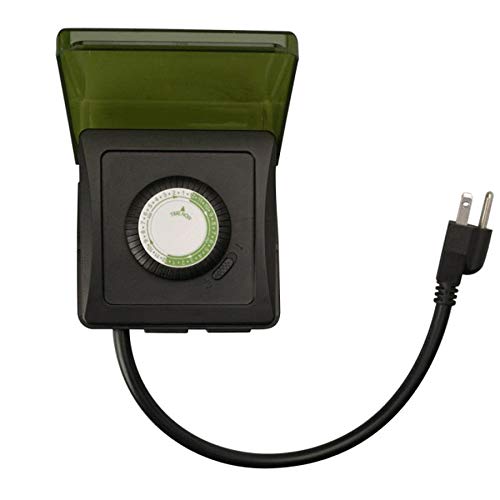
Aworan 1: Iwaju view of the Woods 50012WD Outdoor Mechanical Timer. The timer is black with a green central dial and a short power cord extending from the bottom. Two grounded outlets are visible on the side.
5. Eto ati fifi sori
- Yan Ibi kan: Select a suitable outdoor location that is protected from direct heavy rain and snow, preferably under an overhang or in a sheltered area. Ensure the timer is placed on a stable surface or mounted securely.
- So Aago naa pọ mọ: Insert the timer's power cord into a 125V, 60Hz GFCI-protected outdoor electrical outlet.
- Awọn ẹrọ Sopọ: Plug the devices you wish to control into the two grounded outlets on the timer. Ensure the total wattagagbara ti awọn ẹrọ ti a sopọ mọ ko kọja 1875W.
6. Awọn ilana Iṣiṣẹ
The Woods 50012WD is a 24-hour mechanical timer. Its operation relies on setting the current time and then pushing down segments on the dial to define ON periods.
6.1 Ṣíṣeto Àkókò Lọ́wọ́lọ́wọ́
- Locate the rotating dial on the front of the timer. The dial is marked with 24 hours (1-24 or AM/PM indicators).
- Rotate the entire dial clockwise until the current time aligns with the "TIME NOW" arrow or indicator on the timer's housing. For example, if it's 6 PM, align the "18" (or "6 PM") mark with the indicator.
6.2 Setting ON/OFF Times
The dial is surrounded by small segments. Each segment typically represents a 15 or 30-minute interval. Pushing a segment isalẹ activates the connected device during that time interval. Pulling a segment up deactivates the device.
- Identify the time periods when you want your connected devices to be ON.
- For each desired ON period, push the corresponding segments on the dial isalẹ.
- For all other times, ensure the segments are pulled up.
- The timer will now cycle ON and OFF according to your settings every 24 hours.
6.3 Manual Override Switch
The timer includes a manual override switch, usually located near the dial. This switch allows you to bypass the programmed settings.
- Aago ON: The timer will operate according to the programmed ON/OFF segments.
- Nigbagbogbo ON: The connected devices will remain ON, overriding any programmed OFF times.
- PAA nigbagbogbo: The connected devices will remain OFF, overriding any programmed ON times.
Refer to the specific markings on your timer for the exact positions of the manual override switch.
7. Itọju
- Ninu: Yọ aago kuro ninu ibudo agbara ṣaaju ki o to nu. Fi asọ ti o rọ nu ita rẹ.amp asọ. Ma ṣe lo abrasive ose tabi epo.
- Ibi ipamọ: Tí o bá ń fi aago náà pamọ́ fún ìgbà pípẹ́, rí i dájú pé ó mọ́ tónítóní, ó sì gbẹ. Tọ́jú sí ibi tí ó tutù, tí ó sì gbẹ, tí kò sí ibi tí oòrùn lè tàn dé.
- Ayewo: Periodically inspect the timer and its cord for any signs of damage, such as cracks, fraying, or discoloration. If damage is found, discontinue use and replace the unit.
8. Laasigbotitusita
| Isoro | Owun to le Fa | Ojutu |
|---|---|---|
| Device does not turn ON/OFF at programmed times. |
|
|
| Timer is not working at all. |
|
|
9. Awọn pato
- Awoṣe: 50012WD
- Iru: Heavy Duty Outdoor Mechanical Timer
- Awọn ita: 2 Ilẹ iÿë
- Voltage Rating: 125 V
- AmpOṣuwọn akoko: 15 A
- Iwọn Igbohunsafẹfẹ: 60 Hz
- Iwọn Agbara: 1875 W
- Iru aago: 24-Aago Mechanical
- Brand: Woods (Southwire/Coleman Cable)
- UPC: 078693500121
10. Atilẹyin ọja ati Support
Woods products are manufactured to high-quality standards. For warranty information or technical support, please refer to the official Woods (Southwire/Coleman Cable) webojula tabi kan si wọn onibara iṣẹ Eka.
Jọwọ ṣe idaduro ẹri rira rẹ fun awọn iṣeduro atilẹyin ọja.
Ibi iwifunni: Fun alaye atilẹyin tuntun julọ, jọwọ ṣabẹwo si Woods Store on Amazon or the official manufacturer's webojula.


