
1. Ifihan
The Vonyx VMM-F701 is a versatile 7-channel mixer designed for various audio applications, including live performances and studio recording. It features multiple input options, an integrated effect processor, USB playback, and +48V phantom power for condenser microphones. This manual provides essential information for the safe and effective use of your VMM-F701 mixer.
2. Awọn ilana aabo
- Always read these instructions carefully before using the device. Keep this manual for future reference.
- Rii daju pe ipese agbara ibaamu voltage itọkasi lori ẹrọ.
- Ma ṣe fi ẹrọ naa han si ojo tabi ọrinrin.
- Ge asopọ okun agbara nigba iji manamana tabi nigba lilo fun igba pipẹ.
- To reduce the risk of electric shock, do not remove the cover. There are no user-serviceable parts inside. Refer all servicing to qualified service personnel.
3. Ọja Ipariview
The Vonyx VMM-F701 mixer offers a comprehensive set of features for audio mixing. It includes 5 mono microphone/line inputs (XLR/6.3mm Jack combo), 1 stereo line input (6.3mm Jack), and an integrated USB player. Each channel provides Hi, Mid, and Low equalization controls, along with FX, Pan, and AUX adjustments. The mixer also features a built-in effect processor with delay and repeat functions, +48V phantom power for condenser microphones, a balanced stereo main output, and a headphone output.
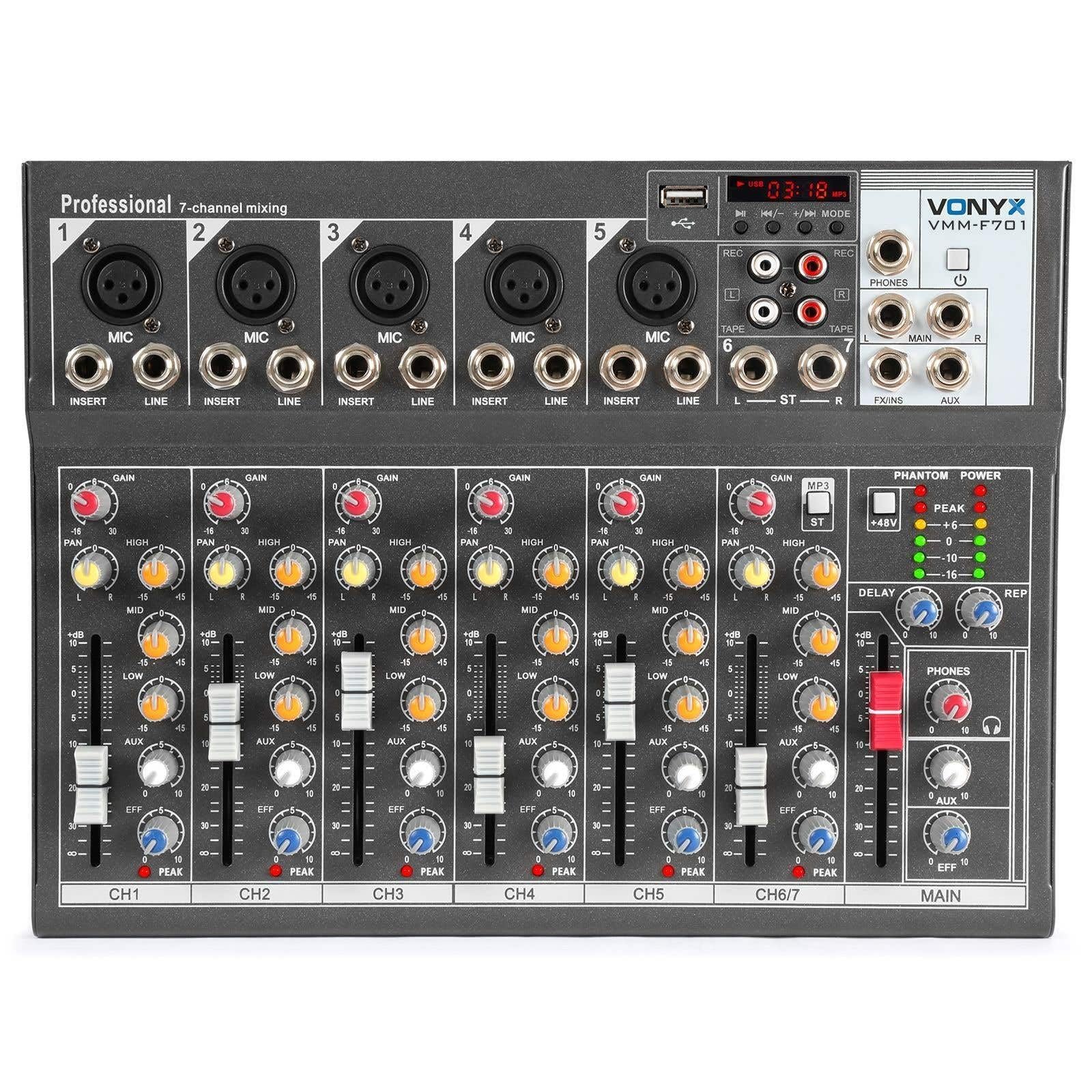
Lapapọ view of the Vonyx VMM-F701 7-channel mixer, showcasing apẹrẹ kekere ati iṣeto iṣakoso rẹ.

Oke-isalẹ view of the Vonyx VMM-F701 mixer, highlighting the input channels, faders, and equalization knobs.

Close-up of the USB input and media player controls on the Vonyx VMM-F701 mixer, with a USB drive inserted.

Rear panel of the Vonyx VMM-F701 mixer, showing the power input and USB port for external power.
4. Eto
- Asopọ agbara: Connect the mixer to a 230Vac/50Hz power source using the provided power cable. The mixer can also be powered via USB (5V/1A) for certain functions.
- Awọn isopọ ti nwọle:
- For microphones, use XLR or 6.3mm jack cables to connect to channels 1-5. Activate +48V phantom power for condenser microphones.
- For line-level instruments or devices, use 6.3mm jack cables to connect to channels 1-5 (line inputs) or the stereo line input (channels 6/7).
- Awọn isopọ Iṣjade: So rẹ akọkọ agbohunsoke tabi amplifier to the balanced stereo main output (6.3mm Jack).
- Agbekọri: Connect headphones to the dedicated headphone output for monitoring.

Alaye view of the mains power input and a wiring diagram for microphone/line inputs on the Vonyx VMM-F701 mixer.
5. Awọn ilana Iṣiṣẹ
- Iṣakoso Iṣakoso: Adjust the input sensitivity for each channel using the GAIN knob.
- Idogba (EQ): Use the HI, MID, and LOW knobs to adjust the treble, midrange, and bass frequencies for each channel.
- Iṣakoso Pan: Adjust the stereo positioning of each channel using the PAN knob.
- Firanṣẹ FX: Use the FX knob to send a portion of the channel's signal to the internal effect processor.
- AUX Firanṣẹ: Use the AUX knob to send a portion of the channel's signal to an external effect unit or monitor mix (via FX Send/Return).
- Awọn Faders ikanni: Adjust the volume level for each individual channel.
- Fader Pataki: Control the overall output volume of the mixer.
- Effect Processor: Adjust the DELAY and REP (Repeat) knobs to control the characteristics of the built-in delay effect.
- Ẹrọ USB: Fi awakọ USB kan sinu ibudo USB lati mu ohun ṣiṣẹ files. Use the media player controls (play/pause, skip, mode) to navigate and control playback.
- Agbara Phantom: Press the +48V PHANTOM POWER button to supply power to condenser microphones. Ensure microphones are connected before activating.
6. Itọju
- Ninu: Use a soft, dry cloth to clean the mixer's surface. Avoid liquid cleaners or solvents.
- Ibi ipamọ: Tọju alapọpo ni itura, aye gbigbẹ kuro lati orun taara ati awọn iwọn otutu to gaju.
- Afẹfẹ: Rii daju pe fentilesonu to dara ni ayika alapọpọ lati ṣe idiwọ igbona.
7. Laasigbotitusita
| Isoro | Owun to le Fa | Ojutu |
|---|---|---|
| Ko si ohun jade | Power off; cables disconnected; faders down; incorrect input selection. | Check power connection; ensure all cables are securely connected; raise channel and main faders; verify correct input source. |
| Ohun ti o daru | Input gain too high; output level too high; faulty cable. | Reduce GAIN knob; lower main fader; try a different cable. |
| Gbohungbohun ko ṣiṣẹ | Phantom power off (for condenser mics); mic not connected; faulty mic. | Activate +48V PHANTOM POWER; check mic connection; test with another microphone. |
| USB player not working | USB drive not recognized; unsupported file ọna kika. | Ensure USB drive is properly inserted; try a different USB drive; check file formats (e.g., MP3). |
8. Awọn pato
| Ẹya ara ẹrọ | Sipesifikesonu |
|---|---|
| Nọmba awoṣe | VMM-F701 |
| Nọmba ti awọn ikanni | 7 |
| Iwọn Igbohunsafẹfẹ | 20 Hz - 20 kHz |
| THD (Ipapọ ti irẹpọ) | <0.01% |
| Ifihan Ibuwọlu-si-Noise | > 110dB |
| Ipele Ijade | ± 1V |
| Sensitivity Input | ± 150mV |
| Ifamọ Input Gbohungbohun | ± 1.5mV |
| Asopọmọra Voltage | 230Vac / 50Hz (USB 5V/1A) |
| Awọn iwọn (L x W x H) | 230 x 312 x 45 mm (9.06 x 12.28 x 1.77 inches) |
| Iwọn | 2.25 kg (4.96 lbs) |
| Asopọmọra Technology | USB |
| Input Audio | XLR, 1/4 inch (6.3 mm) jack |
| O wu Asopọmọra Iru | TRS 1/4" (balanced) |
9. Atilẹyin ọja ati Support
Atilẹyin ọja: This product comes with a 2-year warranty on spare parts. For warranty claims, please retain your proof of purchase.
Atilẹyin: For technical assistance, troubleshooting, or service inquiries, please contact your local Vonyx dealer or visit the official Vonyx webojula fun support oro.