
1. Ifihan
This manual provides essential instructions for the safe and efficient use of your Airam LED Cabinet Lamp 1.2W. This battery-operated lamp features a PIR motion sensor, automatically illuminating when motion is detected, making it ideal for cabinets, drawers, and other enclosed spaces. Please read this manual thoroughly before installation and operation.
2. Eto
2.1 Package Awọn akoonu
Ṣaaju ki o to tẹsiwaju, rii daju pe gbogbo awọn eroja wa nibẹ:
- Airam LED Cabinet Lamp 1.2W
- Mounting hardware (screws or adhesive strips, typically included in packaging)

Figure 1: Airam LED Cabinet Lamp in its retail packaging, showing the lamp and typical mounting accessories.
2.2 Fifi sori batiri
The Airam LED Cabinet Lamp requires 4 x AA 1.5V batteries (not included).
- Locate the battery compartment cover on the back or side of the lamp.
- Gbe tabi yọ ideri naa kuro lati ṣii yara naa.
- Insert 4 AA batteries, ensuring correct polarity (+ and - terminals match the markings inside the compartment).
- Pa ideri batiri naa ni aabo.
2.3 Ṣíṣe L náàamp
Awọn lamp can be mounted using screws or adhesive strips, depending on the included hardware and your preference. Choose a location where the motion sensor has a clear line of sight to the area where movement is expected (e.g., inside a cabinet door, above a drawer).
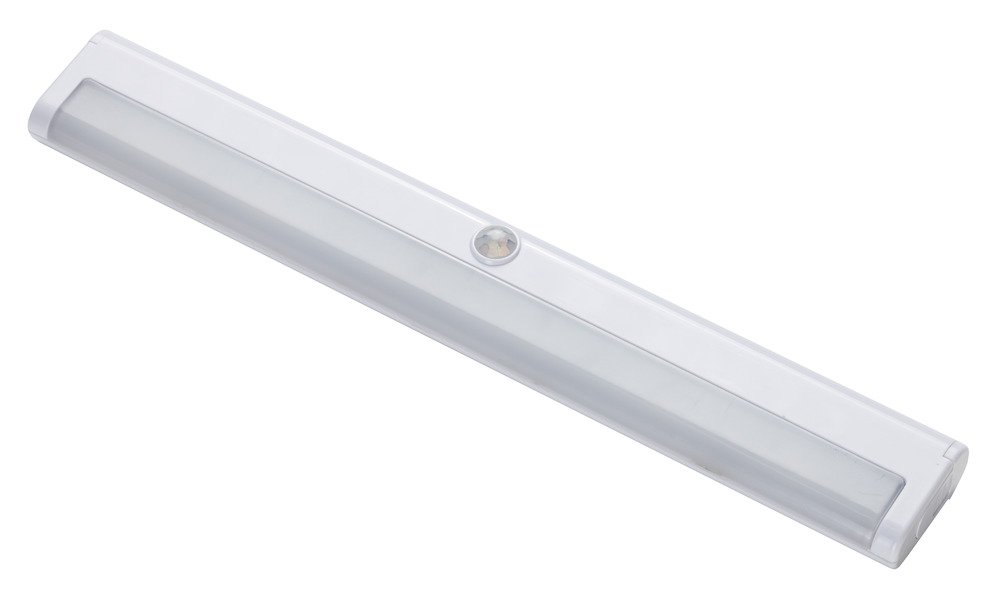
olusin 2: Iwaju view of the Airam LED Cabinet Lamp, highlighting the central motion sensor.
Using Screws (if applicable):
- Ṣe àmì sí ipò ìfìsí tí o fẹ́.
- Drill pilot holes if necessary, matching the lampÀwọn ihò ìfìsípò.
- Ṣe aabo lamp lilo awọn skru ti a pese.
Using Adhesive Strips (if applicable):
- Clean the mounting surface thoroughly to ensure it is dry and free of dust or grease.
- Peel the protective backing from the adhesive strips.
- Firmly press the lamp onto the desired surface for at least 30 seconds.
3. Isẹ
The Airam LED Cabinet Lamp is designed for automatic operation using its integrated PIR (Passive Infrared) motion sensor.
- Once batteries are installed and the lamp is mounted, it will enter standby mode.
- When the PIR motion sensor detects movement within its range (e.g., opening a cabinet door or drawer), the LED lights will automatically turn on.
- Awọn lamp will remain illuminated for approximately 25 seconds after motion is detected.
- If no further motion is detected within this period, the lamp will automatically turn off to conserve battery power.
- If continuous motion is detected, the lamp will remain on until motion ceases for 25 seconds.
Akiyesi: Ensure the motion sensor is not obstructed for optimal performance.
4. Itọju
4.1 Batiri Rirọpo
When the light output diminishes or the lamp stops functioning, it is time to replace the batteries. Refer to section 2.2 Fifi sori batiri fun alaye ilana.
- Always replace all 4 AA batteries at the same time.
- Maṣe dapọ atijọ ati awọn batiri titun, tabi awọn oriṣiriṣi awọn batiri.
- Sọ awọn batiri ti a lo ni ifojusọna ni ibamu si awọn ilana agbegbe.
4.2 Ninu
Awọn lamp is constructed from polycarbonate and ABS plastic. To clean the lamp:
- Pa dada nu pẹlu rirọ, gbẹ, tabi die-die damp asọ.
- Do not use abrasive cleaners, solvents, or harsh chemicals, as these can damage the plastic finish or the sensor.
- Ensure no liquid enters the battery compartment or sensor area.
5. Laasigbotitusita
| Isoro | Owun to le Fa | Ojutu |
|---|---|---|
| Lamp ko tan. |
|
|
| Lamp duro lori continuously. |
|
|
| Imọlẹ jẹ baibai. |
|
|
6. Awọn pato
| Brand | AIRAM |
| Nọmba awoṣe | 8710464 |
| Àwọ̀ | Funfun |
| Ohun elo | Polycarbonate + ABS Plastic |
| Ara | Igbalode |
| Orisun agbara | Battery Powered (4 x AA 1.5V, not included) |
| Pataki Awọn ẹya ara ẹrọ | PIR Motion Sensor, Automatic On/Off |
| Imọlẹ Orisun Orisun | LED |
| Wattage | 1.2 Wattis |
| Imọlẹ | 80 Lumens |
| Voltage | 5 Volts (DC from batteries) |
| Tiipa aifọwọyi | Approx. 25 seconds after last motion detected |
| Igbesi aye batiri | 24 - 30 hours (continuous use) |
| Iṣagbesori Iru | Removable (typically screw or adhesive) |
| Awọn iwọn (isunmọ.) | 300 x 45 mm |
| Olupese | Bot Lighting |
| ASIN | B079V33GJR |
| GTIN | 06435200213563 |
7. Atilẹyin ọja ati Support
Specific warranty information may vary by region and retailer. Please refer to your purchase documentation or contact your point of sale for details regarding warranty coverage.
For technical support or further assistance, please contact the manufacturer, Bot Lighting, or your retailer. Keep your purchase receipt as proof of purchase.