
Ọrọ Iṣaaju
Thank you for choosing the Limit 5695 Digital Chronograph Watch. This manual provides detailed instructions for setting up, operating, and maintaining your watch. Please read it carefully to ensure proper use and to maximize the lifespan of your timepiece.

olusin 1: Iwaju view of the Limit 5695 Digital Chronograph Watch. The watch features a grey case with orange accents, a black silicone strap, and a clear digital display showing time, date, and day of the week.
Ọja Awọn ẹya ara ẹrọ
- Digital display with silicone strap.
- Water resistant up to 100 meters (330 feet).
- Day, Date, and Month display.
- Functions include Alarm, Chronograph (Stopwatch), and Timer.
- Backlight for low-light visibility.
Wo Awọn paati ati Awọn bọtini
Mọ ararẹ pẹlu awọn bọtini aago ati awọn iṣẹ wọn:
- Bọtini MODE (Isalẹ Osi): Used to cycle through different modes (Time, Alarm, Chronograph, Timer).
- ṢE ÀTẸ̀ṢẸ̀ (Òsì Òsì Òsì): Ti a lo lati tẹ ati jade awọn ipo eto.
- Bọ́tìnì ST/STP (Òkè Ọ̀tún): Used to start/stop functions in Chronograph and Timer modes, and to adjust values in setting modes.
- RST/EL Button (Bottom Right): Used to reset functions in Chronograph and Timer modes, and to activate the backlight.
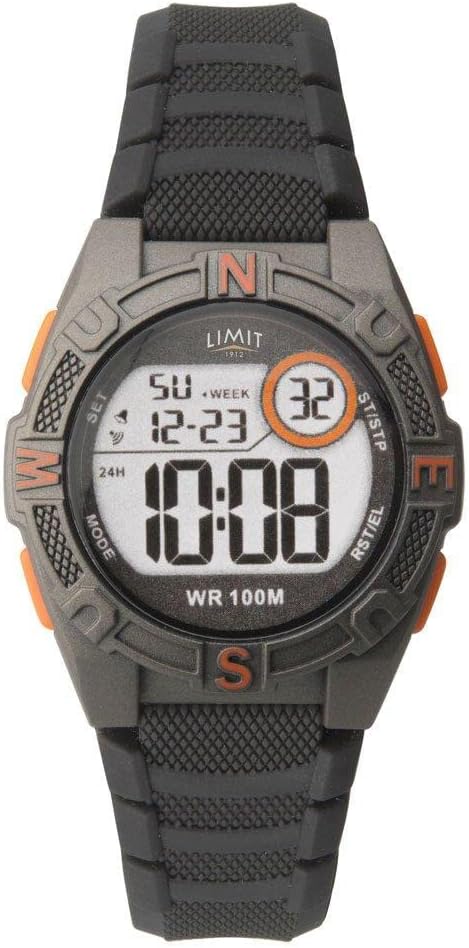
olusin 2: Isunmọ view of the Limit 5695 watch face, highlighting the labels for the four control buttons: MODE, SET, ST/STP, and RST/EL.
Eto ati Iṣeto Ibẹrẹ
Eto Aago ati Ọjọ
- Lati ifihan akoko deede, tẹ bọtini naa MODE bọtini leralera titi ti awọn aaya bẹrẹ ìmọlẹ. Eyi tọka pe o wa ni ipo eto akoko.
- Tẹ awọn ST / STP button to adjust the seconds to zero.
- Tẹ awọn SET button to move to the next setting item (e.g., hour, minute, year, month, day).
- Lo awọn ST / STP button to increase the value of the flashing item. Hold the button to rapidly advance.
- Lo awọn RST/EL button to decrease the value of the flashing item (if applicable, or to cycle through options like 12/24 hour format).
- Repeat steps 3-5 until all desired settings (hour, minute, 12/24 hour format, year, month, day) are configured.
- Ni kete ti gbogbo awọn eto ba ti pari, tẹ bọtini naa MODE bọtini lati jade kuro ni ipo eto ati pada si ifihan akoko deede.
Awọn ilana Iṣiṣẹ
Lilo Itaniji naa
- Lati ifihan akoko deede, tẹ bọtini naa MODE button until "AL" (Alarm) appears on the display.
- Tẹ awọn SET button. The alarm hour will start flashing.
- Lo awọn ST / STP bọtini lati ṣeto aago itaniji ti o fẹ.
- Tẹ awọn SET button again. The alarm minute will start flashing.
- Lo awọn ST / STP bọtini lati ṣeto iṣẹju itaniji ti o fẹ.
- Tẹ awọn MODE bọtini lati jade kuro ni ipo itaniji.
- Lati tan itaniji si TAN/PA, tẹ awọn ST / STP button while in the Alarm mode (without pressing SET). An alarm icon will appear/disappear on the display.
Lilo Chronograph (Aago iṣẹju-aaya)
- Lati ifihan akoko deede, tẹ bọtini naa MODE button until "ST" (Stopwatch) appears on the display, and the time shows "00:00:00".
- Tẹ awọn ST / STP bọtini lati bẹrẹ aago iṣẹju-aaya.
- Tẹ awọn ST / STP bọtini lẹẹkansi lati da aago iṣẹju-aaya duro.
- Tẹ awọn RST/EL bọtini lati tun aago iṣẹju-aaya pada si "00:00:00".
- Láti wọn àkókò pípín, tẹ RST/EL while the stopwatch is running. The display will freeze, showing the split time. Press RST/EL lẹẹkansi lati pada si aago iṣẹju-aaya ti nṣiṣẹ.
- Tẹ awọn MODE bọtini lati jade ni ipo aago iṣẹju-aaya.
Lilo Aago
- Lati ifihan akoko deede, tẹ bọtini naa MODE button until "TR" (Timer) appears on the display.
- Tẹ awọn SET button. The timer hour will start flashing.
- Lo awọn ST / STP button to set the desired timer hour.
- Tẹ awọn SET button again. The timer minute will start flashing.
- Lo awọn ST / STP button to set the desired timer minute.
- Tẹ awọn SET button again. The timer second will start flashing.
- Lo awọn ST / STP button to set the desired timer second.
- Tẹ awọn MODE bọtini lati jade kuro ni ipo eto aago.
- Láti bẹ̀rẹ̀ kíkà iye owó náà, tẹ ST / STP button while in Timer mode.
- To pause/resume the countdown, press the ST / STP bọtini.
- To reset the timer to its initial set value, press the RST/EL button while the timer is paused.
Ṣiṣẹ awọn Backlight
Lati tan imọlẹ ifihan ni awọn ipo ina kekere, tẹ awọn RST/EL button. The backlight will remain on for a few seconds.
Itọju ati Itọju
- Ninu: Pa aago naa nigbagbogbo pẹlu asọ ti o gbẹ. Fun idoti alagidi, lo die-die damp aṣọ àti ọṣẹ díẹ̀, lẹ́yìn náà, gbẹ ẹ́ dáadáa. Yẹra fún àwọn kẹ́míkà líle koko.
- Omi Resistance: This watch is water resistant up to 100 meters (10 ATM). It is suitable for swimming and snorkeling, but not for diving. Do not operate buttons underwater. Ensure the crown (if applicable) is pushed in completely before exposing to water.
- Iwọn otutu: Yẹra fún fífi aago náà sí ojú otútù tó le koko (gbóná tàbí òtútù) fún ìgbà pípẹ́, nítorí pé èyí lè ní ipa lórí iye ìgbà tí batiri bá ń lò ó àti bí ó ṣe péye tó.
- Rirọpo Batiri: When the display becomes dim or functions become erratic, the battery may need replacement. It is recommended to have the battery replaced by a qualified watch technician to ensure water resistance is maintained.
Laasigbotitusita
| Isoro | Owun to le Fa | Ojutu |
|---|---|---|
| Ifihan ti ṣofo tabi baibai. | Batiri kekere. | Rọpo batiri naa. |
| Awọn bọtini ko dahun. | Watch is frozen or in an unusual state. | Try pressing all buttons simultaneously for a few seconds to attempt a soft reset. If problem persists, remove and reinsert battery (professional service recommended). |
| Akoko ko pe. | Incorrect time setting; extreme temperature exposure; low battery. | Re-set the time. Avoid extreme temperatures. Replace battery if needed. |
| Omi inu aago. | Buttons operated underwater; seal compromised. | Immediately take to a qualified watch technician for inspection and repair. Do not attempt to dry it yourself. |
Awọn pato
- Brand: Idiwọn
- Awoṣe: 5695
- Iru ifihan: Oni-nọmba
- Omi Resistance: 100 mita (10 ATM)
- Ohun elo okun: Silikoni
- Awọn iṣẹ: Time (12/24H), Date (Day/Month/Year), Alarm, Chronograph, Timer, Backlight
- Awọn iwọn idii: 25.4 x 6 x 3.6 cm
- Ìwúwo: 80 g
Atilẹyin ọja ati Support
This Limit 5695 Digital Chronograph Watch comes with a 2-odun lopin atilẹyin ọja provided by Limit Time Products. This warranty covers manufacturing defects under normal use.
For warranty claims, technical support, or service inquiries, please refer to the contact information provided with your purchase documentation or visit the official Limit Time Products webojula. Jọwọ ṣe idaduro ẹri rira rẹ fun ijẹrisi atilẹyin ọja.