
1. Ifihan
This manual provides detailed instructions for the installation, operation, and maintenance of your Thomson SB260IBT 2.1 Channel Soundbar. Please read this manual thoroughly before using the product and retain it for future reference.
1.1 Abo Alaye
- Rii daju pe ipese agbara voltage bá àwọn ohun tí a béèrè fún mu lórí àmì ọjà náà.
- Do not expose the soundbar or subwoofer to rain, moisture, or extreme temperatures.
- Yago fun gbigbe ẹrọ naa si nitosi awọn orisun ooru tabi ni imọlẹ orun taara.
- Rii daju pe fentilesonu to dara ni ayika ẹyọ naa lati ṣe idiwọ igbona.
- Maṣe ṣii casing; tọka gbogbo iṣẹ si oṣiṣẹ ti o peye.
- Nu ẹyọ kuro nikan pẹlu asọ ti o gbẹ.
2. Package Awọn akoonu
Jẹrisi pe gbogbo awọn ohun kan wa ninu package:
- Thomson SB260IBT Soundbar
- Subwoofer
- Isakoṣo latọna jijin
- Okun agbara
- Audio Cables (e.g., Optical, AUX - may vary by region)
- Itọsọna olumulo
3. Ọja Ipariview
3.1 Soundbar ati Subwoofer

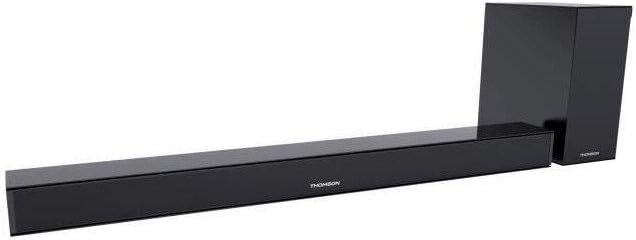
This image displays the Thomson SB260IBT soundbar unit alongside its accompanying subwoofer. The soundbar is a long, slender black unit, and the subwoofer is a compact black cube, both designed to complement modern home entertainment systems.
3.2 Iṣakoso Panel ati Ports
This image shows a close-up of the soundbar's side panel, revealing various control buttons and input/output ports. These include buttons for power, mode selection, volume control, and ports such as USB, SD card slot, and auxiliary input.
3.2.1 Igbimọ iwaju
- Atọka LED: Ṣe afihan ipo lọwọlọwọ tabi ipo.
- Olugba IR: Fun awọn ifihan agbara iṣakoso latọna jijin.
3.2.2 ru Panel
- Iṣagbewọle agbara: Ó so mọ́ okùn agbára AC.
- Iṣawọle OPTICAL: For digital audio connection from a TV or other device.
- Iṣawọle AUX: For analog audio connection using a 3.5mm cable.
3.2.3 Igbimọ ẹgbẹ
- Ibudo USB: Fun ohun afetigbọ files lati a USB drive.
- Iho kaadi SD: Fun ohun afetigbọ files lati ẹya SD kaadi.
- Awọn bọtini Iṣakoso: Power, Mode, Volume Up/Down.
3.2.4 Iṣakoso latọna jijin
The remote control provides full functionality for power, input selection, volume adjustment, and playback controls.
4. Eto
4.1 Ibi
Place the soundbar on a stable, flat surface directly in front of your television. Position the subwoofer on the floor near the soundbar for optimal bass response. Ensure adequate ventilation around both units.
4.2 Nsopọ si Agbara
- So okùn agbára pọ̀ mọ́ ìtẹ̀síwájú agbára ohùn.
- Pulọọgi opin miiran ti okun agbara sinu iṣan ogiri kan.
- Connect the subwoofer to its power source (if separate).
4.3 Awọn isopọ Ohun
4.3.1 Ìsopọ̀ Opitiki
For high-quality digital audio, connect an optical cable from your TV's optical output to the soundbar's OPTICAL input. Select 'Optical' mode on the soundbar.
4.3.2 AUX Asopọ
Use a 3.5mm audio cable to connect your device's audio output (e.g., smartphone, MP3 player) to the soundbar's AUX input. Select 'AUX' mode on the soundbar.
4.3.3 Bluetooth Asopọ
For wireless audio, select 'Bluetooth' mode on the soundbar. Refer to section 5.4 for detailed pairing instructions.
5. Awọn ilana Iṣiṣẹ
5.1 Agbara Tan / Pa
Tẹ awọn Agbara bọ́tìnì lórí ọ̀pá ohùn tàbí ìṣàkóso láti tan tàbí pa ẹ̀rọ náà.
5.2 Aṣayan titẹ sii
Tẹ awọn Ipo button on the soundbar or remote control to cycle through available input sources: Bluetooth, Optical, AUX, USB, SD Card. The LED indicator will show the selected mode.
5.3 Iṣakoso iwọn didun
Lo awọn Iwọn didun + ati Iwọn didun - buttons on the soundbar or remote control to adjust the master volume level.
5.4 Sisopọ Bluetooth
- Tan bar ohun ki o tẹ bọtini naa Ipo button to select Bluetooth mode. The LED indicator will flash, indicating it is in pairing mode.
- Lori ẹrọ Bluetooth ti o ṣiṣẹ (fun apẹẹrẹ, foonuiyara, tabulẹti), mu Bluetooth ṣiṣẹ ki o wa awọn ẹrọ to wa.
- Select "SB260IBT" from the list of found devices to pair.
- Once successfully paired, the soundbar's LED indicator will stop flashing and remain solid. You can now play audio from your device through the soundbar.
5.5 USB / SD Kaadi Sisisẹsẹhin
Insert a USB drive or SD card (containing compatible audio files) into the corresponding port on the soundbar's side panel. The soundbar will automatically switch to USB/SD mode and begin playback. Use the remote control for playback functions such as Play/Pause, Next Track, and Previous Track.
6. Itọju
6.1 Ninu
Disconnect the soundbar from the power supply before cleaning. Use a soft, dry cloth to gently wipe the surfaces. Do not use liquid cleaners, abrasive materials, or chemical solvents, as these may damage the finish.
6.2 Ibi ipamọ
If storing the unit for an extended period, disconnect it from power and store it in a cool, dry place, away from direct sunlight and extreme temperatures. It is recommended to keep the original packaging for storage.
7. Laasigbotitusita
| Isoro | Ojutu |
|---|---|
| Ko si Agbara | Check if the power cable is securely connected to the soundbar and the wall outlet. Ensure the wall outlet is functional. |
| Ko si Ohun | Ensure the correct input source (e.g., Optical, AUX, Bluetooth) is selected. Check all audio cable connections. Increase the volume on both the soundbar and the connected device. |
| Bluetooth Disconnection or Failure to Pair | Ensure the device is within the Bluetooth operating range (approximately 10 meters). Turn off and on Bluetooth on your device, then try re-pairing. Ensure no other devices are actively connected to the soundbar. |
| Isakoṣo latọna jijin Ko Ṣiṣẹ | Check the battery in the remote control and replace if necessary. Ensure there are no obstacles between the remote control and the soundbar's IR receiver. |
8. Awọn pato
- Orukọ awoṣe: SB260IBT
- Brand: Thomson
- Iṣeto ikanni: 2.1 ikanni
- Agbara Ijade ti o pọju: 200 Wattis
- Imọ-ẹrọ Asopọmọra: Bluetooth, Wired/Wireless
- Iru Input: Multiple (Optical, AUX, USB, SD Card)
- Orisun Agbara: Okun Itanna
- Ọna Iṣakoso: Via App, Remote Control, On-unit Buttons
- Awọn ẹya pataki: Bluetooth
- Awọn lilo ti a ṣe iṣeduro: For Computers, Gaming Consoles, Music Players, Smartphones or Tablets, Televisions
- Awọn iwọn ọja: 100 x 15 x 7 cm (Ọpa ohun)
- Iwọn Ọja: Approximately 3 kg (Soundbar and Subwoofer combined)
- Nọmba Awọn Ẹka: 2 (Soundbar and Subwoofer)
- Alatako omi: Rara
- Iru fifi sori: Tabili
9. Atilẹyin ọja ati Support
9.1 atilẹyin ọja Alaye
This product comes with a limited warranty. Please refer to the warranty card included in your package for specific terms and conditions, including the warranty period and coverage details. Retain your proof of purchase for warranty claims.
9.2 Onibara Support
For technical assistance, troubleshooting, or service inquiries, please contact Thomson customer support. Contact details can typically be found on the manufacturer's official website or in your product documentation. Please have your model number (SB260IBT) and purchase information ready when contacting support.