
1. Alaye Aabo pataki
Read all instructions carefully before assembling, installing, operating, or maintaining this fan. Failure to follow these instructions may result in electric shock, fire, or serious personal injury.
- Aabo Itanna: Ensure the fan is connected to a properly grounded 120 Volt AC outlet. Do not operate the fan with a damaged cord or plug. Do not run the power cord under carpeting or cover it with throw rugs, runners, or similar coverings. Arrange the cord away from traffic areas where it will not be tripped over.
- Isẹ gbogbogbo: Always place the fan on a stable, level surface to prevent tipping. Keep hands, hair, clothing, and other objects away from the fan blades during operation. Do not insert fingers or foreign objects into the grille.
- Ayika: This fan is designed for indoor use. Do not use outdoors or in wet locations. Keep the fan away from water and excessive humidity.
- Itọju: Máa yọ afẹ́fẹ́ kúrò nínú ihò agbára kí o tó sọ ọ́ di mímọ́ tàbí kí o ṣe àtúnṣe èyíkéyìí.
- Ilana 65 Ikilọ: Ọja yii le ni awọn kẹmika ti a mọ si Ipinle California lati fa aarun ati awọn abawọn ibimọ tabi ipalara ibisi miiran.
2. Awọn ẹya ara ẹrọ Ọja ati Loriview
The Master 24-Inch Oscillating Industrial High Velocity Pedestal Fan is designed for powerful air circulation in various indoor environments such as shops, garages, and warehouses. It features durable all-metal construction and OSHA-compliant safety guards.
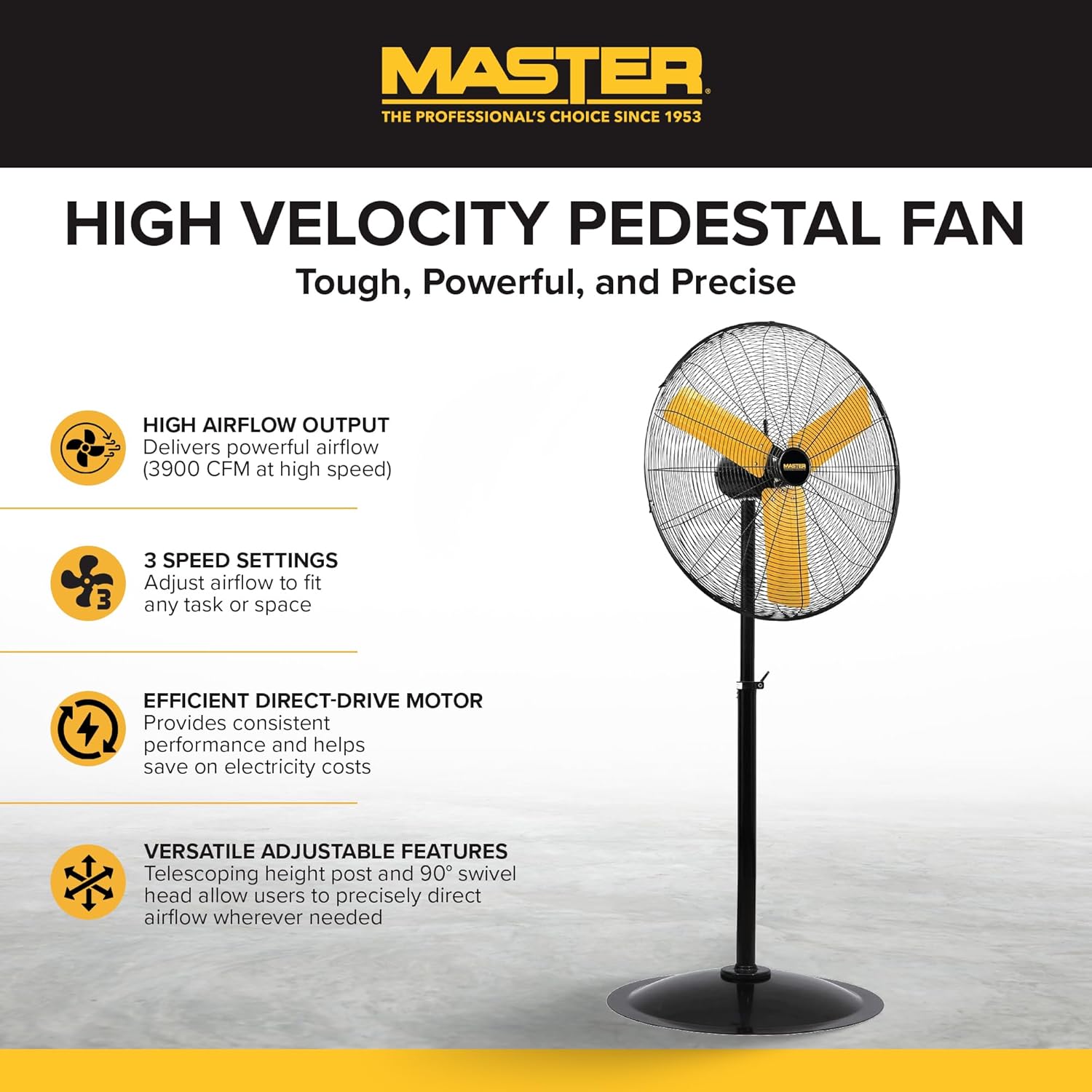
Ni kikun view of the Master 24-Inch Oscillating Pedestal Fan, showcasing its black metal construction and yellow fan blades.

Apa kan view of the Master 24-Inch Oscillating Pedestal Fan, showing its adjustable height post and stable base.
Awọn ẹya pataki:
- High Airflow Output: Delivers powerful airflow up to 3900 CFM.
- 3 Eto Iyara: Allows adjustment of airflow to suit various needs.
- Efficient Direct-Drive Motor: Provides consistent performance and helps conserve electricity.
- Atunṣe ni kikun: Features a telescoping adjustable height post for customized positioning.
- Oscillation: The fan head oscillates to cool a wide area.
- Ipilẹ Alagbara: A wide, heavy-duty pedestal base prevents the fan from tipping over.
- Ikole Gbogbo-irin: Ó ń rí i dájú pé ó lágbára àti pé ó pẹ́ tó.
3. Eto ati Apejọ
Assembly is required for this fan. Follow these steps to ensure proper setup:
- Yọ awọn ohun elo kuro: Fara yọ gbogbo awọn ẹya kuro ninu apoti. Daju pe gbogbo awọn paati ti a ṣe akojọ si ninu atokọ iṣakojọpọ wa.
- Ipilẹ Ipejọpọ: Attach the main support pole to the sturdy pedestal base. Ensure it is securely fastened.
- Attach Motor Assembly: Secure the fan motor assembly to the top of the support pole. This typically involves attaching the motor to a bolt that connects to the pole via a bracket. Ensure all screws and fasteners are tightened.
- Install Grilles and Blades: Mount the fan blades onto the motor shaft, followed by the front and rear safety grilles. Ensure the grilles are properly aligned and secured to prevent accidental contact with the blades.
- Ṣatunṣe Giga: Adjust the telescoping height post to your desired operating height. Secure it in place using the provided locking mechanism.
- Olufẹ ipo: Place the assembled fan on a firm, level surface in the desired location.

A close-up of the fan's wide, heavy-duty round base designed for stability.

A close-up showing the bolt and knob used to adjust the fan head's tilt angle.
4. Awọn ilana Iṣiṣẹ
Once assembled and placed, the fan is ready for operation.
- Asopọ agbara: Plug the fan's power cord into a standard 120 Volt AC electrical outlet.
- Turn On/Adjust Speed: Locate the push-button switch, typically on the rear of the motor housing. Rotate the knob to select one of the three available speed settings (1, 2, or 3). Position '0' is off.
- Adjust Oscillation: The fan head is designed to oscillate automatically. To stop oscillation, consult the fan's specific mechanism, which may involve disengaging a drive arm or a dedicated switch.
- Ṣatunṣe Igun Titẹ: Loosen the adjustment knob on the side of the fan head to tilt the fan up or down to direct airflow. Tighten the knob securely once the desired angle is set.
- Ọna Iṣakoso: This model may support app control. Refer to the manufacturer's website or additional documentation for details on connecting and using the fan with a compatible application.
- Paa: Rotate the speed control knob to the '0' position to turn off the fan. Unplug the fan from the outlet when not in use for extended periods.

A close-up of the fan's rotary switch, indicating three speed settings (0-1-2-3).

A alaye view of the fan's yellow blades and protective metal grille.
5. Itọju
Regular maintenance ensures optimal performance and extends the life of your fan.
- Ninu: Yọọ igbafẹfẹ nigbagbogbo ṣaaju ṣiṣe mimọ. Lo asọ, damp cloth to wipe down the exterior surfaces. For the fan blades and grilles, hand wash with mild soap and water if necessary, ensuring they are completely dry before reassembly and operation. Do not use abrasive cleaners or solvents.
- Lubrication Mọto: A fi epo kun mọto afẹfẹ naa titi lai, ko si nilo epo afikun.
- Ibi ipamọ: If storing the fan for an extended period, cover it to protect against dust and store in a dry location.
6. Laasigbotitusita
Ti o ba pade awọn ọran pẹlu olufẹ rẹ, tọka si awọn igbesẹ laasigbotitusita ti o wọpọ wọnyi:
- Fan Ko Tan-an:
- Rii daju pe okun agbara ti wa ni edidi ni aabo sinu iṣan 120V ti n ṣiṣẹ.
- Ṣayẹwo awọn Circuit fifọ tabi fiusi apoti.
- Verify the speed control knob is set to a speed setting (1, 2, or 3) and not '0' (off).
- Afẹfẹ ti o dinku:
- Check for any obstructions around the fan grilles.
- Clean any dust or debris from the fan blades and grilles.
- Ariwo dani tabi gbigbọn:
- Rí i dájú pé a gbé afẹ́fẹ́ náà sí orí ilẹ̀ tí ó dúró ṣinṣin, tí ó tẹ́jú.
- Check that all assembly screws and fasteners are tight.
- Inspect fan blades for any damage or imbalance.
- Oscillation Not Working:
- Verify that the oscillation mechanism is engaged (if applicable).
- Check for any obstructions preventing the fan head from moving.
If these steps do not resolve the issue, contact Master customer support for further assistance. Availability of replacement parts may vary; inquire with customer support.
7. Awọn pato
| Orukọ awoṣe | MAC-24POSC |
| Brand | Oga |
| Ara | 24-Inch Oscillating Pedestal Fan |
| Àwọ̀ | Dudu |
| Electric Fan Design | Fan Fan |
| Orisun agbara | Okun Itanna |
| Ọja Mefa | 7"D x 35"W x 31.5"H |
| Pataki Ẹya | Oscillating |
| Wattage | 2.2 KW |
| Nọmba ti Blades | 3 |
| Air Sisan Agbara | 3900 Onigun Ẹsẹ Fun iseju |
| Voltage | 120 Volts |
| Yipada Iru | Titari Bọtini |
| Iwọn Nkan | 52.9 iwon |
| inu ile / ita gbangba Lilo | Ninu ile |
| Pato sipesifikesonu | OSHA |
| Ọna Iṣakoso | App (refer to manufacturer for details) |
| Nọmba ti Awọn ipele Agbara | 3 |
| Apejọ ti a beere | Bẹẹni |
| Iwọn opin | 24 inches |
8. Atilẹyin ọja ati Support
Alaye Atilẹyin ọja:
This Master 24-Inch Oscillating Industrial High Velocity Pedestal Fan (MAC-24POSC) comes with a 1 Odun Atilẹyin ọja Lopin. Atilẹyin ọja yi ni wiwa awọn abawọn ninu awọn ohun elo ati iṣẹ ṣiṣe labẹ lilo deede. Jọwọ ṣe idaduro ẹri rira rẹ fun awọn iṣeduro atilẹyin ọja.
Atilẹyin Onibara:
For technical assistance, warranty claims, or inquiries regarding replacement parts, please contact Master customer support. Refer to the product packaging or the official Master webojula fun awọn julọ lọwọlọwọ alaye olubasọrọ.