
1. Ifihan
This manual provides detailed instructions for the setup, operation, and maintenance of your Digoo DG-M1X HD 960P IP Camera. Please read this manual thoroughly before using the product to ensure proper functionality and safety.
The Digoo DG-M1X is a 960P HD wireless IP camera designed for home security, featuring night vision, two-way audio, and app monitoring capabilities.
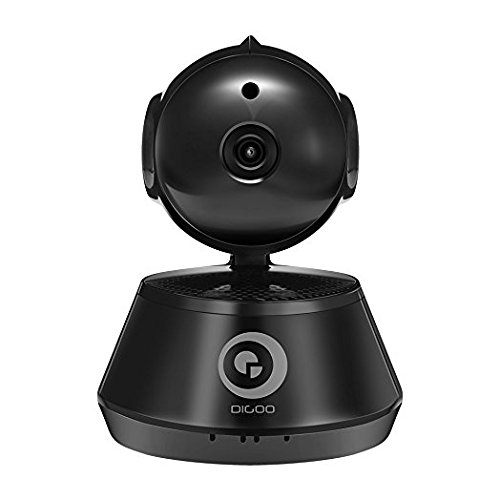
Nọmba 1: Iwaju view of the Digoo DG-M1X HD 960P IP Camera. This image shows the camera's main body, lens, and base, highlighting its compact dome form factor.
2. Package Awọn akoonu
Jẹrisi pe gbogbo awọn ohun kan wa ninu package:
- 1 x Digoo DG-M1X 960P Wireless PAN/Tilt IP Camera Monitor
- 1 x Digoo DG-M1X Micro USB Power Cable
- 1 x Digoo DG-M1X Full English User Manual (this document)
- 1 x Digoo DG-M1X Original Color Gift Package
- 1 x Pack of Installing Accessories
3. Eto Itọsọna
3.1 Fifi sori ti ara
- Yan Ibi kan: Yan ipo inu ile pẹlu ko o view of the area you wish to monitor. Ensure it is within range of your Wi-Fi network. The camera is designed for surface mount installation.
- Iṣagbesori: Use the provided installing accessories to securely mount the camera. The camera has a dome form factor and can be mounted on a flat surface or inverted.
- Asopọ agbara: Connect the Micro USB Power Cable to the camera's power input and plug the other end into a power outlet. The camera will power on and initiate its startup sequence.
3.2 Iṣeto Nẹtiwọọki
The Digoo DG-M1X supports wireless Wi-Fi connectivity.
- Ṣe igbasilẹ ohun elo naa: Wa fun the official Digoo app on your smartphone's app store (compatible with Android devices).
- Iforukọsilẹ akọọlẹ: Ṣii app naa ki o tẹle awọn ilana loju iboju lati forukọsilẹ iroyin olumulo titun kan.
- Fi ẹrọ kun: In the app, select the option to add a new device. Follow the prompts to connect your camera to your Wi-Fi network. This typically involves scanning a QR code on the camera or entering your Wi-Fi credentials into the app.
- Iṣeto akọkọ: Once connected, the app will guide you through any initial setup steps, such as setting a device password.
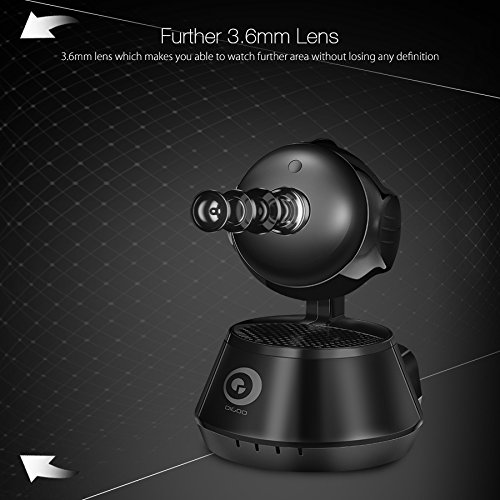
Nọmba 2: Apa view of the Digoo DG-M1X camera, emphasizing its 3.6mm lens. This lens provides a further and higher definition view for surveillance.
4. Awọn ilana Iṣiṣẹ
4.1 Live View ati Abojuto
Open the Digoo app on your smartphone. Select your DG-M1X camera from the device list to access the live video feed. You can view the area in 960P HD resolution.
4.2 Ìṣàkóso Pan/Títì
The camera supports pan and tilt functions. Use the controls within the app to remotely adjust the camera's viewing angle horizontally (pan) and vertically (tilt) to cover a wider area.
4.3 Meji-Ona Audio
The DG-M1X features two-way audio. Tap the microphone icon in the app to speak through the camera's speaker, and listen to audio from the camera's surroundings through your phone.
4.4 Night Vision
The camera is equipped with a 1/3 Progressive CMOS Sensor with night vision capabilities. It automatically switches to night vision mode in low-light conditions, providing clear black and white video footage.
Nọmba 3: A night vision capture from the Digoo DG-M1X camera, displaying a clear black and white image of an outdoor scene at night. This demonstrates the camera's ability to monitor in low-light conditions.
4.5 Gbigbasilẹ ati Sisisẹsẹhin
The camera supports video recording. Depending on your setup (e.g., local storage via microSD card, cloud storage), you can record footage. Access recorded videos through the app for playback.
4.6 Išipopada erin ati titaniji
Configure motion detection settings within the app. When motion is detected, the camera can send alerts to your smartphone, allowing for immediate awareness of activity.
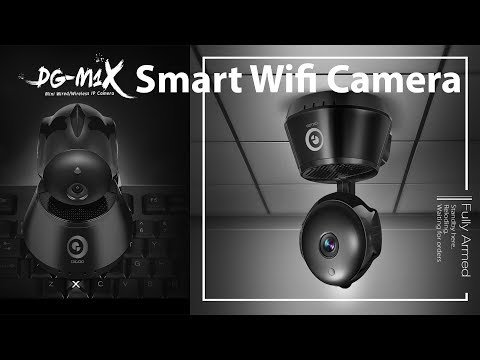
Fidio 1: An official product video demonstrating the features of the Digoo DG-M1X Smart Wifi Camera. This video showcases the camera's design, pan/tilt functionality, and app interface, providing a visual overview ti awọn oniwe-agbara.
5. Itọju
- Ninu: Fi aṣọ rírọrùn gbẹ nu lẹ́ńsì kámẹ́rà àti ara rẹ̀. Yẹra fún lílo àwọn kẹ́míkà líle tàbí àwọn ohun èlò ìpalára tó lè ba kámẹ́rà jẹ́.
- Awọn imudojuiwọn famuwia: Regularly check the Digoo app for available firmware updates. Keeping the camera's firmware updated ensures optimal performance and security.
- Yiyipo Agbara: If the camera experiences issues, try power cycling it by unplugging it from the power source for a few seconds and then plugging it back in.
- Awọn ipo Ayika: The camera is designed for indoor use and is not water-resistant. Ensure it is kept in a dry environment and within recommended operating temperatures.
6. Laasigbotitusita
| Isoro | Owun to le Fa | Ojutu |
|---|---|---|
| Kamẹra ko sopọ mọ Wi-Fi | Incorrect Wi-Fi password; camera too far from router; router firewall settings | Verify Wi-Fi password; move camera closer to router; check router settings or temporarily disable firewall for testing. |
| No live video feed | Camera offline; network issue; app malfunction | Check camera power and network connection; restart camera and app; ensure stable internet connection. |
| Ohun afetigbọ ọna meji ko ṣiṣẹ | Microphone/speaker muted in app; app permissions | Ensure audio is enabled in the app; check app permissions for microphone access on your smartphone. |
| Alẹ iran koyewa | Obstruction near lens; insufficient ambient light for IR to activate | Clear any obstructions from the camera's view; ensure the area is dark enough for night vision to engage automatically. |
7. Awọn pato
| Ẹya ara ẹrọ | Ẹ̀kúnrẹ́rẹ́ |
|---|---|
| Awoṣe | DG-M1X |
| Sensọ Aworan | 1/3 Progressive CMOS Sensor |
| Ipinnu Yaworan fidio | 960P (1,300,000 Pixel) |
| Lẹnsi | 3.6mm |
| Funmorawon | H.264 |
| Iwọn fireemu | 30 awọn fireemu fun keji |
| Asopọmọra Technology | Ailokun (Wi-Fi) |
| Pataki Ẹya | Night Vision, Two-Way Audio, Pan/Tilt |
| inu ile / ita gbangba Lilo | Ninu ile |
| Fọọmù ifosiwewe | Dome |
| Iṣagbesori Iru | Oke Oke |
| Orisun agbara | Okun Itanna |
| Awọn ẹrọ ibaramu | Laptop (for viewing, primarily app-controlled) |
| Adarí Iru | Android (via app) |
| Àwọ̀ | Dudu |
| Ohun elo | Awọn miiran |
| Iwọn Nkan | 340 g |
| Package Mefa | 16.1 x 13 x 11 cm |
8. Atilẹyin ọja ati Support
8.1 atilẹyin ọja Alaye
Specific warranty details for the Digoo DG-M1X camera are typically provided at the point of purchase or within the product packaging. Please refer to your purchase receipt or contact your retailer for warranty terms and conditions.
8.2 Onibara Support
For technical assistance, troubleshooting beyond this manual, or inquiries regarding your Digoo DG-M1X camera, please contact Digoo customer support through their official webaaye tabi alaye olubasọrọ ti a pese ninu iwe ọja rẹ.