
1. Ifihan
This manual provides comprehensive instructions for the installation, operation, and maintenance of your BlueBird A1390 Automatic Irrigation Tap Programmer. This device is designed to automate your garden watering schedule, ensuring efficient and consistent irrigation. Please read this manual thoroughly before using the product to ensure correct operation and to prevent damage.
2. Alaye Aabo
- Do not immerse the unit in water. The unit is designed to be weather-resistant, but not submersible.
- Use only 1.5V AA alkaline batteries. Do not mix old and new batteries, or different types of batteries.
- Yọ awọn batiri kuro ti ẹyọ naa ko ba ni lo fun akoko ti o gbooro sii lati ṣe idiwọ jijo.
- Jeki kuro ni arọwọto awọn ọmọde.
- Má ṣe gbìyànjú láti tú tàbí tún ẹ̀rọ náà ṣe fúnra rẹ. Pe àwọn òṣìṣẹ́ tó mọ̀ nípa iṣẹ́ náà fún iṣẹ́ náà.
- Rii daju pe gbogbo awọn asopọ wa ni aabo lati ṣe idiwọ awọn n jo.
3. Package Awọn akoonu
Jọwọ ṣayẹwo package fun awọn nkan wọnyi:
- 1x BlueBird A1390 Automatic Irrigation Tap Programmer
- 1x Itọsọna olumulo (iwe yii)
Note: 2 AA 1.5V batteries are required for operation and are not included in the package.
4. Ọja Ipariview
The BlueBird A1390 features two main rotary dials for setting irrigation frequency and duration, along with a battery indicator and an ON/OFF switch.
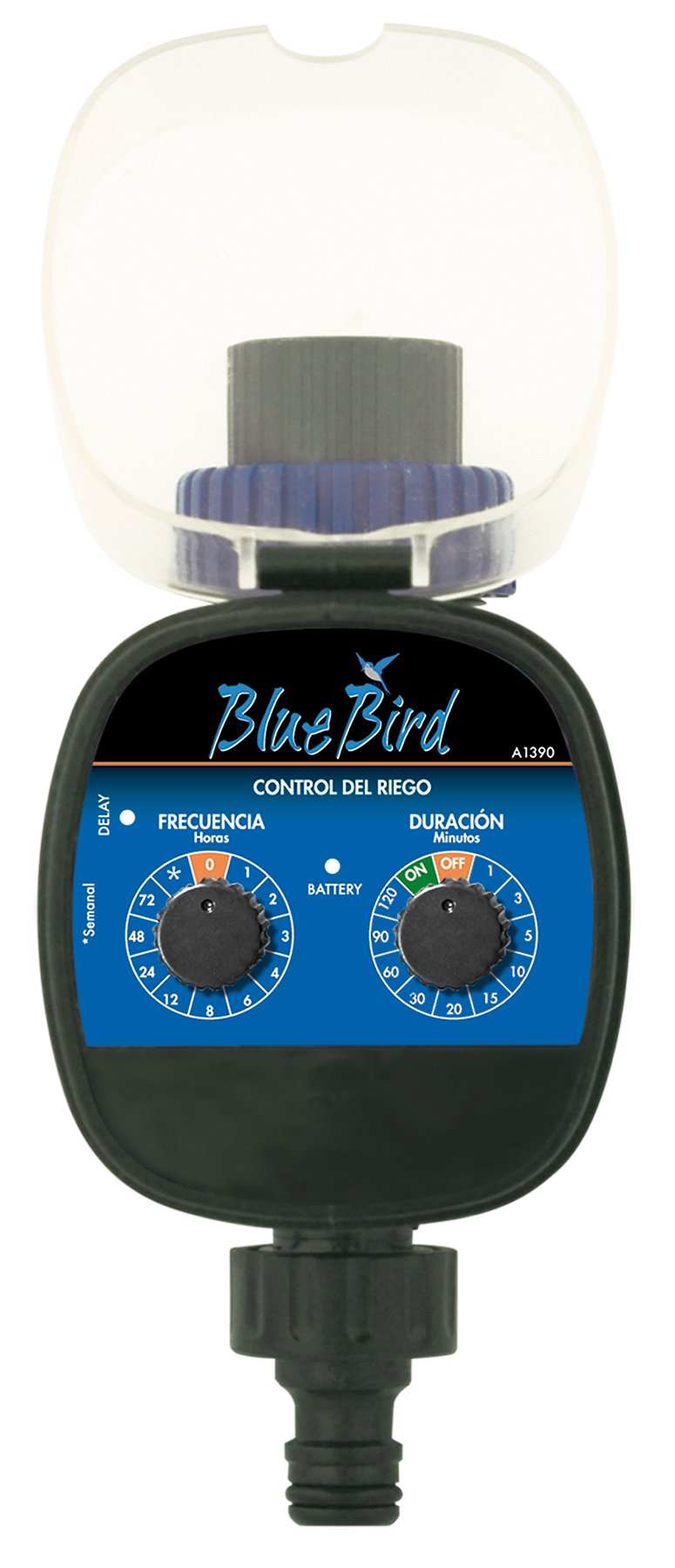
Nọmba 1: Iwaju view of the BlueBird A1390 Irrigation Programmer. The left dial controls irrigation frequency, and the right dial controls irrigation duration. A battery indicator light is located between the dials.
Awọn eroja:
- Frequency Dial (Frecuencia): Sets how often the irrigation occurs. Options include 0 (off), 1, 2, 3, 4, 6, 8, 12, 24, 48, 72 hours, and a '*' setting for manual or weekly operation.
- Duration Dial (Duración): Sets how long each irrigation cycle lasts. Options include 0 (off), 1, 3, 5, 10, 15, 20, 30, 60, 90, 120 minutes.
- ON/PA Yipada: Located on the Duration Dial, allows for manual override or turning the unit off.
- Atọka Batiri: A light that indicates battery status.
- Abala Batiri: Located at the rear of the unit (not visible in Figure 1).
- Ìwọlé/Ìjáde Omi: Standard tap and hose connections.
5. Eto
5.1 Fifi sori batiri
- Wa ideri iyẹwu batiri ni ẹhin ẹyọ naa.
- Remove the cover by twisting or sliding it open.
- Insert two (2) new 1.5V AA alkaline batteries, ensuring correct polarity (+/-).
- Replace the battery compartment cover securely to maintain water resistance.
5.2 Connecting to the Tap
- Ensure your outdoor tap is turned off.
- Screw the BlueBird A1390 programmer onto your tap. Hand-tighten only to prevent damage.
- Connect your garden hose or irrigation system to the outlet of the programmer. Ensure a tight connection to prevent leaks.
- Slowly turn on your outdoor tap. Check for any leaks at the connections.
6. Awọn ilana Iṣiṣẹ
The BlueBird A1390 is designed for simple, intuitive programming using its two rotary dials.
6.1 Setting Irrigation Frequency
- Yiyi awọn Titẹ Igbohunsafẹfẹ (left dial) to your desired irrigation interval.
- Eto to wa ni:
- 0: No irrigation (off).
- 1, 2, 3, 4, 6, 8, 12, 24, 48, 72: Irrigation every X hours.
- *: This setting typically indicates a manual mode or a weekly cycle, depending on the specific model's internal logic. Refer to the example below for common usage.
6.2 Setting Irrigation Duration
- Yiyi awọn Duration Dial (right dial) to your desired watering time per cycle.
- Eto to wa ni:
- PA: No irrigation.
- LATI: Continuous irrigation (use with caution).
- 1, 3, 5, 10, 15, 20, 30, 60, 90, 120: Irrigation for X minutes.
6.3 Eksample siseto
To water every 6 hours for 10 minutes:
- Ṣeto awọn Titẹ Igbohunsafẹfẹ si 6 (wakati).
- Ṣeto awọn Duration Dial si 10 (minutes).
The programmer will automatically begin the cycle based on these settings. The first cycle will typically start shortly after programming, or after a short delay.
6.4 Manual ON/OFF
To manually turn on the water, rotate the Duration Dial to the ON position. To stop manual watering, rotate the dial back to PAA or a timed setting.
7. Itọju
7.1 Batiri Rirọpo
When the battery indicator light dims or the unit stops functioning, it's time to replace the batteries. Follow the steps in Section 5.1 for battery installation.
7.2 Ninu
Clean the exterior of the programmer with a damp cloth. Do not use abrasive cleaners or solvents. Ensure no water enters the battery compartment or internal electronics.
7.3 Winter Ibi ipamọ
Before the first frost, disconnect the programmer from the tap and hose. Remove the batteries. Store the unit indoors in a dry, frost-free location to prevent damage from freezing water.
8. Laasigbotitusita
| Isoro | Owun to le Fa | Ojutu |
|---|---|---|
| Unit does not turn on/display. | Awọn batiri ti o ku tabi ti ko tọ ti fi sori ẹrọ. | Ropo awọn batiri, aridaju ti o tọ polarity. |
| Omi ko san. | Tap is off; programmer set to '0' or 'OFF'; low water pressure; clogged filter. | Ensure tap is fully open. Check frequency/duration settings. Verify water pressure. Clean any filters. |
| Unit leaks at connections. | Àwọn ìsopọ̀ tí ó bàjẹ́; ẹ̀rọ fifọ tí ó bàjẹ́ tàbí tí ó sọnù. | Tighten connections. Check and replace washers if necessary. |
| Irrigation schedule is incorrect. | Incorrect frequency or duration settings. | Re-check and adjust the Frequency and Duration Dials according to your desired schedule. |
9. Awọn pato
- Awoṣe: A1390
- Brand: BlueBird
- Olupese: Altadex
- Orisun Agbara: Batiri Alkaline 2 x AA 1.5V (kò sí nínú rẹ̀)
- Igbohunsafẹfẹ Igbohunsafẹfẹ: 0, 1, 2, 3, 4, 6, 8, 12, 24, 48, 72 hours, or '*' (manual/weekly)
- Iye Igbin: OFF, ON, 1, 3, 5, 10, 15, 20, 30, 60, 90, 120 minutes
- Awọn iwọn ọja: Isunmọ 19.4 x 10.6 x 10 cm
- Iwọn Ọja: O fẹrẹ to 280 g
- GTIN (UPC): 8426375113909
10. Atilẹyin ọja ati Support
This product is covered by a standard manufacturer's warranty. For specific warranty details, please refer to the documentation provided at the time of purchase or contact your retailer. For technical support or inquiries, please contact the seller or manufacturer directly.

