
Ọrọ Iṣaaju
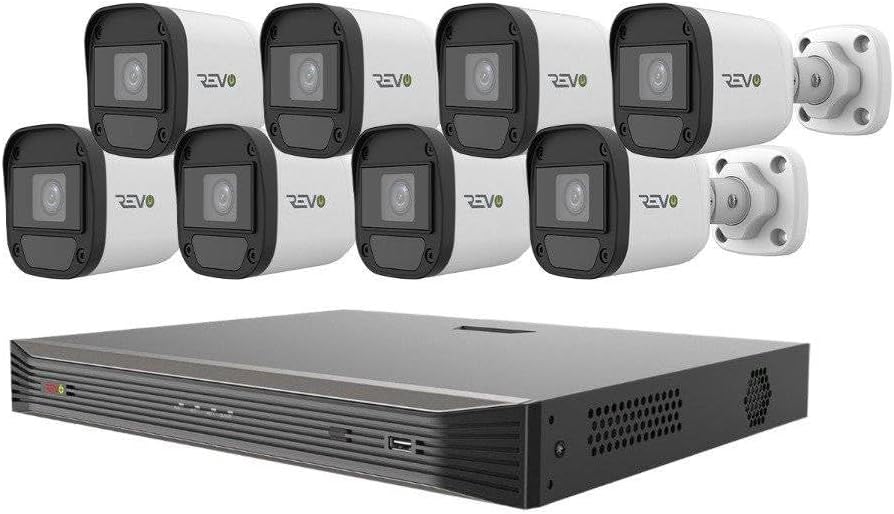
The REVO America Ultra surveillance system offers exceptional video quality, user-friendly operation, and robust networking capabilities. Designed to complement any home or business environment, this system leverages advanced IP technology for superior performance. The RU162ABNDL-1 is a comprehensive, plug-and-play HD surveillance solution, featuring a 16-channel Network Video Recorder (NVR) with a pre-installed 2TB hard disk drive and eight 4MP HD indoor/outdoor bullet cameras. The NVR supports state-of-the-art H.265 compression and 4K video output. REVO Ultra cameras are equipped with optical-grade, IR anti-reflection glass and powerful 4 Megapixel sensors, providing double the resolution of standard 1080P. They also feature commercial-grade "OSRAM" LEDs for clear night vision up to 100 feet in total darkness. Built for outdoor resilience, the cameras can withstand temperatures from -31°F to 140°F. S.M.A.R.T. Technology monitors system health and alerts users to malfunctions. The system's interface is intuitive, accessible via the NVR, mobile app, computer software, or web browser. Setup is simplified with Power over Ethernet (PoE) and Cat 5E cabling, where a single cable handles both power and data between the camera and NVR.
Kini To wa
Your REVO America Ultra surveillance system package includes the following components:
- 16 Channel 4K IP NVR with built-in 16 RJ45 PoE ports
- 8 x 4MP Indoor/Outdoor IP Bullet Cameras
- Pre-installed 2TB Video Surveillance Grade Hard Disk Drive (HDD)
- 8 x 100’ Cat 5E Cables
- Asin
- Adaparọ Agbara fun NVR
- àjọlò Cable

Ṣeto
The REVO America Ultra system is designed for straightforward DIY installation. Follow these simple steps to set up your surveillance system:
- Yọ awọn ohun elo kuro: Carefully remove all items from the packaging and verify against the "What's Included" list.
- Connect NVR: Place the NVR in a secure, well-ventilated location. Connect the NVR to a power source using the provided power adapter. Connect the NVR to your network router using the supplied Ethernet cable for remote access capabilities.
- Sopọ Awọn kamẹra: Utilize the 100’ Cat 5E cables to connect each 4MP IP bullet camera to the built-in RJ45 PoE ports on the NVR. The PoE functionality means a single cable provides both power and video signal, simplifying wiring.
- Asopọmọra Ifihan: Connect a monitor to the NVR via HDMI or VGA for local viewing ati iṣeto ni.
- Iṣeto akọkọ: Power on the NVR. Follow the on-screen prompts for initial setup, including setting up administrator passwords and network settings.
- Eto Alagbeka App: Download the REVO Ultra mobile app on your smartphone or tablet. Follow the app's instructions to add your NVR for remote monitoring. This typically involves scanning a QR code on the NVR or entering its serial number.
For detailed visual instructions, refer to the DIY installation videos provided by REVO America.
Ṣiṣẹ Eto naa
The REVO Ultra system offers a variety of features for effective surveillance and monitoring:
- Gbe View: Access live video feeds from all connected cameras via the NVR, mobile app, or web kiri ayelujara.
- 4K Recording & Output: The NVR supports 4K recording and provides 4K video output for crystal-clear imagery.
- H.265 funmorawon: Advanced H.265 video compression ensures efficient storage and bandwidth usage without compromising video quality.
- Iran Alẹ: Cameras are equipped with powerful IR LEDs, providing clear night vision up to 100 feet in complete darkness.
- Smart Alerts & Notifications: Receive instant notifications via alarms and email for detected events. Configure motion detection zones and sensitivity settings to minimize false alarms.
- Abojuto latọna jijin: Use the REVO Ultra mobile app or browser login to view ifiwe kikọ sii, tunview foo ti o ti kọjatage, receive notifications, adjust settings, set alarms, and check motion events from anywhere. The system allows viewing multiple units simultaneously.
- Ọdẹdẹ View Ipo: Optimize camera views for narrow spaces like hallways, doors, and windows.


Itoju
To ensure optimal performance and longevity of your REVO America Ultra surveillance system, regular maintenance is recommended:
- Àwọn Kámẹ́rà Mímọ́: Periodically clean the camera lenses and housings to remove dust, dirt, or cobwebs that may obstruct the view. Lo asọ, damp asọ.
- Ṣayẹwo Awọn isopọ: Ensure all cable connections (power, Ethernet, camera) are secure and free from damage.
- Abojuto Ibi ipamọ: The NVR features a 2TB HDD. Monitor storage capacity and configure recording settings (e.g., motion-triggered recording) to manage space effectively. The system's S.M.A.R.T. Technology helps monitor its own health, including the HDD, and will alert you of any potential malfunctions.
- Awọn imudojuiwọn sọfitiwia: Keep your NVR firmware and mobile app updated. The system supports hassle-free software upgrades via the cloud.
- Awọn ero Ayika: Ensure the NVR is in a well-ventilated area to prevent overheating. While cameras are built for outdoor use, extreme conditions may require additional protective measures.
Laasigbotitusita
If you encounter issues with your REVO America Ultra system, consider the following common troubleshooting steps:
- Ko si Kamẹra Fidio/Aisinipo:
- Check power and Ethernet connections for the camera and NVR.
- Ensure the Cat 5E cable is not damaged.
- Verify the camera is properly added and configured in the NVR settings.
- Ko si Wiwọle Latọna jijin:
- Confirm the NVR is connected to the internet.
- Check your router settings (firewall, port forwarding if necessary, though usually not required with P2P cloud access).
- Ensure the mobile app or browser client is updated to the latest version.
- Didara fidio ti ko dara:
- Nu lẹnsi kamẹra nu.
- Ṣayẹwo fun awọn idena ni aaye kamẹra ti view.
- Verify network bandwidth if experiencing lag or pixelation.
- Ko si Gbigbasilẹ:
- Check the NVR's recording schedule and motion detection settings.
- Verify the 2TB HDD is functioning correctly and has sufficient free space.
For persistent issues, please contact REVO America technical support.
Awọn pato
| Ẹya ara ẹrọ | Ẹ̀kúnrẹ́rẹ́ |
|---|---|
| Brand | REVO |
| Nọmba awoṣe | RU162ABNDL-1 |
| Asopọmọra Technology | Ti firanṣẹ (PoE) |
| Ipinnu Yaworan fidio | 4 MP (Cameras), 4K (NVR Output) |
| Pataki Awọn ẹya ara ẹrọ | Portable, Night Vision, Motion Sensor, H.265 Compression, S.M.A.R.T. Technology |
| Nọmba ti awọn ikanni | 16 |
| Agbara Ibi ipamọ Iranti | 2 TB HDD (Ti fi sii tẹlẹ) |
| Àwọ̀ | Black (NVR) & Cameras (White) |
| Orisun agbara | Okun Itanna |
| Awọn iwọn Nkan L x W x H | 22 x 12 x 18 inches |
| Eto isesise | Lainos |
| Niyanju Lilo | Indoor, outdoor, home, business, commercial, hospitals, schools, office |
| Awọn ẹrọ ibaramu | Desktop, Laptop, Tablet, Smartphone (Android, iOS) |
| Ibiti Iran Night | 100 Ẹsẹ |
| Iwọn fireemu | 30 fps |
| Ipo Gbigbasilẹ | Ìwádìí Ìṣípopadà Títẹ̀síwájú |
| Ni wiwo Hardware | Àjọlò |
| Iṣawọle fidio | VGA, HDMI |
| Iwọn Nkan | 30 iwon |
Atilẹyin ọja & Atilẹyin
REVO America provides comprehensive support for your surveillance system:
- Atilẹyin ọja: A 2-year free warranty is provided, which includes free parts replacement.
- Oluranlowo lati tun nkan se: Lifetime technical support is available. Email replies are typically provided within 24 hours.
- Atilẹyin foonu: You can also call REVO America at: +1 (866) 625-7386 (Mon: 8am-6pm CST, Tue-Fri: 8am-5pm CST).