
1. Ifihan
This manual provides essential information for the safe and effective use of your Lenovo VR180 Mirage Camera with Daydream. Please read this manual thoroughly before operating the device and retain it for future reference. The Lenovo VR180 Mirage Camera is designed to capture immersive 180-degree virtual reality photos and videos, offering a unique perspective for your content.
2. Alaye Aabo
- Má ṣe fi kámẹ́rà náà sí ojú otútù tó le koko, oòrùn tààrà, tàbí ọriniinitutu tó ga.
- Yẹra fún jíjá tàbí fífi kámẹ́rà náà sí àwọn ìkọlù líle.
- Pa kamẹra naa mọ kuro ninu omi ati awọn omi miiran.
- Ma ṣe gbiyanju lati tu tabi yi kamẹra pada. Eyi yoo sọ atilẹyin ọja di ofo.
- Lo awọn ẹya ẹrọ ti a fọwọsi nikan ati awọn oluyipada agbara.
- Clean the lenses and camera body with a soft, dry cloth. Avoid abrasive materials.
3. Package Awọn akoonu
Daju pe gbogbo awọn ohun kan wa ninu akopọ ọja rẹ:
- Lenovo VR180 Mirage Camera
- USB Iru-C USB
- Quick Bẹrẹ Itọsọna
- Alaye Ailewu ati Atilẹyin ọja
4. Ọja Ipariview
Familiarize yourself with the components and controls of your Lenovo VR180 Mirage Camera.

olusin 4.1: Angled view of the Lenovo VR180 Mirage Camera.
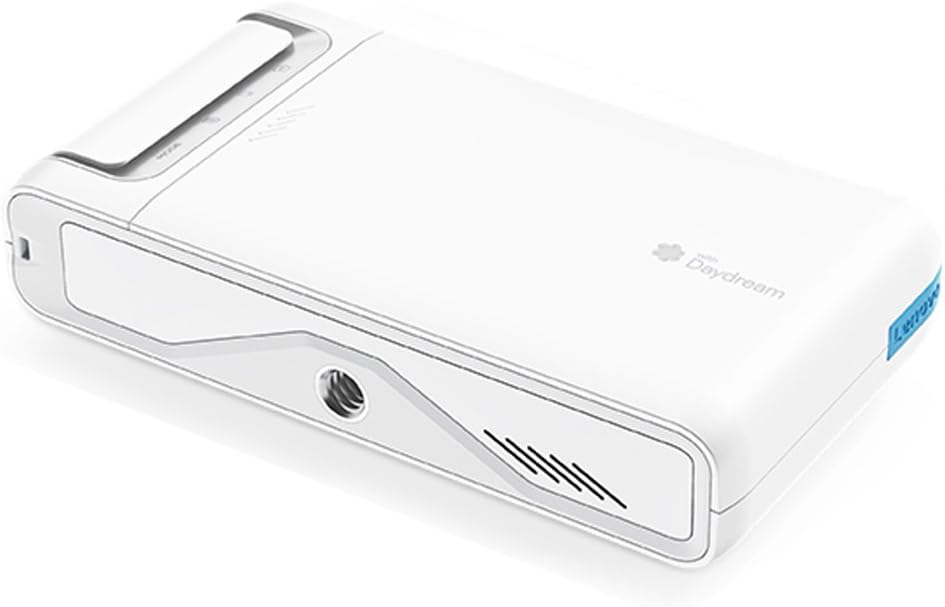
olusin 4.2: Apa view of the camera, showing the power button, function switch, and status indicator.

olusin 4.3: Top view of the camera, highlighting its compact design.

Figure 4.4: Close-up of the dual fisheye lenses, each with 13 megapixels, enabling realistic 3D video recording and an enhanced immersive experience with a wide field of view. This camera is designed for a stable VR viewiriri iriri.

Figure 4.5: Diagram illustrating the camera's controls and features. It includes a Power Button, Function Switch, Shutter Button & Status Indicator, Mode Indicator, and a Standard Tripod Mount. The camera is equipped with image stabilization, features an easy-to-use pocket size (139g), and is compatible with standard tripods.
5. Eto
5.1. Ngba agbara si Batiri naa
Connect the camera to a power source using the provided USB Type-C cable. The status indicator will show charging status. A full charge provides approximately 2 hours of continuous use.
5.2. Fi kaadi microSD sii
Locate the microSD card slot on the side of the camera. Insert a compatible microSD card (up to 128GB) with the gold contacts facing down until it clicks into place. Ensure the card is formatted correctly for optimal performance.
5.3. Agbara akọkọ Lori ati Sisopọ
Press and hold the Power Button to turn on the camera. Follow the on-screen instructions or refer to the quick start guide to pair the camera with your smartphone via the dedicated Daydream app. This app is essential for full functionality, including live view, settings adjustment, and content transfer.
6. Awọn ilana Iṣiṣẹ
6.1. Àwọn Ìyípadà Àwọn Ìgbésẹ̀
Use the Function Switch to toggle between different modes, such as video recording, photo capture, and live streaming. The Mode Indicator will display the current selection.
6.2. Yiya Awọn fọto ati awọn fidio
Press the Shutter Button to start/stop video recording or to take a photo. The status indicator will confirm recording or capture. For best results, hold the camera steady or use a tripod. The camera supports 4K/30fps video and 13-megapixel photos.
6.3. Viewing and Transferring Content
Content can be viewed directly on a compatible Daydream VR headset or transferred to your smartphone or computer via the Daydream app or by connecting the camera via USB Type-C. For optimal VR viewing, use the recommended Daydream platform.
7. Itọju
7.1. Ninu
Gently wipe the camera body with a soft, lint-free cloth. For lenses, use a specialized lens cleaning cloth and solution. Do not use harsh chemicals or abrasive materials.
7.2. Ibi ipamọ
Store the camera in a cool, dry place away from direct sunlight and extreme temperatures. If storing for an extended period, ensure the battery is partially charged (around 50%) to prolong its lifespan.
8. Laasigbotitusita
| Isoro | Owun to le Fa | Ojutu |
|---|---|---|
| Camera overheats and stops recording. | Extended recording, especially in 4K, or high ambient temperatures. | Limit continuous recording time, especially in warm environments. Allow the camera to cool down before resuming use. Consider recording in lower resolutions if prolonged recording is necessary. |
| Audio is out of sync or distorted in videos. | Software glitch or file corruption during recording/transfer. | Ensure camera firmware is up to date. Try re-recording the video. When transferring, use a stable connection and the recommended app. |
| Difficulty playing back content or slow transfer speeds. | Slow microSD card, incompatible playback device/software, or large file awọn iwọn. | Use a high-speed microSD card (Class 10 or higher). Ensure your playback device and software are compatible with VR180 formats. Transfer files directly via USB for faster speeds. For Google Photos, be aware that it may compress images, reducing quality. |
| Significant lag between shutter press and capture. | Processing delay, especially with high-resolution settings. | Anticipate the delay when capturing critical moments. Ensure sufficient free space on the microSD card. |
| Kamẹra ko ṣiṣẹ. | Batiri naa ti dinku tabi aṣiṣe. | Charge the camera fully. If the issue persists, contact support. |
| Cannot connect to smartphone via app. | Bluetooth/Wi-Fi issues, app not updated, or incorrect pairing process. | Ensure Bluetooth and Wi-Fi are enabled on your phone. Update the Daydream app to the latest version. Restart both the camera and phone, then attempt pairing again. |
9. Awọn pato
| Ẹya ara ẹrọ | Ẹ̀kúnrẹ́rẹ́ |
|---|---|
| Nọmba awoṣe | ZA3A0011JP |
| isise | Qualcomm APQ8053 Octa-core Processor (Max 2.2GHz) |
| Iranti akọkọ | 2GB |
| Flash Memory | 16GB |
| Image Pixel Count | 13 million pixels + 13 million pixels Dual Camera |
| Didara fidio | 4K/30fps, 1440p/30fps, 1080p/30fps |
| Aaye ti View (FOV) | Left/Right 180° x Up/Down 180° |
| Awọn sensọ | Gyro Sensor, Accelerometer Sensor |
| Alailowaya Asopọmọra | 802.11 a/b/g/n/ac, Bluetooth 4.2 (BLE compatible) |
| Ohun | Mono Speaker / Dual Microphone |
| Ni wiwo | USB Type-C port, microSD card reader (supports up to 128GB) |
| Ipo ibon | Fidio |
| Ifihan Iṣakoso Iru | Aifọwọyi |
| Àwọ̀ | Imọlẹ Oṣupa |
| Media Iru | Kaadi microSD |
| File Ọna kika | MP4, JPEG |
| Viewoluwari Orisi | LCD |
| Light Sensitivity (ISO) | 100-3200 |
| Igbesi aye Batiri (Apapọ) | Awọn wakati 2 |
| Iwọn Ọja | 139 giramu |
| Filaṣi kamẹra Iru | Ko si |
| Išẹ Idojukọ | Idojukọ aifọwọyi |
| Sensọ Iru | CMOS |
10. atilẹyin ọja Information
This product is covered by a limited warranty provided by Lenovo. For detailed warranty terms and conditions, please refer to the warranty card included in your product package or visit the official Lenovo support webojula. Jeki ẹri rira rẹ fun awọn iṣeduro atilẹyin ọja.
11. Atilẹyin
For technical assistance, product updates, or additional information, please visit the official Lenovo support website or contact their customer service. Support resources may include FAQs, driver downloads, and contact details for regional support centers.
Atilẹyin Lenovo osise: www.lenovo.com/support