
TrickleStar 181SS-US-7XXXA-DA3BS
TrickleStar TS1110 7-Outlet PC Advanced PowerStrip+ Instruction Manual
Model: 181SS-US-7XXXA-DA3BS
Àmì ìtajà: TrickleStar
Ọrọ Iṣaaju
The TrickleStar TS1110 PC Advanced PowerStrip+ (PC APS+) is an energy-saving surge protector designed to reduce active and standby power wasted by computers and workstation peripheral electronics. This device offers a plug-and-play solution compatible with all major computer operating systems, requiring no special software or additional programming. This manual provides comprehensive information on the safe and effective use of your PC APS+.
Alaye Aabo pataki
Your safety is paramount. Please read and understand all safety instructions before using the TrickleStar TS1110 PowerStrip+. Improper use of power strips can lead to electrical failures, fires, injuries, and property damage.
Common Mistakes to Avoid:
- Daisy Chaining: Do not connect multiple power strips together. This can overload the circuit and create a fire hazard.
- Ikojọpọ: Do not plug too many devices into the power strip. Ensure the total power consumption of connected devices does not exceed the power strip's maximum rating.
- Exposure to Moisture: Do not place the power strip near water, in damp environments, or outdoors. Moisture can cause electrical shorts and shock hazards.
- High Current Loads: Do not plug high-current devices such as air conditioners or space heaters directly into the power strip. These devices require direct connection to a wall receptacle as per electrical codes and manufacturer instructions. Plugging them into a power strip can cause overheating and fire.
Fidio: TrickleStar Advanced Power Safety Video. This video highlights critical safety considerations for power strips, including common misuse scenarios and the importance of product quality and certification.
Ọja Pariview ati irinše
The TrickleStar TS1110 PC Advanced PowerStrip+ features a robust design with multiple outlets and intelligent energy-saving capabilities.
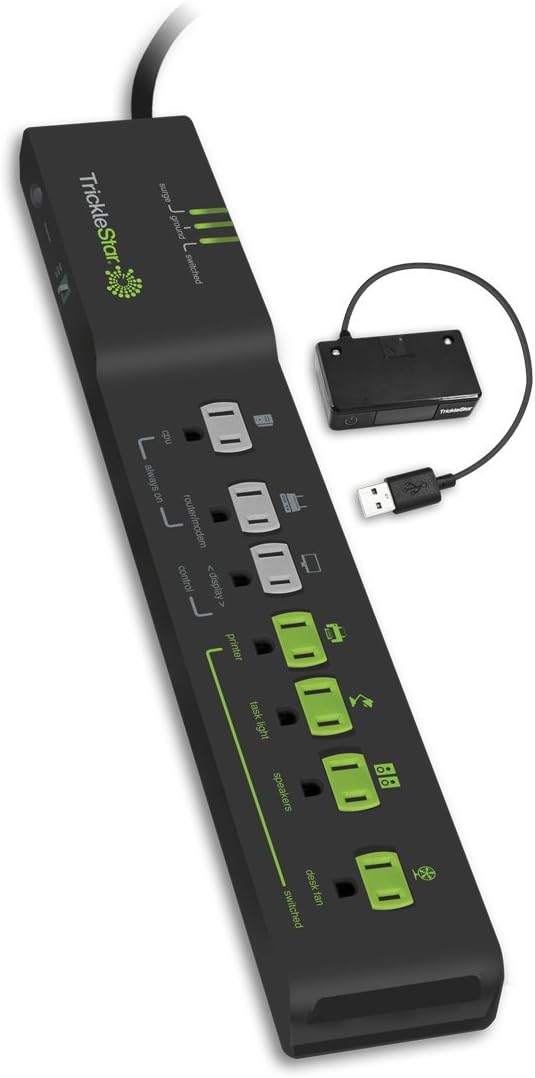
Aworan: The TrickleStar TS1110 7-Outlet PC Advanced PowerStrip+ shown with its connected USB motion sensor. The power strip features various outlet types for optimized power management.
Awọn eroja pataki:
- 7 Awọn ita: Includes Always On, Control, and Switched outlets for comprehensive power management.
- USB Motion Sensor: Connects to your computer via USB to detect user activity in the workspace area. This sensor enables automatic sleep functionality for your computer and connected peripherals.
- Configurable Countdown Timer: Allows adjustment of the time delay (5, 10, 15, 20, 25, or 30 minutes) for the motion sensor to put the computer to sleep after inactivity.
- Awọn itọkasi LED: Displays the status of surge protection, grounding, and switched outlets.
- Heavy-Duty Power Cord and Plug: Ti won won si 15 Amps, designed for durability and safety. The flat plug design allows for easy placement behind furniture.
- UL94 V-0 Rated Plastic Material: Constructed with high-quality, less flammable plastic for enhanced safety.
- Child Safety Protection Covers: Integrated covers help prevent accidental insertion of objects into unused outlets.
- High Quality Circuit Breaker: A robust circuit breaker protects against overloads. The molded enclosure prevents accidental jamming.
- Heat Shrink Internal Power Cable: Internal cables are dressed in heat shrink and physically separated to prevent touching and reduce temperature increases.
- FR-4 Printed Circuit Board Materials: Utilizes flame-resistant FR-4 materials for the circuit board, offering the highest flame retardant rating.
- Thermal Safety Fuses: Includes two thermal safety fuses (one on the PCB, one near the metal oxide varistors) to cut off power in case of over-temperature conditions.
- Patented Ceramic Encased Metal Oxide Varistors (MOVs): Prevents fire in the event of an abnormal electrical surge by suppressing more energy and dissipating heat faster than traditional MOVs.
- Crimped, Spot Welded, and Soldered Jumper Cables: Ensures strong, reliable electrical connections, preventing dangerous arcing and heat buildup common in lower quality products.

Aworan: A oke-isalẹ view of the TrickleStar TS1110 power strip, highlighting the different types of outlets (Always On, Control, Switched) and the connection point for the USB motion sensor.
Awọn ilana iṣeto
The TrickleStar TS1110 PC APS+ is designed for easy setup. Follow these steps to begin using your power strip:
- Ibi: Position the power strip in a dry, indoor location away from moisture and direct sunlight. Ensure adequate ventilation.
- Pulọọgi sinu iṣan odi: Plug the power strip's main cord directly into a grounded wall receptacle. Avoid using extension cords or other power strips.
- Connect USB Motion Sensor: Plug the USB motion sensor into an available USB port on your computer. Place the sensor in a location where it can accurately detect user activity in your workspace.
- Connect Control Device: Plug your computer (or the primary device that controls power to peripherals) into the designated Iṣakoso iṣan jade.
- Connect Always On Devices: Plug devices that require continuous power (e.g., modem, router, external hard drives) into the Nigbagbogbo Tan outlets. These outlets remain powered regardless of the control device's status.
- Connect Switched Devices: Plug peripheral devices (e.g., monitor, speakers, printer, desk lamp) sinu Yipada outlets. These outlets will automatically turn on or off based on the power status of the device plugged into the Control outlet.
- Adjust Motion Sensor Threshold: Use the threshold switch on the motion sensor to select the desired sensitivity (High, Med, Low) for detecting activity.
Awọn ilana Iṣiṣẹ
Once set up, the TrickleStar TS1110 PC APS+ operates largely automatically. Understanding the LED indicators and motion sensor settings will help you optimize its performance.
Oye Awọn Atọka LED:
- LED gbaradi: Indicates that the surge protection is active and functioning. If this light is off, the surge protection may be compromised, and the unit should be replaced.
- LED ilẹ: Confirms that the power strip is properly grounded. If this light is off, there may be a grounding issue with your wall outlet, which can affect surge protection effectiveness.
- LED ti o yipada: Indicates whether the switched outlets are currently receiving power. This light will turn on when the control device is active and off when it enters a low-power state.
Motion Sensor Operation:
The motion sensor detects user activity. If no motion is detected for the set time delay (configurable via the countdown timer switch), the power strip will signal the computer to enter sleep mode and cut power to the switched outlets. Activity detection will reset the timer, preventing unintended power cuts.
Itoju
To ensure the longevity and safe operation of your TrickleStar TS1110 PC APS+, follow these simple maintenance guidelines:
- Ninu igbagbogbo: Dust the power strip and motion sensor regularly with a dry, soft cloth. Do not use liquid cleaners.
- Ṣayẹwo awọn okun ati awọn plug: Periodically check the power cord and plugs for any signs of damage, fraying, or overheating. Replace the unit if any damage is found.
- Atẹle Awọn Atọka LED: Regularly check the Surge and Ground LEDs. If either light is off, the unit's protection may be compromised, and it should be replaced.
- Yago fun ikojọpọ pupọ: Always ensure that the total current draw of connected devices does not exceed the power strip's rated capacity (15 Amps).
Laasigbotitusita
If you encounter issues with your TrickleStar TS1110 PC APS+, refer to the following common problems and solutions:
| Isoro | Owun to le Fa | Ojutu |
|---|---|---|
| Switched outlets are not turning on/off. | Control device is not drawing enough power or is not in the correct outlet. | Ensure the control device is plugged into the 'Control' outlet. Verify the control device is powered on and actively being used. |
| Computer is not going to sleep automatically. | Motion sensor not detecting activity or incorrect threshold setting. | Check motion sensor placement; ensure it has a clear view of the workspace. Adjust the threshold switch (High, Med, Low) to a more sensitive setting. Verify the USB connection to the computer. |
| Surge or Ground LED is off. | Surge protection is compromised or grounding issue. | If the Surge LED is off, the surge protection has likely expired; replace the unit. If the Ground LED is off, check your wall outlet's grounding or consult an electrician. |
| Power strip is completely off. | Circuit fifọ tripped nitori apọju. | Unplug some devices, then press the circuit breaker button to reset. If it trips again, reduce the total load. |
Awọn pato
| Ẹya ara ẹrọ | Sipesifikesonu |
|---|---|
| Nọmba awoṣe | 181SS-US-7XXXA-DA3BS |
| Lapapọ Power iÿë | 7 |
| Voltage | 125 Volts |
| Iwọn Nkan | 1.55 iwon |
| Package Mefa | 17.7 x 4.4 x 1.7 inches |
| Pataki Ẹya | On And Off Switch, Surge Protection |
| Niyanju Lilo | Apartment, Hotel, Office, Restaurant, TV |
Atilẹyin ọja ati Support
TrickleStar stands behind the quality and safety of its products. Your PC Advanced PowerStrip+ is backed by comprehensive warranty and support services.
Connected Device Warranty:
TrickleStar offers a flexible Connected Device Warranty, providing coverage up to $20,000 for equipment damaged by a surge while properly connected to the power strip. Unlike some manufacturers, TrickleStar does not require product registration for the warranty to be valid.
Product Liability Insurance:
TrickleStar maintains product liability insurance through Lloyd's of London and SART, with coverage up to $8 million per occurrence. This provides the most comprehensive product liability insurance coverage in the market.
Atilẹyin Onibara:
For further information or assistance, please contact TrickleStar customer service:
- Foonu: 1-888-700-1098
- Imeeli: client.service@tricklestar.com
Awọn iwe aṣẹ ti o jọmọ - 181SS-US-7XXXA-DA3BS
 |
TrickleStar Surge Protector User Manual (181SS-US-7XX/12) Comprehensive user manual and installation guide for TrickleStar surge protectors. Learn how to set up your TV and PC peripherals, understand warranty terms, and optimize energy savings. |
 |
TrickleStar TS1803TF SensorClick Advanced Power Strip User Guide User guide for the TrickleStar TS1803TF SensorClick 7-outlet Advanced Power Strip with Timer FootSwitch. Learn about product features, installation, programming, and troubleshooting. |
 |
TrickleStar TS1810 7-Outlet AV Advanced PowerStrip+ Multi-Sensor: Quick Start Guide & Manual Comprehensive guide for the TrickleStar TS1810, a 7-outlet AV Advanced PowerStrip+ with Multi-Sensor. Learn about setup, operation modes, sensing features, troubleshooting, and product warranty. |
 |
TrickleStar TS1104 Advanced PowerStrip: User Guide and Warranty Information Learn how to install and use the TrickleStar TS1104 Advanced PowerStrip, a 7-outlet surge protector with a resettable circuit breaker and adjustable threshold switch. Includes warranty details and technical support information. |
 |
TrickleStar TS1304 8-Outlet Timer PowerStrip: User Guide and Features Detailed guide for the TrickleStar TS1304 8-Outlet Timer PowerStrip, covering installation, product and connected device warranties, how it works, and features for energy saving. |
 |
TrickleStar TS1003 To ti ni ilọsiwaju PowerStrip: Awọn ẹya ara ẹrọ, Eto, ati Itọsọna atilẹyin ọja Itọsọna okeerẹ si TrickleStar TS1003 7-Outlet Advanced PowerStrip, ti o ni aabo idabobo rẹ, awọn ẹya fifipamọ agbara, fifi sori ẹrọ, iṣeto fun awọn TV ati awọn PC, ati alaye atilẹyin ọja. |
Ask a question about this manual
Ask about setup, troubleshooting, compatibility, parts, safety, or missing instructions. Manuals+ will review the question and use this page’s manual context to help answer it.